
Vorago BSP-500-V2
Manual de usuario del altavoz Bluetooth Vorago BSP-500-V2
Modelo: BSP-500-V2
Marca: Vorago
1. Producto terminadoview
The Vorago BSP-500-V2 is a portable Bluetooth speaker designed for robust performance and durability. It features IPX5 water resistance, making it suitable for various environments, including outdoor adventures and parties. This manual provides detailed instructions for setting up, operating, and maintaining your speaker.
Características principales:
- Conectividad estéreo inalámbrica verdadera (TWS): Connect two BSP-500-V2 speakers for an immersive stereo sound experience.
- Mayor duración de la batería: Enjoy up to 7 hours of music playback at 70% volume, thanks to its 2000 mAh battery.
- Carga USB tipo C: Convenient and modern USB-C port for charging.
- Conectividad versátil: Supports Bluetooth for wireless streaming and a 3.5mm auxiliary input for wired connections.
- Resistencia al agua IPX5: Protegido contra chorros de agua a baja presión desde cualquier dirección.
Contenido del paquete:
- Altavoz Bluetooth Vorago BSP-500-V2
- Cable de carga USB-C
- Cable de audio de 3.5 mm
- Manual de usuario (este documento)
Diagrama del producto:

Figura 1.1: Frente view of the Vorago BSP-500-V2 Bluetooth speaker, showcasing its mesh grille and central Vorago logo.

Figura 1.2: Angulado view of the speaker, highlighting its robust, rectangular design and integrated carrying strap.

Figura 1.3: Arriba view showing the control panel with power, volume down, play/pause, and volume up buttons.
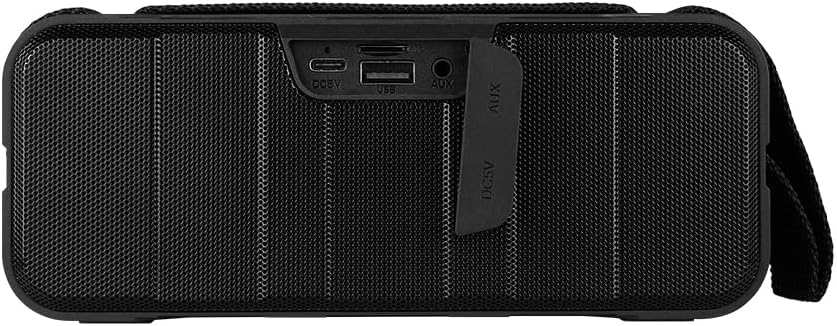
Figura 1.4: Posterior view of the speaker, showing the protective flap covering the input ports.

Figure 1.5: Close-up of the input ports, including DC 5V (USB-C), USB-A, and AUX (3.5mm) inputs, protected by a rubber cover.
2. Información de seguridad
- No exponga el altavoz a temperaturas extremas (calor o frío).
- Evite dejar caer o someter el altavoz a impactos fuertes.
- Mantenga el altavoz alejado de la luz solar directa y de fuentes de calor.
- No desmonte, repare ni modifique el altavoz usted mismo. Esto anulará la garantía.
- Ensure the port cover is securely closed when using the speaker near water to maintain IPX5 water resistance.
- Do not immerse the speaker in water. IPX5 rating protects against splashes and light rain, not submersion.
- Utilice únicamente el cable de carga provisto o un cable USB Tipo-C certificado para cargar.
- Limpie el altavoz con un paño suave y seco. No utilice limpiadores abrasivos ni disolventes.
3. Configuración
3.1 Carga del altavoz
- Open the protective rubber cover on the rear of the speaker to access the charging port.
- Connect the USB Type-C end of the charging cable to the speaker's DC 5V port.
- Conecte el otro extremo del cable USB a un adaptador de corriente USB (no incluido) o al puerto USB de una computadora.
- La luz indicadora de carga se iluminará durante la carga y se apagará cuando esté completamente cargada.
- Once charging is complete, securely close the protective rubber cover to maintain water resistance.
3.2 Encendido / Apagado
- Para encender: Mantenga pulsado el Botón de encendido on the top panel for approximately 3 seconds until you hear an audible prompt.
- Para apagar: Mantenga pulsado el Botón de encendido durante aproximadamente 3 segundos hasta que escuche una indicación audible.
3.3 Emparejamiento Bluetooth
- Asegúrese de que el altavoz esté encendido. Entrará automáticamente en modo de emparejamiento Bluetooth, lo cual se indicará mediante una luz LED parpadeante.
- En su dispositivo (teléfono inteligente, tableta, computadora portátil), habilite Bluetooth y busque los dispositivos disponibles.
- Select "BSP-500-V2" from the list of found devices.
- Once successfully paired, the speaker will emit an audible confirmation, and the LED light will stop flashing and remain solid.
- El altavoz se volverá a conectar automáticamente al último dispositivo emparejado cuando se encienda, si el dispositivo está dentro del alcance y Bluetooth está habilitado.
3.4 Emparejamiento estéreo inalámbrico verdadero (TWS)
TWS allows you to connect two BSP-500-V2 speakers together for a true stereo sound experience.
- Ensure both BSP-500-V2 speakers are powered on and not connected to any other Bluetooth device.
- En uno de los altavoces (este será el altavoz principal), presione dos veces el botón Botón de reproducción/pausaEl altavoz entrará en el modo de emparejamiento TWS.
- The two speakers will automatically search for and connect to each other. You will hear an audible confirmation once they are successfully paired.
- Una vez establecido TWS, conecte su dispositivo al altavoz principal a través de Bluetooth como se describe en la Sección 3.3.
- Para desconectar TWS, presione dos veces el Botón de reproducción/pausa en cualquiera de los altavoces.
3.5 Conexión auxiliar (AUX)
For devices without Bluetooth, you can use the 3.5mm audio cable.
- Open the protective rubber cover on the rear of the speaker.
- Connect one end of the 3.5mm audio cable to the speaker's AUX port.
- Conecte el otro extremo del cable al conector de salida de audio de su dispositivo.
- El altavoz cambiará automáticamente al modo AUX.
- Once disconnected, securely close the protective rubber cover.
4. Instrucciones de funcionamiento
4.1 Funciones de los botones:
| Botón | Función (pulsación corta) | Función (pulsación larga) |
|---|---|---|
| Botón de encendido | N / A | Encendido/apagado |
| Botón para bajar el volumen | Bajar volumen | Pista anterior |
| Botón de reproducción/pausa | Reproducir/Pausar música, Responder/Finalizar llamada | Reject Call, Double-press for TWS Pairing |
| Botón de subir volumen | Aumentar el volumen | Pista siguiente |
5. Mantenimiento
- Limpieza: Use a soft, dry, lint-free cloth to clean the speaker's surface. For stubborn dirt, slightly dampLave el paño con agua. No utilice productos químicos agresivos, disolventes de limpieza ni detergentes fuertes.
- Cuidado de la resistencia al agua: Always ensure the rubber port cover on the back of the speaker is fully and securely sealed when using the speaker outdoors or near water. This maintains its IPX5 water resistance. After exposure to water, wipe the speaker dry before opening the port cover for charging or auxiliary connections.
- Almacenamiento: When not in use for extended periods, store the speaker in a cool, dry place, away from direct sunlight and extreme temperatures. It is recommended to charge the speaker fully before storing and to recharge it every few months to maintain battery health.
- Cuidado de la batería: To prolong battery life, avoid fully discharging the battery frequently. Charge the speaker when the low battery indicator is active.
6. Solución de problemas
| Problema | Posible causa | Solución |
|---|---|---|
| El altavoz no se enciende. | Batería baja. | Charge the speaker fully using the provided USB Type-C cable. |
| No se puede emparejar a través de Bluetooth. | Speaker is not in pairing mode; Device's Bluetooth is off; Speaker is already connected to another device; Device is too far from speaker. | Ensure speaker is powered on and flashing (pairing mode). Turn on Bluetooth on your device. Disconnect from other devices. Move device closer to speaker (within 10 meters). |
| No hay sonido o volumen bajo. | Volumen demasiado bajo en el altavoz o dispositivo; Modo de entrada incorrecto; Altavoz no conectado. | Increase volume on both speaker and connected device. Ensure correct mode (Bluetooth or AUX) is active. Verify successful Bluetooth pairing or AUX cable connection. |
| Distorsión de sonido. | Volumen demasiado alto; Dispositivo demasiado lejos del altavoz; Interferencia. | Reduce volume on speaker and/or device. Move device closer to speaker. Avoid obstacles between speaker and device. |
| El emparejamiento de TWS falla. | Speakers are already paired to a device; Speakers are too far apart. | Ensure both speakers are disconnected from any Bluetooth devices. Place speakers close to each other during TWS pairing. |
7. Especificaciones
| Característica | Detalle |
|---|---|
| Nombre del modelo | BSP-500-V2 |
| Tipo de altavoz | Multimedia |
| Característica especial | Bluetooth |
| Uso recomendado | Para reproductores de música |
| Dispositivos compatibles | Portátil, reproductor de MP3, teléfono inteligente, tableta |
| Tipo de controlador | Botón |
| Configuración de canales de sonido envolvente | 5.0 |
| Duración de la batería | 7 horas |
| Componentes incluidos | Vocero |
| Dimensiones del producto | 5 profundidad x 15 ancho x 18 alto centímetros |
| Peso del producto | 1 kilogramos |
| Impermeable | Sí (IPX5) |
| Capacidad de la batería | 2000 mAh |
| Amptipo de vida | Activo |
| Fuente de poder | Batería |
| Respuesta de frecuencia | 180 Hz |
| Tecnología de conectividad | Bluetooth |
| Modo de salida de audio | Estéreo |
| Tipo de montaje | Montaje de mesa |
8. Garantía y soporte
The Vorago BSP-500-V2 Bluetooth Speaker comes with a limited warranty. Please refer to the warranty card included with your product for specific terms and conditions, or visit the official Vorago websitio para más detalles.
For technical support, troubleshooting assistance, or warranty claims, please contact Vorago customer service through their official channels. You can find more information and contact details on the Tienda de la marca Vorago en Amazon o su funcionario websitio.
Conserve su comprobante de compra para fines de garantía.
Ask a question about this manual
Ask about setup, troubleshooting, compatibility, parts, safety, or missing instructions. Manuals+ will review the question and use this page’s manual context to help answer it.