
1. Introducción
This manual provides detailed instructions for the setup, operation, and maintenance of your LUCKY TIME Race Clock with Tripod. This versatile LED digital display functions as both a precise timer and a reliable counter, suitable for various applications including sports events, production lines, and educational settings. Please read this manual thoroughly before using the product to ensure correct operation and to maximize its lifespan.

2. Información de seguridad
- Ensure the power adapter is connected to a compatible power source.
- No exponga el dispositivo a temperaturas extremas, a la luz solar directa durante períodos prolongados ni a la humedad.
- Evite dejar caer o someter el dispositivo a impactos fuertes.
- Mantenga el dispositivo fuera del alcance de los niños.
- No intente desmontar ni reparar el dispositivo usted mismo. Póngase en contacto con el servicio de atención al cliente para obtener ayuda.
- When using the tripod, ensure it is placed on a stable, level surface to prevent tipping.
3. Contenido del paquete
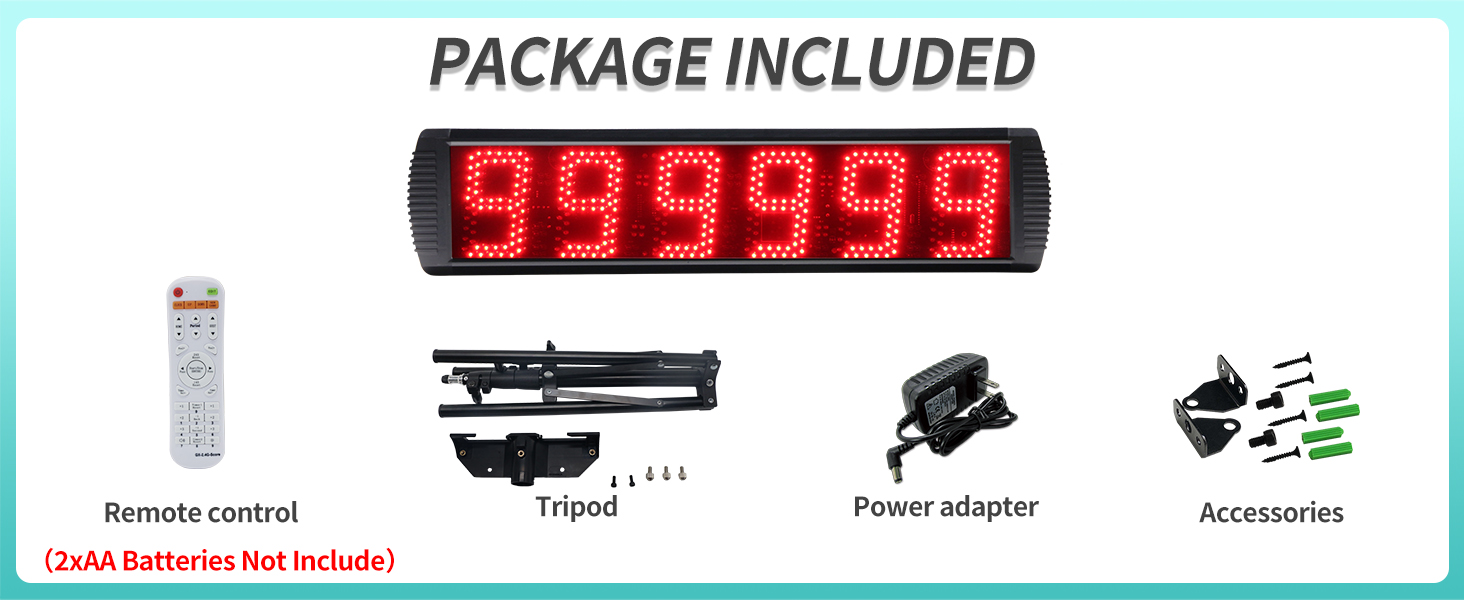
Verifique que todos los artículos que se enumeran a continuación estén presentes en su paquete:
- LED Digital Display Race Clock
- Remote Control (2xAA batteries not included)
- Trípode
- Adaptador de corriente
- Wall Mounting Accessories (screws, wall anchors)
4. Producto terminadoview
The LUCKY TIME Race Clock features a large, clear LED display designed for high visibility and durability.
- Dimensiones de la pantalla: Approximately 26 inches (66 cm) wide, 6.3 inches (16 cm) high, and 1.6 inches (4 cm) deep.
- Altura de dígitos: Each of the 6 digits is 5 inches (12.7 cm) high.
- Visibilidad: Digits are clearly visible from up to 124 feet (37.8 meters).
- Brillo: Adjustable brightness levels to suit various lighting conditions.
- Material: Aleación de aluminio duradera casing, resistant to heat and scratches.
- Zumbador: Built-in buzzer with 3 adjustable sound levels, can be switched off. Activates when time reaches 0 or count changes.
- Control: Remote control effective within 40 feet (12.2 meters) with 360° flexible control.
- Optional Wired Buttons: Supports external wired buttons for faster operation (sold separately).


5. Configuración
5.1 Conexión de alimentación
Connect the provided power adapter to the clock's power input port and then plug it into a standard electrical outlet. The clock will power on automatically.
5.2 Configuración del control remoto
Insert two AA batteries (not included) into the remote control, observing the correct polarity.
5.3 Métodos de montaje
The race clock offers three primary mounting options:
- Trípode:
Assemble the tripod by extending its legs and securing the clock to the tripod mount. Adjust the height as needed. Ensure the tripod is stable on a flat surface.
- Colgar en la pared:
Use the provided wall mounting accessories (screws and anchors) to securely attach the clock to a wall. Ensure the wall can support the weight of the clock.
- Soporte de escritorio:
The clock can be placed on a flat surface using its integrated stand or by simply resting it securely.

6. Instrucciones de funcionamiento
The LUCKY TIME Race Clock offers both timing and counting functionalities, controlled via the remote.
6.1 Funciones del temporizador
The timer mode includes a 12/24H clock, countdown, count-up, and stopwatch with millisecond precision.
- 12/24H Clock: Displays current time in either 12-hour or 24-hour format. Use the remote to switch between modes and set the time.
- Contador regresivo: Set a specific duration, and the clock will count down to zero. The buzzer will sound upon reaching zero.
- Temporizador de cuenta progresiva: Starts from zero and counts upwards.
- Cronógrafo: Measures elapsed time with millisecond accuracy. Features start, stop, and reset functions.

6.2 Counter Functions
The counter mode allows for both counting up and counting down, with a range up to 999,999.
- Contar hasta: Starts from 0 and counts up to 999,999.
- Cuenta regresiva: Starts from 999,999 and counts down to 0.


6.3 Operación del control remoto
The remote control allows full access to all clock functions. Refer to the remote's button layout for specific controls. Key functions include:
- Selección de modo: Switch between clock, timer, and counter modes.
- Iniciar/Detener/Reiniciar: Control timing and counting operations.
- Colocar: Enter setting mode for time, countdown values, etc.
- Ajuste de brillo: Increase or decrease display brightness.
- Control de zumbador: Adjust buzzer volume or turn it off.
For faster and easier use of various functions, especially in high-speed environments, optional wired buttons can be connected (purchased separately). Button 1 is recommended for timing functions, and Button 2 for counting functions.
7. Mantenimiento
- Limpieza: Limpie la pantalla y casinLimpie con un paño suave y seco. No utilice limpiadores abrasivos ni disolventes.
- Almacenamiento: When not in use for extended periods, store the clock in a cool, dry place. Remove batteries from the remote control to prevent leakage.
- Inspección: Periodically check the power cord and connections for any signs of damage.
8. Solución de problemas
| Problema | Posible causa | Solución |
|---|---|---|
| La pantalla está en blanco. | No hay problema con la energía ni con el adaptador de corriente. | Verifique la conexión eléctrica. Asegúrese de que el adaptador esté bien enchufado y que el tomacorriente funcione. |
| El control remoto no funciona. | Dead batteries or remote out of range. | Replace remote batteries. Ensure you are within 40 feet (12.2 meters) of the clock and pointing the remote towards it. |
| El timbre no suena. | Buzzer volume set to off or too low. | Adjust buzzer volume using the remote control. |
| Hora incorrecta mostrada. | La hora no está configurada correctamente. | Use the remote control to enter setting mode and adjust the time. |
9. Especificaciones
| Característica | Detalle |
|---|---|
| Marca | TIEMPO DE SUERTE |
| Modelo | B0CFVJB7L4 |
| Material | Aleación de aluminio |
| Dimensiones del producto (ancho x alto x profundidad) | 26" x 6.3" x 1.6" (aprox. 66 cm x 16 cm x 4 cm) |
| Tamaño de pantalla | 27 pulgadas (diagonal) |
| Altura de dígitos | 5 pulgadas (12.7 cm) |
| Peso del artículo | 5.6 libras (aprox. 2.54 kg) |
| Alcance del control remoto | Hasta 40 pies (12.2 metros) |
| Buzzer Levels | 3 levels (including off) |
| Fuente de poder | Adaptador de CA |
10. Garantía y soporte
For warranty information or technical support, please contact LUCKY TIME customer service through the retailer where the product was purchased. Please have your product model number (B0CFVJB7L4) and purchase date available when contacting support.
Para obtener recursos adicionales e información sobre el producto, puede visitar el LUCKY TIME Store on Amazon.