
1. Primeros pasos
1.1 Contenido del paquete
Antes de comenzar, asegúrese de que todos los artículos estén presentes en su paquete:
- 2 x QCY T13X Earbuds
- 1 x Estuche de carga
- 3 x Pairs of Eartips (Small, Medium - pre-installed, Large)
- Cable de carga 1 x USB-C
- 1 x Manual de usuario
1.2 Carga inicial
The earbuds must be fully charged before first use. Place both earbuds into the charging case. Connect the USB-C cable to the charging case and a power source. A full charge takes approximately 120 minutes. If the earbuds are not used for more than two weeks, charge them regularly to maintain battery health.
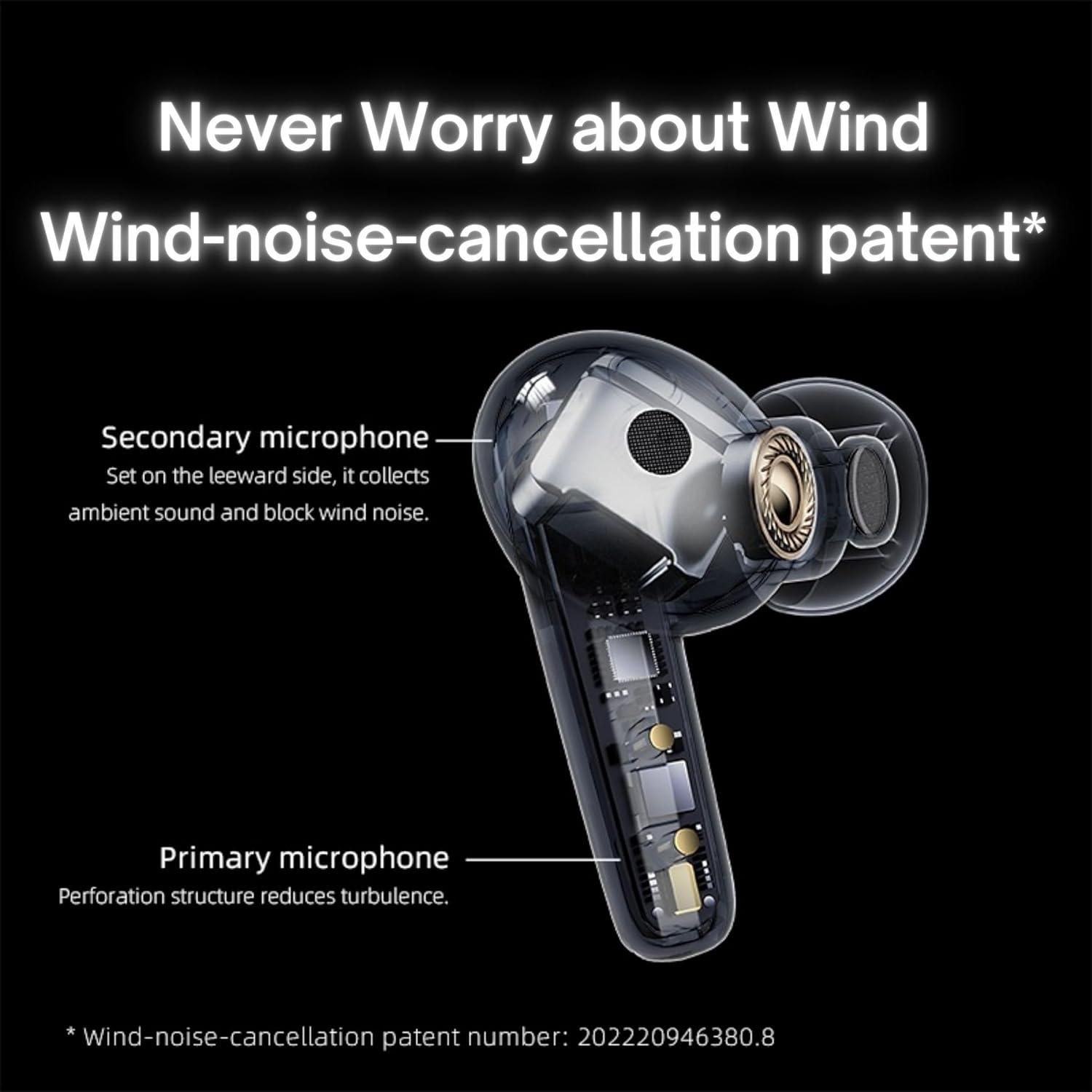
Image: QCY T13X Earbuds in their charging case, connected with a USB-C cable for charging. The image illustrates the charging process and the compact design of the case and earbuds.
1.3 Selección de la punta del oído
For optimal sound quality and comfort, choose the eartips that best fit your ears. The package includes small, medium, and large sizes. The medium size is pre-installed. A proper seal is crucial for bass response and noise isolation.
1.4 Emparejamiento con su dispositivo
- Asegúrese de que los auriculares estén cargados y colocados en el estuche de carga.
- Abre la tapa del estuche de carga. Los auriculares entrarán automáticamente en modo de emparejamiento.
- En su teléfono inteligente o dispositivo con Bluetooth, vaya a la configuración de Bluetooth.
- Buscar available devices and select "QCY T13X" from the list.
- Una vez conectado, escuchará un tono de confirmación.

Image: QCY T13X Earbuds and their charging case, highlighting the Bluetooth 5.3 connectivity. This image demonstrates the wireless technology used for pairing.
2. Funcionamiento de los auriculares
2.1 Encendido y apagado
- Encendido: Open the charging case, and the earbuds will automatically power on. Alternatively, press and hold the touch panel on both earbuds for 1-2 seconds.
- Apagado: Place the earbuds back into the charging case and close the lid. They will automatically power off and begin charging. Alternatively, disconnect them from your device, and they will power off after a few minutes of inactivity.
2.2 Controles de reproducción de música
The QCY T13X earbuds feature touch controls for easy management of your audio:
- Reproducir/Pausa: Double-tap the touch panel on either earbud.
- Pista siguiente: Toca tres veces el auricular derecho.
- Pista anterior: Toque tres veces el auricular izquierdo.

Image: A person wearing a QCY T13X earbud, demonstrating the discreet design and the area for touch controls. This image helps visualize how the earbuds are worn and interacted with.
2.3 Gestión de llamadas
- Responder/Finalizar llamada: Double-tap the touch panel on either earbud.
- Rechazar llamada: Press and hold the touch panel on either earbud for 1.5 seconds.
2.4 Control de volumen
Volume control is managed through the QCY application on your smartphone. Download the QCY app to customize settings and adjust volume levels directly.
2.5 QCY Application
For enhanced features and customization, download the official QCY app from your device's app store. The app allows you to:
- Ajustar el volumen.
- Personaliza los controles táctiles.
- Select from various EQ presets (e.g., Pure Vocals, Boosted Original, Soft and Immersive).
- Actualice el firmware.

Image: QCY T13X Earbuds with a graphic indicating three default EQ settings: Pure Vocals, Boosted Original, and Soft and Immersive. This highlights the sound customization options available through the app.
2.6 Conectividad multidispositivo
The QCY T13X supports seamless switching between multiple paired devices. Once paired with several devices, the earbuds can intelligently connect to the active audio source.

Image: QCY T13X Earbuds shown connected to both a smartphone and a tablet, illustrating the multi-device connectivity feature. This image demonstrates the flexibility of using the earbuds with different devices.
3. Mantenimiento y cuidado
3.1 Carga de los auriculares y el estuche
The charging case has a capacity of 350 mAh, with each earbud having a 45 mAh battery. A single charge provides up to 8 hours of playback, and the charging case extends total playback time to up to 30 hours. The earbuds support fast charging. Ensure regular charging if not used for extended periods.
3.2 Limpieza
Limpie regularmente sus auriculares y el estuche de carga para garantizar un rendimiento óptimo y una higiene óptima. Use un paño suave, seco y sin pelusa. Para las almohadillas, retírelas y límpielas suavemente con un paño húmedo.amp paño y séquelo completamente antes de volver a colocarlo.
3.3 Almacenamiento
Store your QCY T13X earbuds in their charging case when not in use. Avoid exposing them to extreme temperatures, such as below 10 degrees Celsius (50°F) or above 60 degrees Celsius (140°F), to prevent battery damage and ensure longevity.
4. Solución de problemas
4.1 Restablecimiento de fábrica
If you experience persistent connection or functionality issues, a factory reset may resolve them:
- Delete the previous connection record for "QCY T13X" from your phone's Bluetooth settings.
- Coloque ambos auriculares en el estuche de carga y asegúrese de que se estén cargando.
- Mantenga presionado el botón del estuche de carga durante 10 segundos.
- The red and blue LED indicators will flash alternately 3 times, indicating a successful reset.
4.2 Problemas de conexión
- Asegúrese de que Bluetooth esté habilitado en su dispositivo.
- Make sure the earbuds are charged and within the 10-meter Bluetooth range.
- Intente reiniciar su dispositivo y los auriculares.
- Realice un restablecimiento de fábrica como se describe arriba.
4.3 Problemas de sonido
- Check the volume levels on both your device and through the QCY app.
- Ensure the eartips provide a proper seal in your ear.
- Limpie cualquier residuo de los altavoces de los auriculares.
- If only one earbud is working, try placing both back in the case, closing the lid, and then reopening to re-establish the connection between them.
5. Especificaciones
| Característica | Especificación |
|---|---|
| Nombre del modelo | T13X (BH23QT26A) |
| Tamaño del controlador | Controlador dinámico de 7.2 mm |
| Micrófonos | 4 (ENC Noise Reduction, Mic Amplification, Echo Cancellation) |
| Versión de Bluetooth | 5.3 |
| Alcance de Bluetooth | Hasta 10 metros |
| Protocolos soportados | HFP / A2DP / AVRCP |
| Códecs de audio | CAA, SBC |
| Capacidad de la batería del auricular | 45 mAh (cada uno) |
| Capacidad de la batería del estuche de carga | 350 mAh |
| Tiempo total de reproducción | Hasta 30 horas (con estuche de carga) |
| Single Use Playback Time | Hasta 8 horas |
| Tiempo de carga (estuche) | Aproximadamente 120 minutos |
| Resistencia al agua | IPX5 |
| Peso (auricular) | 6.34 gramos |
| Peso total (estuche + auriculares) | 48.15 gramos |
| Método de control | Tocar |
| Control de ruido | Cancelación activa de ruido (ANC) |
| Respuesta de frecuencia | 20000 kHz |
| Sensibilidad | 105 dB |
| Impedancia | 100 ohmios |

Image: An exploded diagram of a QCY T13X earbud, illustrating the internal 7.2mm dynamic driver. This image provides insight into the audio technology within the earbud.

Image: A detailed diagram of a QCY T13X earbud, highlighting the placement of its multiple microphones for Environmental Noise Cancellation (ENC) and wind noise reduction. This image explains the technology behind clear calls.
6. Garantía y soporte
6.1 Garantía del fabricante
The QCY T13X Bluetooth Earbuds come with a Garantía del fabricante de 1 añosConserve su comprobante de compra para cualquier reclamación de garantía. La garantía cubre defectos de materiales y mano de obra en condiciones normales de uso.
6.2 Atención al cliente
Para obtener más ayuda, soporte técnico o consultas sobre la garantía, visite el sitio web oficial de QCY. website or contact their customer service. You can also refer to the QCY app for additional resources and FAQs.