
Lightkiwi B0CG2PSV8B
Lightkiwi 600 vatios Multi-Tap de bajo volumentage Landscape Lighting WiFi Transformer
Model: B0CG2PSV8B
Introducción
This manual provides detailed instructions for the safe and efficient installation, operation, and maintenance of your Lightkiwi 600 Watt Multi-Tap Low Voltage Landscape Lighting WiFi Transformer. This transformer is designed for low voltage outdoor lighting applications, including landscape, lawn, and garden lighting. Please read this manual thoroughly before installation and retain it for future reference.
Información de seguridad
ADVERTENCIA: To reduce the risk of fire or injury to persons, read these instructions carefully before use.
- Sólo para instalación en o sobre materiales no combustibles.
- Adecuado para uso en interiores y al aire libre.
- Read installation instructions before connecting to the power supply.
- Solo para uso con bajo vol.tage landscape luminaries and fittings.
- No apto para uso con accesorios sumergibles.
- Always disconnect power before servicing or installing.
- Asegúrese de que todas las conexiones estén seguras y adecuadamente aisladas.
- Do not overload the transformer. Refer to the maximum load specifications.

Imagen: interna view of the Lightkiwi transformer, showing safety warnings and wiring terminals. This image highlights the internal components and the caution labels for safe operation.
Contenido del paquete
Verifique el contenido del paquete para asegurarse de que todos los artículos estén presentes y sin daños:
- Lightkiwi 600 vatios Multi-Tap de bajo volumentage Landscape Lighting WiFi Transformer
- Enchufe inteligente WiFi
- Manual de instrucciones (este documento)
Producto terminadoview
The Lightkiwi 600 Watt Multi-Tap Transformer is a robust and efficient solution for your outdoor lighting needs. It features a heavy-duty stainless steel enclosure, a high-performance toroidal core for quiet and reliable operation, and multi-tap output voltages (12V-13V-14V-15V AC) to compensate for voltage drop over extended wire runs. It also includes dual protection with an auto-reset thermal circuit breaker and two 25A magnetic circuit breakers for enhanced safety.

Image: The Lightkiwi 600 Watt Multi-Tap Low Voltage Landscape Lighting WiFi Transformer shown alongside its smart plug accessory. This image provides a complete view of the product and its smart control component.

Image: A close-up of the Lightkiwi transformer, emphasizing its heavy-duty stainless steel construction and the attached power cord. This image highlights the robust build quality suitable for outdoor use.
Configuración e instalación
Follow these steps for proper installation of your transformer:
- Elija una ubicación: Select a suitable location for mounting the transformer. It should be close to a 120V AC power outlet and centrally located to your landscape lighting fixtures to minimize wire runs. The unit is weatherproof and suitable for outdoor installation.
- Monte el transformador: Securely mount the transformer to a wall or sturdy surface using appropriate hardware (not included) through the mounting holes on the top flange. Ensure it is mounted vertically with the wiring compartment facing downwards.
- Conectar bajo volumentage Alambres: Open the transformer door. Connect your low voltage landscape lighting wires to the appropriate output terminals (Com1, Com2, 12V, 13V, 14V, 15V). Use the multi-tap voltages (13V, 14V, 15V) to compensate for voltage drop on longer wire runs. For example, use 12V for short runs, and higher voltages for longer runs to maintain consistent brightness.
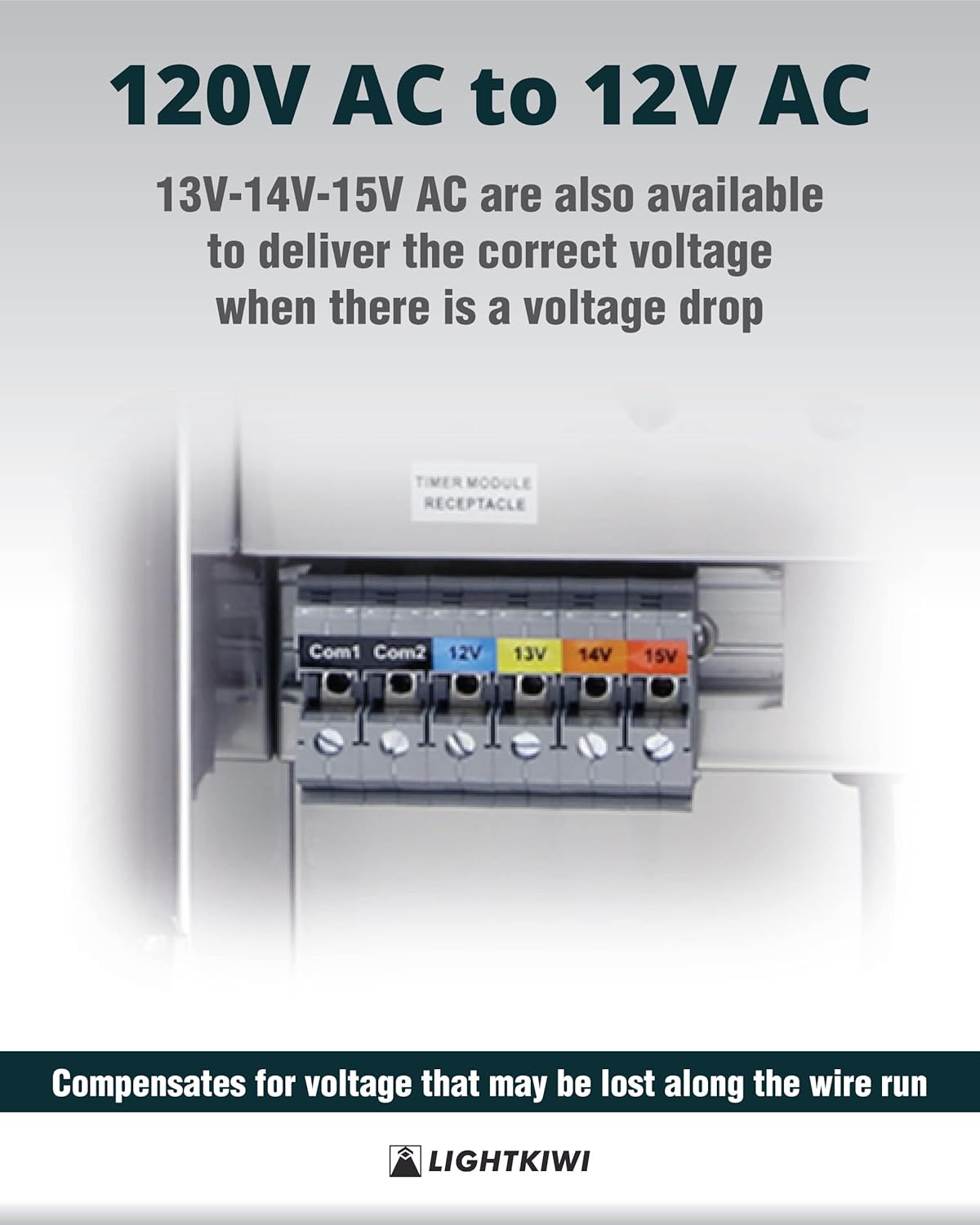
Imagen: Un detalle view of the multi-tap voltage terminals (Com1, Com2, 12V, 13V, 14V, 15V) on the Lightkiwi transformer. This image illustrates where to connect the low voltage wiring for different voltagy salidas.
- Connect the Smart Plug (Optional): If using the WiFi Smart Plug, plug it into the 'TIMER MODULE RECEPTACLE' inside the transformer. Then, plug the photocell plug (if applicable) into the smart plug.

Image: The Lightkiwi transformer with the smart plug and photocell connected to the internal receptacle. This image demonstrates the correct way to integrate the smart plug for remote control.

Image: A detailed composite image showing various configurations of the smart plug and photocell connections within the transformer. This provides clear visual guidance for connecting these components.
- Encendido: Plug the transformer's power cord into a grounded 120V AC outlet. The transformer is now ready for operation.
Instrucciones de funcionamiento
The Lightkiwi transformer is designed for simple operation. Once installed and powered, your low voltage lighting system will be active.
Using the WiFi Smart Plug
The included WiFi Smart Plug allows for remote control and scheduling of your landscape lighting via the Smart Life app.
- Descargar la aplicación: Descargue la aplicación 'Smart Life' desde la App Store (iOS) o Google Play Store (Android).
- Registrarse/Iniciar sesión: Crea una cuenta o inicia sesión en tu cuenta Smart Life existente.
- Agregar dispositivo: Follow the in-app instructions to add the WiFi Smart Plug. Typically, this involves putting the smart plug into pairing mode (often by holding a button until an indicator light blinks rapidly) and then selecting 'Electrical Outlet' or 'Smart Plug' in the app.
- Control and Schedule: Once connected, you can turn your lighting system on/off remotely, set schedules, timers, and integrate with voice assistants (if supported by the app).
Mantenimiento
The Lightkiwi transformer requires minimal maintenance to ensure long-lasting performance.
- Limpieza regular: Limpie periódicamente el exterior del transformador con un paño limpio.amp Paño para eliminar la suciedad y los residuos. No utilice limpiadores abrasivos ni disolventes.
- Inspeccionar el cableado: Annually inspect all wiring connections for tightness and signs of wear or corrosion. Ensure the power cord is not damaged.
- Ventilaciones transparentes: Ensure that any ventilation openings are clear of obstructions to prevent overheating.
- Verificación del disyuntor: The transformer features magnetic circuit breakers. If the lighting system goes out, check if a breaker has tripped. Reset by flipping the switch back to the 'ON' position. If it trips repeatedly, investigate for a short circuit or overload in your lighting system.
Solución de problemas
If you encounter issues with your Lightkiwi transformer, refer to the following common problems and solutions:
| Problema | Posible causa | Solución |
|---|---|---|
| Las luces no se encienden. | No power to transformer; Tripped circuit breaker; Loose wiring connection; Faulty bulb/fixture. | Check power outlet and transformer plug. Reset circuit breakers inside the transformer. Inspect and tighten all wire connections. Test individual bulbs/fixtures. |
| Las luces están tenues o parpadean. | Volumentage drop due to long wire run; Overloaded transformer; Loose connection. | Utilice un volumen más altotage tap (13V, 14V, or 15V) on the transformer. Reduce the total wattage of connected lights. Check and tighten all wire connections. |
| Transformer makes unusual noise. | Overload; Internal issue. | Reduce the load on the transformer. If noise persists, disconnect power and contact customer support. |
| Smart Plug not connecting to WiFi. | Incorrect WiFi password; Out of range; Router issues. | Ensure correct WiFi password. Move transformer closer to router or use a WiFi extender. Restart router. Follow Smart Life app troubleshooting. |
Presupuesto
Detailed technical specifications for the Lightkiwi 600 Watt Multi-Tap Transformer:
- Modelo: B0CG2PSV8B
- Vol de entradatage: 120 V CA
- Vol de salidatage: 12V-13V-14V-15V AC Multi-Tap
- Wat máximotage: 600 vatios
- Carga máxima: 70% of rated wattage
- Calificación actual: 25 Amps (per secondary breaker)
- Cable de alimentación: 70" black 18AWG SJTW cord and plug set
- Material del recinto: Acero inoxidable de servicio pesado
- Tipo de núcleo: High-Performance Toroidal Core
- Protección: Primary: Auto Reset Thermal Circuit Breaker; Secondary: (2) 25A Magnetic Circuit Breakers
- Certificaciones: Listado en ETL
- Dimensiones (aproximadas): 14.60" (alto) x 6.80" (ancho) x 6.50" (profundidad)

Image: A technical drawing illustrating the dimensions of the Lightkiwi transformer, including height, width, depth, and power cord length. This provides precise measurements for installation planning.

Image: The ETL Listed certification mark and associated product information for the Lightkiwi transformer. This confirms the product's compliance with safety guidelines and standards.
Garantía y soporte
Lightkiwi stands behind the quality of its products. For warranty information, technical support, or any inquiries regarding your transformer, please contact Lightkiwi customer service. Refer to the product packaging or the official Lightkiwi webSitio para obtener los datos de contacto más actualizados.
Nos comprometemos a brindar un excelente servicio y soporte para su producto.
Ask a question about this manual
Ask about setup, troubleshooting, compatibility, parts, safety, or missing instructions. Manuals+ will review the question and use this page’s manual context to help answer it.