
MEGATEK CP27BR
Manual de usuario del reproductor de CD portátil MEGATEK
Model: CP27BR
Introducción
Thank you for choosing the MEGATEK Portable CD Player. This device is designed to provide a versatile and high-quality audio experience, supporting various media formats and offering multiple connectivity options. Please read this manual carefully to ensure proper use and maintenance of your new CD player.

Image: The MEGATEK Portable CD Player, showcasing its compact design, integrated speakers, control buttons, and included accessories like headphones and USB-C charging cables.
Información de seguridad
Para garantizar un funcionamiento seguro y evitar daños, tenga en cuenta las siguientes precauciones:
- No exponga el dispositivo a temperaturas extremas, humedad o luz solar directa.
- Evite dejar caer o someter el dispositivo a impactos fuertes.
- No desmonte ni intente reparar el dispositivo usted mismo. Encargue cualquier servicio técnico a personal cualificado.
- Utilice únicamente el cable de carga proporcionado y un adaptador de corriente compatible.
- Mantenga el dispositivo alejado del agua y otros líquidos.
- Limpie el dispositivo con un paño suave y seco. No utilice limpiadores abrasivos ni disolventes.
- Escuchar el volumen alto durante mucho tiempo puede causar daños auditivos. Ajuste el volumen a un nivel seguro.
Contenido del paquete
Verifique que todos los artículos estén presentes en el paquete:
- MEGATEK Portable CD Player - Black
- Auriculares con cable
- Cable de carga USB-C
- Manual del usuario

Image: A visual representation of the package contents, including the CD player, headphones, USB-C cable, and user manual.
Producto terminadoview
Familiarize yourself with the various parts and controls of your MEGATEK Portable CD Player.
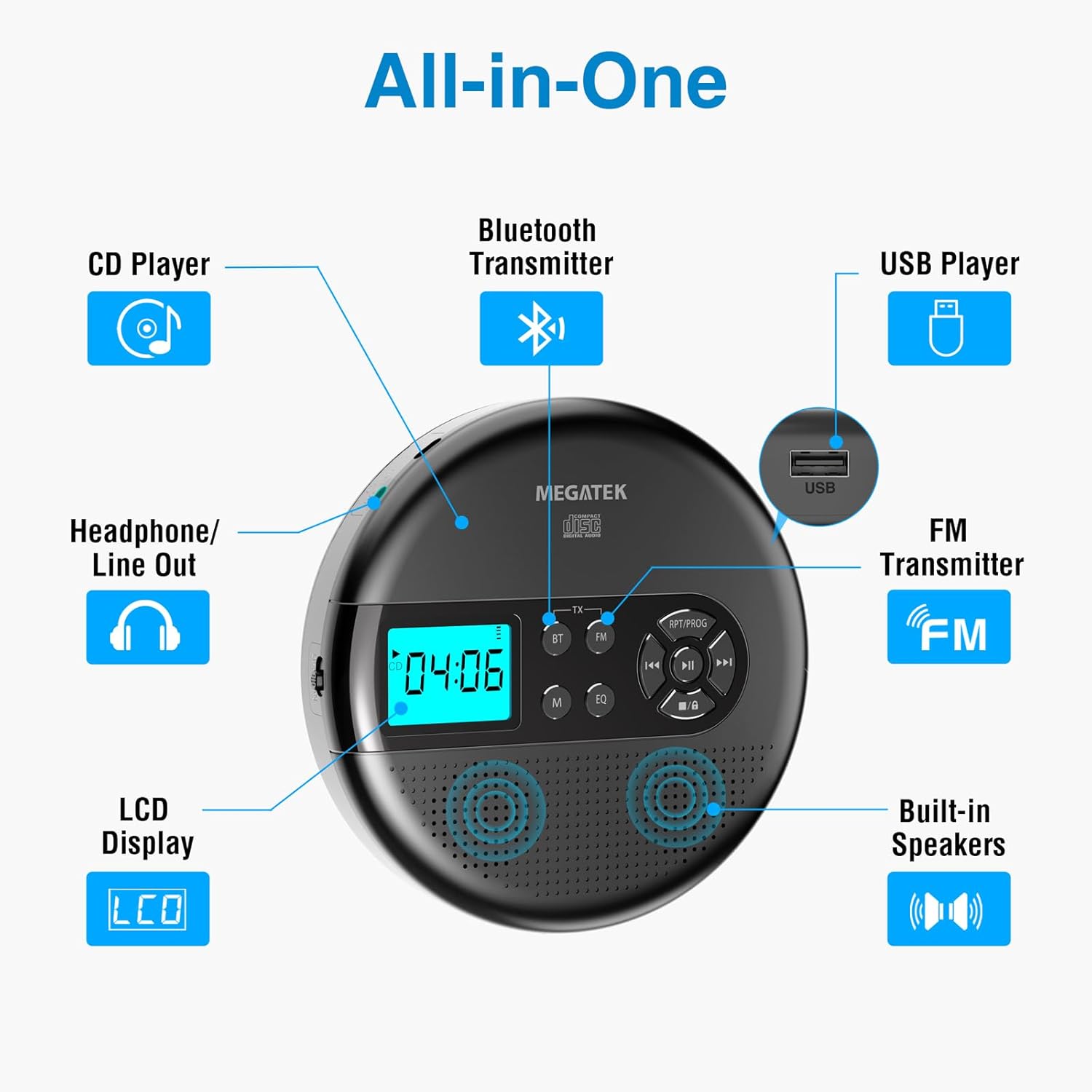
Image: An "All-in-One" diagram highlighting key features such as the CD Player, Bluetooth Transmitter, USB Player, FM Transmitter, Built-in Speakers, LCD Display, and Headphone/Line Out port.
Controles y Puertos:
- Pantalla LCD: Muestra el número de pista, la hora, el modo y el estado de la batería.
- Botón de reproducción/pausa: Inicia o pausa la reproducción.
- Botones Anterior/Siguiente: Salta pistas o avanza/retrocede rápidamente.
- Botón Detener: Detiene la reproducción.
- RPT/PROG Button: Controls repeat modes and programming tracks.
- Botón BT: Activa el modo de transmisión Bluetooth.
- Botón FM: Activates FM transmission mode.
- Botón M (modo): Switches between CD, USB, Bluetooth, and FM modes.
- Botón EQ: Recorre los ajustes preestablecidos del ecualizador.
- Control de volumen: Ajusta el nivel de salida de audio.
- Puerto USB: Para reproducir audio files desde una unidad USB.
- Puerto de carga tipo C: Para cargar la batería interna.
- 3.5mm Audio Out Jack: Para conectar auriculares o altavoces externos.
- Altavoces estéreo integrados: Para reproducción de audio directa.
Configuración
Carga de la batería:
The device is equipped with a built-in 2000mAh rechargeable Li-ion battery. Before first use, fully charge the player.
- Connect the provided USB-C charging cable to the Type-C charging port on the player.
- Conecte el otro extremo del cable USB-C a un adaptador de corriente USB (no incluido) o al puerto USB de una computadora.
- The battery indicator on the LCD display will show charging status. A full charge provides up to 15 hours of playtime at medium volume.

Image: The portable CD player connected to a power source via its USB-C cable, resting on a nightstand next to a bed.
Insertar un CD:
- Locate the CD compartment latch/button on the side of the player and slide/press it to open the lid.
- Carefully place the CD onto the center spindle with the label side facing up.
- Presione suavemente el CD hacia abajo hasta que encaje en su lugar.
- Cierre firmemente la tapa del compartimiento del CD hasta que encaje.

Image: The portable CD player with its lid open, showing a blue CD disc inserted into the compartment, ready for playback.
Instrucciones de funcionamiento
Reproducción de CD:
- Inserte un CD como se describe en la sección Configuración.
- Presione el Reproducir/Pausa para comenzar la reproducción.
- Utilice el Anterior/Siguiente buttons to navigate between tracks. Hold to fast-forward or rewind.
- Presione el RPT/PROG button to cycle through repeat modes (repeat one, repeat all, random) or to program a custom playback order.
- Presione el Detener Botón para finalizar la reproducción.
- Adjust volume using the dedicated volume control.
Reproducción USB:
The player supports MP3, WMA, and WAV audio files desde una unidad USB.
- Inserte una unidad flash USB en el puerto USB.
- Presione el M (Modo) para cambiar al modo USB.
- Utilice el Reproducir/Pausa, Anterior/Siguiente, y RPT/PROG botones como lo haría para la reproducción de CD.
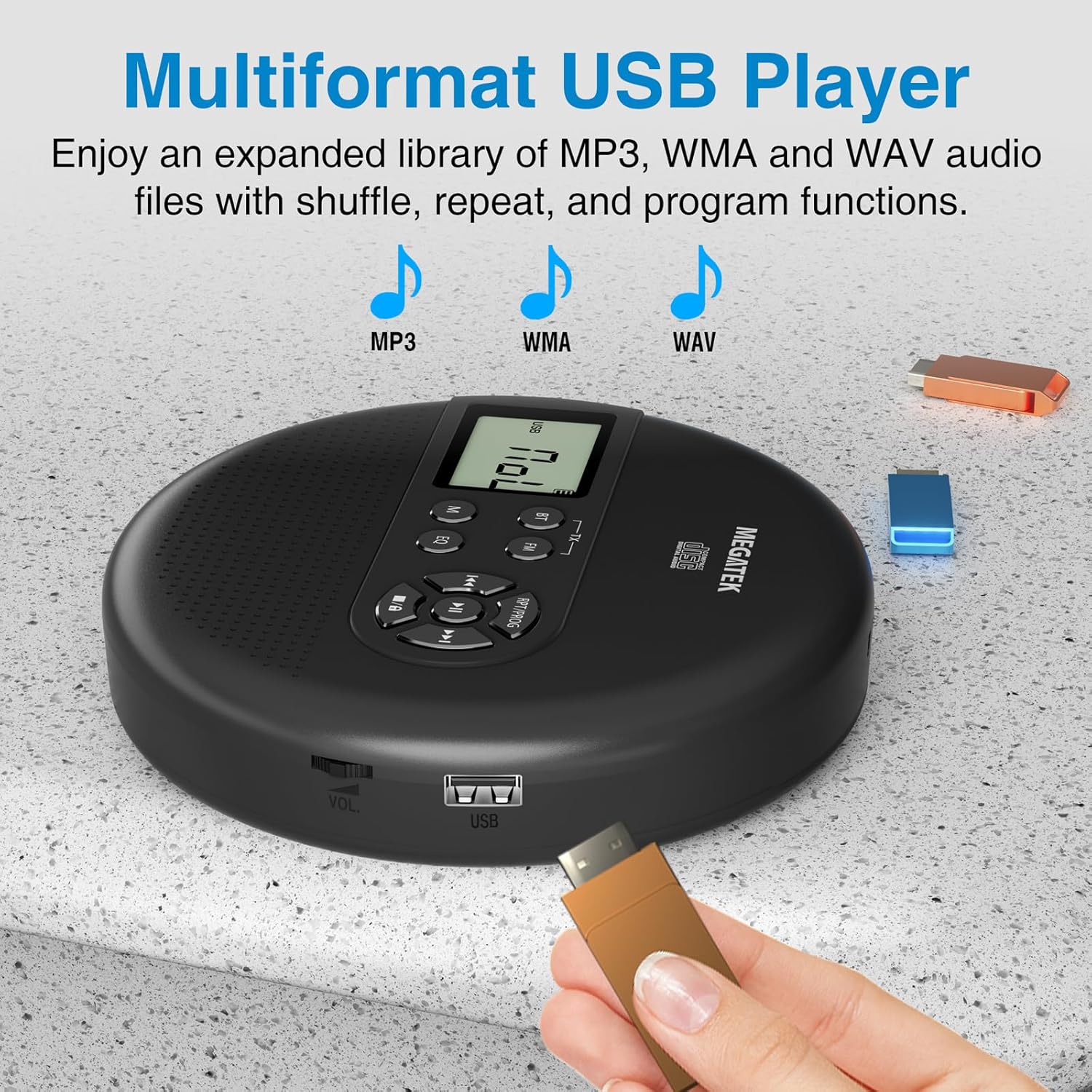
Image: The portable CD player with a USB flash drive inserted into its side port, illustrating its multi-format USB playback capability.
Transmisión Bluetooth:
Stream audio wirelessly to Bluetooth-enabled headphones or speakers. Note: This feature does not support connections to car stereo systems.
- Asegúrese de que sus auriculares o altavoz Bluetooth estén en modo de emparejamiento.
- On the CD player, press the BT button. The Bluetooth indicator on the display will flash.
- The player will automatically search for and connect to nearby Bluetooth devices. Once connected, the indicator will stop flashing.

Image: The portable CD player wirelessly transmitting audio to two external Bluetooth speakers, demonstrating its Bluetooth transmission capability.
Transmisión FM:
Transmit audio signals to nearby FM radios, including car FM stereos and home stereo systems.
- Presione el FM button on the CD player. The display will show an FM frequency.
- Tune your FM radio (car stereo, home stereo) to the same frequency displayed on the CD player.
- Adjust the frequency on the CD player using the Anterior/Siguiente buttons if interference occurs or to find a clearer channel.

Image: The portable CD player placed on a car dashboard, transmitting audio to the car's FM stereo system, indicated by an FM frequency on the car's display.
Using Headphones/External Speakers:
For private listening or connecting to wired audio systems:
- Plug the included wired headphones into the 3.5mm audio out jack.
- Alternatively, connect an audio cable (not included) from the 3.5mm audio out jack to the AUX input of external speakers or an audio system.
- The built-in speakers will automatically mute when headphones or external speakers are connected.

Image: A close-up of the portable CD player, visually representing sound waves emitting from its dual stereo speakers, emphasizing the built-in audio capability.
Mantenimiento
- Limpieza: Use a soft, dry, lint-free cloth to clean the exterior of the player. For the CD lens, use a specialized CD lens cleaner. Do not use liquids or aerosol cleaners directly on the device.
- Almacenamiento: Cuando no utilice el reproductor durante períodos prolongados, guárdelo en un lugar fresco y seco, alejado de la luz solar directa y de temperaturas extremas.
- Cuidado de la batería: Para prolongar la vida útil de la batería, evite descargarla por completo con frecuencia. Cargue el dispositivo regularmente, incluso si no lo usa.
Solución de problemas
| Problema | Posible causa | Solución |
|---|---|---|
| El reproductor no se enciende. | La batería está agotada. | Charge the player using the USB-C cable. |
| No hay sonido en los altavoces/auriculares. | Volume is too low; headphones not fully plugged in; incorrect mode selected. | Increase volume; ensure headphones are securely connected; press the M (Modo) Botón para seleccionar la fuente correcta. |
| El CD salta o no se reproduce. | CD is dirty, scratched, or inserted incorrectly; anti-skip function overwhelmed. | Clean the CD; ensure CD is properly seated; avoid strong vibrations. |
| Problemas de conexión Bluetooth. | Dispositivo no en modo de emparejamiento; demasiado lejos del reproductor; interferencia. | Ensure receiving device is in pairing mode; move closer to the player; restart both devices. |
| Transmisión FM estática/mala calidad. | Interference; incorrect frequency. | Adjust the FM frequency on the player and receiver to find a clear channel. |
Presupuesto
| Característica | Detalle |
|---|---|
| Número de modelo | CP27BR |
| Dimensiones del producto | 5.91 x 5.91 x 1.32 pulgadas |
| Peso del artículo | 10.9 onzas |
| Batería | Batería de iones de litio de 2000 mAh (recargable) |
| Recreo | Hasta 15 horas (a volumen medio) |
| Formatos de CD compatibles | CD, CD-R/RW, CD MP3, CD de audiolibros |
| Formatos USB compatibles | MP3, WMA, WAV |
| Protección Anti-Salto | 60 segundos |
| Conectividad | USB, Bluetooth Transmitter, FM Transmitter, 3.5mm Audio Out |
| Características especiales | Built-in Stereo Speakers, Resume Play, Shuffle, Repeat, Program Functions, 5 EQ Options |
Garantía y soporte
MEGATEK offers comprehensive support for its products:
- Reemplazo de 12 meses: In case of product defects or issues within 12 months of purchase.
- Soporte técnico de por vida: Assistance with product usage, troubleshooting, and general inquiries.
- Servicio al cliente 24 horas al día, 7 días a la semana: Available through Amazon buyer-seller messaging.
For any questions or problems, please contact MEGATEK customer service via the Amazon platform or refer to the contact information provided in the product packaging.
Image: A graphic detailing MEGATEK's customer support, including 12-month replacement, lifetime technical support, and 24/7 Amazon buyer-seller messaging, alongside an image of customer service representatives.
Ask a question about this manual
Ask about setup, troubleshooting, compatibility, parts, safety, or missing instructions. Manuals+ will review the question and use this page’s manual context to help answer it.