
SUNOL T16
SUNOL T16 Wireless Earbuds User Manual
Model: T16 | Brand: SUNOL
Introducción
The SUNOL T16 Wireless Earbuds are designed for an active lifestyle, offering high-quality audio and convenient features. These Bluetooth headphones provide up to 48 hours of total playtime with their wireless charging case, featuring an LED power display for easy monitoring. With earhooks for a secure fit and water resistance, they are ideal for workouts, running, and various sports activities. The built-in microphone with noise cancellation ensures clear calls.
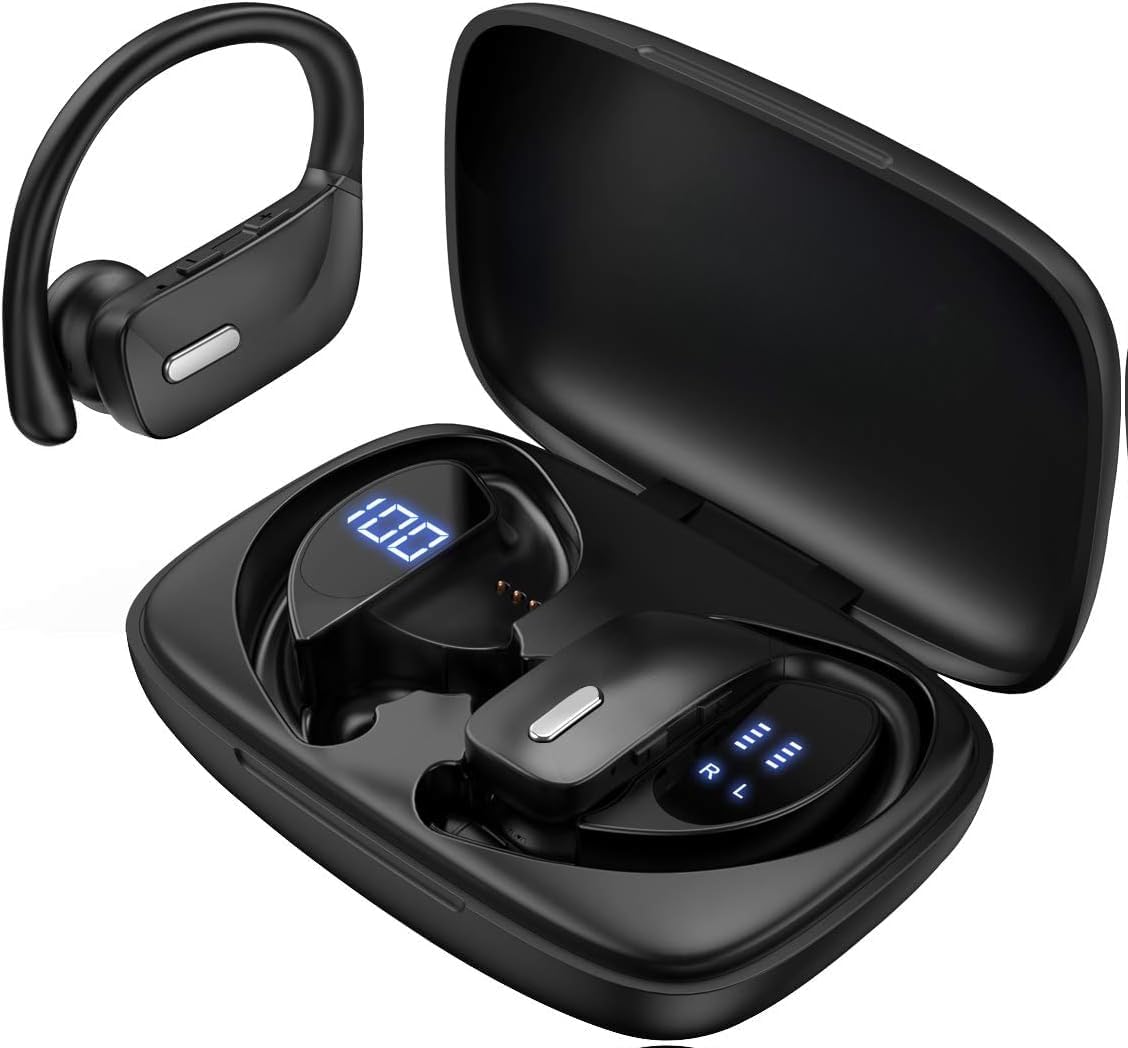
Image: The SUNOL T16 Wireless Earbuds with their charging case, showcasing la pantalla digital.
¿Qué hay en la caja?
- SUNOL T16 Wireless Earbuds (Left and Right)
- Estuche de carga inalámbrica
- Cable de carga USB-C
- 3 Pairs of Ear Caps (S, M, L)
Presupuesto
| Característica | Detalle |
|---|---|
| Nombre del modelo | T16 |
| Tecnología de conectividad | Inalámbrico (Bluetooth 5.0) |
| Alcance de Bluetooth | Hasta 10 metros |
| Duración de la batería del auricular | Hasta 9 horas (una sola carga) |
| Tiempo total de reproducción (con estuche) | Hasta 48 horas |
| Opciones de carga | Wireless Charging, USB-C Charging |
| Tamaño del controlador de audio | Controlador dinámico de 10 mm |
| Rango de frecuencia | 20 Hz - 20,000 Hz |
| Impedancia | 40 ohmios |
| Control de ruido | Cancelación activa de ruido |
| Micrófono | Built-in with Noise Cancellation |
| Nivel de resistencia al agua | Resistente al agua |
| Tipo de control | Touch, Siri Voice Assistant |
| Colocación de orejas | Sobre la oreja (con ganchos para la oreja) |
| Material | Acrilonitrilo butadieno estireno (ABS) |
| Peso del artículo | 6.4 onzas |

Image: Diagram illustrating the premium stereo sound quality and Bluetooth 5.0 connectivity.
Configuración
1. Carga de los auriculares y el estuche
The charging case supports both wireless charging and USB-C charging. The impressive 9 hours of listening time on a single charge for the sports wireless headphones are extended to a remarkable 48 hours of play time with the included charging case.
- To charge the case, connect a USB-C cable to the charging port on the back of the case, or place it on a compatible wireless charging pad.
- Coloque los auriculares en sus respectivas ranuras del estuche de carga. Asegúrese de que estén bien colocados para iniciar la carga.
- The smart LED digital power display on the case will show the remaining battery level of the charging case and the individual earbuds. The percentage in the middle indicates the case battery, while the battery icons on both sides indicate the left and right earbud charge levels.

Imagen: El estuche de carga con su pantalla LED que muestra los niveles de batería del estuche y de los auriculares individuales.

Image: Diagram illustrating the battery life: 15 min charge for 1 hour playtime, 8 hours on a single charge, and 48 hours with the charging case.
2. Emparejamiento con su dispositivo
Los auriculares entran automáticamente en modo de emparejamiento cuando se retiran del estuche de carga.
- Abre el estuche de carga y retira ambos auriculares. Se encenderán automáticamente y entrarán en modo de emparejamiento.
- En su dispositivo móvil (teléfono inteligente, tableta, computadora portátil), vaya a la configuración de Bluetooth.
- Buscar available devices. You should see "T16" or "S8" appear in the list.
- Select "T16" or "S8" to connect. Once connected, you will hear an audio prompt, and the earbuds will be ready for use.

Image: Diagram showing the earbuds automatically pairing with mobile phones.
Video: Official product video demonstrating the unboxing, charging, and Bluetooth pairing process of the SUNOL T16 Wireless Earbuds.
Instrucciones de funcionamiento
Cómo usar los auriculares
The T16 earbuds are designed with flexible earhooks to ensure a secure and comfortable fit, especially during physical activity. Gently place the earbud into your ear canal and adjust the earhook over the top of your ear until it feels stable and comfortable. Experiment with the included ear cap sizes to find the best fit for optimal sound and comfort.

Image: A woman wearing the SUNOL T16 earbuds, demonstrating their secure fit for an active lifestyle.
Controles táctiles
The earbuds feature physical buttons for precise control of various functions:
- Reproducir/Pausa: Un solo toque en cualquiera de los auriculares.
- Responder/colgar llamada: Un solo toque en cualquiera de los auriculares durante una llamada.
- Canción anterior: Toque dos veces el auricular izquierdo.
- Siguiente canción: Toque dos veces el auricular derecho.
- Active Voice Assistant (Siri): Toque tres veces cualquiera de los auriculares.
- Rechazar llamadas: Mantenga presionado cualquiera de los auriculares durante una llamada entrante.
- Ajuste de volumen: Use the dedicated volume buttons on the earbuds.

Image: Diagram detailing the physical buttons and their functions, including volume adjustment, play/pause, call management, and voice assistant activation.
Mantenimiento
To ensure the longevity and optimal performance of your SUNOL T16 Wireless Earbuds, follow these maintenance guidelines:
- Limpieza: Regularly wipe the earbuds and charging case with a soft, dry, lint-free cloth. For ear caps, remove them and clean with mild soap and water, then dry thoroughly before reattaching.
- Resistencia al agua: While water-resistant, avoid submerging the earbuds in water. Dry them completely if they get wet from sweat or rain before placing them back in the charging case.
- Almacenamiento: Cuando no los uses, guarda los auriculares en su estuche de carga para protegerlos y mantenerlos cargados. Guárdalos en un lugar fresco y seco, alejado de temperaturas extremas.
- Puerto de carga: Mantenga el puerto de carga USB-C libre de polvo y residuos.
Solución de problemas
If you encounter any issues with your SUNOL T16 Wireless Earbuds, try the following solutions:
- Los auriculares no se emparejan:
- Asegúrese de que ambos auriculares estén completamente cargados.
- Place earbuds back in the case, close the lid, wait a few seconds, then open and remove them again.
- Desactive el Bluetooth en su dispositivo, luego vuelva a activarlo e intente emparejarlo nuevamente.
- Forget or remove the "T16" or "S8" device from your device's Bluetooth list and attempt to pair from scratch.
- Solo funciona un auricular:
- Asegúrese de que ambos auriculares estén cargados.
- Coloque nuevamente ambos auriculares en el estuche de carga, cierre la tapa y luego sáquelos simultáneamente.
- If the issue persists, try resetting the earbuds.
- Mala calidad de sonido:
- Ensure the earbuds are properly seated in your ears and the ear caps provide a good seal.
- Verifique la configuración de volumen y sonido del dispositivo de fuente de audio.
- Move closer to your connected device to avoid interference or exceeding the 10-meter Bluetooth range.
- Clean the earbud speakers and ear caps.
- El estuche de carga no carga:
- Asegúrese de que el cable USB-C esté conectado de forma segura tanto al estuche como a la fuente de alimentación.
- Pruebe con un cable USB-C o un adaptador de corriente diferente.
- Si utiliza la carga inalámbrica, asegúrese de que el estuche esté colocado correctamente sobre la plataforma de carga.
Garantía y soporte
For warranty information and technical support, please refer to the documentation included with your product or contact the manufacturer, SUNOL, directly through their official webSitio web o canales de atención al cliente. Conserve su recibo de compra como comprobante para cualquier reclamación de garantía.
Ask a question about this manual
Ask about setup, troubleshooting, compatibility, parts, safety, or missing instructions. Manuals+ will review the question and use this page’s manual context to help answer it.