
Luqeeg Luqeeg5vusa2ir6y-13
Luqeeg Smart Glasses Instruction Manual
Model: Luqeeg5vusa2ir6y-13
Introducción
This manual provides detailed instructions for the setup, operation, and maintenance of your Luqeeg Smart Glasses, Model Luqeeg5vusa2ir6y-13. These smart audio glasses feature Bluetooth 5.3 connectivity, a built-in microphone and speaker, and are designed for daily wear with interchangeable lenses. Please read this manual thoroughly to ensure proper use and to maximize the product's lifespan.

Image: Luqeeg Smart Glasses in use by a person at a desk.
¿Qué hay en la caja?
Verifique que todos los artículos estén presentes en el paquete:
- 1 x Smart Glasses
- 1 x Polarized Lens
- 1 x Night Vision Lens
- 1 x Cable de carga magnética
- 1 paño para limpiar gafas
- 1 x Manual de instrucciones

Image: All components included in the Luqeeg Smart Glasses package.
Presupuesto
| Característica | Detalle |
|---|---|
| Nombre del modelo | Luqeeg5vusa2ir6y-13 |
| Protocolo Bluetooth | 5.3 |
| Distancia de conexión Bluetooth | 10 m |
| Capacidad de la batería | 110mAh (per lens leg) |
| Tiempo de carga | Aproximadamente 90 minutos (1.5 horas) |
| Tiempo de reproducción de música | Hasta 6 horas (al 80% del volumen) |
| Tiempo de espera | Mayor a 20 días |
| Vol. De cargatage / Actual | DC5V, max 110mA |
| Canal de sonido | Dual speakers, stereo sound |
| Clasificación de resistencia al agua | IPX4 (impermeable) |
| Sistemas compatibles | iOS y Android |
| Material de la lente | PC (Policarbonato) |
| Material del marco | Policarbonato (PC) |
| Características especiales | Anti Blue Lighting Lens, Night Vision Lens, Polarized Lens |
Configuración
1. Charging the Smart Glasses
Before initial use, fully charge the smart glasses. Use the provided magnetic charging cable.
- Connect the magnetic end of the charging cable to the charging contacts located on the inside of the glasses' temples.
- Connect the USB end of the charging cable to a standard USB power adapter (DC5V) or a computer's USB port.
- The charging indicator (if present, refer to visual cues on the device) will show charging status. A full charge takes approximately 90 minutes.
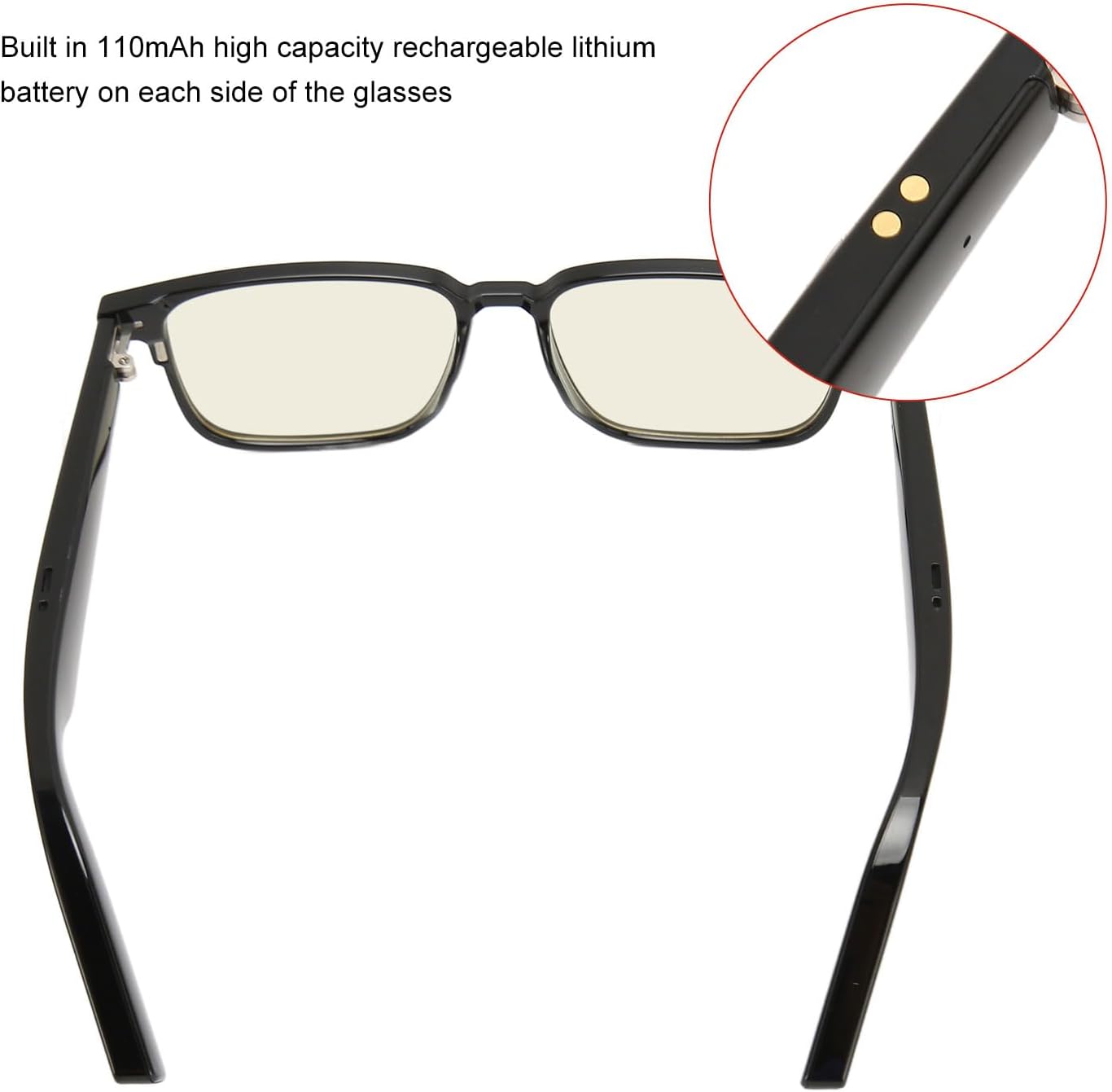
Image: Magnetic charging contacts on the smart glasses temple.
2. Emparejamiento Bluetooth
Pair your smart glasses with your smartphone or other Bluetooth-enabled device.
- Encendido: Long press the touch area on either temple for 4 seconds to turn on the device. The glasses will automatically enter pairing mode.
- Activar Bluetooth: En su teléfono inteligente o dispositivo, vaya a la configuración de Bluetooth y asegúrese de que Bluetooth esté habilitado.
- Busque y conéctese: Buscar available devices. The smart glasses should appear in the list. Select the device to connect.
- Confirmación: After successful pairing, you will hear a voice prompt confirming the connection.
Instrucciones de funcionamiento
1. Controles táctiles básicos
The smart glasses feature touch controls on both temples for easy operation.
- Reproducir/Pausar música: Toque una vez el área táctil.
- Responder/Finalizar llamada: Single tap the touch area during an incoming call.
- Rechazar llamada: Long press the touch area during an incoming call.
- Siguiente canción: Double tap the right temple.
- Canción anterior: Double tap the left temple.
- Activar asistente de voz: Triple tap the touch area (compatible with your smartphone's voice assistant).
Note: Specific gestures for volume control may vary. Refer to the device for exact actions.
2. Using Interchangeable Lenses
Your Luqeeg Smart Glasses come with different lenses for various conditions.
- Anti-Blue Light Lenses: These lenses are designed to reduce screen glare and eye fatigue, making them suitable for daily wear, especially when using digital screens.
- Lentes polarizadas: These lenses block up to 99% of UVA/UVB rays, providing effective protection against UV light and reducing glare from sunlight. They are ideal for outdoor use as sunglasses.
- Night Vision Lenses: These yellow anti-glare lenses are suitable for night use, particularly when driving. They help prevent glare from oncoming vehicle lights and improve visibility in low-light conditions without affecting the field of vision.

Image: Smart glasses with anti-blue light lenses for reduced eye strain.

Image: Smart glasses equipped with removable magnetic polarized lenses for sun protection.

Image: Smart glasses with removable magnetic night vision lenses, suitable for low-light conditions.
To change lenses, gently detach the current lenses from the frame and magnetically attach the desired lenses.
Mantenimiento
- Limpieza: Use the provided glasses cleaning cloth to gently wipe the lenses and frame. Avoid using abrasive materials or harsh chemical cleaners, which can damage the lenses or coatings.
- Resistencia al agua: The smart glasses have an IPX4 waterproof rating, meaning they are resistant to splashing water from any direction. They are not designed for submersion in water. Avoid exposing them to heavy rain or prolonged water contact.
- Almacenamiento: When not in use, store the glasses in a protective case to prevent scratches and damage.
- Cuidado de la batería: To prolong battery life, avoid fully discharging the battery frequently. Charge the glasses regularly, even if not used for extended periods.
Solución de problemas
| Problema | Posible causa / solución |
|---|---|
| Las gafas no se encienden. |
|
| No se puede emparejar mediante Bluetooth. |
|
| No hay sonido o la calidad del sonido es mala. |
|
| Los controles táctiles no responden. |
|
Garantía y soporte
Garantía limitada: The Luqeeg Smart Glasses come with a limited warranty. Please refer to the warranty card included in your package or contact Luqeeg customer support for specific terms and conditions.
Atención al cliente: For further assistance, technical support, or warranty claims, please contact Luqeeg customer service through the retailer where the product was purchased or visit the official Luqeeg websitio para información de contacto.
Ask a question about this manual
Ask about setup, troubleshooting, compatibility, parts, safety, or missing instructions. Manuals+ will review the question and use this page’s manual context to help answer it.