
1. Introducción
The SHX SHXA700 Infrared Heating Panel is designed to provide efficient and comfortable heating for your living spaces. Featuring a modern, frameless design with a white carbon crystal surface, it seamlessly integrates into any room. This 700W panel offers WiFi connectivity, remote control operation, and a programmable thermostat for optimal energy saving and comfort. This manual provides essential information for the safe and effective use of your heating panel.

Figure 1: SHX SHXA700 700W WiFi Infrared Heating Panel, front view. A clean, white rectangular infrared heating panel, showcasing su diseño minimalista.
2. Instrucciones de seguridad
Lea atentamente todas las instrucciones de seguridad antes de instalar y usar el producto. El incumplimiento de estas instrucciones podría provocar descargas eléctricas, incendios o lesiones personales.
- Asegúrese de que la fuente de alimentación voltage coincide con la etiqueta de clasificación del aparato.
- No utilice el calentador si el cable o el enchufe están dañados. Si el cable está dañado, debe ser reemplazado por el fabricante, su agente de servicio técnico o personal cualificado para evitar riesgos.
- No cubra el calentador. Esto puede causar sobrecalentamiento.
- Maintain a minimum distance of 100 cm from the front of the heater to any objects, and 20 cm from the sides and top to walls or other surfaces.
- This appliance is rated IP44, making it suitable for use in bathrooms. However, it must not be installed directly above a bath, shower, or swimming pool.
- No introduzca ningún objeto en las aberturas del calentador.
- The heater is equipped with overheating protection. If the heater overheats, it will automatically shut off. Unplug the heater and allow it to cool down before restarting.
- Mantenga a los niños y a las mascotas alejados del calentador durante su funcionamiento.
- Desenchufe siempre el calentador antes de limpiarlo o realizarle mantenimiento.
3. Contenido del paquete
Desempaque la caja con cuidado y asegúrese de que todos los artículos estén presentes y sin daños. Si falta algún artículo o está dañado, contacte con su vendedor.
- Panel de calefacción por infrarrojos
- Manual de usuario
- Mando a distancia
- Screws and Dowels for wall mounting
- Optional Feet for freestanding placement
4. Características del producto
The SHX SHXA700 Infrared Heating Panel offers a range of features designed for convenience and efficiency:
- Potente salida de 700 W: Provides effective heating for rooms up to 14 m².
- Integrated WiFi Functionality: Control your heater remotely via a smartphone app.
- Mando a distancia: Convenient operation with the included remote.
- Temporizador de 24 horas: Program specific operating times for energy saving.
- Termostato ajustable: Mantenga la temperatura ambiente deseada.
- Protección contra sobrecalentamiento: Característica de seguridad mejorada.
- Clasificación IP44: Adecuado para su uso en damp Ambientes como baños.
- Diseño moderno: Frameless white carbon crystal surface for aesthetic integration.
- Pantalla LCD: Clear display for settings and status.

Figure 2: SHX Infrared Heating Panel features. An infographic highlighting the main features of the SHX SHXA700 infrared heating panel, including WiFi connectivity, remote control, 24-hour timer, adjustable thermostat, and overheating protection. It also indicates suitability for up to 14m² rooms.
5. Configuración e instalación
The SHX SHXA700 heating panel can be installed either wall-mounted or freestanding using the optional feet.
5.1 Montaje en pared
- Choose a suitable location on a wall, ensuring sufficient clearance from other objects (refer to Safety Instructions).
- Mark the drilling points on the wall using the provided template or by measuring the panel's mounting holes.
- Perfore agujeros e inserte los tacos proporcionados.
- Fije los soportes de montaje a la pared utilizando los tornillos proporcionados.
- Carefully hang the heating panel onto the mounting brackets, ensuring it is securely seated.
- Conecte el cable de alimentación a una toma eléctrica adecuada.
5.2 Colocación independiente
- Attach the optional feet to the bottom of the heating panel using the provided screws.
- Place the panel on a stable, level surface, ensuring it is not easily tipped over.
- Ensure sufficient clearance from other objects (refer to Safety Instructions).
- Conecte el cable de alimentación a una toma eléctrica adecuada.

Figure 3: SHX Infrared Heating Panel in various room settings. A collage of four images demonstrating the SHX infrared heating panel's versatile placement options in different rooms: a living room, a bedroom, a bathroom, and an office, illustrating its modern design integration.

Figure 4: SHX SHXA700 Infrared Heating Panel dimensions. A diagram illustrating the physical dimensions of the SHX SHXA700 infrared heating panel, showing its width (1200mm), height (500mm), and depth (45mm), along with its weight (2.9 kg).
6. Instrucciones de funcionamiento
The heating panel can be operated using the integrated control panel on the back or the included remote control.
6.1 Panel de control terminadoview
The control panel is located on the back of the unit and includes buttons for power, WiFi, temperature adjustment, timer, and an LCD display.
6.2 Funcionamiento básico
- Encendido/apagado: Presione el botón de encendido en el panel de control o el control remoto para encender o apagar el calentador.
- Ajuste de temperatura: Use the '+' and '-' buttons to set your desired temperature. The LCD display will show the current and target temperatures.
- Función de temporizador: Press the timer button to activate and set the 24-hour timer. Follow the on-screen prompts to program the desired operating duration.

Figure 5: SHX Infrared Heating Panel control panel and remote control. A close-up view of the heating panel's integrated control unit on the side, featuring power, WiFi, LCD display, 24-hour timer, and indicator light buttons, alongside the included remote control for easy operation.
7. WiFi Connectivity & App Control
The SHX SHXA700 heating panel features integrated WiFi, allowing for smart control via your smartphone.
- Descargar la aplicación: Descarga la aplicación "Tuya Smart" de la tienda de aplicaciones de tu teléfono inteligente (disponible para iOS y Android).
- Registrarse/Iniciar sesión: Cree una cuenta o inicie sesión en su cuenta Tuya Smart existente.
- Agregar dispositivo: Follow the in-app instructions to add your SHX heating panel. This typically involves putting the heater into pairing mode (refer to the app's guide for specific steps, usually by holding the WiFi button on the control panel).
- Conéctese a Wi-Fi: Seleccione su red WiFi doméstica e ingrese la contraseña.
- Control: Once connected, you can control the heater's power, temperature, timer, and other settings directly from the app.
- Integración de casa inteligente: The Tuya Smart app supports integration with voice assistants like Amazon Alexa and Google Home, allowing for voice control of your heating panel.

Figure 6: SHX Infrared Heating Panel WiFi and integrated timer features. An image showing the heating panel's WiFi symbol and a smartphone displaying the "Tuya Smart" app interface, along with logos for Alexa and Google Home, indicating smart home compatibility and a 24-hour timer function.
8. Mantenimiento
Regular cleaning and maintenance will ensure the longevity and optimal performance of your heating panel.
- Limpieza: Always unplug the heater and allow it to cool completely before cleaning. Wipe the surface with a soft, damp paño. No utilice limpiadores abrasivos, disolventes ni productos químicos fuertes, ya que pueden dañar la superficie.
- Almacenamiento: Si va a guardar el calentador durante un periodo prolongado, asegúrese de que esté limpio y seco. Guárdelo en un lugar fresco y seco, preferiblemente en su embalaje original.
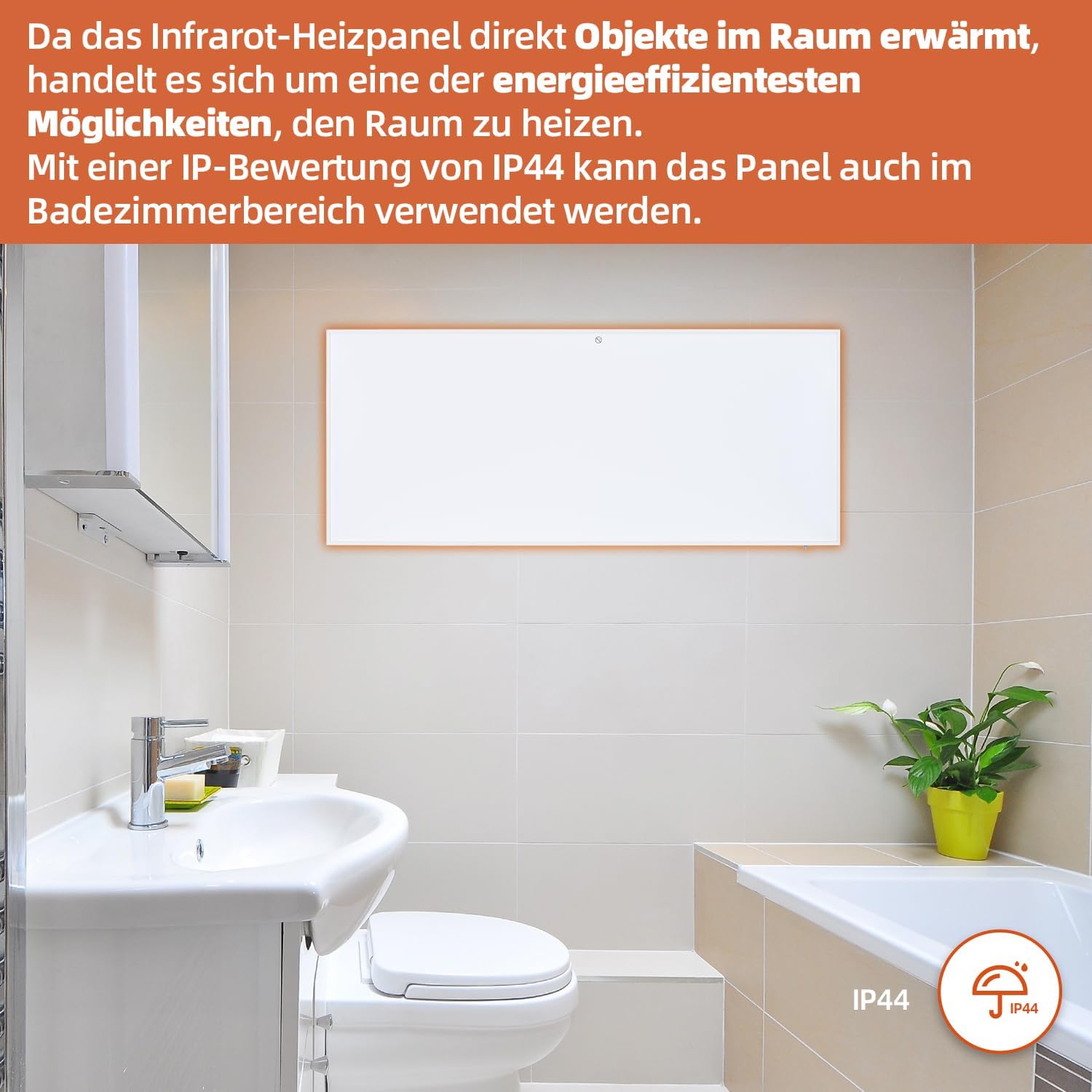
Figure 7: SHX Infrared Heating Panel with IP44 rating. The infrared heating panel mounted in a modern bathroom setting, emphasizing its IP44 water resistance rating, making it safe for use in damp entornos.
9. Solución de problemas
If you encounter any issues with your SHX heating panel, refer to the following common problems and solutions:
| Problema | Posible causa | Solución |
|---|---|---|
| El calentador no enciende. | No power supply. Overheating protection activated. | Check if the power cord is securely plugged in and the outlet is functional. Unplug the heater, allow it to cool for 30 minutes, then plug it back in. |
| La conexión WiFi falla. | Incorrect WiFi password. Heater not in pairing mode. Router issues. | Ensure correct WiFi password. Put the heater into WiFi pairing mode (refer to app instructions). Restart your WiFi router. Ensure the heater is within WiFi range. |
| El control remoto no funciona. | Las pilas están agotadas o mal insertadas. Hay una obstrucción entre el control remoto y el calefactor. | Replace the batteries in the remote control (requires 2 AAA batteries). Ensure there is a clear line of sight between the remote and the heater's receiver. |
| El calentador no calienta eficazmente. | Temperature setting too low. Room size exceeds heater capacity. Drafts. | Increase the target temperature. Ensure the room size is within the recommended range (up to 14 m²). Seal any drafts in the room. |
10. Especificaciones
| Especificación | Valor |
|---|---|
| Marca | SHX |
| Número de modelo | SHXA700-WiFi |
| Color | Blanco |
| Dimensiones del producto (L x An x Al) | 120 x 50 x 4.5 cm |
| Peso | 2.9 kilogramos |
| Fuerza | 700 vatios |
| Volumentage | 220 voltios (CA) |
| Clase de eficiencia energética | De la A a la G |
| Nivel de ruido | 1 decibelios |
| Características especiales | WiFi Compatible, Overheating Protection, Programmable Thermostat, Remote Control, Energy Efficient |
| Fuente de poder | Eléctrico con cable |
| Método de calentamiento | Radiante |
| Uso recomendado | Interior, Hogar |
| Tipo de montaje | Wall Mount, Floor Mount (with optional feet) |
| Se requieren baterías para el control remoto | 2 pilas AAA |
| País natal | Porcelana |
11. Garantía y soporte
The SHX SHXA700 Infrared Heating Panel comes with a 2 año de garantía A partir de la fecha de compra. Conserve el comprobante de compra para reclamaciones de garantía.
For technical support, warranty claims, or any questions regarding your product, please contact your retailer or the manufacturer's customer service. Contact information can typically be found on the product packaging or the manufacturer's official websitio.