
1. Másview
El Moukey MAMP1 is a compact yet powerful 2.0 channel Bluetooth audio stereo amplifier receiver designed for various home audio applications. It delivers 400 watts of maximum power output, providing a high-quality audio experience for karaoke, home theater, acoustic sound systems, and monitor headphones. Featuring multiple input and output modes, EQ controls, Bluetooth 5.0 connectivity, and an HD LED screen, the MAMP1 offers versatile and user-friendly operation.
2. Información importante de seguridad
- Read and heed all instructions.
- No utilice este producto cerca del agua.
- Limpiar únicamente con un paño seco.
- Asegúrese del volumentage of your local mains supply matches the product's requirements.
- No obstruya las aberturas de ventilación. Instale el producto según las instrucciones del fabricante.
- No lo instale cerca de fuentes de calor como radiadores, rejillas de calefacción, estufas u otros aparatos (incluidos ampificadores) que producen calor.
- Utilice únicamente accesorios especificados por el fabricante.
- Desenchufe este producto durante tormentas eléctricas o cuando no lo utilice durante períodos prolongados.
- Deje todo servicio a personal de servicio calificado.
3. Contenido del paquete
- Moukey MAMP1 Audio Stereo Ampmás vivaz
- Mando a distancia
- Antena FM
- Cable de alimentación
- Manual de usuario
4. Características del producto
- 400 vatios de potencia máxima: Compact yet powerful 2.0 Channel Bluetooth Audio Stereo Amplifier Receiver, ideal for karaoke, home theater, acoustic sound systems, and monitor headphones.
- Multiple Input and Output Modes: Supports 2 pairs of RCA audio inputs (for CD/DVD players), 2 x 1/4 inch (6.35mm) microphone inputs, USB (Max 64G), SD card (Max 32G), 3.5mm AUX IN, and FM radio. Features RCA Line Out and banana plug speaker outputs. Includes a 1/4 inch (6.35mm) headphone connection.
- Controles de ecualización: Features clear, responsive buttons and knobs for microphone echo/volume, balance, bass, treble, master volume, input source, and unique folder/track control.
- Conectividad Bluetooth 5.0: Professional indoor stereo receiver with Bluetooth music streaming up to 40 feet / 10 meters or more. Easily pairs with smartphones, tablets, iPads, iPhones, and computers.
- Pantalla LED HD: Integrated FM radio with built-in LED display and front panel audio control center. FM Antenna and Remote Control included for distant audio adjustments.
5. Controles del panel frontal
The front panel provides access to all essential controls for operating your Moukey MAMP1 ampmás duradero.
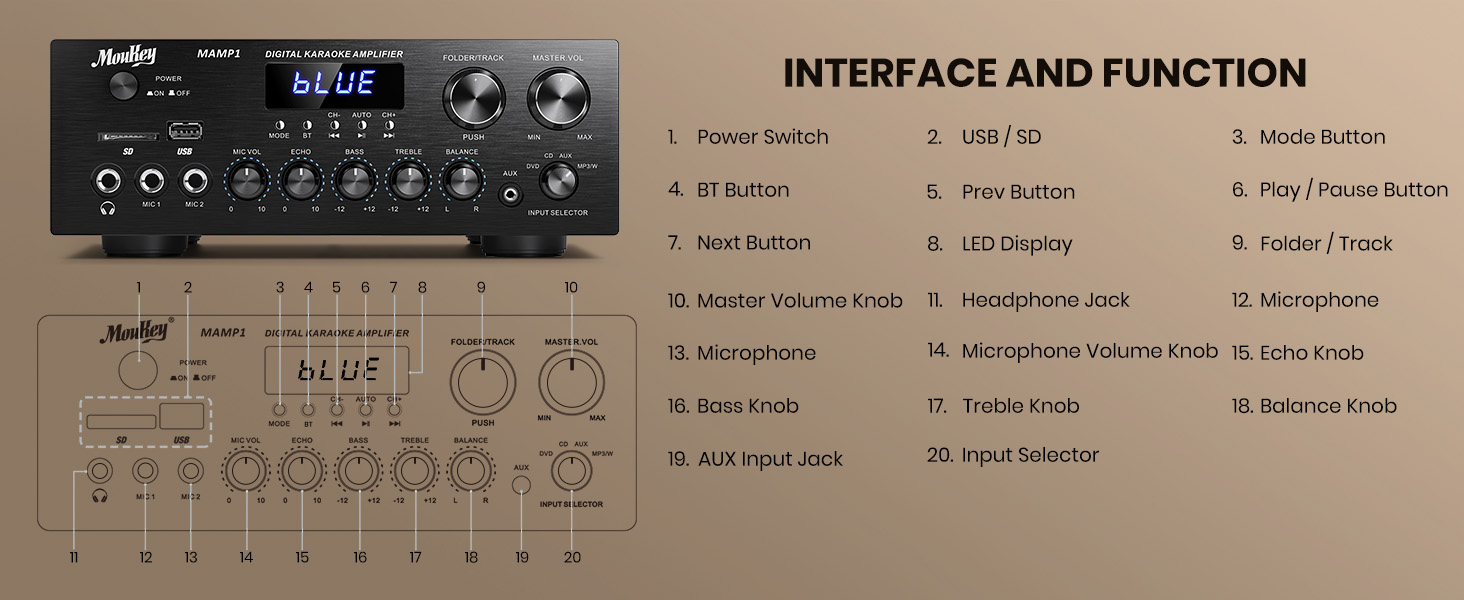
Figura 1: Moukey MAMP1 Disposición del panel frontal
- Interruptor de alimentación: Pulse para encender o apagar la unidad.
- USB / SD Card Slot: Insert USB flash drives (max 64GB) or SD cards (max 32G) for MP3 playback.
- Botón de modo: Press to cycle through input sources (USB/SD, Bluetooth, FM, AUX, CD, DVD).
- Botón BT: Presione para seleccionar el modo Bluetooth.
- Botones Anterior/Siguiente: Navigate tracks in USB/SD/Bluetooth mode or stations in FM mode.
- Botón de reproducción/pausa: Reproducir o pausar la reproducción de audio.
- Pantalla LED: Muestra el modo actual, información de la pista o frecuencia FM.
- Folder/Track Knob: Select folders or tracks.
- Perilla de volumen maestro: Ajusta el volumen de salida general.
- Toma de auriculares (6.35 mm): Conecte auriculares para escuchar en privado.
- Microphone Inputs (MIC1, MIC2 - 6.35mm): Conecte hasta dos micrófonos para karaoke o megafonía.
- Perilla de volumen del micrófono: Ajusta el volumen de los micrófonos conectados.
- Perilla de eco: Ajusta el efecto de eco para los micrófonos.
- Perilla de graves: Ajusta la salida de baja frecuencia.
- Perilla de agudos: Ajusta la salida de alta frecuencia.
- Perilla de equilibrio: Ajusta el balance del canal izquierdo/derecho.
- Input Selector Knob: Manually select input sources (CD, AUX, DVD, MP3/BT).
6. Conexiones del panel trasero
The rear panel provides all necessary ports for connecting your audio sources and speakers.

Figura 2: Moukey MAMP1 Disposición del panel trasero
- Conector de antena FM: Conecte la antena FM incluida para la recepción de radio.
- Audio Input (DVD/CD - RCA): Connect external audio sources like DVD or CD players using RCA cables.
- Salida de línea (RCA): Conectar a otro ampLifier o dispositivo de grabación.
- Salida de altavoz (conectores banana): Connect your passive speakers. Ensure correct polarity (+ to + and - to -).
- Entrada de energía: Connect the power cable to a standard AC outlet.
7. Configuración
7.1 Conexión de altavoces
To connect your passive speakers to the Moukey MAMP1 amplificador, siga estos pasos:

Figura 3: Diagrama de conexión de los altavoces
- Asegúrese de que ampEl alificador está apagado y desenchufado de la toma de corriente.
- Identify the positive (+) and negative (-) terminals on both your speakers and the ampmás duradero.
- For bare wire connections: Rotate and loosen the speaker knob on the amplifier. Insert the bare wire (remove approximately 10mm insulation). Tighten the knobs to secure the wires.
- Conecte el terminal positivo (+) de su altavoz al terminal positivo (+) del ampmás duradero.
- Conecte el terminal negativo (-) de su altavoz al terminal negativo (-) del ampmás duradero.
- Repeat for all speakers. Ensure all connections are secure to prevent short circuits.
7.2 Conexión de fuentes de audio
- RCA Devices (CD/DVD Player): Use RCA cables to connect the audio output of your CD or DVD player to the corresponding RCA input jacks on the ampPanel trasero del lificador.
- Dispositivos AUX: Connect devices with a 3.5mm audio output (e.g., smartphone, tablet) to the 3.5mm AUX IN jack on the front panel.
- Micrófonos: Plug 1/4 inch (6.35mm) microphones into the MIC1 or MIC2 jacks on the front panel.
- Antena FM: Connect the included FM antenna to the FM ANT jack on the rear panel for radio reception.
7.3 Conexión de alimentación
- Ensure all audio and speaker connections are made.
- Connect the power cable to the AC POWER INPUT on the rear panel of the ampmás duradero.
- Conecte el otro extremo del cable de alimentación a una toma de corriente CA adecuada.
8. Instrucciones de funcionamiento
8.1 Encendido y apagado
Presione el FUERZA Encienda el panel frontal para encenderlo. ampEncendido o apagado del dispositivo. La pantalla LED se iluminará al encenderlo.
8.2 Selección de la fuente de entrada
Utilice el MODO botón o el SELECTOR DE ENTRADA knob on the front panel to choose your desired audio source (Bluetooth, USB, SD, AUX, FM, CD, DVD).
8.3 Control de volumen y tono
- Volumen principal: Girar el VOLUMEN MAESTRO Perilla para ajustar el nivel de sonido general.
- Volumen del micrófono: Utilice el VOLUMEN DEL MICRÓFONO knob to adjust microphone volume independently.
- Eco: Adjust the microphone echo effect with the ECO perilla.
- Graves agudos: Fine-tune the low and high frequencies using the BASS y TRIPLICAR perillas.
- Balance: Adjust the left/right channel balance with the BALANCE perilla.
8.4 Emparejamiento Bluetooth
- Presione el MODO botón o BT button to select Bluetooth mode. The LED display will show "BLUE".
- En su dispositivo móvil, habilite Bluetooth y busque dispositivos disponibles.
- Seleccione "MAMP1" from the list to pair. A confirmation tone will sound upon successful connection.
8.5 Reproducción USB/SD
- Insert a USB flash drive or SD card into the respective slot on the front panel.
- El amplifier will automatically switch to USB/SD mode and begin playback. If not, press the MODO botón para seleccionarlo.
- Utilice el ANTERIOR / SIGUIENTE botones para saltar pistas y el REPRODUCIR/PAUSA Botón para controlar la reproducción.
8.6 Funcionamiento de la radio FM
- Asegúrese de que la antena FM esté conectada al panel trasero.
- Presione el MODO button to select FM radio mode. The LED display will show the frequency.
- Presione el AUTO Botón para escanear y guardar automáticamente las estaciones de FM disponibles.
- Utilice el CH- y CH+ botones para navegar por las estaciones guardadas.
9. Mantenimiento
- Mantenga la unidad limpia frotándola con un paño suave y seco.
- Evite utilizar productos químicos agresivos o limpiadores abrasivos.
- Ensure proper ventilation by keeping the vents clear of obstructions.
- Almacenar el ampGuarde el dispositivo en un lugar fresco y seco, alejado de la luz solar directa y de temperaturas extremas.
10. Solución de problemas
| Problema | Posible causa | Solución |
|---|---|---|
| Sin poder | Cable de alimentación no conectado; Interruptor de encendido apagado; Mal funcionamiento del tomacorriente | Verifique la conexión del cable de alimentación; encienda el interruptor de encendido; pruebe la toma de corriente con otro dispositivo. |
| No hay salida de sonido | Incorrect input source; Volume too low; Speaker connections loose/incorrect; Faulty audio cable | Select correct input source; Increase master volume; Check speaker wiring; Replace audio cables. |
| El Bluetooth no se conecta | Not in Bluetooth mode; Device too far; Device already connected to another unit | Cambiar al modo Bluetooth; acercar el dispositivo; desconectarse de otros dispositivos y volver a intentarlo. |
| Recepción de FM deficiente | Antena no conectada; señal débil | Connect FM antenna; Adjust antenna position for better reception. |
11. Especificaciones
| Característica | Especificación |
|---|---|
| Marca | Ratón |
| Modelo | MAMP1 |
| Potencia de salida | 400 Watts Max |
| Canales | Canal 2.0 |
| Versión de Bluetooth | 5.0 |
| Alcance de Bluetooth | Hasta 40 pies / 10 metros |
| Interfaces de entrada | 2x RCA (CD/DVD), 2x 1/4" (6.35mm) MIC, USB, SD, 3.5mm AUX IN, FM Antenna |
| Interfaces de salida | RCA Line Out, Banana Plug Speaker Outputs, 1/4" (6.35mm) Headphone |
| USB/SD Max Capacity | USB: 64G, SD: 32G |
| Respuesta de frecuencia | 20 Hz-20 kHz |
| Tecnología de sintonizador | FM |
| Dimensiones del producto | 81.28 x 78.74 x 43.18 cm; 3.19 kg |
12. Garantía y soporte
Moukey products are designed and manufactured to the highest quality standards. For detailed warranty information and customer support, please refer to the warranty card included in your package or visit the official Moukey website. If you encounter any issues or have questions regarding your MAMP1 amplifier, please contact Moukey customer service for assistance.