
Introducción
The COMPUTHERM E280 Wi-Fi Thermostat allows you to control connected heating or cooling devices, such as boilers or air conditioning systems, via your smartphone or tablet over the internet. This thermostat is compatible with any two-wire thermostatic connector and supports both 24V and 230V control circuits. It is particularly useful for managing heating/cooling in homes, apartments, or holiday residences, especially when occupancy schedules are irregular.
Equipped with a connectable floor temperature sensor, the E280 is ideal for controlling underfloor heating systems. It features two potential-free relays that can operate simultaneously, allowing independent control of two devices. This enables the thermostat to manage a pump and a zone valve in addition to the main boiler, facilitating multi-zone heating systems without requiring a separate zone control system.

Image: The Computherm E280 Wi-Fi Thermostat displaying room temperature and set temperature, alongside a smartphone showing the thermostat's control application.
Contenido del paquete
Al abrir el paquete, verifique que todos los componentes estén presentes y sin daños.
- Computherm E280 Wi-Fi Thermostat unit
- Sonda de temperatura del suelo
- Tornillos de montaje y tacos de pared
- Manual de usuario (este documento)

Image: The Computherm E280 thermostat, its floor sensor, mounting hardware, and printed user manuals as found in the product packaging.
Configuración e instalación
Importante: Installation should only be performed by a qualified electrician or heating engineer. Ensure the main power supply is disconnected before commencing any wiring.
1. Montaje del termostato
- Choose a suitable location on an interior wall, away from direct sunlight, drafts, or heat sources, at approximately 1.5 meters (5 feet) from the floor.
- Separe con cuidado el panel frontal de la placa posterior del termostato.
- Mark the drilling points on the wall using the backplate as a template.
- Drill holes, insert wall plugs, and secure the backplate to the wall using the provided screws.
2. Conexiones de cableado
The Computherm E280 features two potential-free relays (K1 and K2) for controlling heating/cooling systems and an optional floor sensor.

Imagen: La parte trasera view of the Computherm E280 thermostat, detailing the terminal block for electrical connections, including power input, relay outputs (K1 and K2), and the floor sensor input.
- Fuente de alimentación (L, N): Connect the live (L) and neutral (N) wires of your 230V AC power supply.
- Relay K1 (COM, NO, NC): This relay is typically used for controlling the main heating/cooling device (e.g., boiler).
- DE: Common terminal.
- NO: Normally Open (connect to this for heating applications where the circuit closes to activate).
- CAROLINA DEL NORTE: Normally Closed (connect to this for cooling applications where the circuit opens to activate).
- Relay K2 (COM, NO): This relay can be used for an auxiliary device, such as a pump or zone valve.
- DE: Common terminal.
- NO: Normalmente abierto.
- Sensor de suelo: Connect the wires from the external floor temperature sensor to the designated terminals.
3. Asamblea Final
- Once wiring is complete and secure, carefully reattach the front panel of the thermostat to the backplate.
- Restore power to the system. The thermostat display should illuminate.
Instrucciones de funcionamiento
The Computherm E280 can be operated directly via its touch buttons or remotely via the dedicated smartphone application.
1. Encendido inicial y conexión Wi-Fi
- After power-on, the thermostat will display the current room temperature and default settings.
- Download the "Computherm" or "Smart Life" app from your smartphone's app store (iOS or Android).
- Follow the in-app instructions to add a new device and connect your E280 thermostat to your 2.4 GHz Wi-Fi network. This typically involves putting the thermostat into pairing mode (refer to the app or thermostat's quick start guide for specific button presses).
2. Basic Thermostat Functions (On-Device)

Imagen: Un detalle view of the Computherm E280 thermostat's digital display, showing current room temperature, set temperature, day, and time, along with the touch-sensitive control buttons below the screen.
- Botón de encendido (⏻): Presione para encender o apagar el termostato.
- Botón de modo (↻): Cycle through operating modes (e.g., Heating, Cooling, Auto, Manual).
- Botón Establecer (⏱): Access settings or programming menus.
- Flechas arriba/abajo (▲ / ▼): Adjust temperature setpoints or navigate menu options.
3. Remote Control via Smartphone App
The smartphone app provides comprehensive control and monitoring capabilities:
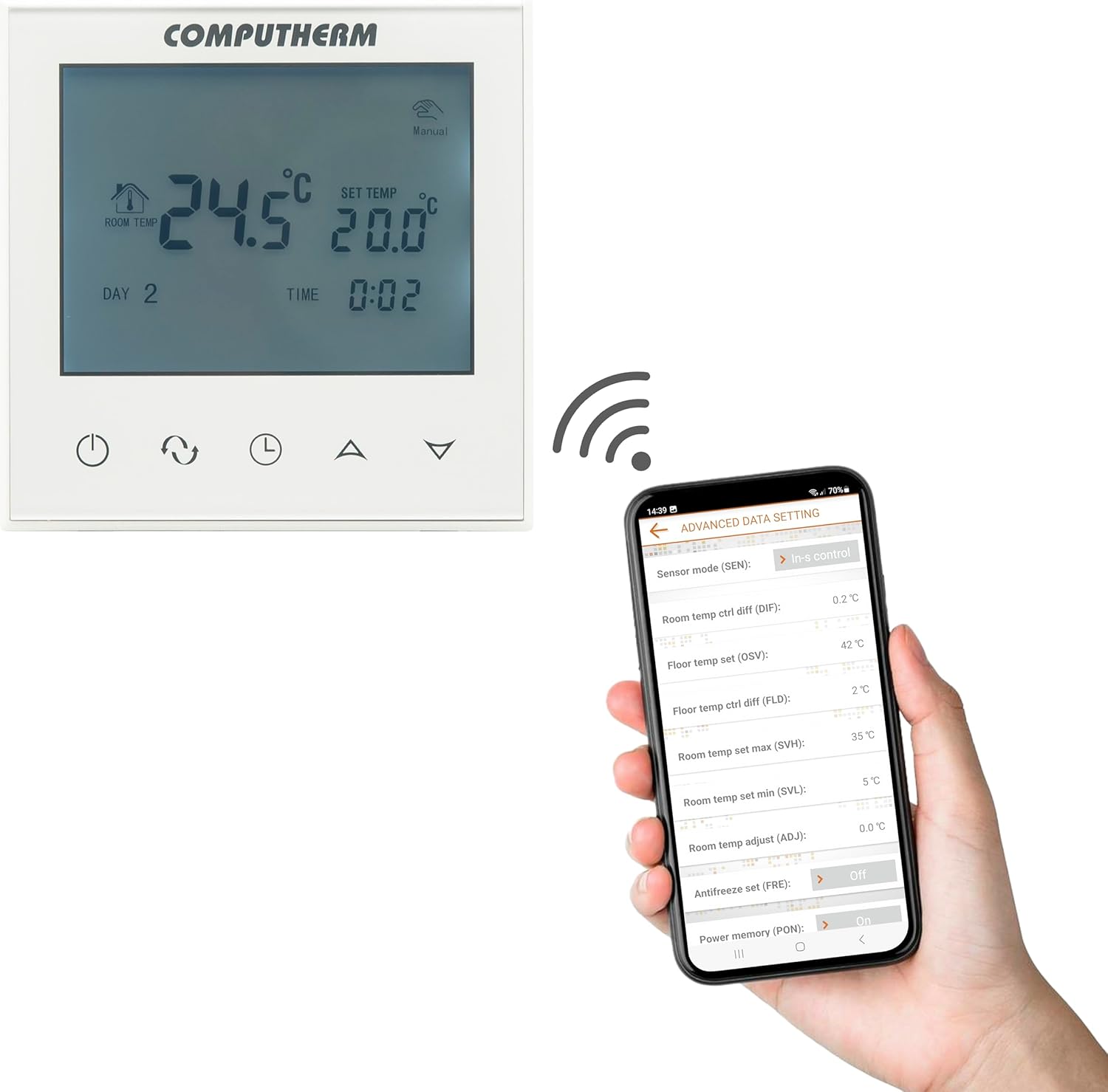
Image: A smartphone screen displaying the advanced settings interface of the Computherm E280 thermostat app, showing options like sensor mode, temperature differentials, and antifreeze settings.
- Ajuste de temperatura: Easily change the set temperature from anywhere.
- Programación: Create and modify weekly heating/cooling schedules.
- Selección de modo: Switch between heating, cooling, and manual modes.
- Configuración avanzada: Configure parameters such as temperature calibration, switching sensitivity, floor sensor limits, and antifreeze protection.
- Escucha: View current room and floor temperatures, operating status, and historical data.
Mantenimiento
The Computherm E280 thermostat requires minimal maintenance to ensure optimal performance.
- Limpieza: Limpie la pantalla del termostato y casinLimpie con un paño suave y seco. Evite el uso de limpiadores abrasivos, disolventes o aerosoles químicos, ya que pueden dañar la superficie o los componentes internos.
- Verificación de sensores: Periodically ensure that the internal and external (floor) temperature sensors are free from obstructions or debris that could affect accurate readings.
- Actualizaciones de software: Keep the smartphone application updated to the latest version to benefit from new features and performance improvements. The thermostat's firmware may also receive updates via the app.
Solución de problemas
If you encounter issues with your Computherm E280 thermostat, refer to the following common problems and solutions:
| Problema | Posible causa | Solución |
|---|---|---|
| La pantalla del termostato está en blanco. | No hay suministro de energía. | Revise el disyuntor y las conexiones del cableado. Asegúrese de que se restablezca la energía. |
| No se puede conectar al wifi. | Contraseña de Wi-Fi incorrecta, red de 5 GHz o señal débil. | Verify Wi-Fi password. Ensure you are connecting to a 2.4 GHz network. Move thermostat closer to router or use a Wi-Fi extender. Restart thermostat and router. |
| El sistema de calefacción/refrigeración no responde. | Incorrect wiring, system turned off, or thermostat in wrong mode. | Check wiring connections (refer to Setup section). Ensure heating/cooling system is powered on. Verify thermostat is in the correct operating mode (e.g., Heating). |
| Lecturas de temperatura inexactas. | Sensor obstruction, thermostat location, or calibration issue. | Ensure sensors are clear. Relocate thermostat if exposed to drafts/direct sunlight. Check app for temperature calibration options. |
If the problem persists, please contact Computherm customer support.
Presupuesto
| Característica | Detalle |
|---|---|
| Marca | COMPUTADORA |
| Número de modelo | E280 |
| Color | Blanco |
| Material | Plástico |
| Dimensiones del producto (L x An x Al) | 1.7 x 8.6 x 8.6 cm |
| Peso del artículo | 370 gramos |
| Volumentage | 240 Volts AC (max. 24V DC / 240V AC for relays) |
| Fuente de poder | Eléctrico con cable |
| Tecnología de conectividad | Wi-Fi (b/g/n) 2.4 GHz |
| Rango de medición de temperatura (interna) | 0 °C - 50 °C (0.1 °C increments) |
| Temperature Measurement Range (Floor Sensor) | 0 °C - 99 °C (0.1 °C increments) |
| Precisión de la medición de temperatura | ± 0.5 °C |
| Rango de temperatura ajustable | 5 °C - 99 °C (0.5 °C increments) |
| Sensibilidad de conmutación | ± 0.1 °C to ± 1.0 °C (0.1 °C increments) |
| Switchable Current (K1) | 8A (2A inductive load) |
| Switchable Current (K2) | 3A (1A inductive load) |
| Heat Sensor Type (Internal & Floor) | NTC 3950K 10kΩ at 25°C |
| Características especiales | Programmable, Wi-Fi Control, Floor Sensor Included |
| Usos específicos | Radiator, Underfloor Heating |
Garantía y soporte
The Computherm E280 Wi-Fi Thermostat comes with a 2 año de garantía A partir de la fecha de compra. Esta garantía cubre defectos de fabricación y mal funcionamiento en condiciones normales de uso. Conserve su comprobante de compra para reclamaciones de garantía.
For technical support, troubleshooting assistance, or warranty inquiries, please contact your retailer or visit the official Computherm websitio para información de contacto.