
1. Introducción
Thank you for choosing the Nimble Champ Portable Charger. This 10,000mAh power bank is designed for fast and efficient charging of your devices on the go. Featuring dual USB-C ports and 20W fast charging, it offers convenience and reliability. This manual provides essential information for the safe and optimal use of your portable charger.

Figure 1: Nimble Champ Portable Charger (Midnight Black)
2. Qué incluye
- Ch ágilamp Portable Charger (10,000mAh)
- Cable de carga USB-C a USB-C
- Manual de usuario (este documento)
3. Características del producto
- 10,000 mAh de alta capacidad: Proporciona múltiples cargas para la mayoría de los teléfonos inteligentes.
- Carga rápida de 20 W: Charges devices from 0% to 50% in under 30 minutes.
- Puertos USB-C duales: Permite la carga simultánea de dos dispositivos.
- Diseño compacto y ligero: Approximately the size of a credit card, easy to carry.
- Cordón integrado: Para una portabilidad cómoda.
- Indicador de encendido LED: Muestra el nivel de batería restante.
- Advanced 6-Layer Protection: Includes Auto Shut-Off, Temperature Protection, Certified Charging Components, Overcharge Protection, Adaptive Charging Rates, and Short Circuit Protection.
- Construcción ecológica: Made from certified recycled plastic with 100% biodegradable, plastic-free packaging.
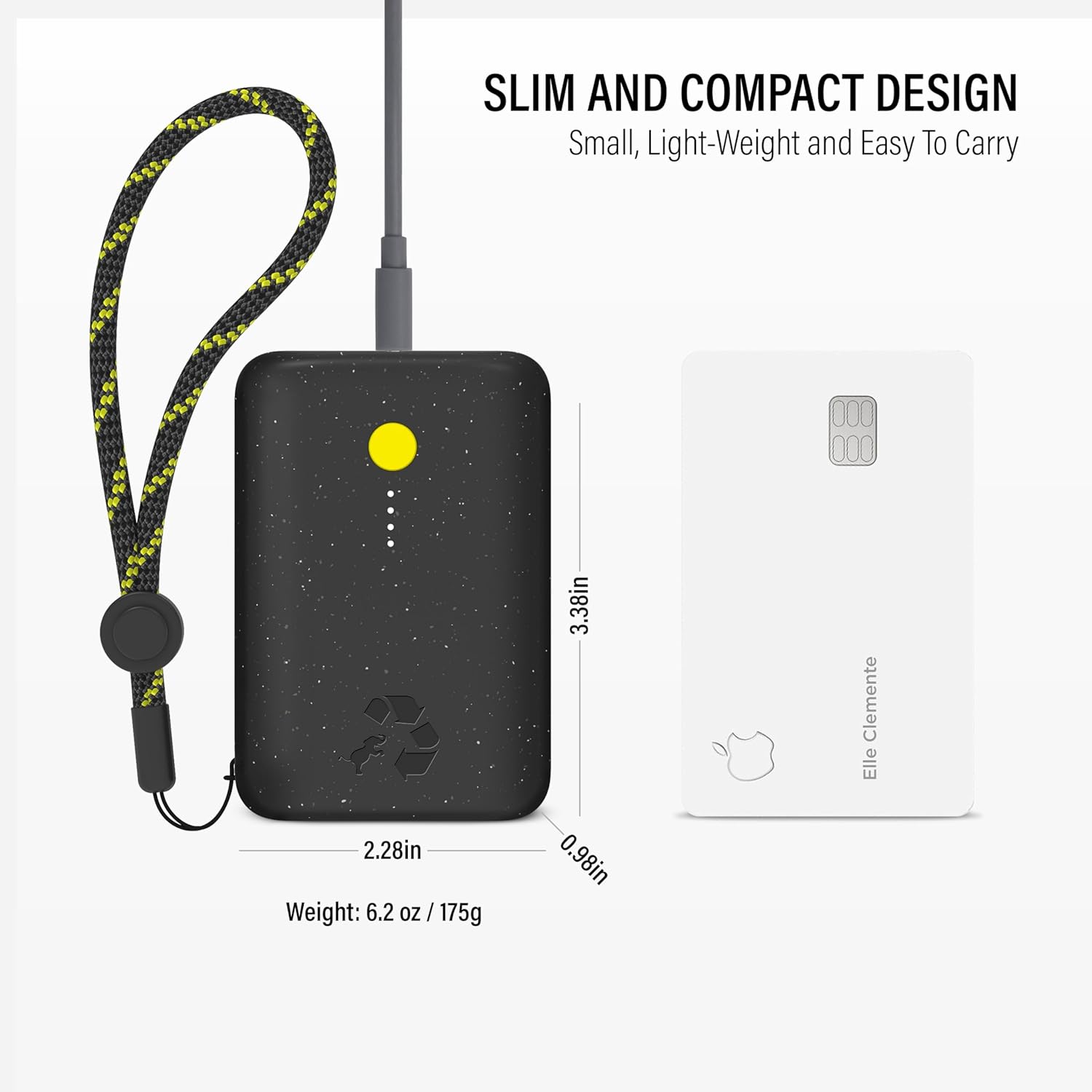
Figura 2: Diseño compacto y dimensiones

Figure 3: Advanced 6-Layer Protection

Figure 4: Eco-Friendly Design
4. Configuración
4.1 Cargo inicial
Before first use, fully charge your Nimble Champ Portable Charger. Connect the included USB-C cable to one of the power bank's USB-C ports and the other end to a compatible USB-C wall adapter (not included). The LED power indicators will illuminate to show charging progress and turn solid when fully charged.
4.2 Comprobación del nivel de la batería
Press the power button located on the side of the power bank. The LED indicators will light up to show the current battery level:
- 4 LED: 75-100%
- 3 LED: 50-75%
- 2 LED: 25-50%
- 1 LED: 0-25%
5. Instrucciones de funcionamiento
5.1 Dispositivos de carga
Para cargar su dispositivo:
- Connect your device's charging cable to one of the USB-C output ports on the Nimble Champ Cargador portátil.
- Conecte el otro extremo del cable a su dispositivo.
- La batería externa comenzará a cargar tu dispositivo automáticamente. Si no lo hace, presiona el botón de encendido una vez.

Figura 5: Carga de dos dispositivos simultáneamente
5.2 Carga de paso
The Nimble Champ Portable Charger supports pass-through charging, allowing you to charge both the power bank and your connected devices simultaneously. Simply connect the power bank to a wall adapter and then connect your devices to the power bank. Both will charge.

Figure 6: Pass-Through Charging in Action
6. Compatibilidad
The Nimble Champ Portable Charger is widely compatible with a variety of devices, including:
- Teléfonos inteligentes: iPhone 17, 16, 15, 14, 13, 12, 11 (Air, Pro, Max, Plus, XS/XR/X), Samsung Galaxy S22, S23, Google Pixel, and other USB-C compatible smartphones.
- Tabletas: iPad Pro, Air, Mini, and other USB-C compatible tablets.
- Otros dispositivos: Kindle e-readers, Smartwatches, AirPods, and various laptops that support USB-C charging.

Figura 7: Compatibilidad universal
7. Información de seguridad
Para garantizar un funcionamiento seguro y prolongar la vida útil de su dispositivo, tenga en cuenta lo siguiente:
- No exponga el banco de energía a temperaturas extremas (calor o frío).
- Evite dejar caer, desmontar o intentar reparar el dispositivo usted mismo.
- Mantener alejado del agua y de la humedad alta.
- Utilice únicamente cables de carga y adaptadores certificados.
- The power bank is TSA compliant for air travel.
8. Mantenimiento
To maintain your Nimble Champ Cargador portátil:
- Limpie el exterior con un paño suave y seco.
- Conservar en un lugar fresco y seco cuando no esté en uso.
- Evite la exposición prolongada a la luz solar directa.
9. Solución de problemas
- El dispositivo no se carga: Ensure the power bank is charged. Press the power button once to activate charging. Check cable connections and try a different cable or port.
- El banco de energía no carga: Asegúrate de que el cable de carga y el adaptador de pared funcionen correctamente. Prueba con otro cable o adaptador.
- Carga lenta: Verify that your device and cable support fast charging. Some devices may charge at a slower rate depending on their specifications.
10. Especificaciones
| Atributo | Detalle |
|---|---|
| Número de modelo | NB-CPC-10K2C |
| Capacidad de la batería | 10,000 mAh |
| Potencia de salida | 20W Max (Dual USB-C) |
| Potencia de entrada | 20 W máx. (USB-C) |
| Dimensiones del producto | 3.38 x 2.28 x 0.98 pulgadas |
| Peso del artículo | 8.1 onzas |
| Tipo de conector | USB tipo C |
| Características especiales | Auto Shut-Off, Portable, Fast Charging, Travel, Pocket Size, Lightweight, Eco Print, Dual USB-C Ports, Indicator Lights, Slim |
11. Garantía y soporte
The Nimble Champ Portable Charger comes with a 2 año de garantía. For any product inquiries, technical support, or warranty claims, please contact Nimble customer service through the official websitio o su distribuidor.
Para obtener más información, visite el Nimble Store.