
Inseego MiFi X PRO 5G M3000
Manual de usuario del punto de acceso móvil Inseego MiFi X Pro 5G M3000
Model: MiFi X PRO 5G M3000
1. Introducción
The Inseego MiFi X Pro 5G M3000 is a powerful and secure mobile hotspot designed to provide high-speed internet connectivity. It leverages 5G and Wi-Fi 6 technologies to support up to 32 Wi-Fi enabled devices, including laptops and tablets. This manual provides essential information for setting up, operating, maintaining, and troubleshooting your device.
2. Dispositivo terminadoview
Familiarize yourself with the physical components and display of your Inseego MiFi X Pro 5G M3000 mobile hotspot.

Figura 2.1: Frente view of the Inseego MiFi X Pro 5G M3000 Mobile Hotspot, showing the display with network information and menu options.

Figura 2.2: De arriba hacia abajo view highlighting the power button and the interactive touchscreen display.
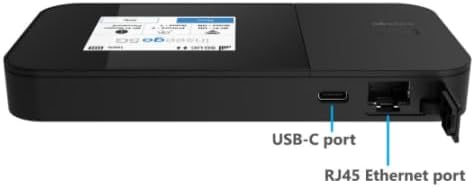
Figura 2.3: Lado view illustrating the USB-C port for charging and tethering, and the RJ45 Ethernet port for wired connections.
Componentes clave:
- Botón de encendido: Located on the side, used to turn the device on/off and wake the screen.
- Pantalla táctil: Provides access to device status, settings, Wi-Fi name, and password.
- Puerto USB-C: For charging the device, USB tethering, and universal charging of external devices.
- Puerto Ethernet RJ45: For wired network connections, supporting up to 1 Gbps.
- Ranura para tarjeta SIM: Located internally, for inserting the 5G 4FF Nano SIM card.
3. Configuración
3.1. Inserción de la tarjeta SIM
- Asegúrese de que el dispositivo esté apagado.
- Locate the SIM card slot, typically under the battery cover or on the side with a tray.
- Insertar un 5G 4FF Nano SIM card into the slot with the gold contacts facing down and the notched corner aligned correctly.
- Secure the SIM card if necessary (e.g., close the tray or replace the battery cover).
3.2. Carga inicial y encendido
- Connect the provided USB-C cable to the device's USB-C port and the other end to a compatible power adapter or computer.
- Allow the device to charge until the battery indicator shows a sufficient charge (e.g., 50% or more).
- Press and hold the power button until the Inseego logo appears on the screen.
- Follow any on-screen prompts for initial setup, such as language selection or basic network configuration.
4. Operación del dispositivo
4.1. Conexión de dispositivos mediante Wi-Fi
The MiFi X Pro 5G M3000 supports Wi-Fi 6 (802.11 a/b/g/n/ac/ax) on both 2.4GHz and 5GHz bands, allowing up to 32 devices to connect simultaneously.
- On the MiFi device's touchscreen, navigate to view the Wi-Fi name (SSID) and password.
- En su dispositivo con Wi-Fi habilitado (computadora portátil, tableta, teléfono inteligente), abra la configuración de Wi-Fi.
- Select the MiFi's Wi-Fi network name from the list of available networks.
- Ingrese la contraseña de Wi-Fi cuando se le solicite.
- Your device should now be connected to the internet through the MiFi hotspot.
4.2. Conexión de dispositivos mediante Ethernet
The device features a 1 Gbps RJ45 Ethernet port for wired connections.
- Connect one end of an Ethernet cable to the RJ45 port on the MiFi device.
- Connect the other end of the Ethernet cable to the Ethernet port on your computer or network device.
- The connected device should automatically obtain an IP address and gain internet access.
4.3. Navegación con pantalla táctil
The intuitive touchscreen allows you to monitor connections, view Wi-Fi details, and access settings.
- Pantalla de inicio: Displays network status (5G signal strength), battery level, Wi-Fi status, and number of connected devices.
- Botón de menú: Accesses advanced settings and information.
- Wi-Fi Name/Password: Rápidamente view your network credentials.
- Ayuda: Provides on-device assistance and tips.
4.4. Inseego Mobile App
For convenient management, download the Inseego Mobile app from your device's app store. The app allows for easy setup and centralized management of your MiFi device.
5. Mantenimiento
5.1. Batería y carga
- The device is equipped with a 5050 mAh Li-ion battery.
- Charge the device using the provided USB 3.1 Gen 1, Type A to C cable and a compatible power adapter.
- For 24/7 operation, the proprietary battery preservation mode can be enabled when connected to AC power.
- Evite exponer el dispositivo a temperaturas extremas para prolongar la vida útil de la batería.
5.2. Actualizaciones de firmware
Periodically check for firmware updates to ensure optimal performance, security, and access to new features. Updates can typically be initiated through the device's web administration portal or the Inseego Mobile app when connected to the internet.
5.3. Limpieza
Use a soft, dry, lint-free cloth to clean the device's exterior and touchscreen. Avoid using harsh chemicals or abrasive materials.
6. Solución de problemas
This section addresses common issues you might encounter with your MiFi X Pro 5G M3000.
6.1. No hay conexión a Internet
- Comprobar tarjeta SIM: Ensure the 5G Nano SIM card is correctly inserted and activated with your service provider (T-Mobile).
- Intensidad de la señal: Verify that the device shows adequate 5G signal strength on the display. Move to an area with better reception if needed.
- Plan de datos: Confirme que su plan de datos esté activo y tenga datos disponibles.
- Reiniciar el dispositivo: Power off the MiFi device, wait a few seconds, and then power it back on.
- Dispositivos conectados: Ensure your connected device (laptop, phone) is properly connected to the MiFi's Wi-Fi network or Ethernet port.
6.2. Device Not Powering On or Charging
- Comprobar el cargador: Ensure the USB-C cable and power adapter are functioning correctly and securely connected. Try a different charger if available.
- Nivel de batería: If the battery is completely depleted, it may take a few minutes of charging before the device responds.
- Botón de encendido: Confirme que está presionando y manteniendo presionado el botón de encendido durante el tiempo requerido (normalmente 3-5 segundos).
6.3. Velocidades lentas o conexión intermitente
- Ubicación: Move the MiFi to a location with better 5G signal reception.
- Interferencia: Keep the MiFi away from other electronic devices that might cause interference.
- Dispositivos conectados: Too many devices connected simultaneously can impact performance. Disconnect some devices to test.
- Banda de Wi-Fi: If possible, connect to the 5GHz Wi-Fi band for potentially faster speeds, especially in crowded areas.
7. Especificaciones
| Característica | Detalle |
|---|---|
| Nombre del modelo | MiFi X Pro 5G M3000 |
| Dimensiones (alto x ancho x profundidad) | 5.9 x 2.91 x 0.74 pulgadas (150 x 74 x 18.9 mm) |
| Peso | 8.60 onzas (245 gramos) |
| Conjunto de chips | Qualcomm Snapdragon X62 / X65 |
| Tipo de SIM | 5G 4FF Nano SIM |
| Tecnología de red | 5G sub-6GHz NSA, SA, NR-CA, DSS; 4x4 MIMO 5G sub-6 GHz; 4G LTE Cat 20 4X4 MIMO; 3G HSPA+/UMTS |
| Batería | 5050 mAh Li-ion (Included) |
| Puerto de carga | USB 3.1 Gen 1, Type A to C |
| Estándar Wi-Fi | Wi-Fi 6: a/b/g/n/ac/ax (2.4GHz & 5GHz) |
| Máximo de dispositivos conectados | Hasta 32 |
| Puerto Ethernet | 1 Gbps RJ45 |
| Temperatura de funcionamiento | 14 ° F a 131 ° F (-10 ° C a 55 ° C) |
| Características de seguridad | WPA/WPA2/WPA3, Wi-Fi privacy separation, AES encryption, Administration portal, Security-hardened web interface, Password hash, Session timeout, Incorrect password lockout, Anti-CSRF, Open VPN, VPN passthrough, Static IP support |
8. Garantía y soporte
As an Amazon Renewed product, specific warranty details are typically provided by the seller or through the Amazon Renewed program. Please refer to your purchase documentation or contact the seller directly for information regarding warranty coverage and support.
For device management and additional support resources, utilize the Inseego Mobile app or visit the official Inseego support websitio.
Ask a question about this manual
Ask about setup, troubleshooting, compatibility, parts, safety, or missing instructions. Manuals+ will review the question and use this page’s manual context to help answer it.