
Introducción
This manual provides detailed instructions for the SUNOL GM20 True Wireless Earbuds. Please read this manual carefully before using the product to ensure proper operation and to maximize your listening experience. These earbuds feature Bluetooth 5.3 connectivity, a waterproof design, and a charging case with an LED display.
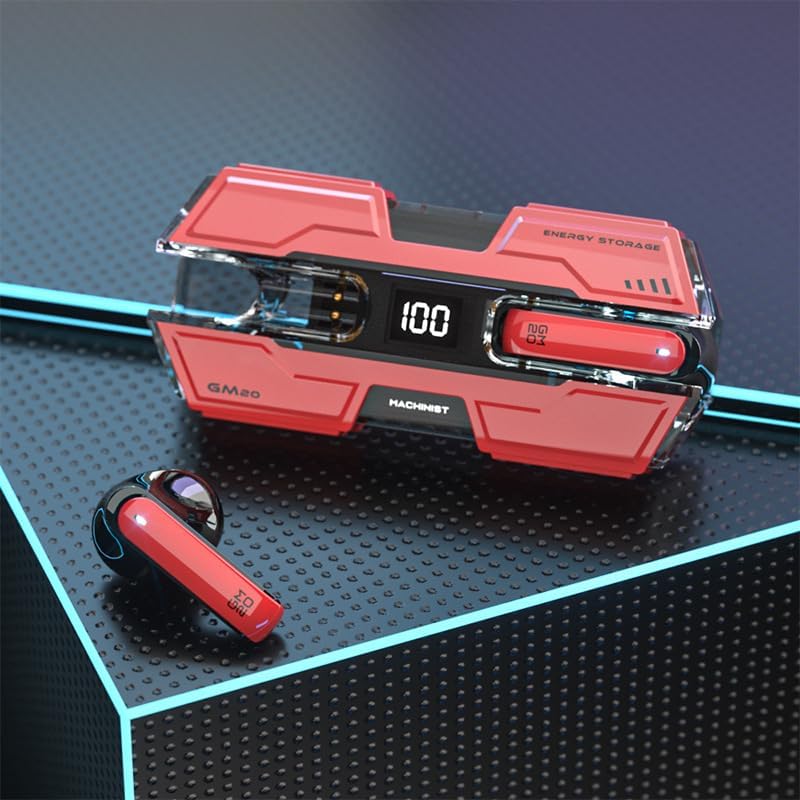
Image: The SUNOL GM20 True Wireless Earbuds with their charging case, showcasing the design and LED display.
Contenido del paquete
Asegúrese de que todos los artículos estén presentes en el paquete:
- GM20 True Wireless Earbuds (Left and Right)
- Estuche de carga
- Cable de carga
- Manual de usuario
- Múltiples tamaños de tapones para los oídos
Características del producto
- Tecnología Bluetooth 5.3: Offers faster pairing, stable connection, and lower power consumption with an effective range of up to 10 meters.
- 48-Hour Playback: The charging case provides multiple charges, extending total listening time.
- IPX8 a prueba de agua: Designed to withstand water exposure, suitable for sports and outdoor activities.
- Pantalla LED: The charging case features an LED display to show battery life.
- Deep Bass Audio: Equipped with a 14mm dynamic bass unit for enhanced sound quality.
- Micrófono incorporado: Supports hands-free calls with environmental noise reduction.
- Diseño ergonómico: Ligero y cómodo para uso prolongado.

Image: The GM20 earbuds and charging case, emphasizing Bluetooth 5.3 and high-definition sound quality.

Imagen: Una explosión view diagram illustrating the internal components of the earbud, highlighting the 13mm moving coil and composite diaphragm for high-fidelity sound.
Configuración
1. Carga de los auriculares y del estuche de carga
Before first use, fully charge the earbuds and the charging case. Connect the provided charging cable to the charging case and a USB power source. The LED display on the charging case will indicate the charging status and battery level. When charging the earbuds inside the case, the display will show their individual battery life.
2. Encendido / apagado
- Encendido: Los auriculares se encenderán automáticamente cuando se retiren del estuche de carga.
- Apagado: Coloque los auriculares nuevamente en el estuche de carga para apagarlos automáticamente y comenzar a cargarse.
3. Emparejamiento con un dispositivo
Los auriculares admiten el emparejamiento en un solo paso para mayor comodidad.
- Asegúrese de que los auriculares estén cargados.
- Abre el estuche de carga y retira ambos auriculares. Se encenderán automáticamente e intentarán conectarse.
- After approximately 10 seconds, the earbuds will enter pairing mode.
- En tu dispositivo (teléfono inteligente, tableta, etc.), activa el Bluetooth y busca dispositivos disponibles.
- Select "GM20 TWS" from the list of found devices to complete the pairing process.
- Una vez emparejados, los auriculares se conectarán automáticamente al último dispositivo emparejado cuando se retiren del estuche de carga.

Image: The GM20 earbuds and charging case, illustrating the quick connect and pairing process with a smartphone.
Instrucciones de funcionamiento
1. Cómo usar los auriculares
Select the ear tips that provide the most comfortable and secure fit. Insert the earbuds gently into your ear canal and rotate slightly until they feel snug. A proper fit ensures optimal sound quality and noise isolation.
2. Controles básicos
The earbuds feature a multifunction button for various controls:
- Reproducir/Pausar música: Single press the multifunction button on either earbud.
- Siguiente canción: Double press the multifunction button on the right earbud.
- Canción anterior: Double press the multifunction button on the left earbud.
- Responder/Finalizar llamada: Single press the multifunction button on either earbud during an incoming call or active call.
- Rechazar llamada: Press and hold the multifunction button on either earbud during an incoming call.
- Control de volumen: (Note: Specific volume control via earbuds is not detailed in product information. Adjust volume via your connected device.)
3. Funcionalidad impermeable
The GM20 earbuds are designed with an IPX8 waterproof nano-coating, making them resistant to water. This feature makes them suitable for activities such as running, cycling, and other sports where exposure to sweat or light rain may occur. Avoid prolonged submersion in water.

Image: The GM20 earbuds and charging case in a gaming context, highlighting fast transmission and no delay for an enhanced experience.
Mantenimiento
1. Limpieza
Regularly clean your earbuds and charging case to maintain optimal performance and hygiene. Use a soft, dry, lint-free cloth. For stubborn dirt, a slightly damp Se puede usar un paño, pero asegúrese de que no entre humedad en las aberturas de los auriculares ni en los puertos de carga. No utilice productos químicos agresivos ni materiales abrasivos.
2. Almacenamiento
Cuando no los uses, guarda los auriculares en su estuche de carga para protegerlos del polvo, daños y mantenerlos cargados. Guarda el estuche en un lugar fresco y seco, alejado de la luz solar directa y temperaturas extremas.
3. Cuidado de la batería
To prolong battery life, avoid fully discharging the earbuds and charging case frequently. Charge them regularly, even if not in constant use. Do not expose batteries to excessive heat.
Solución de problemas
- Los auriculares no se emparejan entre sí: Place both earbuds back into the charging case, close the lid, wait a few seconds, then remove them again. They should automatically connect.
- Los auriculares no se conectan al dispositivo: Ensure Bluetooth is enabled on your device and the earbuds are in pairing mode. Forget "GM20 TWS" from your device's Bluetooth list and try pairing again.
- No hay sonido en un auricular: Check if both earbuds are charged. Try resetting them by placing them in the case and then removing them.
- Problemas de carga: Ensure the charging cable is securely connected and the power source is functional. Clean the charging contacts on both the earbuds and the case.
- Mala calidad de sonido: Ensure the earbuds are properly seated in your ears. Try different sized ear tips for a better seal. Check the audio source device for any issues.
Especificaciones técnicas
| Nombre del modelo | GM20 (K8) |
| Versión de Bluetooth | 5.3 |
| Alcance de Bluetooth | Hasta 10 metros |
| Duración de la batería (auriculares) | Approximately 48 hours with charging case |
| Batería del estuche de carga | 600 mAh |
| Nivel de resistencia al agua | IPX8 |
| Tipo de controlador de audio | Controlador dinámico de 14 mm |
| Rango de frecuencia | 20 Hz - 20 kHz |
| Método de control | Toque/Botón |
| Material | Acrilonitrilo butadieno estireno (ABS) |
Información de garantía
The SUNOL GM20 True Wireless Earbuds come with a standard manufacturer's warranty. Please refer to the warranty card included in your package or contact customer support for specific details regarding warranty coverage and duration. Keep your proof of purchase for warranty claims.
Atención al cliente
If you encounter any issues not covered in this manual or require further assistance, please contact SUNOL customer support. Contact information can typically be found on the product packaging or the official SUNOL websitio.