
KiriNavi For Ford Expedition Interceptor 2018-2023
KiriNavi Car Radio User Manual
Model: For Ford Expedition Interceptor 2018-2023
Introducción
This manual provides detailed instructions for the installation, operation, and maintenance of your KiriNavi Qualcomm Android 11 Car Radio. Please read this manual thoroughly before using the product to ensure proper functionality and safety.
This head unit is designed as a stereo replacement for Ford Expedition Limited models from 2018 to 2023, specifically compatible with the SYNC3 system. It features a 14.4-inch display, built-in Wireless Carplay, and Wired Android Auto, powered by a Qualcomm Octa-Core CPU with 8GB RAM and 128GB ROM for high performance and stability.
Contenido del paquete
Verifique que todos los componentes estén presentes en el paquete:
- KiriNavi Car Radio Head Unit (14.4 Inch)
- Cables de alimentación
- Manual de usuario (este documento)
- Additional necessary installation accessories (if applicable, not specified in input)
Configuración e instalación
The KiriNavi Car Radio is designed for factory OEM fit, requiring no modification for installation in compatible Ford Expedition models (2018-2023) with SYNC3. Professional installation is recommended.
Lista de verificación previa a la instalación:
- Asegúrese de que el encendido del vehículo esté apagado y la batería esté desconectada antes de comenzar la instalación.
- Reúna todas las herramientas necesarias (por ejemplo, herramientas para quitar molduras, destornilladores, pelacables).
- Familiarícese con el diseño y el cableado del tablero actual del vehículo.
Pasos de instalación:
- Carefully remove the existing head unit and dashboard trim. Refer to your vehicle's service manual for specific instructions.
- Connect the provided power cables and other necessary wiring harnesses to the new KiriNavi head unit. Ensure all connections are secure.
- Integrate the new head unit with the vehicle's existing systems. This unit is designed to retain original features such as Sirius XM radio, Microsoft SYNC System, Heated Steering Wheel Control, Massage Seat Control, Physical Climate Control, 360 Cameras and Reverse Camera, Sound System, and Steering Wheel Control.
- Monte con cuidado la nueva pantalla de 14.4 pulgadas en la abertura del tablero.
- Vuelva a conectar la batería del vehículo y pruebe la funcionalidad de la unidad antes de volver a ensamblar completamente el tablero.
- Vuelva a montar el revestimiento del tablero.

Figura 1: Comparison showing the vehicle's dashboard before and after the installation of the KiriNavi 14.4-inch head unit. The new unit seamlessly integrates into the existing console, replacing the original display and controls.
Instrucciones de funcionamiento
Operación básica:
The unit operates on Android 11, providing a familiar smartphone-like interface. Navigate using the 14.4-inch QHD 2K 2560 x 1440 IPS Touch Screen.
Conectividad:
- CarPlay inalámbrico y Android Auto con cable: Connect your compatible smartphone for seamless integration of navigation, music, and communication apps.
- Bluetooth 5.0: Pair your phone for hands-free calling and audio streaming. The Bluetooth connection is designed for stability.
- Red Wi-Fi y 4G: Connect to a Wi-Fi hotspot or insert a 4G SIM card (if supported by the specific model) to access online content, navigation, and app downloads (e.g., YouTube, Netflix, Facebook).

Figura 2: The KiriNavi head unit displaying the user interface for Wireless CarPlay and Android Auto, demonstrating voice command integration for tasks like playing music or finding a restaurant.

Figura 3: The KiriNavi head unit's screen showing the Bluetooth phone interface for making calls and a separate image illustrating internet browsing via Wi-Fi, with various app icons.
Navegación:
The unit features built-in GPS + GLONASS for high-precision navigation. It supports both online and offline maps, including popular applications like Apple Maps, Google Maps, and Waze. Ensure the GPS antenna is properly installed for optimal signal reception.
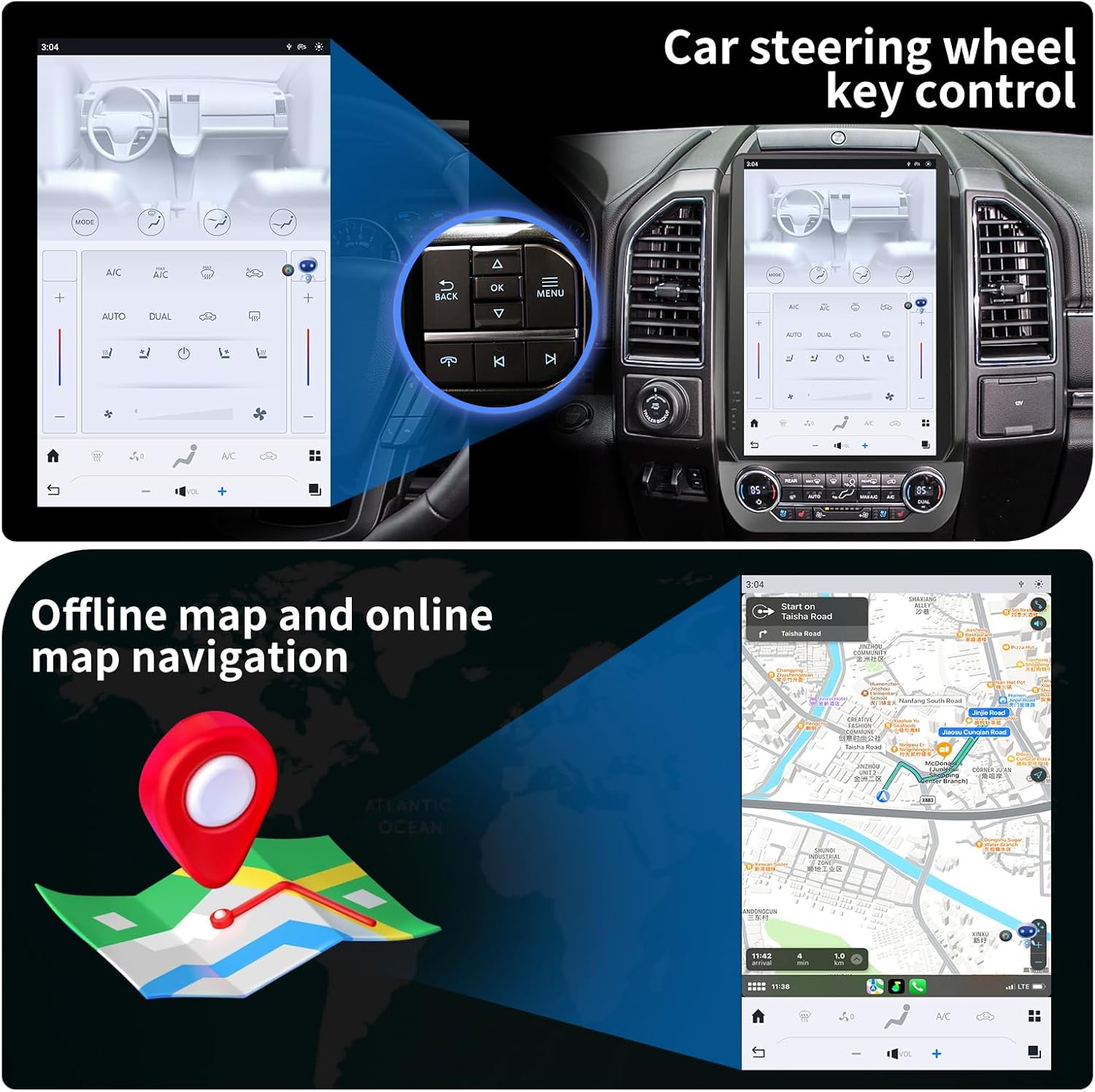
Figura 4: The KiriNavi head unit showing a navigation map on the screen, alongside an inset image highlighting the vehicle's steering wheel controls, which can be configured to operate the head unit.
Reproducción multimedia:
Enjoy music and videos via USB, AUX IN, or streaming services. The unit supports various audio and video formats. You can save your favorite FM radio stations for easy access.
Control del volante:
The unit supports learning original steering wheel buttons, allowing for convenient remote control of functions such as volume, track changes, and hands-free calling.
Funcionalidad de pantalla dividida:
The 14.4-inch display supports split-screen mode, enabling you to run two applications simultaneously, such as navigation and video playback.

Figura 5: The KiriNavi head unit demonstrating its split-screen capability, showing a navigation map on one side and a video playing on the other, allowing for simultaneous use of two applications.
Mantenimiento
- Limpieza: Utilice un paño suave y seco para limpiar la pantalla y el exterior. Evite limpiadores abrasivos o disolventes.
- Actualizaciones de software: Revise periódicamente las actualizaciones de software para garantizar un rendimiento óptimo y el acceso a nuevas funciones. Las actualizaciones suelen realizarse por wifi.
- Condiciones ambientales: Evite exponer la unidad a temperaturas extremas, luz solar directa durante períodos prolongados o humedad excesiva.
Solución de problemas
| Problema | Posible causa | Solución |
|---|---|---|
| La unidad no se enciende. | Conexión de alimentación suelta; fusible quemado; problema con la batería del vehículo. | Revise todas las conexiones de los cables de alimentación. Inspeccione los fusibles del vehículo. Asegúrese de que la batería del vehículo esté cargada. |
| No hay sonido. | Volumen demasiado bajo; Silencio activado; Problema de cableado del altavoz; Fuente de audio incorrecta. | Increase volume. Check if mute is active. Verify speaker connections. Select correct audio input. |
| Señal GPS débil o inexacta. | GPS antenna not properly installed or obstructed; Poor satellite reception area. | Asegúrese de que la antena GPS esté conectada de forma segura y tenga una vista libre. view del cielo. Muévete a un área abierta. |
| Problemas de conexión Bluetooth. | Dispositivo no en modo de emparejamiento; Interferencia; Fuera de alcance. | Ensure Bluetooth is enabled on both devices and in pairing mode. Reduce distance between devices. Restart both devices. |
| La pantalla táctil no responde. | Fallo de software; daño en la pantalla. | Realice un reinicio parcial (consulte la configuración del dispositivo para ver la opción de reinicio). Si el problema persiste, contacte con el servicio de asistencia. |
Presupuesto
| Característica | Detalle |
|---|---|
| Nombre del modelo | For Ford Expedition Interceptor 2018-2023 |
| Sistema operativo | Androide 11 |
| UPC | Qualcomm Octa Core |
| RAM | 8 GB |
| memoria de sólo lectura | 128 GB |
| Tamaño de la pantalla | 14.4 pulgadas |
| Resolución de pantalla | QHD 2K 2560 x 1440 IPS Touch Screen |
| Conectividad | Bluetooth 5.0, Wi-Fi, 4G LTE (SIM card support), USB |
| Navegación | GPS + GLONASS, Supports Apple Maps, Google Maps, Waze |
| Integración de coche | Wireless CarPlay, Wired Android Auto, Retains SYNC3, Sirius XM, Heated Steering Wheel, Massage Seat, Climate Control, 360/Reverse Cameras, Sound System, Steering Wheel Control |
| Componentes incluidos | Car Radio Head Unit, Power Cables |
| Peso del artículo | 9.61 libras |
| Dimensiones del paquete | 17.87 x 12.56 x 7.87 pulgadas |
Información de garantía
This KiriNavi Car Radio comes with a Garantía de 1 años from the date of purchase. This warranty covers manufacturing defects and malfunctions under normal use. It does not cover damage caused by improper installation, accident, misuse, abuse, neglect, or unauthorized modification.
Conserve su comprobante de compra para reclamos de garantía.
Atención al cliente
For technical assistance, troubleshooting, or warranty inquiries, please contact KiriNavi customer support. Refer to the contact information provided with your product packaging or visit the official KiriNavi websitio.
When contacting support, please have your product model number (For Ford Expedition Interceptor 2018-2023) and purchase details ready.
Ask a question about this manual
Ask about setup, troubleshooting, compatibility, parts, safety, or missing instructions. Manuals+ will review the question and use this page’s manual context to help answer it.