
1. Introducción
This manual provides detailed instructions for the operation and maintenance of the LAUNCH CRP129E Plus OBD2 Scanner. Please read this manual thoroughly before using the device to ensure proper and safe operation. The CRP129E Plus is a comprehensive diagnostic tool designed for automotive professionals and enthusiasts, offering full system diagnostics and various service reset functions.
2. Producto terminadoview
2.1. Componentes del dispositivo
The LAUNCH CRP129E Plus features a user-friendly interface with a 5-inch touchscreen and physical buttons for navigation.

Imagen 2.1: The LAUNCH CRP129E Plus OBD2 Scanner and its protective carrying case.
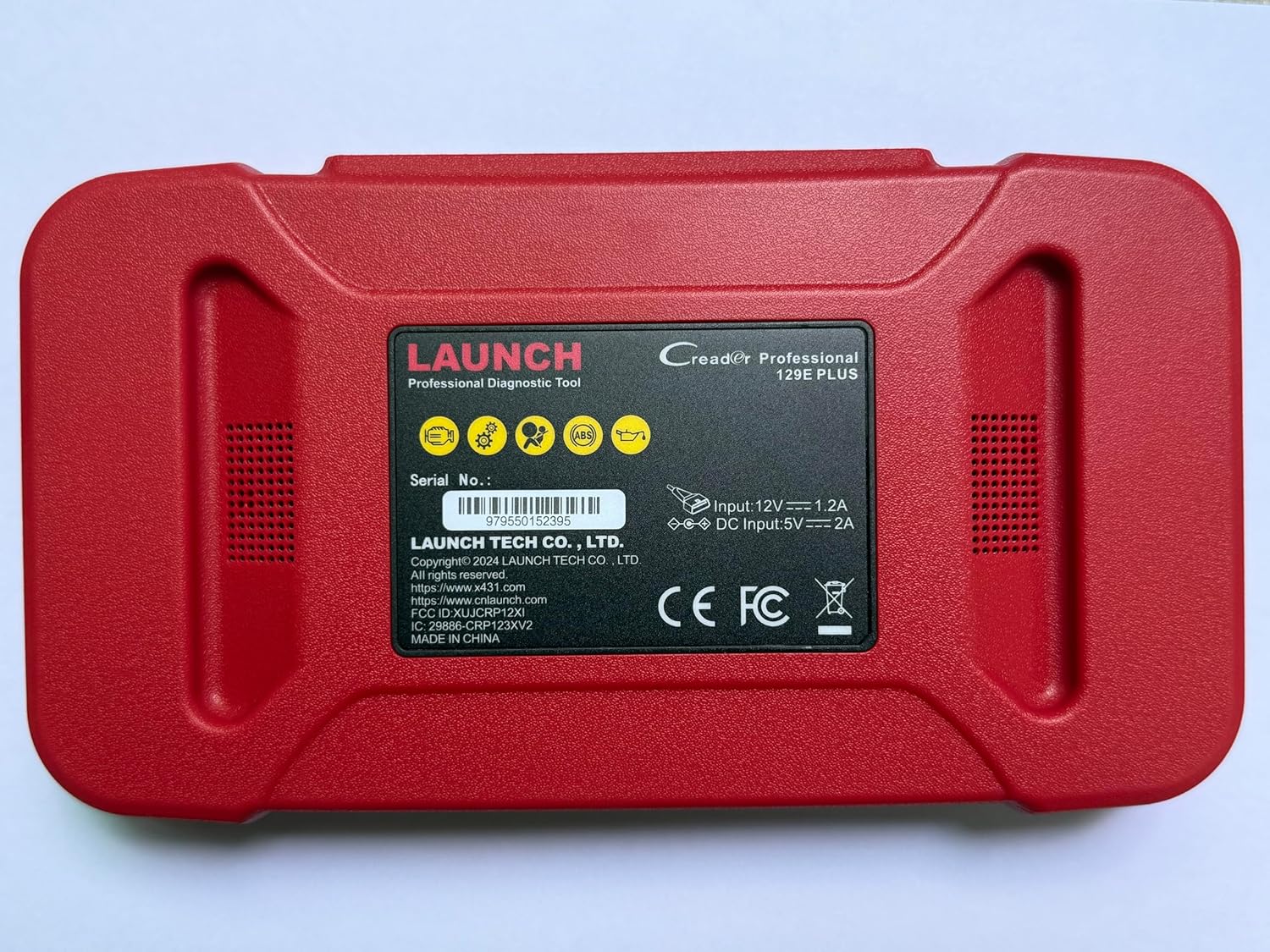
Imagen 2.2: Trasero view of the CRP129E Plus, displaying input voltage, current specifications, and serial number (e.g., 979550152395).
2.2. Contenido del paquete
Al desembalar, verifique que estén presentes todos los elementos enumerados a continuación:
- CRP129E PLUS OBD2 Scanner (x1)
- OBDII Cable (x1)
- 5V DC Charging Cable (x1)
- Manual de usuario (x1)
- Guía de inicio rápido (x1)
- Bolsa de transporte (x1)

Imagen 2.3: Visual representation of the CRP129E Plus package contents.
3. Configuración y uso inicial
3.1. Carga del dispositivo
Before first use, ensure the device is fully charged using the provided 5V DC charging cable. Connect the cable to the device and a suitable power source.
3.2. Encendido / apagado
- Encendido: Mantenga presionado el botón de encendido hasta que la pantalla se ilumine.
- Apagado: Mantenga presionado el botón de encendido, luego seleccione "Apagar" en las opciones.
3.3. Conexión al vehículo
Locate the vehicle's OBDII port, typically under the dashboard on the driver's side. Connect the provided OBDII cable from the CRP129E Plus to the vehicle's OBDII port. Ensure the vehicle's ignition is in the ON position (engine off or running, depending on the diagnostic task).
3.4. Conexión Wi-Fi y actualizaciones
The CRP129E Plus supports one-click Wi-Fi updates. Connect the device to a stable Wi-Fi network to download the latest software and vehicle data. Regular updates ensure compatibility with new vehicle models and improved diagnostic functions.
- Desde el menú principal, toque “Configuración”.
- Select "WLAN" and connect to an available network.
- Return to the main menu and tap "Upgrade".
- Select the desired software updates and tap "Update".

Imagen 3.1: The device interface showing options for updates, DTC lookup, live data stream, and battery test.
4. Instrucciones de funcionamiento
4.1. Escaneo automático de VIN
The device can automatically identify vehicle information. After connecting to the vehicle, select "Diagnose" and the device will attempt an Auto VIN scan to quickly identify the vehicle's make, model, and year.

Imagen 4.1: Visual representation of the Auto VIN scan process and systems covered by diagnosis.
4.2. Diagnóstico completo del sistema
The CRP129E Plus can access and diagnose all available vehicle systems. This includes, but is not limited to, Engine, ABS, SRS, SAS, TCM, TPMS, Body, Chassis, Powertrain, Fuel System, and Lighting System.
- Desde el menú principal, seleccione “Diagnosticar”.
- Choose "Health Report" or select specific systems for diagnosis.
- The device will scan for Diagnostic Trouble Codes (DTCs) and display results.
- You can read fault codes, clear fault codes, and view transmisiones de datos en vivo

Imagen 4.2: Encimaview of the comprehensive system diagnostic capabilities.
4.3. Funciones OBD2
The device supports all 10 modes of OBDII testing for emissions-related issues.
- Leer/borrar DTC: Retrieve and erase diagnostic trouble codes.
- Transmisión de datos en vivo: View Datos en tiempo real de los sensores del vehículo.
- Preparación I / M: Verifique el estado de los monitores relacionados con las emisiones.
- Congelar datos de cuadro: View una instantánea de las condiciones del vehículo cuando se estableció un código de falla.
- Prueba del sensor O2: Recupere los resultados de la prueba del monitor del sensor de O2.
- Prueba del monitor a bordo: Recupere resultados para componentes del sistema de propulsión relacionados con las emisiones.
- Prueba del sistema EVAP: Iniciar una prueba del sistema de emisión evaporativa.
- Información del vehículo: Recupere el número de identificación del vehículo (VIN), la identificación de calibración y el número de verificación de calibración (CVN).
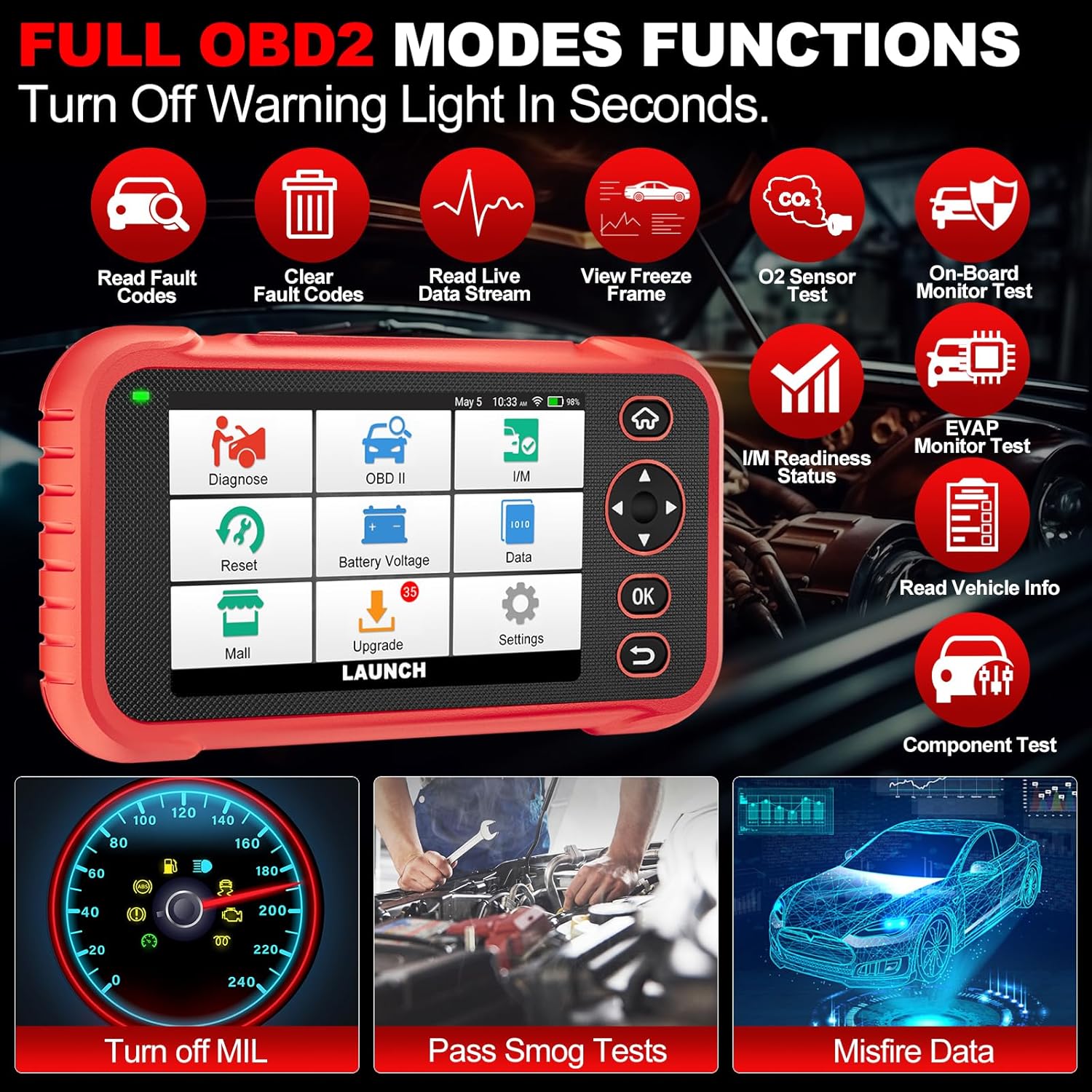
Imagen 4.3: Main menu options for OBD2 functions.
4.4. Service Reset Functions
The CRP129E Plus offers 12+ essential service reset functions for common maintenance tasks.
- Reinicio de aceite: Restablece el sistema de vida útil del aceite después de un cambio de aceite.
- Adaptación del acelerador: Inicializa los actuadores del acelerador al estado predeterminado.
- Reinicio de AdBlue: Resets the urea after the diesel exhaust fluid (AdBlue) is replaced or refilled.
- Cabezalamp Pareo: Calibrates the adaptive front lighting system.
- Restablecimiento de TPMS: Restablece los sensores del sistema de monitoreo de presión de neumáticos.
- Restablecimiento de SAS: Calibra el sensor del ángulo de dirección.
- Coincidencia de batería (reinicio de BMS): Registra el reemplazo de una batería nueva.
- Reinicio de A/F: Adjusts air/fuel ratio parameters.
- Regeneración del DPF: Limpia las partículas del filtro DPF.
- Codificación del inyector: Codifica nuevos números de inyectores en la ECU.
- Restablecimiento del EPB: Restablece las pastillas del freno de estacionamiento electrónico después del reemplazo.
- Purga del ABS: Performs bleeding of the brake system.

Imagen 4.4: Encimaview of available service reset functions.
4.5. Live Data Graphing and Recording
The device can display live data streams in merged quadrant graphs, allowing for comprehensive analysis of up to four parameters simultaneously. Data can also be recorded and played back for further review.

Imagen 4.5: Example of 4-in-1 live data graphing and diagnostic report generation.
4.6. Volumen de la bateríatage Prueba
Monitorear el volumen de la batería del vehículotage in real-time to assess its status and identify potential issues.

Imagen 4.6: Vol de la bateríatage test interface and other diagnostic support features.
5. Mantenimiento
- Limpieza: Utilice un paño suave y seco para limpiar el dispositivo. Evite limpiadores abrasivos o disolventes.
- Almacenamiento: Guarde el dispositivo en su estuche de transporte en un lugar fresco y seco cuando no esté en uso.
- Actualizaciones de software: Regularly check for and install software updates via Wi-Fi to ensure optimal performance and vehicle compatibility.
- Cuidado de la batería: Evite descargar la batería por completo con frecuencia. Cargue el dispositivo regularmente, incluso si no lo usa, para mantener la batería en buen estado.
6. Solución de problemas
| Problema | Posible causa | Solución |
|---|---|---|
| El dispositivo no se enciende. | Batería baja; botón de encendido defectuoso. | Cargue el dispositivo durante al menos 30 minutos. Si el problema persiste, contacte con el servicio de asistencia. |
| Error de comunicación con el vehículo. | Loose OBDII connection; vehicle ignition off; incompatible vehicle protocol. | Ensure cable is securely connected. Turn ignition to ON. Verify vehicle compatibility. |
| Unable to update software. | No Wi-Fi connection; unstable internet; insufficient storage. | Check Wi-Fi connection. Ensure stable internet. Free up storage if necessary. |
| La pantalla no responde. | Fallo de software; daño físico. | Reinicie el dispositivo. Si el problema persiste, contacte con el servicio de asistencia. |
7. Especificaciones
- Modelo: CRP129E PLUS
- Sistema operativo: Androide 7.0
- Mostrar: Pantalla táctil de 5 pulgadas
- Memoria: 16 GB
- Batería: 6100 mAh
- Conectividad: Wifi
- Dimensiones: 7.09 x 6.3 x 2.36 pulgadas
- Peso del artículo: 2.27 libras
- Protocolos Soportados: OBDII/EOBD
- Cobertura del vehículo: Over 85 brands (1996-2025)
- Código postal: 884508007774

Imagen 7.1: Summary of key hardware and software specifications.

Imagen 7.2: Extensive vehicle brand coverage and multi-language support.
8. Garantía y soporte
The LAUNCH CRP129E Plus comes with a manufacturer's warranty. Please refer to the official LAUNCH websitio o su documentación de compra para conocer los términos y condiciones específicos de la garantía.
- Garantía: 5 años (según la información del producto)
- Return/Replace Policy: 90 Days (as per product information)
- Apoyo técnico: 24/7 technical support is available. For assistance, please contact LAUNCH customer service.
- Comentarios en línea: The device supports online feedback for quick resolution of diagnostic issues.
For further assistance or to provide feedback, please visit the official LAUNCH support channels.


