
1. Introducción
Welcome to the KRUPS Sensation C10 EA910A10 Superautomatic Coffee Machine user manual. This guide provides comprehensive instructions for the safe and efficient operation, maintenance, and troubleshooting of your new coffee machine. Please read this manual thoroughly before first use and keep it for future reference.
2. Instrucciones de seguridad importantes
Para garantizar un funcionamiento seguro, siga siempre estas precauciones básicas de seguridad:
- Lea todas las instrucciones antes de utilizar el aparato.
- No sumerja el aparato, el cable de alimentación ni el enchufe en agua ni en otros líquidos.
- Este aparato está destinado únicamente para uso doméstico.
- Asegúrese del volumentagEl voltaje indicado en el aparato corresponde al voltaje de su red eléctrica.tage.
- Desenchufe siempre el aparato de la toma de corriente antes de limpiarlo o cuando no esté en uso.
- No opere ningún aparato con un cable o enchufe dañado, o después de que el aparato funcione mal o haya sufrido algún daño de cualquier tipo.
- Mantenga a los niños alejados del aparato durante su funcionamiento.
- Utilice únicamente accesorios recomendados por el fabricante.
- Avoid contact with hot surfaces, such as the coffee spouts or steam nozzle.
3. Componentes del producto
Familiarize yourself with the main components of your KRUPS Sensation C10 EA910A10 coffee machine:
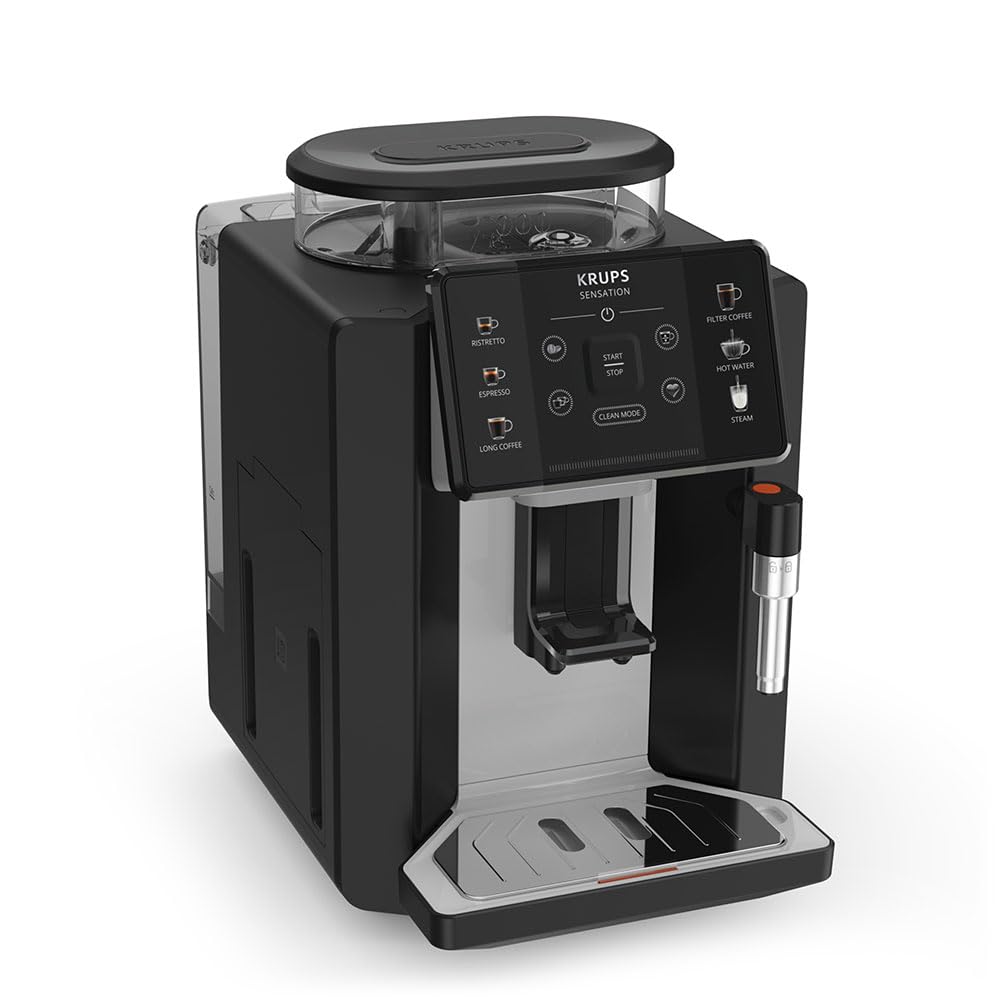
Imagen: Frontal derecha view of the KRUPS Sensation C10 EA910A10 Superautomatic Coffee Machine, showing the bean hopper, control panel, coffee spouts, and drip tray. Two cups of coffee are being dispensed.
- Tolva de frijoles con tapa
- Tanque de agua
- Control Panel (Touchscreen)
- Coffee Spouts (Adjustable)
- Bandeja de goteo con rejilla
- Contenedor de posos de café
- Steam Nozzle / Hot Water Spout
- Conexión del cable de alimentación
4. Configuración inicial
4.1. Desembalaje
- Retire con cuidado la cafetera de su embalaje.
- Retire todos los materiales de embalaje, incluidas las películas protectoras y las pegatinas.
- Coloque la máquina sobre una superficie estable, plana y resistente al calor, lejos de fuentes de agua y calor.
4.2. Preparación para el primer uso
- Enjuague el tanque de agua: Remove the water tank, rinse it thoroughly with fresh water, and fill it to the MAX level. Reinsert the tank securely.
- Llene la tolva de frijoles: Open the lid of the bean hopper and fill it with fresh coffee beans. Do not use ground coffee in the bean hopper.
- Conexión de energía: Plug the power cord into the machine and then into a grounded electrical outlet.
- Ciclo de enjuague inicial: The machine will prompt you to perform an initial rinse cycle. Follow the instructions on the touchscreen. This primes the system and cleans internal components.
5. Instrucciones de funcionamiento
5.1. Panel de control terminadoview

Image: A hand interacting with the intuitive touchscreen control panel of the KRUPS Sensation C10 EA910A10, highlighting its ease of use.
The KRUPS Sensation C10 EA910A10 features an intuitive touchscreen control panel for easy operation. Key functions include:
- Ristretto: For a very short, concentrated espresso.
- Café exprés: For a classic espresso shot.
- Café largo: Para un mayor volumen de café.
- Café de filtro: For a milder, filter-style coffee.
- Agua caliente: Para té u otras bebidas calientes.
- Vapor: Para espumar leche.
- Inicio/Parada: To begin or end a brewing cycle.
- Modo limpio: Initiates cleaning cycles.
- Coffee Strength/Volume Adjustment: Icons to customize your drink.
5.2. Hacer café
To brew a coffee beverage:
- Ensure the water tank is filled and the bean hopper contains sufficient beans.
- Coloque una taza debajo de la boquilla del café. Ajuste la altura de la boquilla si es necesario.
- Select your desired coffee type (e.g., Espresso, Long Coffee) from the touchscreen.
- Adjust coffee strength and volume using the on-screen options if desired.
- Press the "Start" button to begin brewing.
- La máquina molerá los granos, preparará el café y lo dispensará en tu taza.
- The machine will automatically stop when the brewing is complete.

Image: A selection of coffee beverages, including espresso, long coffee, and a milk-based drink, demonstrating the versatility of the KRUPS Sensation C10 EA910A10.
5.3. Función de agua caliente
- Coloque una taza debajo del surtidor de agua caliente.
- Select the "Hot Water" option on the touchscreen.
- Press "Start" to dispense hot water. Press "Stop" to cease dispensing.
5.4. Steam Function (for milk frothing)
- Llene una jarra con leche fría.
- Coloque la boquilla de vapor en la leche.
- Select the "Steam" option on the touchscreen.
- Press "Start" to activate the steam. Move the pitcher up and down to froth the milk.
- Press "Stop" when desired froth is achieved.
- Importante: Clean the steam nozzle immediately after use to prevent milk residue buildup.
6. Mantenimiento y limpieza
La limpieza y el mantenimiento regulares garantizan un rendimiento óptimo y la longevidad de su cafetera.
6.1. Limpieza diaria
- Bandeja de goteo y contenedor de posos de café: Vacíe y enjuague la bandeja de goteo y el recipiente de posos de café diariamente o cuando se lo solicite la máquina.
- Boquillas para café: Limpie las boquillas de salida del café con publicidad.amp paño.
- Tanque de agua: Enjuague el tanque de agua con agua fresca diariamente.
6.2. Descalcificar
The machine will indicate when descaling is required. Follow the on-screen instructions and use a KRUPS-approved descaling solution.

Image: A hand inserting a cleaning tablet into the designated slot of the KRUPS Sensation C10 EA910A10, illustrating the ease of the cleaning process.
6.3. Reemplazo del filtro de agua
If your machine uses a water filter, replace it every 2-3 months or as indicated by the machine to ensure optimal water quality and prevent limescale buildup.
7. Solución de problemas
Consulte la siguiente tabla para conocer los problemas más comunes y sus soluciones.
| Problema | Posible causa / solución |
|---|---|
| La máquina no se enciende. | Compruebe que el cable de alimentación esté bien enchufado a la máquina y a la toma de corriente. Asegúrese de que la toma funcione. |
| No se dispensa café. | Water tank empty: Fill the water tank. Bean hopper empty: Fill with coffee beans. Coffee grounds container full: Empty and clean. Descaling required: Perform descaling cycle. |
| El café está demasiado débil. | Adjust coffee strength settings on the control panel. Check if the bean hopper is sufficiently filled. Ensure fresh beans are used. |
| Fugas de agua de la máquina. | Check if the water tank is correctly inserted. Ensure the drip tray is properly positioned. If leakage persists, contact customer support. |
| "Clean Mode" alert persists. | Perform the indicated cleaning cycle (e.g., descaling, rinsing). Ensure all removable parts are clean and correctly reinserted. |
| Steam nozzle not frothing milk effectively. | Clean the steam nozzle thoroughly after each use to prevent blockages. Ensure cold milk is used. |
| Grinder is unusually loud or not grinding. | Check for foreign objects in the bean hopper. Ensure the bean hopper is not empty. Contact customer support if the issue persists. |
8. Especificaciones técnicas
| Característica | Especificación |
|---|---|
| Número de modelo | EA910A10 |
| Marca | KRUPS |
| Volumentage | 145 voltios |
| Fuerza | 1450 vatios |
| Material | Acero |
| Peso del producto | 7.5 kilogramos |
| Interfaz | Pantalla táctil |

Image: The KRUPS Sensation C10 EA910A10 coffee machine with indicated dimensions: 24 cm width, 34.6 cm depth, and 36.4 cm height.
9. Información de garantía
Your KRUPS Sensation C10 EA910A10 Superautomatic Coffee Machine is covered by a manufacturer's warranty. Please refer to the warranty card included in your product packaging for specific terms, conditions, and duration. Keep your proof of purchase for warranty claims.
10. Atención al cliente
For further assistance, technical support, or spare parts, please contact KRUPS customer service. Contact details can typically be found on the KRUPS official websitio o en la documentación de garantía proporcionada con su electrodoméstico.