
Introducción
This manual provides detailed instructions for the setup, operation, and maintenance of your Zenwire USB-C Hub 10-in-1 Adapter. Please read this manual thoroughly before using the device to ensure optimal performance and longevity.

Image: The Zenwire USB-C Hub, a compact gray device, is shown connected to various cables and accessories, including HDMI, USB, Ethernet, and SD cards, illustrating its multi-functionality.
Producto terminadoview
The Zenwire USB-C Hub is a versatile 10-in-1 adapter designed to expand the connectivity of your USB-C enabled devices. It features a durable aluminum alloy shell for efficient heat dissipation.
Key Features and Ports:
- Puerto HDMI 2.1: Supports resolutions up to 8K@30Hz or 4K@120Hz, with backward compatibility for lower resolutions.
- DisplayPort 1.4: Supports resolutions up to 8K@30Hz or 4K@120Hz, with backward compatibility for lower resolutions.
- USB-C Power Delivery (PD) 100W Port: Allows fast charging of your host device while using the hub, providing up to 100W power.
- 2 puertos USB 3.0: Offers data transfer speeds up to 5 Gbps, 10 times faster than USB 2.0.
- Lector de tarjetas SD: Supports SD cards up to 2TB.
- Lector de tarjetas MicroSD: Supports MicroSD cards up to 2TB.
- RJ-45 Gigabit Ethernet Port: Provides a stable wired internet connection with speeds up to 1000 Mbps.
- Conector de audio de 3.5 mm: For connecting headphones, microphones, or external speakers.
- USB-C 3.1 / Thunderbolt 3.0 Host Connection: Connects the hub to your laptop or compatible device.

Imagen: Un detalle view of the Zenwire USB-C Hub, highlighting its 10 ports including 3.5mm audio, Type-C PD100W, DP1.6, HDMI2.1, Gigabit Ethernet, USB3.0 5Gbps, SD, and MicroSD slots.

Image: A close-up of the Zenwire USB-C Hub, emphasizing its aluminum alloy shell designed for effective heat dissipation, ensuring the device remains cool during operation.
Configuración
- Conectarse al dispositivo host: Plug the integrated USB-C cable of the Zenwire Hub into a compatible USB-C or Thunderbolt 3.0/4.0 port on your laptop, tablet, or smartphone. The hub is Plug & Play and typically requires no driver installation.
- Entrega de energía (opcional): If your host device requires charging or if you are connecting power-intensive peripherals, connect your original USB-C power adapter to the USB-C PD 100W port on the hub.
- Conectar periféricos: Connect your desired devices (monitors, USB drives, Ethernet cable, SD/MicroSD cards, audio devices) to the corresponding ports on the hub.
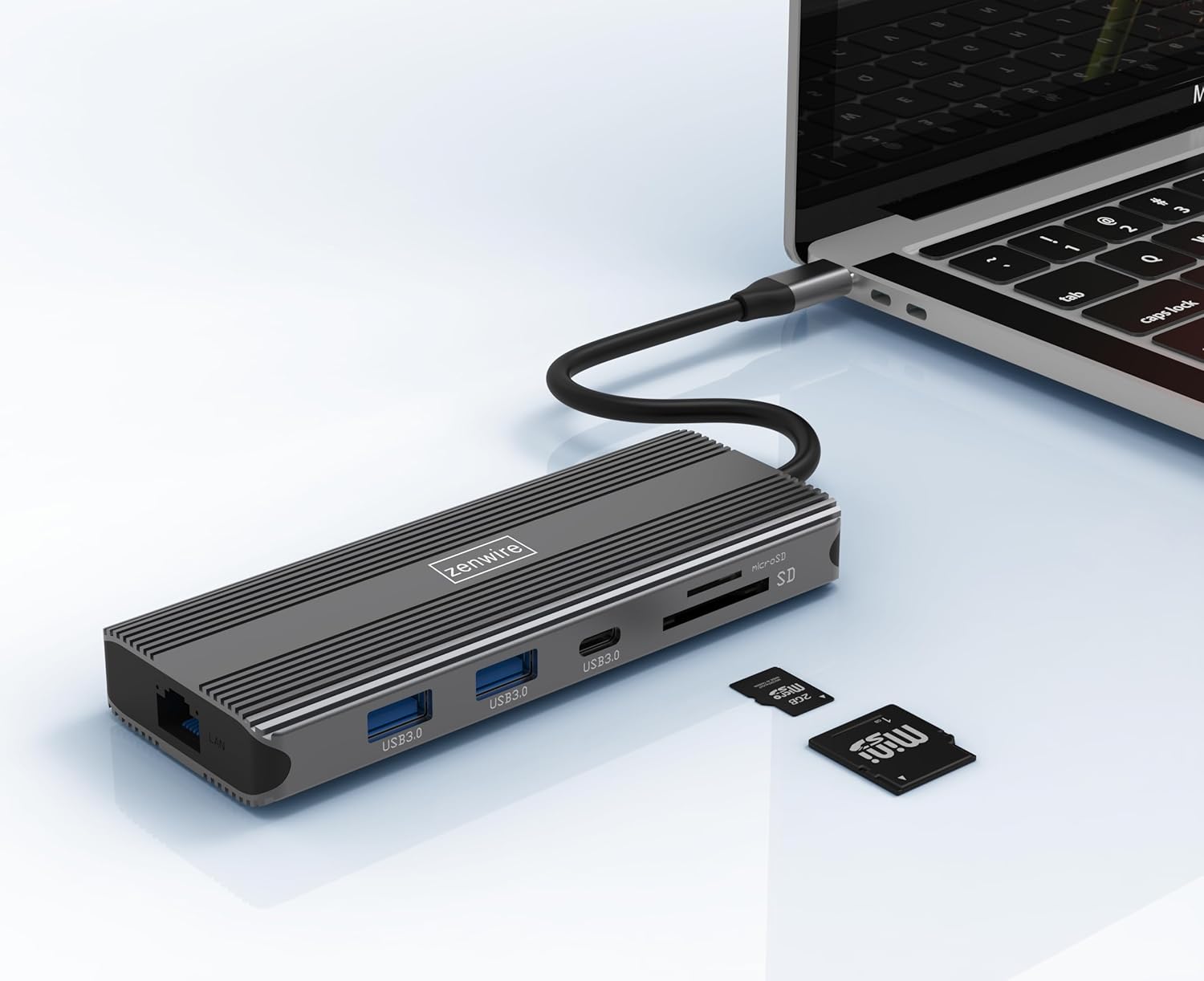
Image: The Zenwire USB-C Hub is shown connected to a laptop via its integrated USB-C cable, with SD and MicroSD cards placed nearby, illustrating a typical setup scenario.
Instrucciones de funcionamiento
Conectividad de pantalla:
The hub supports connecting up to two external monitors simultaneously via its HDMI 2.1 and DisplayPort 1.4 interfaces. Both can display video in 4K@60Hz concurrently.
- Monitor único: Connect your monitor to either the HDMI or DisplayPort.
- Monitores duales: Connect one monitor to the HDMI port and another to the DisplayPort.

Image: A laptop is displayed connected to two larger external monitors, demonstrating the multi-display capability of the Zenwire USB-C Hub.
Multi-Display Modes (MacOS vs. Windows):
The behavior of multiple external displays can vary between operating systems.
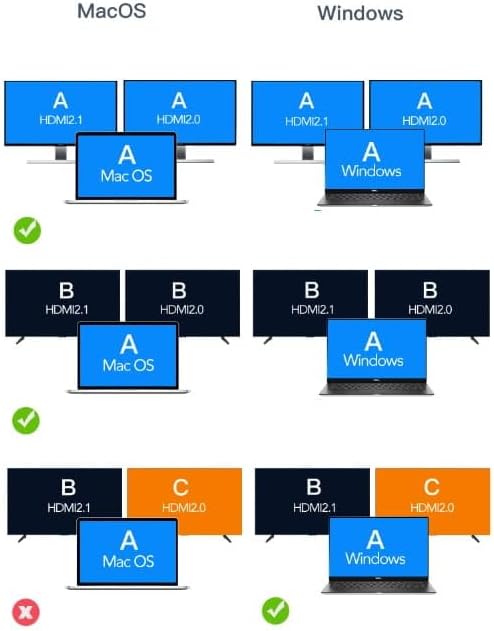
Image: A diagram illustrating different multi-display configurations for MacOS and Windows. It shows that MacOS typically supports extended desktop across two external monitors (A, B) and the laptop screen (A), while Windows can support extended desktop across three screens (A, B, C) or mirrored displays.
- Sistema operativo Mac: Typically supports extended desktop across two external monitors (A, B) and the laptop screen (A). Mirroring is also supported.
- Ventanas: Supports extended desktop across three screens (A, B, C) or mirrored displays, offering more flexibility for multi-monitor setups.
HDMI 2.1 and DisplayPort 1.4 Advanced Features:
These ports offer higher refresh rates and advanced features for an enhanced visual experience:
- Altas velocidades de transferencia: Up to 48 Gbps for HDMI 2.1, ensuring high data throughput.
- eARC (canal de retorno de audio mejorado): For higher audio quality and support for object-based audio formats like Dolby Atmos and DTS-X.
- VRR (frecuencia de actualización variable): Useful for gaming, where refresh rates are not constant.
- ALLM (modo automático de baja latencia): Automatically detects content like games and switches the device to a low-latency mode.
- QMS (Cambio rápido de medios): The image on the screen changes immediately when switching between content.
- QFT (Transporte rápido de tramas): Reduces input lag further.
- HDR dinámico: Adjusts the image parameters during content transmission for higher quality visuals. Supports HDR 10 and 10+.
Conectividad de audio:
The 3.5mm audio jack allows connection of various audio devices:
- Micrófonos
- Auriculares
- Headphones with integrated microphone
- Altavoces externos
Mantenimiento
- Limpieza: Utilice un paño suave y seco para limpiar el cubo. Evite limpiadores líquidos o materiales abrasivos.
- Almacenamiento: Guarde el concentrador en un lugar fresco y seco, alejado de la luz solar directa y de temperaturas extremas.
- Manejo: Evite dejar caer el dispositivo o someterlo a fuertes impactos.
- Disipación de calor: The aluminum alloy shell is designed for effective heat dissipation. Ensure the hub is placed in a well-ventilated area during prolonged use.
Solución de problemas
- Sin salida de pantalla:
- Ensure the USB-C cable from the hub is securely connected to your host device.
- Verify that the HDMI/DisplayPort cable is firmly connected to both the hub and the monitor.
- Check your host device's display settings to ensure the external monitor is detected and configured correctly (e.g., extended, mirrored).
- Try a different HDMI/DisplayPort cable or monitor to rule out cable/monitor issues.
- Sin entrega de potencia:
- Asegúrese de que su adaptador de corriente USB-C esté conectado al puerto PD del concentrador y funcione correctamente.
- Verifique que su dispositivo host admita la entrega de energía USB-C.
- Dispositivos USB no reconocidos:
- Reconnect the USB device to a different USB 3.0 port on the hub.
- Ensure the USB device is functioning correctly by connecting it directly to your host device.
- Some high-power USB devices may require external power if the hub's PD port is not utilized.
- Problemas de conexión Ethernet:
- Compruebe si el cable Ethernet está conectado de forma segura tanto al concentrador como al enrutador/módem.
- Verifique la configuración de red en su dispositivo host.
- Ensure your router/modem is working correctly.
- Tarjeta SD/MicroSD no detectada:
- Asegúrese de que la tarjeta esté completamente insertada en la ranura correcta.
- Check if the card is formatted correctly and readable by your operating system.
- Pruebe con una tarjeta diferente para descartar problemas.
Presupuesto
| Marca | Zenwire |
| Modelo | Zenwire USB-C Hub |
| Conectividad | USB-C 3.1 / Thunderbolt 3.0 (Host) |
| Puertos |
|
| Velocidad de transferencia de datos | USB 3.0: 5 Gbps; Ethernet: 1000 Mbps |
| Entrega de potencia | Hasta 100W |
| Material | Carcasa de aleación de aluminio |
| Dimensiones (L x An x Al) | 118 x 48 x 15 mm |
| Peso | 109 gramos |
| Longitud del cable | Aproximadamente 15cm |
| Compatibilidad del sistema operativo | Windows 11/10/8/7, Apple macOS, Linux, Android, iPad Pro iOS (USB-C models) |

Imagen: Un ángulo view of the Zenwire USB-C Hub, showcasing its compact design and the integrated USB-C host cable.
Garantía y soporte
Zenwire products are designed for reliability and performance. For warranty information and technical support, please refer to the official Zenwire webSitio web o contacte a su vendedor. Conserve el recibo de compra para reclamaciones de garantía.
For the latest software updates or driver information (if applicable), please visit the Zenwire support page. This device is designed to be Plug & Play, generally not requiring additional drivers.