
1. Introducción
This manual provides essential information for the safe and efficient operation of your TuTu TUB32HN1N 32-inch HD Ready TV. Please read it thoroughly before using the television and retain it for future reference.

Frente view of the TuTu TUB32HN1N 32-inch HD Ready TV, highlighting its borderless design and key features like HD Ready, Dolby Audio, USB, HDMI, Hotel Mode, CI+, and DVB-S2/T2/C tuners.
2. Información de seguridad
Siga siempre las precauciones básicas de seguridad al utilizar este televisor para reducir el riesgo de incendio, descarga eléctrica y lesiones.
- No exponga el televisor a la lluvia o la humedad.
- No abra el gabinete; deje cualquier reparación a personal calificado.
- Asegúrese de que haya una ventilación adecuada alrededor del televisor.
- Desenchufe el televisor durante tormentas eléctricas o cuando no lo utilice durante períodos prolongados.
- Mantenga el televisor alejado de la luz solar directa y de fuentes de calor.
3. Contenido del paquete
Verifique que todos los elementos estén presentes en la caja:
- 1x TuTu TUB32HN1N 32-inch HD Ready TV
- 1x Manual de usuario
- 1x control remoto
- 1x TV Stand (base)
Note: 2x AA batteries for the remote control are not included.
4. Producto terminadoview
4.1. Dimensiones
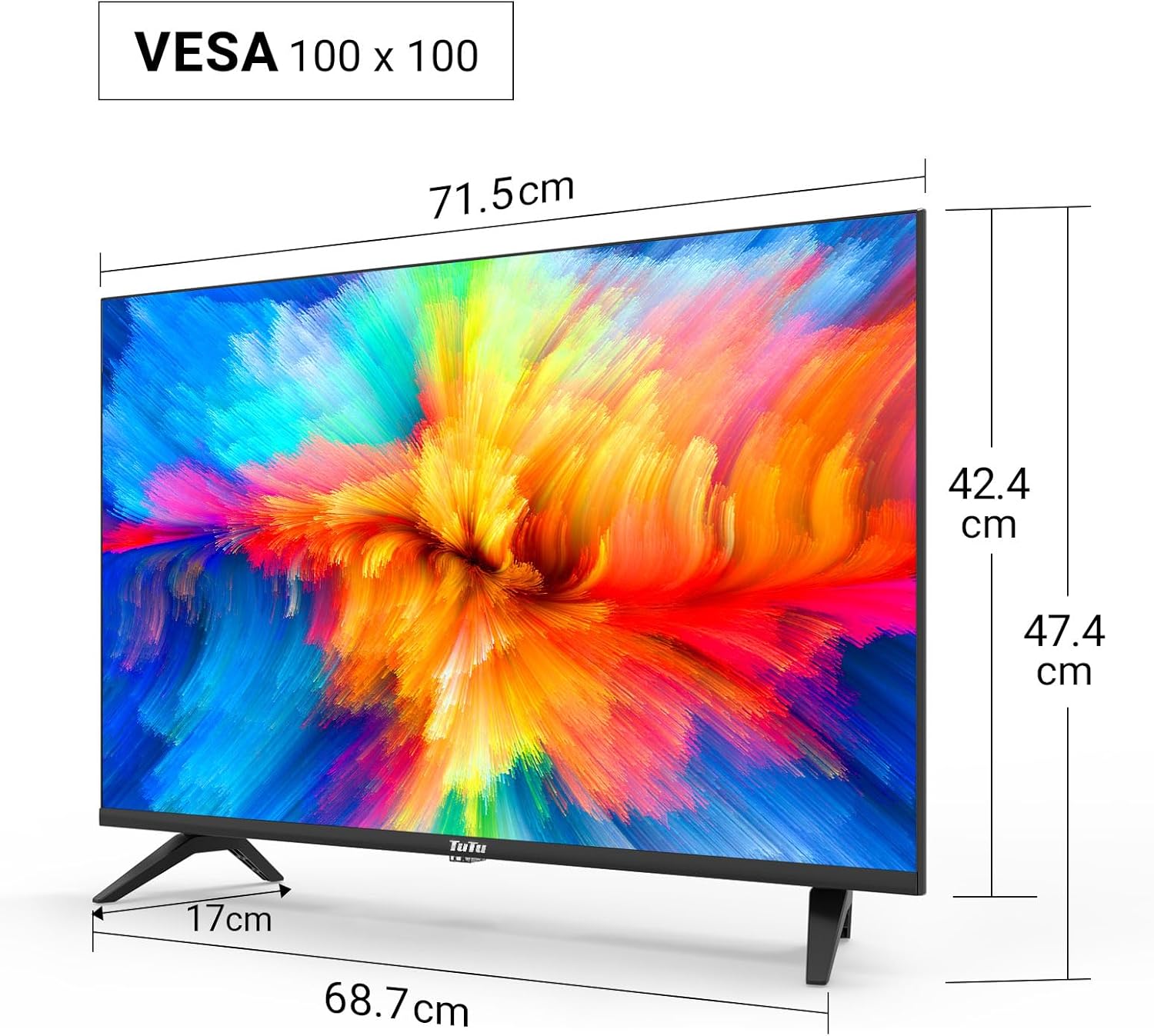
Technical drawing displaying the dimensions of the 32-inch TV, including screen width (71.5cm), height with stand (47.4cm), height without stand (42.4cm), and stand depth (17cm). VESA 100x100 compatibility is also indicated.
4.2. Puertos de conexión

Detallado view of the TV's input/output ports, including SCART, Coaxial Out, LNB In, RF (Antenna), 2x HDMI, USB, CI+ Common Interface, Mini AV, Mini YPbPr, and Earphone Out.
The TV features a variety of ports for connecting external devices:
- HDMI (x2): For connecting high-definition devices like Blu-ray players, game consoles, or external streaming devices.
- USB 2.0 (x1): For media playback and recording from USB storage devices.
- CI/CI+ Slot (x1): For inserting a Common Interface module to access encrypted digital channels.
- RF (Antena): Para conectar una antena terrestre o de cable.
- LNB In: Para conectar una antena parabólica.
- Euroconector: Para conectar dispositivos analógicos más antiguos.
- Salida coaxial: Para salida de audio digital.
- Mini AV / Mini YPbPr: For analog video and audio input (adapters may be required).
- Salida de auriculares: Para conectar auriculares.
5. Configuración
5.1. Montaje del soporte
Para montar el soporte del televisor:
- Coloque con cuidado el televisor boca abajo sobre una superficie suave y plana para evitar dañar la pantalla.
- Alinee el soporte con los orificios de montaje en la parte inferior del televisor.
- Asegure el soporte utilizando los tornillos provistos.
5.2. Montaje en pared
The TV supports VESA 100x100 wall mounts. Wall mount brackets are sold separately. Follow the instructions provided with your wall mount kit for proper installation.
5.3. Conexión de periféricos
Connect your antenna, satellite dish, or cable to the appropriate RF or LNB IN port. Use HDMI cables for high-definition devices. Insert USB drives into the USB port for media access.

Illustration of the TV's triple tuner capabilities, showing connections for DVB-S/S2 (satellite), DVB-C (cable), and DVB-T/T2 (terrestrial) reception.
5.4. First-Time Power On & Channel Scan
After connecting the power cable and antenna/satellite, press the power button on the remote control or TV. The TV will guide you through the initial setup, including language selection and automatic channel scanning for DVB-T/T2, DVB-C, and DVB-S/S2 signals.
6. Instrucciones de funcionamiento
6.1. Funciones de control remoto
Refer to the remote control diagram in your printed manual for specific button layouts. Common functions include Power, Volume Up/Down, Channel Up/Down, Input Source, Menu, and Navigation buttons.
6.2. Selección de fuente de entrada
Press the 'Source' button on your remote to switch between connected devices (e.g., HDMI 1, HDMI 2, USB, DVB-T, DVB-S).
6.3. USB Media Playback and Recording
Insert a USB storage device into the USB port. The TV's media player will allow you to browse and play video, image, and music files. The TV also supports recording digital broadcasts to a connected USB device.

Image demonstrating the USB media player and recorder function, allowing playback of video, images, and music from a USB drive or external hard disk. The 'REC' indicator shows recording capability.
6.4. CI/CI+ Module Installation
To access encrypted channels, insert your CI/CI+ module (with smart card) into the CI slot on the side or rear of the TV. Ensure the module is inserted correctly according to its instructions.
6.5. Hotel Mode Configuration
The Hotel Mode feature allows for customized settings ideal for hospitality environments. This includes limiting volume range, creating custom channel lists, locking sources, and batch processing TV settings via USB.

Screenshot of the Hotel Mode menu, illustrating features such as limited volume range, custom channel list creation, source locking, and batch processing of TV settings via USB.
7. Mantenimiento
Para mantener su televisor en óptimas condiciones:
- Limpieza de la pantalla: Limpie suavemente la pantalla con un paño suave que no deje pelusa. Para manchas difíciles, use un limpiador de pantallas específico para televisores, aplicándolo directamente sobre el paño, no sobre la pantalla.
- Limpieza del gabinete: Utilice un paño suave y seco para limpiar el mueble del televisor. No utilice limpiadores abrasivos ni disolventes.
- Ventilación: Asegúrese de que las aberturas de ventilación en la parte posterior del televisor no estén bloqueadas para evitar el sobrecalentamiento.
8. Solución de problemas
Si tiene problemas con su televisor, consulte los siguientes problemas y soluciones comunes:
| Problema | Posible solución |
|---|---|
| Sin poder | Compruebe que el cable de alimentación esté bien enchufado al televisor y a la toma de corriente. Pruebe con otra toma. |
| No hay imagen, pero hay sonido | Asegúrese de que la fuente de entrada seleccionada sea correcta. Compruebe las conexiones de los cables a los dispositivos externos. |
| No hay sonido, pero hay imagen | Verifique el volumen y el estado de silencio. Verifique las conexiones del cable de audio. |
| No se pueden encontrar canales | Ensure the antenna/satellite cable is properly connected. Perform an automatic channel scan again. Check antenna signal strength. |
| El control remoto no funciona | Reemplace las pilas. Asegúrese de que no haya obstrucciones entre el control remoto y el sensor infrarrojo del televisor. |
9. Especificaciones
Here are the technical specifications for the TuTu TUB32HN1N TV:
| Característica | Especificación |
|---|---|
| Marca | TuTu |
| Modelo | TUB32HN1N |
| Tamaño de pantalla | 32 pulgadas (80 cm) |
| Tecnología de visualización | LED (Direct LED Display) |
| Resolución | Listo para HD (1366x768p) |
| Relación de aspecto | 16:9 |
| Frecuencia de actualización | 60 Hz |
| Tecnología de sintonizador | DVB-T/T2 (Terrestre), DVB-C (Cable), DVB-S/S2 (Satélite) |
| Puertos HDMI | 2 |
| Puertos USB | 1 (USB 2.0) |
| CI/CI+ Slot | 1 |
| Modo de salida de audio | Stereo (Dolby Digital) |
| Consumo de energía (SDR) | 27.0 W |
| Clase de eficiencia energética | F |
| Dimensiones del producto (con soporte) | 79.6 x 12.8 x 50.5 cm |
| Peso | 5.04 kilogramos |
| Compatibilidad VESA | 100 x 100 mm |

The EU energy label for the TuTu TUB32HN1N TV, showing an energy efficiency class of F and energy consumption of 27 kWh/1000h.

A detailed product information sheet (PRODUCT INFORMATION SHEET) providing technical parameters and compliance details for the TuTu TUB32HN1N TV. For more details, visit the official EPREL database: https://eprel.ec.europa.eu/qr/1589506
10. Garantía y soporte
TuTu offers a two-year warranty policy for this product. For warranty claims, technical support, or any inquiries, please refer to the contact information provided in your purchase documentation or visit the official TuTu websitio.