
Introducción
Gracias por la compraasing the Baseus S-09 Pro Series Car FM Transmitter. This device allows you to stream audio from your smartphone or other devices to your car's FM radio, and also provides fast charging capabilities. Please read this manual carefully before use to ensure proper operation and to maximize the product's lifespan.
Producto terminadoview
The Baseus S-09 Pro Series Car FM Transmitter is designed to enhance your in-car audio experience and provide convenient charging. Key features include:
- FM Transmitter Functionality: Transmite audio a la radio FM de su automóvil.
- Conectividad Bluetooth 5.3: For stable wireless audio streaming from compatible devices.
- Flash Drive Playback: Supports audio playback directly from a flash drive (up to 512GB).
- Carga rápida: Equipped with a USB-C port supporting PD 18W (Max) fast charging.
- Dual-Mic System: Provides premium sound quality and clear calls.
- Large LED Screen with Dual Display: Shows frequency band and battery voltage alternately.
- Triple Charging Ports: Offers multiple charging options.
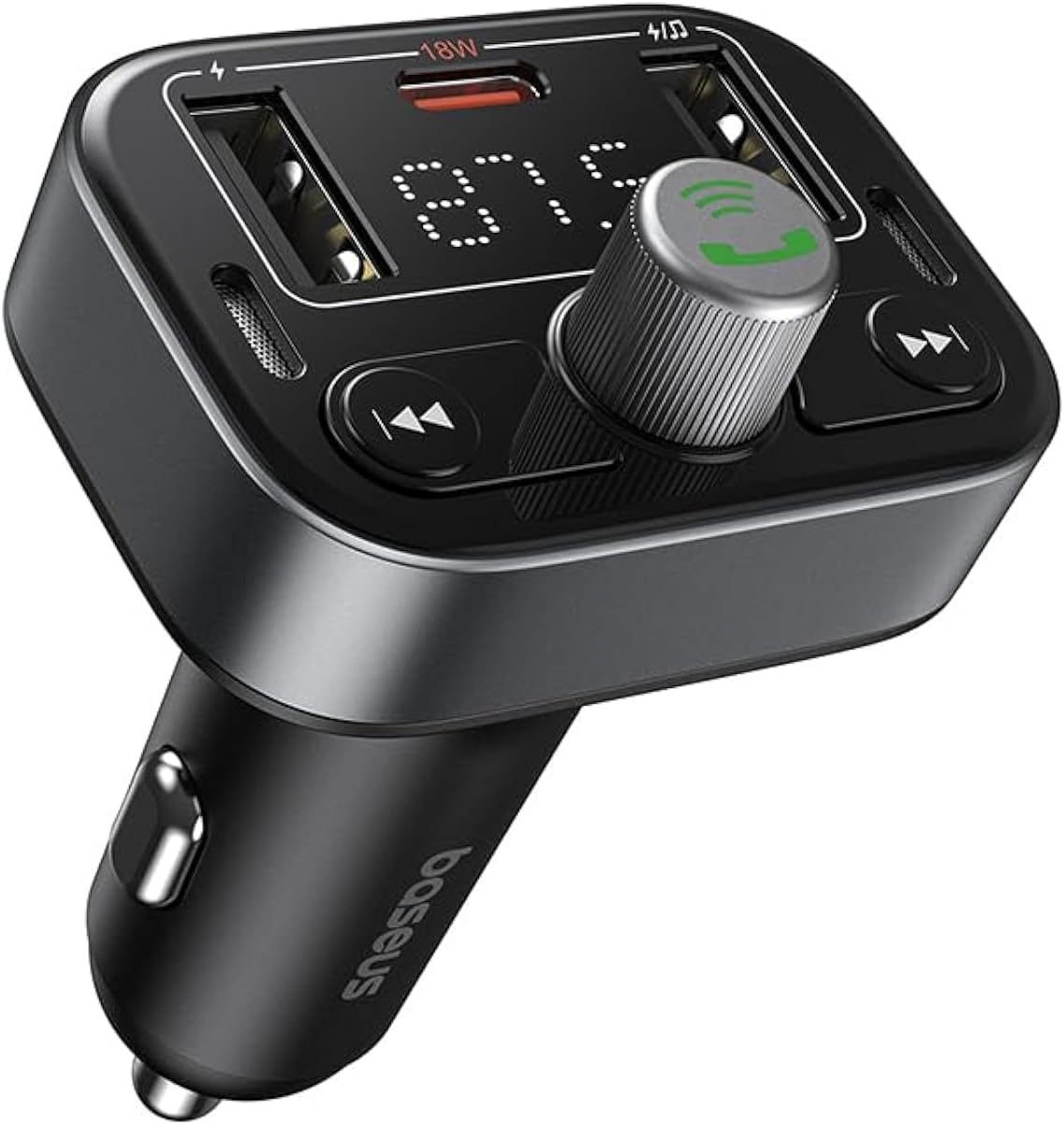
Figura 1: Frente view of the Baseus S-09 Pro Series Car FM Transmitter, showing the display, control knob, and USB ports.
Contenido del paquete
Por favor revise el paquete para ver los siguientes artículos:
- Baseus S-09 Pro Series Car FM Transmitter
- Manual de instrucciones (este documento)

Figure 2: The Baseus S-09 Pro Series Car FM Transmitter shown in its retail packaging.
Configuración
- Insert into Car Cigarette Lighter Socket: Plug the Baseus S-09 Pro Series Car FM Transmitter firmly into your car's 12V/24V cigarette lighter socket. The device will power on automatically, and the LED display will light up.
- Sintonizar frecuencia FM:
- On the FM Transmitter, press and hold the multi-function knob (the large central knob) until the FM frequency on the LED display starts flashing.
- Rotate the multi-function knob left or right to adjust the frequency. Choose an empty FM frequency (one with no radio station broadcasting) to minimize interference.
- On your car's FM radio, tune to the exact same empty frequency you selected on the transmitter.
- Once matched, the transmitter is ready to broadcast audio to your car stereo.
- Emparejamiento Bluetooth:
- After the device powers on, it will automatically enter Bluetooth pairing mode. The Bluetooth icon on the display may flash.
- On your smartphone or Bluetooth-enabled device, open the Bluetooth settings and search for available devices.
- Select "Baseus S-09 Pro" (or similar name) from the list to connect. Once connected, the Bluetooth icon on the transmitter's display will stop flashing and remain solid.

Figure 3: Illustration showing connection options: via flash drive and Bluetooth 5.3 pairing with a smartphone.
Instrucciones de funcionamiento
Reproducción de audio
- Audio Bluetooth Once paired, play music or audio from your smartphone. The audio will be transmitted to your car's FM radio.
- Flash Drive Audio: Insert a USB flash drive (up to 512GB, formatted to FAT32) containing MP3 audio files into the designated USB port on the transmitter. The device will automatically detect and play the audio files.
- Botones de control:
- Perilla multifunción: Rotate to adjust volume. Press once to play/pause.
- Botón de pista anterior (◀◀): Presione para ir a la pista anterior.
- Botón de siguiente pista (▶▶): Presione para ir a la siguiente pista.
Llamadas manos libres
- Responder/Finalizar llamada: Presione la perilla multifunción una vez para responder una llamada entrante o finalizar una llamada en curso.
- Rechazar llamada: Mantenga presionada la perilla multifunción durante 2 segundos para rechazar una llamada entrante.
- Volver a marcar el último número: Presione dos veces la perilla multifunción para volver a marcar el último número marcado.
- Cambiar llamada a teléfono: During a call, press and hold the multi-function knob for 2 seconds to switch the call between the transmitter and your phone.

Figure 4: The device highlighting its dual-mic system for premium sound quality during calls and music playback.
Dispositivos de carga
- The transmitter features multiple USB ports for charging your devices.
- Puerto USB-C: Supports Power Delivery (PD) 18W (Max) fast charging. Use a compatible USB-C to USB-C or USB-C to Lightning cable for fast charging supported devices.
- Puertos USB-A: Provide standard charging for various devices.

Figure 5: The transmitter connected via its USB-C port to an iPhone for fast charging.
Información de la pantalla
- The large LED screen alternately displays the current FM frequency and the car battery voltage.
- Frecuencia FM: Indicates the frequency the transmitter is broadcasting on.
- Volumen de la bateríatage: Muestra el volumen en tiempo realtage of your car's battery, allowing you to monitor its health.

Figure 6: The LED screen displaying both the FM frequency (87.5) and the car battery voltage (12.5 V).
Mantenimiento
- Mantenga el dispositivo seco. No lo exponga a la humedad ni a temperaturas extremas.
- Limpie el dispositivo con un paño suave y seco. No utilice productos químicos agresivos ni limpiadores abrasivos.
- Evite dejar caer o someter el dispositivo a impactos fuertes.
- Conservar en un lugar fresco y seco cuando no esté en uso.
Solución de problemas
| Problema | Posible causa | Solución |
|---|---|---|
| Sin energía/Pantalla apagada | Not properly inserted into cigarette lighter; Car socket fuse blown. | Ensure firm connection. Check car's fuse box. |
| Static/Poor audio quality | FM frequency interference; Volume too low. | Change to a different, empty FM frequency. Increase volume on both transmitter and car stereo. |
| No se puede emparejar Bluetooth | Device not in pairing mode; Bluetooth disabled on phone. | Ensure transmitter is in pairing mode. Enable Bluetooth on your phone and search again. |
| La carga rápida no funciona | Cable not compatible; Device does not support fast charging. | Use a certified fast-charging cable. Ensure your device supports PD 18W. |
Presupuesto
- Nombre del modelo: S-09 Pro Series
- Número de modelo: C10762200113-00
- Interfaz de hardware: Bluetooth
- Dispositivos compatibles: Car Stereo System, Smartphone, Tablet
- Características especiales: Transmisor FM
- Entrada de audio: AUXILIAR DE 3.5 mm
- Modo de salida de audio: Estéreo
- Tipo de salida de audio: Radio FM, Bluetooth
- Volumentage: 12 voltios (CC)
- Fuente de energía: Eléctrico con cable
- Tipo inalámbrico: Bluetooth
- Versión de Bluetooth: 5.3
- Tipos de medios admitidos: MP3 (from flash drive)
- Dimensiones del paquete: 17 x 11.6 x 3.9 cm
- Peso del artículo: 80 gramos
- Color: Negro
Garantía y soporte
Baseus products typically come with a standard manufacturer's warranty. Please refer to the warranty card included in your product packaging or visit the official Baseus webSitio para conocer los términos y condiciones detallados de la garantía.
For technical support, troubleshooting assistance, or warranty claims, please contact Baseus customer service through their official channels or the retailer from whom you purchased the product.
Puede encontrar más información y soporte en el Tienda Baseus en Amazon.