
1. Introducción
The Flysky FS-R4M is a compact 4-channel mini receiver designed for use with RC models, specifically mini and micro cars. It operates on the 2.4GHz ISM band using the advanced ANT protocol, offering reliable bidirectional communication. This receiver features a single external antenna and provides PWM output for control signals.
It is compatible with Flysky transmitters that support the ANT protocol, such as the FS-G7P. Its ultra-small size and lightweight design make it an ideal choice for applications where space and weight are critical considerations.
2. Características
- Salida de 4 canales: Provides four independent PWM channels for controlling various functions.
- ANT Protocol: Utilizes the advanced ANT 2.4GHz protocol for stable and efficient communication.
- Transmisión bidireccional: Supports two-way communication between the receiver and compatible transmitter.
- Single External Antenna: Ensures reliable signal reception.
- Diseño compacto: Ultra-small dimensions (20.0 x 13.0 x 7.2mm) and lightweight (3g) for easy integration into mini/micro RC models.
- Amplia compatibilidad: Designed for use with Flysky ANT protocol transmitters, such as the FS-G7P.
- Easy Binding: Facilitates quick and straightforward pairing with compatible transmitters.
- Online Update Support: Allows for firmware updates to enhance performance and features.
3. Producto terminadoview
Familiarize yourself with the components and layout of the FS-R4M receiver.

Figure 1: FS-R4M Receiver Component Diagram
- [1] CH1: Channel 1 PWM Output
- [2] CH2: Channel 2 PWM Output
- [3] CH3: Channel 3 PWM Output
- [4] CH4: Channel 4 PWM Output
- [5] Antenna: Single external antenna for signal reception.
- [6] LED: Luz indicadora de estado.
- [7] Signal pin: Output for control signal.
- [8] Power anode: Entrada de potencia positiva.
- [9] Power cathode: Entrada de potencia negativa (tierra).
Nota: The interface specifications for the connectors are ZH1.5mm-3P, commonly known as JST-PH2.0. Standard RC servo connectors (Futaba style) are not directly compatible and will require adapter cables or modification.
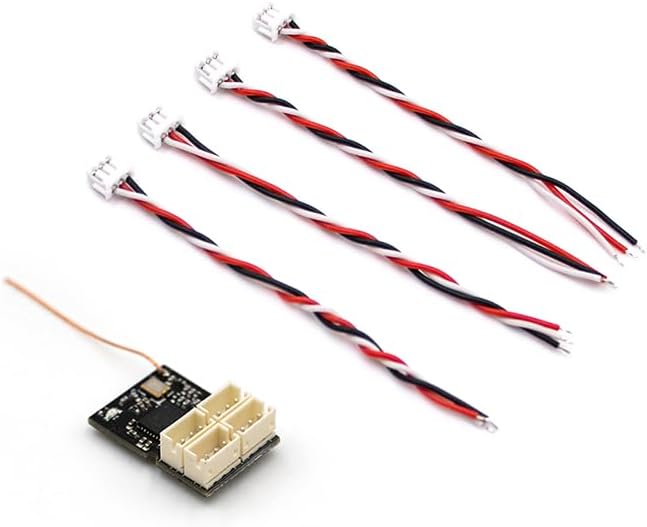
Figure 2: FS-R4M Receiver with Adapter Cables
This image illustrates the FS-R4M receiver alongside the necessary adapter cables for connecting to standard RC components. The receiver's ports are designed for ZH1.5mm-3P (JST-PH2.0) connectors.
4. Configuración y vinculación
4.1 conexiones de cableado
Connect your servos, Electronic Speed Controller (ESC), and other components to the corresponding channels on the FS-R4M receiver. Ensure correct polarity for power connections (Power anode [8] for positive, Power cathode [9] for negative/ground, Signal pin [7] for signal).
As noted in the product overview, the receiver uses ZH1.5mm-3P (JST-PH2.0) connectors. If your servos or ESC use standard Futaba-style connectors, you will need to use appropriate adapter cables or modify the connectors. Ensure all connections are secure before proceeding.
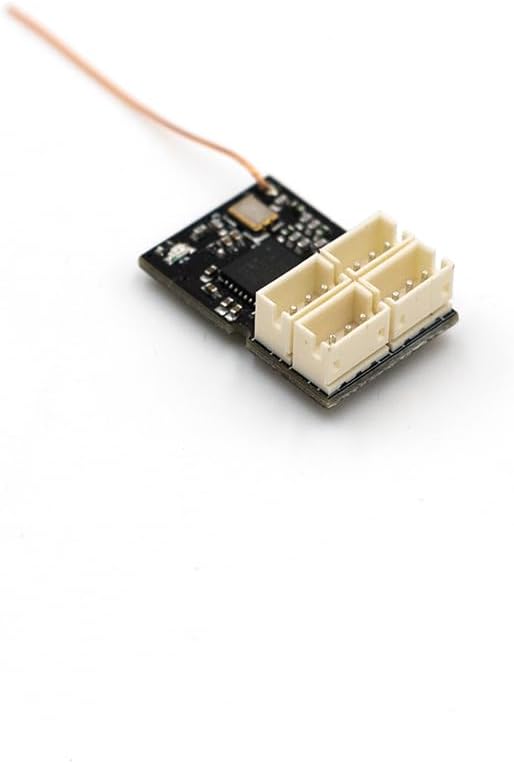
Figure 3: Receiver Channel Ports
Un detallado view of the four channel ports on the FS-R4M receiver, highlighting their compact design.
4.2 Procedimiento vinculante
The binding process links your FS-R4M receiver to your Flysky ANT protocol transmitter. Refer to your specific transmitter's manual for detailed binding instructions, as procedures may vary slightly. A general binding sequence is as follows:
- Asegúrese de que su transmisor esté apagado.
- Connect power to the FS-R4M receiver. The LED [6] on the receiver will typically flash, indicating it is in binding mode or awaiting a signal.
- Place your transmitter into binding mode. This usually involves holding a specific button (e.g., "BIND" button) while powering on the transmitter. Consult your transmitter's manual for the exact steps.
- Once the receiver and transmitter successfully bind, the LED on the receiver will change to a solid state, indicating a successful connection.
- Release the bind button on the transmitter and power cycle both the transmitter and receiver to confirm the binding.
If binding fails, ensure the receiver is within range of the transmitter and that both devices are using the ANT protocol. Repeat the steps if necessary.
5. Instrucciones de funcionamiento
After successful binding, the FS-R4M receiver will output PWM signals corresponding to the commands from your transmitter. Ensure all control surfaces and functions respond correctly before operating your RC model.
- Secuencia de encendido: Always power on your transmitter first, then the receiver. When powering off, disconnect power from the receiver first, then power off the transmitter.
- Verificación de rango: Perform a range check before each use, especially in new environments, to ensure reliable signal strength.
- Interferencia: Avoid operating near sources of 2.4GHz interference (e.g., Wi-Fi routers, other 2.4GHz RC systems) to prevent signal loss.
6. Mantenimiento
Proper care and maintenance will extend the lifespan of your FS-R4M receiver.
- Condiciones ambientales: Operate and store the receiver within the specified temperature range of -10°C to +60°C and humidity limit of 20% to 95%. Avoid extreme temperatures and high humidity.
- Volumentage and Safety: Always pay attention to the input voltage range (3.5-9V/DC) and ensure it is not exceeded. Incorrect voltagPuede dañar el receptor.
- Limpieza: Mantenga el receptor limpio y libre de polvo, suciedad y humedad. Utilice un paño suave y seco para limpiarlo. Evite el uso de disolventes o productos químicos agresivos.
- Cuidado de la antena: Ensure the antenna is not cut, bent sharply, or damaged. A damaged antenna can significantly reduce range and signal reliability.
- Actualizaciones de firmware: The receiver supports online updates. Periodically check the official Flysky webSitio para actualizaciones de firmware disponibles para garantizar un rendimiento óptimo y acceso a nuevas funciones.
7. Solución de problemas
If you encounter issues with your FS-R4M receiver, consider the following troubleshooting steps:
- Receptor no vinculante:
- Ensure both the transmitter and receiver are powered on and within close proximity during the binding process.
- Verify that your transmitter supports the ANT protocol.
- Check the LED status on the receiver; it should indicate binding mode (e.g., flashing).
- Refer to your transmitter's manual for specific binding instructions.
- Sin respuesta de control:
- Confirm the receiver is successfully bound to the transmitter (solid LED).
- Check all wiring connections between the receiver, ESC, and servos for correct polarity and secure fit.
- Ensure the power supply to the receiver is within the specified voltage range (3.5-9V/DC).
- Verify that the transmitter is powered on and functioning correctly.
- Short Range or Intermittent Signal:
- Inspect the receiver antenna for any damage, kinks, or improper routing. Ensure it is positioned away from metal objects.
- Evite operar en áreas con alta interferencia de 2.4 GHz.
- Ensure the transmitter's battery is adequately charged.
- Problemas con los indicadores LED:
- If the LED does not light up, check the power connection to the receiver.
- Refer to the transmitter manual for specific LED indications during binding and operation.
8. Especificaciones
| Característica | Especificación |
|---|---|
| Modelo del producto | FS-R4M |
| Transmisores adaptativos | Transmitters with ANT protocol (e.g., Flysky FS-G7P) |
| Modelos adaptativos | Mini/Micro RC Cars |
| Número de canales | 4 |
| Frecuencia de RF | 2.4GHz ISM |
| Máxima potencia | <10dBm (pire) (UE) |
| Tipo de antena | Antena externa única |
| Distance (Ground) | >50 m |
| Protocolo 2.4G | HORMIGA |
| Resolución | 1024 |
| Salida de datos | Modulación por ancho de pulso (PWM) |
| Vol de entradatage Rango | 3.5-9 V / CC |
| Actualización en línea | Sí |
| Rango de temperatura | -10°C a +60°C |
| Límite de humedad | 20% a 95% |
| Dimensiones (L*An*Al) | 20.0 x 13.0 x 7.2 mm |
| Peso | 3g |
| Proceso de dar un título | CE, FCC ID: 2A2UNR4M00 |
| Tipo de interfaz | ZH1.5mm-3P (JST-PH2.0) |
9. Garantía y soporte
Para obtener información sobre la garantía, consulte los términos y condiciones proporcionados por su vendedor o el fabricante al momento de la compra. Conserve su comprobante de compra para cualquier reclamación de garantía.
For technical support, firmware updates, and additional product information, please visit the official Flysky websitio:
You may also contact your point of purchase for assistance.