
1. Introducción
Thank you for choosing the Docooler Smart Biometric Fingerprint Cabinet Lock. This device provides a secure and convenient keyless access solution for your cabinets, drawers, wardrobes, and other furniture. Utilizing advanced fingerprint recognition and Bluetooth app control, it offers enhanced security and ease of use. Please read this manual thoroughly before installation and operation to ensure proper functionality and safety.
2. Producto terminadoview y características
The Docooler Smart Biometric Fingerprint Cabinet Lock integrates modern technology to protect your personal items and documents. Its compact design allows for discreet installation within various furniture types.
Características principales:
- Múltiples métodos de desbloqueo: Access your belongings using fingerprint recognition, Bluetooth app control, or emergency USB key.
- Alta seguridad: Advanced biometric technology ensures only authorized fingerprints can unlock the device.
- Control de la aplicación Bluetooth: Connect via Bluetooth to manage fingerprints, view unlock records, and monitor battery status directly from your smartphone.
- Desbloqueo rápido: Features a 0.5-second reaction time for rapid access.
- Bloqueo automático: The lock automatically secures itself after closing, preventing accidental oversight.
- Advertencia de baja potencia: An indicator light signals when the battery level is low, prompting replacement.
- Fuente de alimentación de emergencia: In case of complete battery depletion, the lock can be temporarily powered via a USB connection for emergency unlocking.
- Amplia aplicación: Suitable for various wooden furniture including cabinets, drawers, wardrobes, and storage boxes.

Figura 2.1: Sobreview of Docooler Smart Electronic Cabinet Lock features.

Figure 2.2: Docooler Smart Biometric Fingerprint Cabinet Lock components and usage scenarios.
3. Contenido del paquete
Verifique que todos los artículos enumerados a continuación estén incluidos en su paquete:
- Front Panel (Fingerprint Panel)
- Caja de bloqueo
- Manual de usuario (este documento)
- Bolsa de tornillos
- Bloqueo
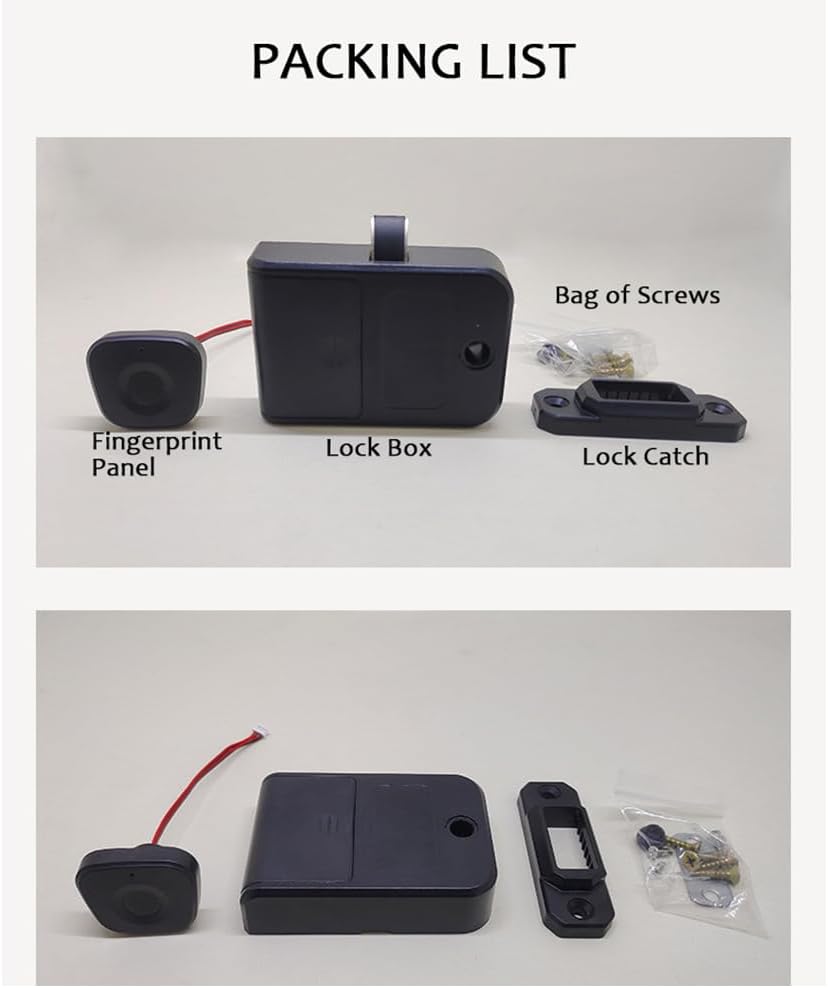
Figure 3.1: Package contents of the Docooler Smart Biometric Fingerprint Cabinet Lock.
4. Especificaciones
| Característica | Descripción |
|---|---|
| Marca | Enfriador de bebidas |
| Característica especial | Huella dactilar |
| Tipo de bloqueo | Biométrico |
| Material | Acrilonitrilo Butadieno Estireno, Acero Inoxidable |
| Usos recomendados | Cabinets, Drawers, Wardrobes, Storage Boxes, Furniture |
| Estilo | Moderno |
| Color | Negro |
| Tipo de controlador | Solicitud |
| Método de control | Aplicación, toque |
| Protocolo de conectividad | Bluetooth |
| Peso del artículo | 4.2 onzas |
| Dimensiones del paquete | 4.45 x 3.78 x 2.56 pulgadas |

Figura 4.1: Dimensiones y parámetros del producto.
5. Instalación
The Docooler Smart Biometric Fingerprint Cabinet Lock is designed for easy installation on various wooden furniture. A screwdriver is typically the only tool required.
Pasos de instalación:
- Prepare la superficie: Ensure the installation surface on your cabinet or drawer is clean and dry.
- Position the Fingerprint Panel: Determine the desired location for the fingerprint panel on the exterior of your furniture. Mark the screw holes and the cable entry point.
- Install the Fingerprint Panel: Secure the fingerprint panel using the provided screws. Route the connecting wires through the pre-drilled hole to the interior of the furniture.
- Mount the Lock Box: On the interior of the furniture, align the lock box with the fingerprint panel's wires. Secure the lock box with screws.
- Attach the Lock Catch: Install the lock catch on the frame of the furniture, ensuring it aligns properly with the lock box mechanism when the door/drawer is closed.
- Conectar cables: Connect the fingerprint panel wires to the lock box.
- Instale las baterías: Open the battery cover on the lock box and insert 3 AAA batteries (not included), observing correct polarity.
- Funcionalidad de prueba: Close the door/drawer and test the lock's operation.

Figure 5.1: Simple installation process diagram.

Figura 5.2: Instalación examples for drawers and single-door cabinets.

Figure 5.3: Internal lock box placement within a drawer.
6. Configuración
6.1. Initial Setup and Administrator Fingerprint Enrollment
- After installing the batteries, the lock will be in initial setup mode.
- Place your finger on the fingerprint sensor. The indicator light will flash.
- Lift and place your finger repeatedly (typically 5-8 times) until the indicator light turns solid green, indicating successful enrollment of the administrator fingerprint.
- The first enrolled fingerprint will automatically be designated as the administrator.
6.2. Adding User Fingerprints
- Use the administrator fingerprint to unlock the device.
- While the lock is open, place the administrator finger on the sensor and hold it until the indicator light flashes blue.
- Then, have the new user place their finger on the sensor repeatedly until the light turns solid green.
- Repeat for additional user fingerprints. The lock can store up to 20 fingerprints.
6.3. Bluetooth App Connection and Control
The lock supports control via a dedicated mobile application (e.g., Tuya Smart app).
- Descargar la aplicación: Buscar and download the recommended smart home app (e.g., Tuya Smart) from your device's app store.
- Registrarse/Iniciar sesión: Cree una cuenta o inicie sesión en la aplicación.
- Agregar dispositivo: Ensure your phone's Bluetooth is enabled. In the app, select 'Add Device' or the '+' icon. The app should automatically detect the lock. If not, you may need to manually select 'Lock' or 'Security Sensor' and follow the in-app instructions.
- Emparejamiento: Follow the app's prompts to pair your lock. This may involve pressing a button on the lock or performing an action with the administrator fingerprint.
- Funciones de la aplicación: Una vez conectado, puedes usar la aplicación para:
- Unlock the cabinet remotely.
- Add or delete fingerprints.
- View unlock records (who unlocked and when).
- Monitor the current battery level.

Figure 6.1: Tuya App interface for lock control.

Figure 6.2: Fingerprint and Bluetooth app unlock methods.
7. Operación
7.1. Desbloqueo con huella dactilar
Place your enrolled finger on the fingerprint sensor. The indicator light will flash green, and the lock will disengage, allowing you to open the cabinet or drawer. The lock will automatically re-engage when the door/drawer is closed.

Figure 7.1: Unlocking the cabinet with a registered fingerprint.
7.2. Unlocking with Bluetooth App
Open the connected mobile app on your smartphone. Tap the unlock icon within the app interface. The lock will disengage, and you can open the cabinet or drawer.
7.3. Bloqueo automático
After successfully unlocking and opening the cabinet/drawer, the lock mechanism will automatically retract. When you close the cabinet/drawer, the lock will automatically extend and secure the furniture.
8. Mantenimiento
8.1. Reemplazo de la batería
The lock is powered by 3 AAA batteries (not included). When the battery level is low, the indicator light will flash red 3 times continuously during operation. Replace the batteries promptly to ensure continuous functionality.
- Locate the battery compartment on the lock box (interior of the furniture).
- Retire la tapa de la batería.
- Replace the old AAA batteries with new ones, ensuring correct polarity (+/-).
- Cierre de forma segura la tapa de la batería.

Figure 8.1: Low power warning indicator.

Figure 8.2: Battery compartment and emergency USB power supply.
8.2. Suministro de energía de emergencia
If the batteries completely run out and you cannot unlock the device, you can connect an external power bank via the Type-C USB port on the fingerprint panel for temporary emergency power. This will allow you to unlock the device and replace the internal batteries.
8.3. Limpieza
Wipe the fingerprint sensor and the lock's exterior with a soft, dry cloth. Avoid using abrasive cleaners or solvents, as these can damage the surface or electronic components.
9. Solución de problemas
- Lock does not respond to fingerprint:
- Asegúrese de que su dedo esté limpio y seco.
- Pruebe diferentes ángulos o posiciones de su dedo en el sensor.
- Verify that the fingerprint is correctly enrolled. If not, re-enroll it.
- Verifique el nivel de batería. Reemplace las baterías si están bajas.
- Cannot connect to Bluetooth app:
- Asegúrese de que Bluetooth esté habilitado en su teléfono inteligente.
- Make sure the lock is within Bluetooth range.
- Reinicie la aplicación e intente realizar el emparejamiento nuevamente.
- Check battery level of the lock.
- Lock is completely unresponsive:
- The batteries may be completely depleted. Use the emergency USB power supply to temporarily power the lock and then replace the internal batteries.
- Asegúrese de que todas las conexiones de los cables estén seguras.
- Lock mechanism is stuck:
- Check for any obstructions preventing the lock from engaging or disengaging.
- Ensure the lock catch is properly aligned with the lock box.
10. Demostración en vídeo del producto
Watch this video for a visual demonstration of the Docooler Smart Biometric Fingerprint Cabinet Lock's features and operation.
Video 10.1: Fingerprint Lock Product Display. This video demonstrates the installation and usage of the Docooler Smart Biometric Fingerprint Cabinet Lock, including fingerprint and app unlocking methods.
11. Garantía y soporte
Docooler products are designed for reliability and performance. For specific warranty information, please refer to the warranty card included with your purchase or contact Docooler customer support directly. If you encounter any issues not covered in this manual, please reach out to our support team for assistance.
Información del contacto: Please refer to the product packaging or the official Docooler webSitio para obtener los detalles de contacto de atención al cliente más actualizados.