
syitren R300
Manual del usuario del reproductor de CD syitren R300
Modelo: R300
Brand: syitren
1. Introducción
The syitren R300 is a portable desktop retro CD player designed for home use. It features Bluetooth connectivity and fiber optic output, allowing users to connect to various external audio systems. This manual provides detailed instructions for setting up, operating, maintaining, and troubleshooting your R300 CD player.

Figure 1: syitren R300 CD Player - Front View
2. ¿Qué hay en la caja?
Verifique el contenido del paquete para asegurarse de que todos los artículos estén presentes:
- syitren R300 CD Player
- Cable de alimentación tipo C
- 1 pila AAA (incluida)
3. Configuración
3.1 Encendido y carga
The R300 CD player is powered via a Type-C cable. It includes a built-in 2000mAh battery, providing over 6 hours of playback on a full charge. Connect the provided Type-C power cable to the DC IN 5V port on the back of the unit and plug the other end into a compatible USB power adapter (not included).

Figure 2: Rear Ports (DC IN 5V and SPDIF)
3.2 Conexión a dispositivos de audio
The R300 CD player does not have a built-in speaker. It requires connection to external audio devices for sound output. This design helps reduce the impact of audio vibration on the CD player, allowing users to choose their preferred speakers and power ampequipo más duradero.
3.2.1 Conexión Bluetooth
The R300 CD player can connect wirelessly to Bluetooth headphones or speakers.
- Ensure your external Bluetooth audio device is in discovery mode.
- On the R300, activate Bluetooth pairing mode by holding the designated Bluetooth button (refer to controls section for button identification).
- Once connected, a solid Bluetooth icon will appear on the R300's display.
Video 1: Demonstrates how to connect the R300 CD Player to an external stereo system using Bluetooth. The video shows activating Bluetooth on the R300 and pairing it with a separate speaker, confirming connection via the display icon.
3.2.2 Fiber Optic (SPDIF) Output
For high-quality digital audio output, connect the R300 to an audio receiver or amplifier using a fiber optic cable (not included) via the SPDIF port on the back of the unit.
3.2.3 Salida AUX
The R300 also features an AUX output for analog audio connection to compatible devices using a 3.5mm audio cable (not included).
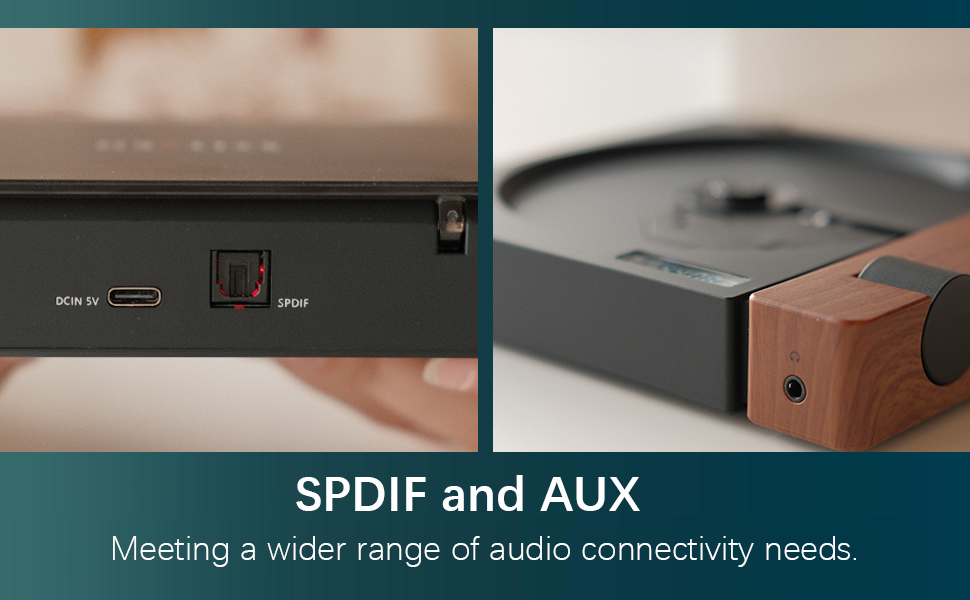
Figure 3: SPDIF and AUX Connectivity Options
4. Instrucciones de funcionamiento
4.1 Reproducción de CD
- Abra con cuidado la cubierta del disco.
- Coloque un CD en el eje, asegurándose de que esté colocado correctamente.
- Cierre la cubierta del disco.
- Press the Play/Pause button (orange button) to begin playback.
- Use the Skip Forward and Skip Backward buttons to navigate between tracks.
- Ajuste el volumen con la perilla de volumen.

Figure 4: Opening the Disc Cover

Figura 5: Panel de control y pantalla
4.2 controles sobreview
The R300 features a minimalist control panel on the right side of the unit:
- Interruptor de alimentación: Located on the back/side of the unit (refer to Figure 2).
- Perilla de volumen: Rotates to adjust audio output level.
- Botón de reproducción/pausa: Orange button to start or pause CD playback.
- Botones de salto: Black buttons for skipping tracks forward or backward.
- Bluetooth Activation Button: (Likely one of the black buttons, or the top one, as shown in video) Used to initiate Bluetooth pairing.
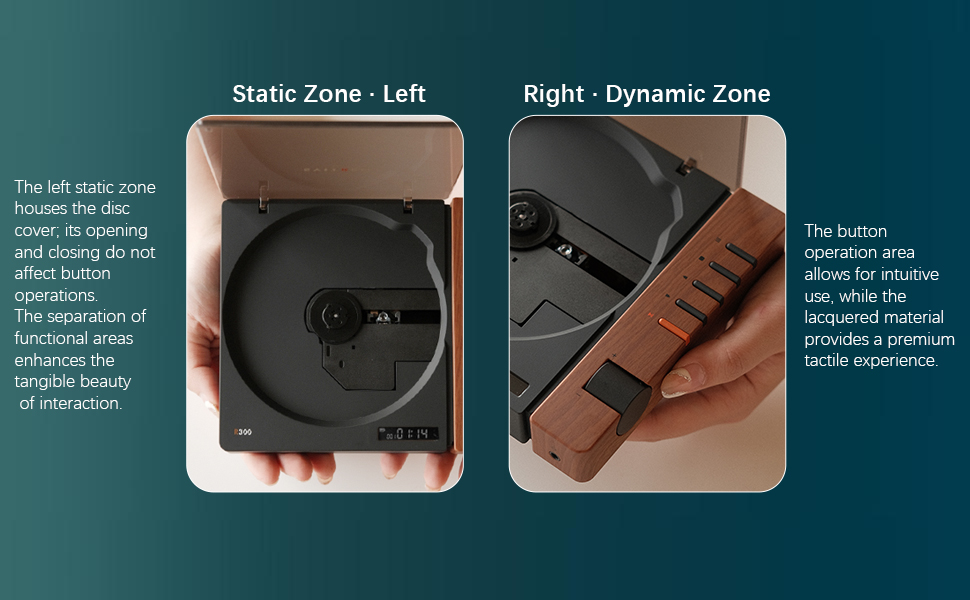
Figure 6: Functional Zones of the R300
5. Mantenimiento
- Mantenga la unidad limpia con un paño suave y seco. Evite el uso de limpiadores abrasivos o disolventes.
- Ensure the disc tray is free of dust and debris to prevent playback issues.
- Cuando no esté en uso, guarde el reproductor de CD en un lugar fresco y seco, alejado de la luz solar directa y de temperaturas extremas.
- Manipule los CD por los bordes para evitar huellas dactilares y arañazos.
6. Solución de problemas
| Problema | Posible causa | Solución |
|---|---|---|
| El reproductor no se enciende. | La batería está agotada o el cable de alimentación no está conectado. | Charge the unit using the Type-C power cable. Ensure the power cable is securely connected. |
| "NO CD" message displayed. | No CD inserted, CD is dirty/scratched, or CD is not properly seated. | Insert a CD. Clean the CD with a soft cloth. Ensure the CD is placed correctly on the spindle. |
| No hay salida de sonido. | No external speaker connected, volume too low, or incorrect output mode selected. | Connect an external speaker via Bluetooth, SPDIF, or AUX. Increase the volume. Ensure the external device is properly configured for input. |
| Problemas de conexión Bluetooth. | Dispositivo no en modo de emparejamiento, fuera de alcance o con interferencias. | Ensure both devices are in pairing mode. Move devices closer. Reduce interference from other wireless devices. |
| Player randomly shuts off. | Batería baja o mal funcionamiento interno. | Asegúrese de que la batería esté completamente cargada. Si el problema persiste, comuníquese con atención al cliente. |
7. Especificaciones
- Nombre del modelo: R300
- Marca: siitren
- Dimensiones del producto: 6.38 x 5.79 x 1.28 pulgadas
- Peso del artículo: 14.1 onzas
- Baterías: Se requieren 1 pilas AAA (incluidas)
- Tecnología de conectividad: Bluetooth, SPDIF, AUX
- Característica especial: Portátil
- Fabricante: syitren/Guangdong Kaiping Electronics Co., Ltd
- Capacidad de la batería: Built-in 2000mAh (more than 6 hours playback)
8. Garantía y soporte
For warranty information and customer support, please refer to the product's official Amazon listing page or visit the syitren official webSitio. Conserve su recibo de compra para cualquier reclamación de garantía.
Fabricante: syitren/Guangdong Kaiping Electronics Co., Ltd
Tienda de la marca: Visit the syitren Store on Amazon
Ask a question about this manual
Ask about setup, troubleshooting, compatibility, parts, safety, or missing instructions. Manuals+ will review the question and use this page’s manual context to help answer it.