
JMT 007
JMT M.2 RGB SSD Enclosure
Modelo: 007 - Manual de instrucciones
1. Introducción
Thank you for choosing the JMT M.2 RGB SSD Enclosure, Model 007. This enclosure is designed to provide a high-speed, portable storage solution for your M.2 NVMe and SATA SSDs. It supports both M-Key and B+M Key SSDs in the 2280 form factor, offering versatile compatibility for your storage needs.
The Model 007 features a robust all-aluminum design for optimal heat dissipation and durability. It utilizes a Master Control 9210B chip, enabling dual-protocol support for NVMe (up to 10Gbps) and SATA (up to 6Gbps) drives via a USB 3.2 interface. This model does not include a touch screen.

Figura 1: Frente view of the JMT M.2 RGB SSD Enclosure (Model 007), showcasing its sleek design and integrated RGB light bar.
2. Configuración e instalación
This section guides you through the process of installing your M.2 SSD into the enclosure and connecting it to your device.
2.1. Instalación de SSD
- Prepare el recinto: Gently slide open the enclosure cover. The Model 007 typically has a sliding mechanism or screws to access the internal PCB.
- Inserte el SSD: Align your M.2 2280 NVMe or SATA SSD with the M-Key or B+M Key slot on the enclosure's circuit board. Insert the SSD firmly but carefully into the slot at an angle.
- Asegure el SSD: Once inserted, gently push down the SSD until it is flat against the PCB. Secure it with the provided screw or rubber fastener at the end of the SSD.
- Cerrar el recinto: Slide the cover back onto the enclosure until it clicks into place or secure it with the screws. Ensure it is fully closed to protect the internal components.
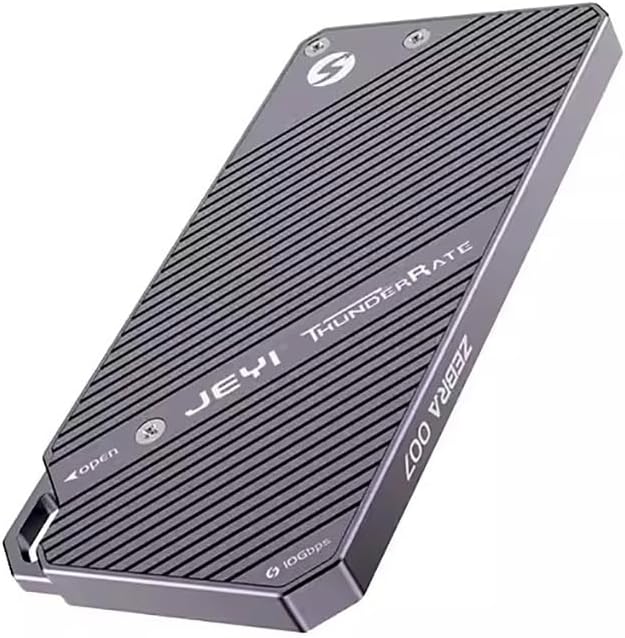
Figura 2: Posterior view of the enclosure, indicating the access points for SSD installation. Note the "JEYI ThunderRate ZEBRA 007" branding.
2.2. Conexión a su dispositivo
- Conecte el cable USB: Use the provided USB-C to USB-C or USB-C to USB-A cable to connect the enclosure's USB-C port to a compatible USB port on your computer or device.
- Reconocimiento de dispositivo: Your operating system should automatically detect the new storage device. For new SSDs, you may need to initialize and format the drive through Disk Management (Windows) or Disk Utility (macOS) before it appears as a usable drive.

Figura 3: Lado view of the enclosure, highlighting the USB-C port for connection and the "10Gbps" speed indicator.
3. Instrucciones de funcionamiento
Once connected, the JMT M.2 RGB SSD Enclosure functions as an external storage device. You can drag and drop files, or use it for backups and other data management tasks.
3.1. Transferencia de datos
- Rendimiento de alta velocidad: The enclosure supports USB 3.2, providing data transfer speeds of up to 10Gbps with NVMe drives and up to 6Gbps with SATA drives. Ensure your computer's USB port also supports USB 3.2 (or higher) for optimal performance.
- Indicador RGB: The integrated RGB light bar indicates activity and status. Its dynamic lighting provides visual feedback during operation.

Figure 4: The enclosure with its RGB light bar illuminated, indicating operational status.
3.2. Read and Write Protection
The enclosure supports read and write protection features to safeguard your data. Consult your operating system's disk management tools for options to enable or disable write protection for the drive, if applicable. This feature helps prevent accidental data deletion or modification.
4. Mantenimiento
Proper maintenance ensures the longevity and optimal performance of your SSD enclosure.
- Limpieza: Use a soft, dry cloth to wipe the exterior of the enclosure. Avoid using liquid cleaners or abrasive materials.
- Disipación de calor: The all-aluminum design is optimized for heat dissipation. Ensure the enclosure is placed in a well-ventilated area during prolonged use to prevent overheating, especially during large data transfers.
- Almacenamiento: Cuando no esté en uso, guarde el gabinete en un lugar fresco y seco, alejado de la luz solar directa y de temperaturas extremas.
- Eyección segura: Always safely eject the enclosure from your operating system before disconnecting the USB cable to prevent data corruption.
5. Solución de problemas
If you encounter issues with your JMT M.2 RGB SSD Enclosure, refer to the following common troubleshooting steps:
- Gabinete no detectado:
- Asegúrese de que el cable USB esté conectado de forma segura tanto al gabinete como a la computadora.
- Pruebe con un puerto USB diferente en su computadora.
- Pruebe con un cable USB diferente.
- Verify that the M.2 SSD is correctly seated and secured within the enclosure.
- Verifique Administración de discos (Windows) o Utilidad de discos (macOS) para ver si la unidad se detecta pero no está inicializada/sin formato.
- Velocidades de transferencia lentas:
- Ensure you are using a USB 3.0/3.1/3.2 port on your computer. Connecting to a USB 2.0 port will result in significantly slower speeds.
- Verify the type of SSD installed (NVMe drives are faster than SATA drives).
- Check for background processes that might be consuming system resources or disk I/O.
- Ensure the enclosure is not overheating during large transfers.
- La luz RGB no se ilumina:
- Asegúrese de que el gabinete esté conectado correctamente a un puerto USB con alimentación.
- If the drive is detected and functioning, the light issue might be minor and not affect functionality.
Si los problemas persisten, consulte la información de soporte proporcionada en la Sección 7.
6. Especificaciones
| Característica | Detalle |
|---|---|
| Modelo | 007 |
| Chip de control maestro | 9210B |
| Tipos de SSD compatibles | M.2 NVMe / SATA (2280 form factor only) |
| Supported Keys | M-Key, B+M Key |
| Interfaz | USB 3.2 Tipo C |
| NVMe Transfer Speed | Hasta 10 Gbps |
| SATA Transfer Speed | Hasta 6 Gbps |
| Material | Aluminio |
| Característica especial | RGB Light Bar, Read/Write Protection |
| Mostrar | None (Model 007) |
7. Garantía y soporte
JMT products are designed for reliability and performance. For specific warranty details, please refer to the documentation included with your purchase or visit the official JMT websitio.
For technical support, troubleshooting assistance, or inquiries regarding your JMT M.2 RGB SSD Enclosure, please contact JMT customer service. You can often find contact information on the official JMT brand store or product packaging.
JMT Brand Store: Visit the JMT Store on Amazon