
1. Introducción
The Sygonix SY-5044422 Digital Timer Switch is designed for easy programming and operation, helping to manage power consumption for various appliances. This device features 20 ON/OFF programs, 3 random settings, and a countdown function, with switching intervals as short as 1 minute. Programs can be set for specific days, combinations of days, or daily. Its IP44 splash-proof rating allows for outdoor use, and an integrated battery retains settings during power outages. The timer supports a maximum switching capacity of 1800 W and includes enhanced touch protection.
2. Instrucciones de seguridad
- Lea atentamente todas las instrucciones antes de usar.
- This device is rated IP44, making it splash-proof for outdoor use. However, do not immerse it in water or expose it to direct jets of water.
- Ensure the total load of connected appliances does not exceed 1800 W.
- Do not open the device housing. Repairs should only be performed by qualified personnel.
- Keep out of reach of children. The device features enhanced touch protection.
- Desenchufe siempre el temporizador de la toma de corriente antes de limpiarlo.
3. Contenido del paquete
- Sygonix SY-5044422 Digital Timer Switch
- Manual de instrucciones
- Información de garantía
4. Producto terminadoview
Familiarize yourself with the components and controls of your digital timer switch.
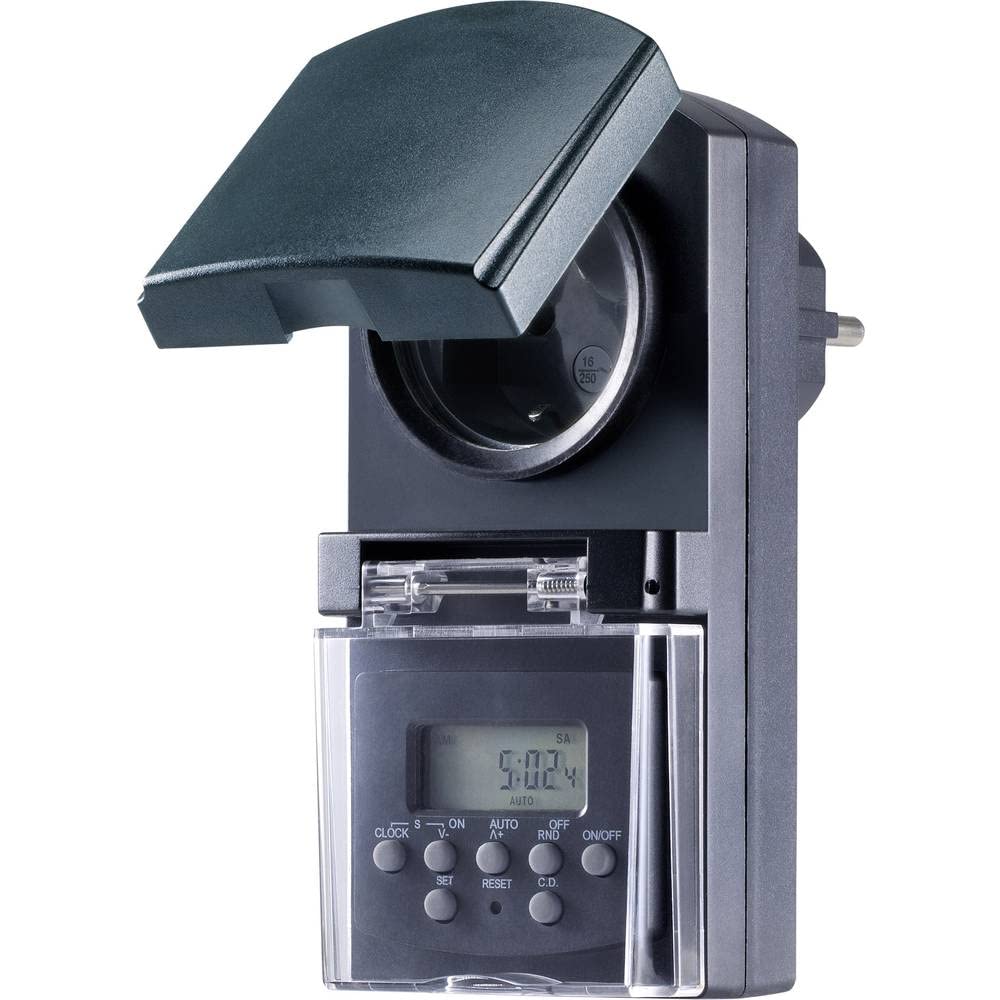
Figura 1: Frente view of the Sygonix SY-5044422 Digital Timer Switch. This image displays the LCD screen, which shows the current time and day, along with various control buttons including CLOCK, ON/OFF, SET, RESET, AUTO/A+, OFF/RND, and C.D. (Countdown).

Figura 2: Frente view of the timer with the protective cover opened, showing the integrated power socket. The display and control buttons are visible below the socket.
Botones de control:
- RELOJ: Se utiliza para establecer la hora y el día actuales.
- ENCENDIDO/APAGADO: Manually switches the timer output ON or OFF.
- CONJUNTO: Ingresa al modo de programación y confirma las configuraciones.
- REINICIAR: Borra todas las configuraciones y restablece el temporizador a los valores predeterminados de fábrica.
- AUTO/A+: Cycles through automatic mode, program settings, and adjusts values.
- OFF/RND: Activates or deactivates the Random function.
- C.D. (Countdown): Activates or deactivates the Countdown function.
5. Configuración
5.1 Carga inicial
Before first use, plug the timer into a power outlet for approximately 30 minutes to charge the internal battery. This ensures the display is active and settings are retained during power outages o cuando está desenchufado.
5.2 Configuración de la hora y el día actuales
- Mantenga pulsado el RELOJ botón.
- Mientras sostenía RELOJ, prensa AUTO/A+ repeatedly to set the current day (MO, TU, WE, TH, FR, SA, SU).
- Mientras sostenía RELOJ, prensa COLOCAR repetidamente para establecer la hora actual.
- Mientras sostenía RELOJ, prensa OFF/RND repetidamente para establecer el minuto actual.
- Liberar el RELOJ para guardar la configuración
5.3 Summer Time Adjustment
The timer supports a summer time function. To activate or deactivate:
- Mantenga pulsado el RELOJ botón y el ENCENDIDO/APAGADO button simultaneously for 3 seconds. The display will show "SUMMER" or "WINTER" to indicate the mode.
6. Instrucciones de funcionamiento
6.1 Programming ON/OFF Times (Weekly Program)
The timer allows for up to 20 ON/OFF programs. Each program can be set for specific days or combinations of days.
- Presione el COLOCAR button once to enter program mode. The display will show "1 ON".
- Prensa AUTO/A+ to select the desired day(s) for the program (e.g., MO, TU, WE, TH, FR, SA, SU, MO-FR, SA-SU, MO-SA, etc.).
- Prensa COLOCAR para confirmar la selección del día.
- Prensa AUTO/A+ para establecer la hora de encendido deseada.
- Prensa OFF/RND para establecer el minuto de encendido deseado.
- Prensa COLOCAR again. The display will now show "1 OFF".
- Repita los pasos 2 a 5 para configurar el tiempo de apagado para el mismo programa.
- Continuar presionando COLOCAR to cycle through all 20 ON/OFF programs. To exit program mode at any time, press the RELOJ botón.
Nota: After programming, ensure the timer is in AUTO mode for the programs to execute. Press ENCENDIDO/APAGADO repeatedly until "AUTO" is displayed.
6.2 Función de cuenta regresiva
The countdown function allows you to switch the connected appliance ON or OFF after a set duration.
- Presione el CD button once. The display will show "CD ON" or "CD OFF".
- Prensa AUTO/A+ para establecer la hora de cuenta regresiva deseada.
- Prensa OFF/RND to set the desired countdown minute.
- Prensa CD again to start the countdown. The display will show the remaining time.
- Para cancelar la cuenta regresiva, presione CD una vez más.
6.3 Random Function (Presence Simulation)
The random function simulates presence by randomly switching the connected appliance ON and OFF within a set time window, deterring potential intruders.
- Asegúrese de que el temporizador esté en AUTO modo.
- Presione el OFF/RND button. The display will show "RND" to indicate the random function is active.
- The timer will now randomly switch the output ON and OFF for short periods within the programmed ON/OFF times.
- To deactivate the random function, press OFF/RND again. "RND" will disappear from the display.
6.4 Anulación manual de encendido y apagado
You can manually override the programmed settings at any time.
- Presione el ENCENDIDO/APAGADO button repeatedly to cycle through "ON", "OFF", and "AUTO" modes.
- "ON" means the output is continuously ON.
- "OFF" means the output is continuously OFF.
- "AUTO" means the timer will follow the programmed settings.
7. Mantenimiento
- Before cleaning, always unplug the timer from the power outlet.
- Limpie el dispositivo con un paño suave y seco. No utilice limpiadores abrasivos ni disolventes.
- Asegúrese de que no entren líquidos en el dispositivo.
8. Solución de problemas
| Problema | Posible causa | Solución |
|---|---|---|
| La pantalla está en blanco o tenue. | La batería interna está descargada. | Conecte el temporizador a una toma de corriente activa durante al menos 30 minutos para cargar la batería. |
| Los programas no se están ejecutando. | El temporizador no está en modo AUTO. | Presione el ENCENDIDO/APAGADO button repeatedly until "AUTO" is displayed. |
| Incorrect time or day displayed. | Time/day was not set correctly or reset. | Refer to Section 5.2 "Setting Current Time and Day" to re-set. |
| Se perdieron todas las configuraciones después de un corte de energíatage. | Internal battery not charged or faulty. | Ensure the timer is regularly plugged in to keep the internal battery charged. If the issue persists, contact support. |
9. Especificaciones
| Número de modelo: | SY-5044422 |
| Max. Switching Capacity: | 1800 W |
| Clase de protección: | IP44 (a prueba de salpicaduras) |
| Tipo de pantalla: | Digital |
| Programas: | 20 programas ON / OFF |
| Intervalo mínimo de conmutación: | 1 minuto |
| Características especiales: | Countdown function, Random function (presence simulation), Summer time, Integrated battery for settings retention, Enhanced touch protection. |
| Dimensiones del producto: | 14 x 10 x 6 cm |
| Fabricante: | Sygonix |
| País natal: | Porcelana |
10. Garantía y soporte
This product comes with a minimum 2-year warranty from the date of purchase. In case of any issues or defects, please contact your retailer or Sygonix customer support for assistance. Keep your proof of purchase for warranty claims.