
1. Introducción
This manual provides comprehensive instructions for the proper setup, operation, and maintenance of the Sartorius GL2202i-2S Gold Scale. Adhering to these guidelines will ensure accurate and reliable performance of your precision weighing instrument.
2. Información de seguridad
Tenga en cuenta las siguientes precauciones de seguridad para evitar lesiones y daños al dispositivo:
- Operate the scale only in a stable, level environment free from excessive vibrations, drafts, and extreme temperature fluctuations.
- Do not expose the scale to corrosive chemicals or liquids.
- Asegúrese de que la fuente de alimentación coincida con las especificaciones indicadas en el dispositivo.
- Evite dejar caer o someter la báscula a impactos fuertes.
- Sólo personal calificado debe realizar reparaciones o ajustes internos.
3. Producto terminadoview
The Sartorius GL2202i-2S is a precision gold scale designed for accurate weighing applications. Key components include the weighing pan, digital display, and control panel.
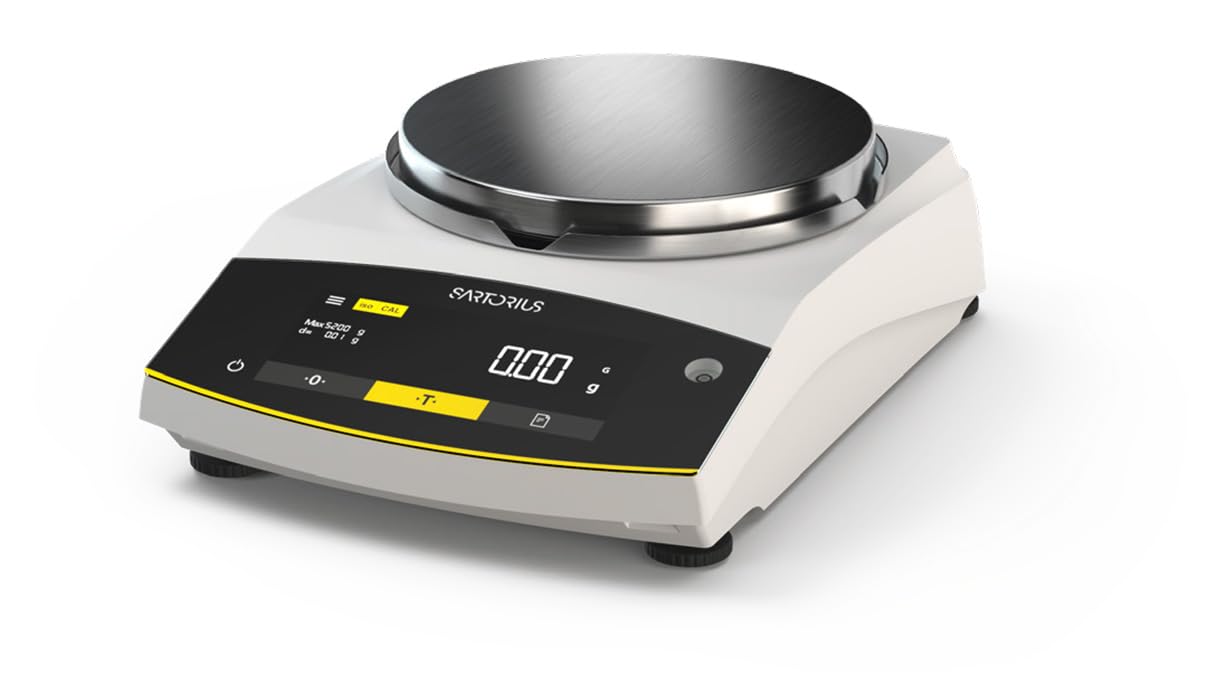
Figure 1: Sartorius GL2202i-2S Gold Scale. This image shows the scale's stainless steel weighing pan, the digital display, and the control buttons for operation.
Componentes principales:
- Plato de pesaje: Plataforma de acero inoxidable para colocar artículos a pesar.
- Pantalla digital: Hybrid display (LED and touch technology) showing weight readings and operational status.
- Panel de control: Buttons for power, tare, calibration, and menu navigation.
- Pies niveladores: Adjustable feet to ensure the scale is perfectly level.
4. Configuración
4.1 Desembalaje
Carefully remove the scale and all accessories from the packaging. Retain the original packaging for future transport or storage.
4.2 Colocación
Place the scale on a firm, stable, and level surface. Avoid locations subject to:
- Luz solar directa o fuentes de calor.
- Strong air currents (drafts from doors, windows, or air conditioning).
- Vibrations from machinery or heavy traffic.
- Rapid temperature changes.
4.3 Nivelación de la báscula
Adjust the leveling feet located at the bottom of the scale until the air bubble in the level indicator (usually located near the display) is centered. This ensures accurate weighing results.
4.4 Conexión de alimentación
Connect the provided power adapter to the scale's power input and then to a suitable electrical outlet. Allow the scale to warm up for at least 30 minutes after initial power-on for optimal stability.
5. Instrucciones de funcionamiento
5.1 Encendido y apagado
Presione el Fuerza button (often marked with a circle and a vertical line) to turn the scale on or off. The display will show a self-test sequence before settling at zero.
5.2 Pesaje básico
- Ensure the display reads 0.00 gramos before placing any item on the pan.
- Coloque con cuidado el artículo que va a pesar en el centro del plato de pesaje.
- Wait for the reading to stabilize. The stable reading will be displayed.
- Retire el artículo de la sartén.
5.3 Función de tara
La función de tara le permite pesar artículos en un contenedor restando el peso del contenedor.
- Coloque el recipiente vacío sobre el plato de pesaje.
- Presione el Tara button (often marked with a 'T' or '->0<-'). The display will reset to 0.00 gramos.
- Añada el artículo a pesar al recipiente. La pantalla mostrará su peso neto.
- Remove both the item and container from the pan.
6. Calibración
The Sartorius GL2202i-2S features an automatic, built-in calibration and adjustment function. Regular calibration ensures the highest level of accuracy. Refer to the on-screen prompts or the scale's specific menu for initiating the automatic calibration process. Ensure the scale is stable and free from any load during calibration.
7. Mantenimiento y limpieza
7.1 Limpieza
To maintain the scale's performance and appearance:
- Disconnect the scale from the power supply before cleaning.
- Limpie las superficies exteriores con un paño suave, damp paño y un detergente suave.
- No utilice limpiadores abrasivos, solventes o productos químicos agresivos, ya que pueden dañar el acabado o los componentes internos.
- Ensure no liquids enter the scale's housing or display area.
- The stainless steel weighing pan can be removed and cleaned separately with appropriate cleaning agents.
7.2 Almacenamiento
If storing the scale for an extended period, ensure it is clean, dry, and stored in its original packaging or a protective container in a stable environment.
8. Solución de problemas
Esta sección aborda problemas comunes que podrías encontrar. Si tienes problemas que no aparecen aquí, contacta con atención al cliente.
| Problema | Posible causa | Solución |
|---|---|---|
| La pantalla muestra "Err" o lecturas inestables. | Scale not level, vibrations, drafts, overload, or internal error. | Check leveling, move to a stable location, ensure no load exceeds capacity, restart the scale. |
| La báscula no se enciende. | Power cable disconnected, faulty outlet, or power adapter issue. | Verify power cable connection, try a different outlet, check power adapter. |
| Lecturas inexactas. | Needs calibration, environmental factors, or dirty pan. | Perform calibration, ensure stable environment, clean weighing pan. |
9. Especificaciones
- Modelo: GL2202i-2S
- Marca: Sartorio
- Capacity x Readability: 2200 gx 0.01 g
- Tamaño de la sartén: 180 mm (Diameter)
- Peso: Aproximadamente 12.00 libras (5.44 kg)
- Tipo de pantalla: Hybrid (LED and Touchscreen)
- Característica especial: Automatic, built-in calibration and adjustment function
- Color: Blanco
10. Garantía y soporte
For warranty information, technical support, or service inquiries, please refer to the documentation provided with your purchase or contact Sartorius customer service directly. Keep your purchase receipt and model number readily available when contacting support.