
Introducción
Thank you for choosing the BoyKeep Ease Life 1080P Indoor Security Camera, Model K11. This manual provides essential information for setting up, operating, and maintaining your camera to ensure optimal performance and security for your home. This camera features 1080P resolution, 2.4G Wi-Fi connectivity, motion detection, two-way audio, and night vision capabilities.
¿Qué hay en la caja?
- BoyKeep Ease Life 1080P Indoor Security Camera (Model K11)
- Adaptador de corriente
- Manual de instrucciones
Guía de configuración
1. Encendido
Connect the camera to the power adapter and plug it into a power outlet. The camera will initiate a self-calibration sequence.
Descripción del vídeo: This video demonstrates the unboxing and initial power-on process of the BoyKeep K11 camera. It shows connecting the power cable and the camera performing its self-calibration, rotating to scan its environment.
2. Descarga e instalación de la aplicación
Download the 'BoyKeep' app from the App Store (iOS) or Google Play Store (Android). Scan the QR code provided in the user manual or search directly for 'BoyKeep'.

Descripción de la imagen: A visual guide showing four steps to connect the camera: 1. Download the app, 2. Press and hold the reset button, 3. Scan the QR code, 4. Connect successfully.
3. Emparejamiento de dispositivos
- Open the BoyKeep app and register an account if you haven't already.
- Select 'Add Device' and choose the K11 model (Lightbulb Cam).
- Follow the in-app instructions to connect to your 2.4G Wi-Fi network. Ensure your Wi-Fi password is correct.
- The app will generate a QR code. Present this QR code to the camera lens (4 to 12 inches away) until you hear a 'beep-beep' sound, indicating successful pairing.
4. Opciones de montaje
The camera can be placed on a flat surface or mounted on a wall or ceiling. Ensure the camera is positioned to cover the desired surveillance area. For outdoor use, place the camera in a sheltered area to protect it from direct weather exposure.
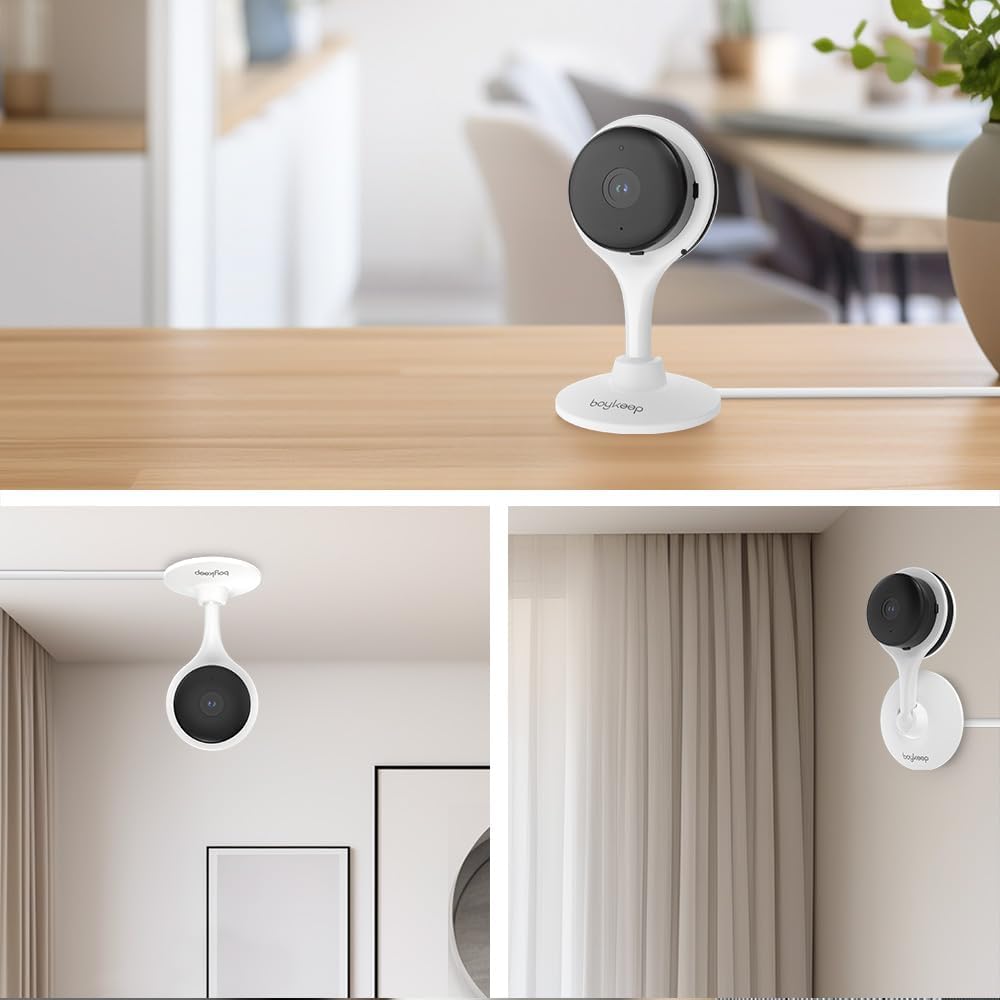
Descripción de la imagen: This image displays various mounting options for the BoyKeep K11 camera, including tabletop, ceiling, and wall mounting, demonstrating its versatile placement.

Descripción de la imagen: A notice illustrating the importance of sheltered operation for the camera. It shows correct placement under an eave and incorrect placement directly exposed to rain, emphasizing durability and performance.
Instrucciones de funcionamiento
1. Vivir View y control PTZ
Once connected, access the live feed through the BoyKeep app. Use the on-screen controls to pan (355° horizontal) and tilt (60° vertical) the camera for a comprehensive view of your space. Digital zoom is also available.

Descripción de la imagen: An illustration showing the 360-degree pan and tilt capabilities of the camera, providing all-round coverage without blind spots.
2. Audio bidireccional
La cámara cuenta con un micrófono y un altavoz integrados, lo que permite la comunicación bidireccional. Toca el icono del micrófono en la app para hablar a través de la cámara y escuchar el audio del entorno.

Descripción de la imagen: A visual representation of the two-way audio feature, showing a dog saying "Woof Woof!" and a person responding "Baby, miss you!" through the camera.

Descripción de la imagen: This image highlights the clear communication of the two-way audio, showing a child and a dog interacting with a parent's voice message, "It's time to go home."
3. Detección y seguimiento de movimiento
Enable motion detection in the app settings to receive real-time alerts on your smartphone when movement is detected. The camera can also automatically track detected motion.

Descripción de la imagen: An image demonstrating the motion tracking feature, with a dog running in a yard and yellow boxes highlighting its movement as the camera follows.
4. Visión nocturna
The K11 camera offers both clear night vision (black and white) and color night vision, ensuring visibility even in low-light conditions. The light can be activated manually via the app.

Descripción de la imagen: A scene of an outdoor patio at night, illuminated by string lights, showcasing the camera's color night vision capability.

Descripción de la imagen: A black and white image of a dog looking at food on a table, demonstrating the camera's clear night vision in monochrome.
5. Grabación y almacenamiento
The camera supports local storage via a MicroSD card (not included) for continuous recording or event-triggered recordings. Cloud storage options are also available through a subscription service.

Descripción de la imagen: This image illustrates the recording capabilities of the camera, showing options for cloud storage and memory card storage, with a filmstrip overlay of recorded moments.
Mantenimiento
- Limpieza: Utilice un paño suave y seco para limpiar la lente y el cuerpo de la cámara. Evite usar productos químicos agresivos o limpiadores abrasivos.
- Actualizaciones de software: Regularly check the BoyKeep app for firmware updates to ensure your camera has the latest features and security enhancements.
- Ciclo de energía: Si la cámara tiene problemas, intente desconectarla de la fuente de alimentación durante 10 segundos y luego volver a conectarla.
Solución de problemas
- La cámara no se conecta al Wi-Fi: Ensure your Wi-Fi network is 2.4G (the camera supports 5G, but some users report better stability on 2.4G). Verify the Wi-Fi password is correct. Try resetting the camera by holding the reset button for 30 seconds.
- Sin vida view: Check your internet connection and ensure the camera is powered on. Restart the app.
- Alertas de movimiento no recibidas: Verify motion detection is enabled in the app settings and that app notifications are allowed on your phone.
- Mala calidad de video: Ensure your Wi-Fi signal is strong. Adjust video resolution settings in the app if necessary.
Presupuesto
| Característica | Detalle |
|---|---|
| Nombre del modelo | K11 |
| Marca | BoyKeep |
| Resolución de captura de video | 2K (3 MP) |
| Tecnología de conectividad | Inalámbrico (Wi-Fi) |
| Protocolo de conectividad | WiFi (2.4G) |
| Característica especial | 2-Way Audio, Motion Detection, Night Vision |
| Uso en interiores y exteriores | Indoor (Outdoor with shelter) |
| Dispositivos compatibles | Tableta, teléfono inteligente |
| Fuente de poder | Eléctrico con cable |
| Tipo de montaje | Montaje en pared |
| Factor de forma | Cúpula |
| Dimensiones del artículo L x W x H | 5 x 3.2 x 2.7 pulgadas |
| Peso del artículo | 8.1 onzas |
| Calificación de protección internacional | IP65 |
Información de garantía
Please refer to the product packaging or contact BoyKeep customer support for detailed warranty information. Typically, products come with a limited manufacturer's warranty covering defects in materials and workmanship.
Atención al cliente
For any questions, technical assistance, or support needs, please contact BoyKeep customer service. Contact details can usually be found in the included instruction manual or on the official BoyKeep websitio.
Descripción del vídeo: Este vídeo ofrece una breve descripciónview of the BoyKeep 3MP Bulb Security Camera, highlighting its features and ease of use. It serves as a general product introduction from the seller.


