
Introducción
Thank you for choosing the Vieta Pro Karaoke Party Microphone. This device combines a high-quality microphone with an integrated speaker, designed for an engaging karaoke experience. It features True Wireless technology, allowing two microphones to connect to a single device, and offers various sound modes and connectivity options.
Contenido del paquete
- Vieta Pro Karaoke Party Microphone with Integrated Speaker
- Cable de carga (USB-C)
- Manual de usuario

Image: The retail box of the Vieta Pro Karaoke Party Microphone, showing the product and its features.
Producto terminadoview
Familiarize yourself with the main components and controls of your Vieta Pro Karaoke Party Microphone.

Imagen: Frente view of the Vieta Pro Karaoke Party Microphone, highlighting the control buttons for power, volume, mode, and Bluetooth.
Controles y Puertos:
- Botón de encendido: Mantenga pulsado para encender o apagar. Pulse brevemente para cambiar de modo.
- Botones de volumen (+/-): Ajusta el volumen del altavoz.
- Botón de modo (M): Cycle through sound effects or modes.
- Botón Bluetooth: Iniciar el emparejamiento Bluetooth.
- Puerto USB-C: Para cargar el dispositivo.
- 3.5mm Audio Jack (Input): Conecta fuentes de audio externas.
- 3.5mm Audio Jack (Output): Conecte auriculares o altavoces externos.
- Botón de modo de luz: Change or turn off LED lighting effects.
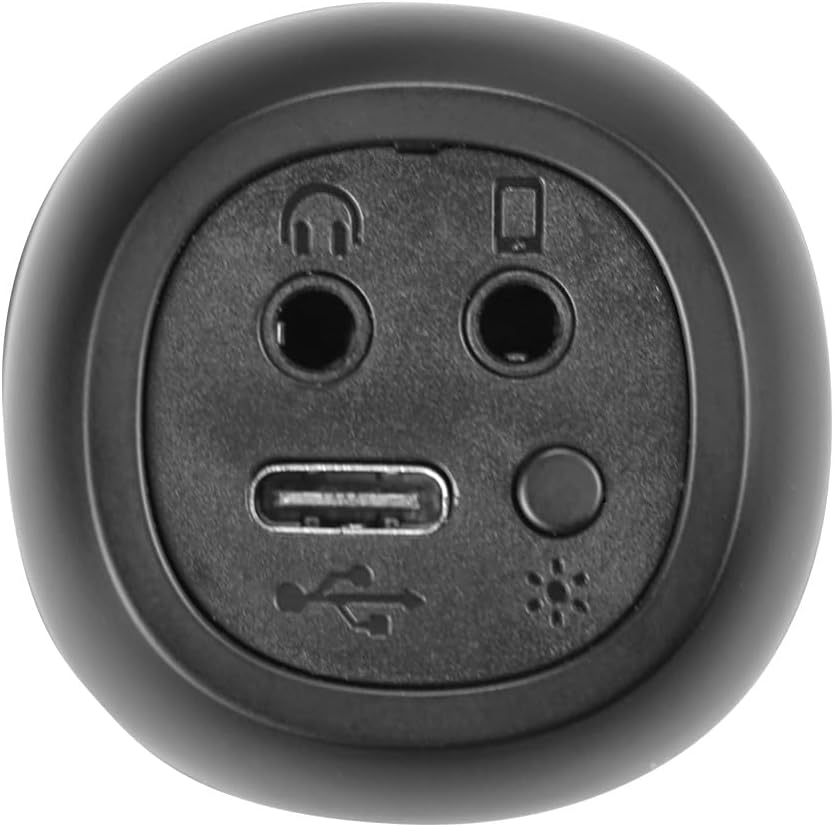
Imagen: Primer plano view of the bottom of the microphone, showing the USB-C charging port, 3.5mm audio input/output jacks, and the light mode button.
Configuración y conexión
1. Carga del micrófono
Before first use, fully charge the microphone. Connect the provided USB-C cable to the microphone's USB-C port and the other end to a USB power adapter (not included) or a computer's USB port. The battery indicator light will show charging status.
2. Encendido / apagado
Mantenga pulsado el Botón de encendido for approximately 3 seconds to turn the microphone on or off. A sound prompt will indicate the power status.
3. Emparejamiento Bluetooth
- Turn on the microphone. It will automatically enter Bluetooth pairing mode, indicated by a flashing Bluetooth light.
- En su teléfono inteligente, tableta o computadora, habilite Bluetooth y busque los dispositivos disponibles.
- Select "Vieta Pro Karaoke Party" from the list of devices.
- Once connected, a sound prompt will confirm successful pairing, and the Bluetooth light will stop flashing.
4. True Wireless Connection (Connecting Two Microphones)
To use two Vieta Pro Karaoke Party microphones simultaneously with one device:
- Asegúrese de que ambos micrófonos estén encendidos y no conectados a ningún otro dispositivo Bluetooth.
- On one microphone (this will be the primary), double-press the Botón Bluetooth. It will enter True Wireless pairing mode.
- The primary microphone will search for the second microphone. Once connected, a sound prompt will confirm the True Wireless connection.
- Now, connect the primary microphone to your device via Bluetooth as described in step 3. Both microphones will now output audio from your device.

Image: Two individuals holding and using Vieta Pro Karaoke Party Microphones, demonstrating the True Wireless feature.
5. Conexión por cable (AUX)
Connect an external audio source (e.g., MP3 player) to the microphone using a 3.5mm audio cable (not included) plugged into the 3.5mm audio input jack.
Instrucciones de funcionamiento
1. Ajuste del volumen
Utilice el Volumen + y Volumen buttons on the microphone to adjust the speaker output volume. You can also control the volume from your connected device.
2. Changing Sound Modes/Effects
Presione el Botón de modo (M) repeatedly to cycle through the four available sound configuration modes or voice effects. Experiment to find your preferred sound.
3. Voice Reduction Feature
This feature allows you to reduce the vocal track of a song, making it easier to sing along. To activate or deactivate this feature, refer to the specific instructions in the full manual or experiment with the Botón de modo (M) or a dedicated button if present (not explicitly detailed in provided data, but mentioned as a feature).
4. Grabación
The microphone supports one-touch recording. Connect the microphone to a compatible recording device (e.g., smartphone with a recording app) via Bluetooth or the 3.5mm output jack. Press the dedicated Botón de grabación (if available, or refer to the full manual for specific button assignment) to start and stop recording.
5. Efectos de iluminación LED
Presione el Botón de modo de luz (located near the ports at the bottom) to change the LED lighting patterns or turn them off.

Image: Close-up of the Vieta Pro Karaoke Party Microphone's speaker grille, showing the integrated LED lighting effects.
Mantenimiento
- Limpieza: Use a soft, dry cloth to clean the microphone's surface. Do not use abrasive cleaners or solvents.
- Almacenamiento: Guarde el micrófono en un lugar fresco y seco, alejado de la luz solar directa y de temperaturas extremas.
- Cuidado de la batería: Para prolongar la vida útil de la batería, evite descargarla por completo con frecuencia. Cargue el dispositivo regularmente, incluso si no lo usa durante períodos prolongados.
- Exposición al agua: Este dispositivo no es resistente al agua. Evite la exposición al agua o a la humedad alta.
Solución de problemas
| Problema | Posible causa | Solución |
|---|---|---|
| Sin poder | La batería está agotada. | Cargue el micrófono con el cable USB-C. |
| No se puede conectar a través de Bluetooth | Bluetooth is off on the device; microphone is already connected to another device; microphone is out of range. | Ensure Bluetooth is enabled on your device. Disconnect from other devices. Move microphone closer to your device (within 10 meters). Restart both devices. |
| No hay salida de sonido | Volume is too low; microphone is muted; incorrect input source. | Increase volume on both the microphone and your connected device. Check if the microphone is in the correct operating mode. |
| True Wireless connection fails | One or both microphones are already paired; microphones are too far apart. | Ensure both microphones are unpaired from other devices. Place them close to each other during True Wireless pairing. Follow True Wireless pairing steps carefully. |
Presupuesto
| Característica | Detalle |
|---|---|
| Nombre del modelo | Karaoke Party |
| Marca | Vieta Pro |
| Tecnología de conectividad | Verdaderamente inalámbrico, Bluetooth |
| Tipo de conector | USB-C, conector de 3.5 mm |
| Potencia de salida | 18 W |
| Duración de la batería | Hasta 10 horas |
| Tipo de batería | 1 batería de iones de litio (incluida) |
| Rango de frecuencia | De 50 a 15,000 Hz |
| Impedancia | 600 ohmios |
| Patrón polar | Unidireccional |
| Dispositivos compatibles | Computadora personal, teléfono inteligente |
| Características especiales | Volume Control, 1-Touch Recording, Lighting Modes, Battery Indicator, Radio |
| Peso | 337 gramos |
| Material | Plástico |
Garantía y soporte
For warranty information and technical support, please contact the manufacturer, FRAMASON AUDIO SA, or your local retailer. Keep your proof of purchase for any warranty claims.
Manufacturer: FRAMASON AUDIO SA