
1. Introducción
Thank you for choosing the TECLAST Mini PC N15. This compact and powerful mini computer is designed for a wide range of applications, from home entertainment and office tasks to creative work and light gaming. Featuring an Intel N5095 processor, 16GB DDR4 RAM, and a 512GB PCI-e 3.0 SSD, it offers efficient performance in a small form factor. This manual provides essential information for setting up, operating, maintaining, and troubleshooting your device.
2. Contenido del paquete
Please verify that all items listed below are included in your package. If any items are missing or damaged, please contact TECLAST customer support.
- 1x TECLAST N15 Mini PC
- 1x Manual de usuario
- 1 cable HDMI
- 1x soporte VESA
- 1x adaptador de corriente
- 1x cable de alimentación

Image: Package contents of the TECLAST N15 Mini PC.
3. Producto terminadoview
3.1. Características principales
- Procesador: Intel N5095 (4 Cores, 4 Threads, up to 2.9GHz Turbo Frequency)
- Gráficos: Gráficos Intel UHD
- Memoria: 16 GB de RAM DDR4
- Almacenamiento: 512GB PCI-e 3.0 SSD
- Conectividad: Dual 2.5GbE RJ45 Ethernet, Wi-Fi (2.4G+5G ac), Bluetooth 4.2
- Salida de vídeo: Supports up to three 4K displays (HDMI, DisplayPort, Full-Function Type-C)
- Puertos: Multiple USB 3.2, USB 2.0, Full-Function Type-C, DisplayPort, HDMI, COM Port, Micro SD Card Reader, Headphone Output, Microphone Input
- Diseño: Compact (0.53L volume, 400g weight), Aluminum Body, VESA Mountable

Image: Intel N5095 Processor specifications and architecture.
3.2. Puertos e Interfaces
The TECLAST N15 Mini PC offers a comprehensive set of ports for versatile connectivity:
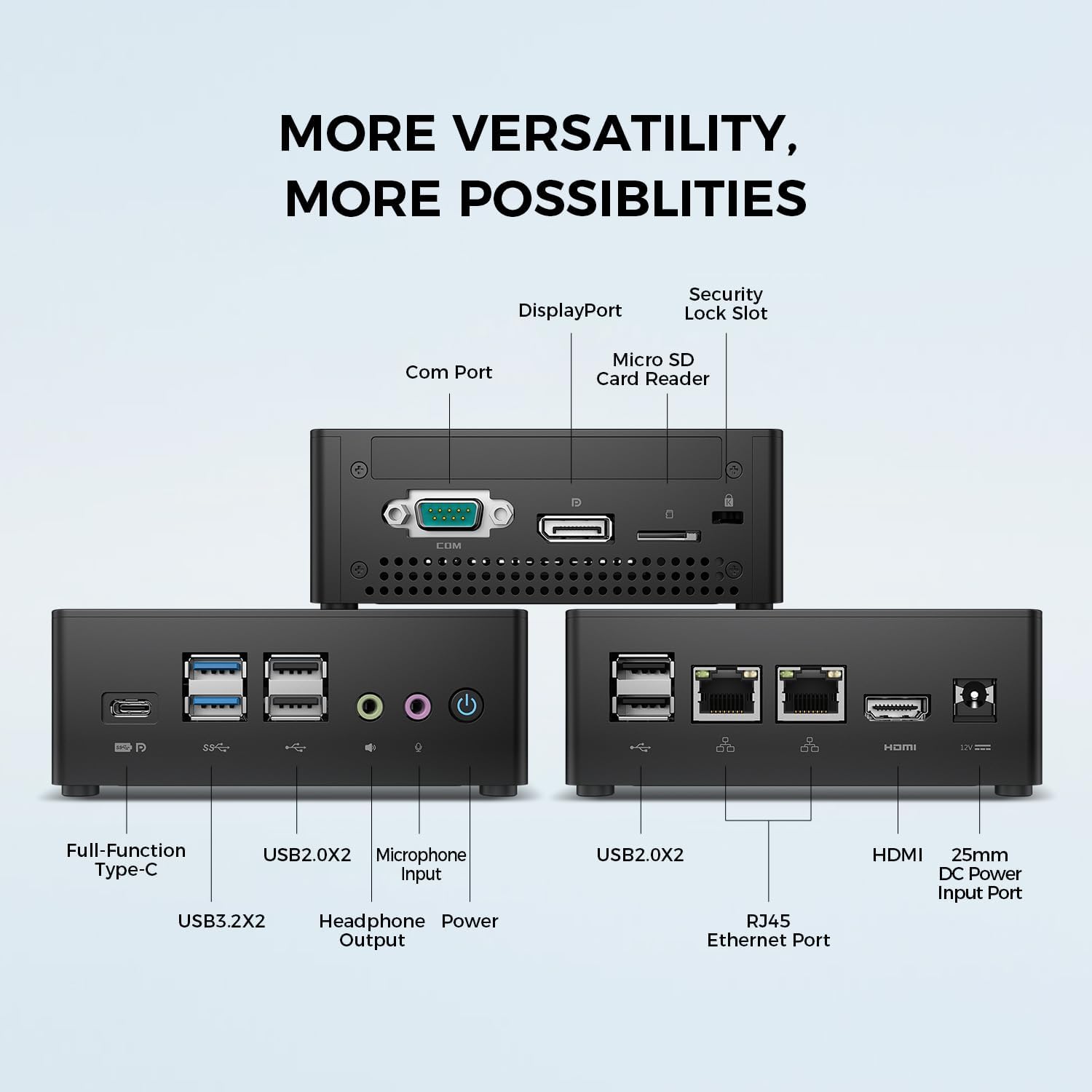
Imagen: Detallada view of the TECLAST N15 Mini PC's front, side, and rear ports.
- Panel frontal: Full-Function Type-C (supports charging, data, video, audio), 2x USB 3.2, 2x USB 2.0, Headphone Output, Microphone Input, Power Button.
- Panel lateral: COM Port, DisplayPort, Micro SD Card Reader, Security Lock Slot.
- Panel trasero: 2x USB 2.0, 2x RJ45 Ethernet Ports (2.5GbE), HDMI, DC Power Input.

Image: Dual 2.5GbE RJ45 Ethernet Ports for high-speed networking.
3.3. Sistema de refrigeración
The N15 Mini PC is designed for efficient heat dissipation to ensure stable and quiet operation. It features a 15W TDP, nickel-plated heat pipe, and a turbo fan, providing over 16000mm² of heat dissipation area.

Image: Internal cooling system design for quiet and efficient operation.
3.4. Diseño compacto
With a compact volume of approximately 0.53L and a weight of 400g, the N15 Mini PC is highly portable and can be easily integrated into any workspace. Its aluminum body ensures durability.

Image: Compact size and lightweight design of the Mini PC.
4. Instrucciones de configuración
4.1. Conexión de periféricos
- Conectar el monitor: Use the provided HDMI cable to connect your monitor to the HDMI port on the Mini PC. Alternatively, use a DisplayPort cable or a Full-Function Type-C cable for compatible monitors.
- Conectar el teclado y el ratón: Conecte el teclado y el mouse USB a cualquier puerto USB disponible en la Mini PC.
- Conectarse a la red (opcional): For a wired connection, connect an Ethernet cable from your router or modem to one of the RJ45 ports on the Mini PC. For wireless, ensure your Wi-Fi network is available during initial setup.
- Conecte la electricidad: Connect the power adapter to the DC Power Input port on the Mini PC, then plug the power cable into a wall outlet.
4.2. Encendido y configuración inicial
- Press the Power Button on the front of the Mini PC.
- The system will boot up. If it's the first time, it will guide you through the Windows operating system setup process. Follow the on-screen instructions to configure language, region, network, and user accounts.
- Asegúrese de que todos los controladores estén instalados. Windows Update suele gestionar esto automáticamente.
5. Instrucciones de funcionamiento
5.1. Funcionamiento básico
Once setup is complete, your TECLAST N15 Mini PC functions like a standard desktop computer. You can launch applications, browse the internet, and manage files using your connected keyboard and mouse.
5.2. Configuración de múltiples pantallas
The Mini PC supports connecting up to three 4K displays simultaneously, enhancing productivity and entertainment experiences.
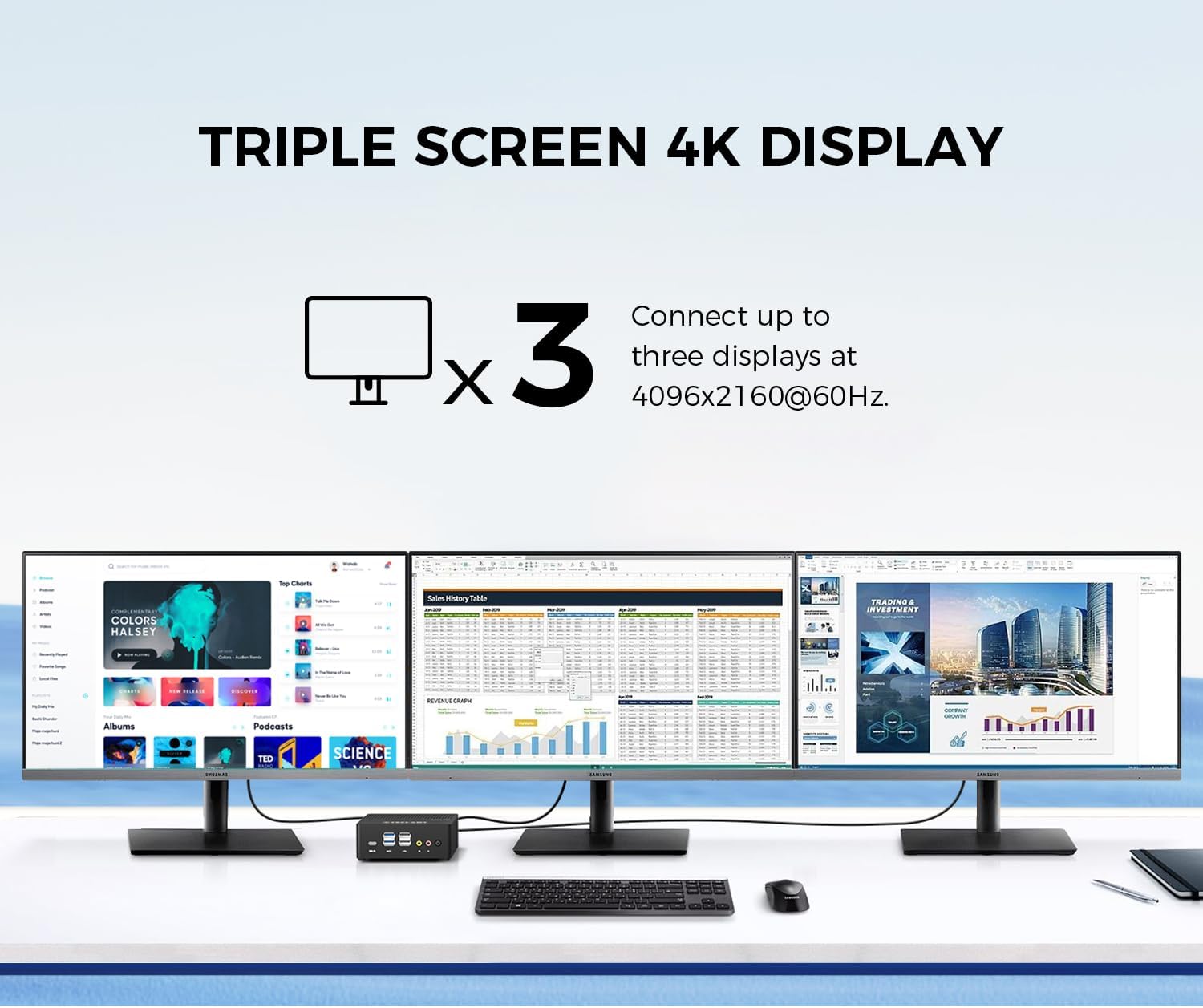
Image: Triple screen 4K display setup with the Mini PC.
- Conecte su monitor principal a través de HDMI.
- Connect a second monitor via DisplayPort.
- Connect a third monitor via the Full-Function Type-C port (requires a compatible Type-C to DisplayPort/HDMI adapter or monitor).
- In Windows, right-click on the desktop and select "Display settings" to configure your multiple displays (extend, duplicate, or show only on one).
5.3. Conectividad inalámbrica
The Mini PC supports 2.4G+5G ac Wi-Fi and Bluetooth 4.2 for wireless connections.
- Wifi: Access Wi-Fi settings in Windows to connect to your preferred wireless network.
- Bluetooth: Pair Bluetooth devices like keyboards, mice, or headphones through Windows Bluetooth settings.
6. Mantenimiento
El mantenimiento regular ayuda a garantizar la longevidad y el rendimiento óptimo de su Mini PC.
- Limpieza: Utilice un paño suave y seco para limpiar el exterior. Para la acumulación de polvo en las rejillas de ventilación, utilice aire comprimido. Asegúrese de que el dispositivo esté apagado y desenchufado antes de limpiarlo.
- Actualizaciones de software: Regularly check for and install Windows updates and driver updates to maintain system security and performance.
- Administración de almacenamiento: Limpia periódicamente lo innecesario files and applications to free up storage space and improve system responsiveness.
- Ventilación: Asegúrese de que la mini PC esté colocada en un área bien ventilada y que sus rejillas de ventilación no estén obstruidas para evitar el sobrecalentamiento.
7. Solución de problemas
If you encounter issues with your TECLAST N15 Mini PC, refer to the following common troubleshooting steps:
| Asunto | Posible solución |
|---|---|
| No hay ninguna imagen en el monitor | Check all cable connections (HDMI, DisplayPort, Type-C). Ensure the monitor is powered on and set to the correct input source. Try a different cable or monitor if possible. |
| La mini PC no se enciende | Verify the power adapter is securely connected to both the Mini PC and a working power outlet. Try a different power outlet. |
| Sin conexión a Internet (Wi-Fi) | Comprueba si el Wi-Fi está habilitado en la configuración de Windows. Asegúrate de estar conectado a la red correcta y de haber ingresado la contraseña correctamente. Reinicia el router/módem. |
| No internet connection (Wired) | Ensure the Ethernet cable is securely connected to both the Mini PC and your router/modem. Check the network status in Windows. Restart your router/modem. |
| Rendimiento lento | Cierre las aplicaciones innecesarias. Compruebe si hay procesos en segundo plano que consuman recursos. Asegúrese de tener suficiente espacio de almacenamiento libre. Ejecute un análisis del sistema en busca de malware. |
| Peripheral devices not recognized | Try connecting the device to a different USB port. Ensure device drivers are installed. Restart the Mini PC. |
Si el problema persiste después de intentar estos pasos, comuníquese con el servicio de atención al cliente de TECLAST para obtener más ayuda.
8. Especificaciones
Detailed technical specifications for the TECLAST N15 Mini PC:
| Característica | Especificación |
|---|---|
| Marca | TECLAST |
| Número de modelo | N15 |
| Modelo de CPU | Intel Celeron N5095 |
| Velocidad de la CPU | Up to 2.9 GHz (Turbo Frequency) |
| Cantidad de procesadores | 4 |
| Memoria RAM instalada | 16 GB DDR4 |
| Tamaño máximo de la memoria RAM | 16 GB |
| Capacidad de almacenamiento de memoria | 512 GB PCI-e 3.0 SSD |
| Coprocesador gráfico | Gráficos Intel UHD |
| Resolución máxima de pantalla | 3840 x 2160 píxeles (4K) |
| Interfaces de salida de vídeo | HDMI, DisplayPort, Type-C |
| Tecnología de conectividad | Ethernet (Dual RJ45 2.5GbE), HDMI, LAN, Wi-Fi (802.11ac), Bluetooth 4.2 |
| Puertos USB totales | 6 (2 USB 3.2, 4 USB 2.0) |
| Peso del artículo | 400 gramos |
| Consumo de energía | 15 vatios |
| Método de enfriamiento | Air (with Turbo Fan and Nickel-Plated Heat Pipe) |
| Color | Negro |
9. Garantía y soporte
TECLAST products are designed for quality and reliability. For any product-related inquiries, technical support, or warranty claims, please contact TECLAST customer service. Most questions are answered within 24 hours.
Para obtener más ayuda, visite el sitio web oficial de TECLAST. websitio o comuníquese directamente con sus canales de soporte.
10. Vídeo del producto
Mire este video oficial del producto para obtener una visión generalview of the TECLAST N15 Mini PC's features and connectivity.
Vídeo: Terminadoview of the TECLAST N15 Mini PC, showcasing its design, ports, and internal components.