
Introducción
This manual provides detailed instructions for the safe and efficient use of your OttLite Wellness Series Wireless Charging LED Table LampEste lamp features OttLite's exclusive ClearSun LED technology, designed to reduce eyestrain, along with convenient wireless charging and a USB charging port. Please read this manual thoroughly before operating the lamp y conservarlo para futuras referencias.
Instrucciones de seguridad importantes
Para reducir el riesgo de incendio, descarga eléctrica o lesiones a las personas, tenga en cuenta lo siguiente:
- No lo utilice con un cable o enchufe dañado.
- No opere el lamp Si se ha caído o dañado.
- No intente modificar el lamp.
- Utilice únicamente el adaptador de corriente proporcionado.
- Mantén la lamp lejos del agua u otros líquidos.
- Este lamp es solo para uso en interiores.
- La fuente de luz LED no es reemplazable.
Contenido del paquete
- Mesa LED de carga inalámbrica OttLite Wellness Series Lamp
- Adaptador de corriente
Configuración
- Desembalar la Lamp: Retire con cuidado todos los componentes del embalaje.
- Conecte la electricidad: Insert the power adapter plug into the power input port located on the back of the lamp base. Plug the other end of the adapter into a standard 110V AC wall outlet.
- Coloque la Lamp: Coloque la lamp Sobre una superficie plana y estable. Asegúrese de que el cable de alimentación no esté pellizcado ni obstruido.
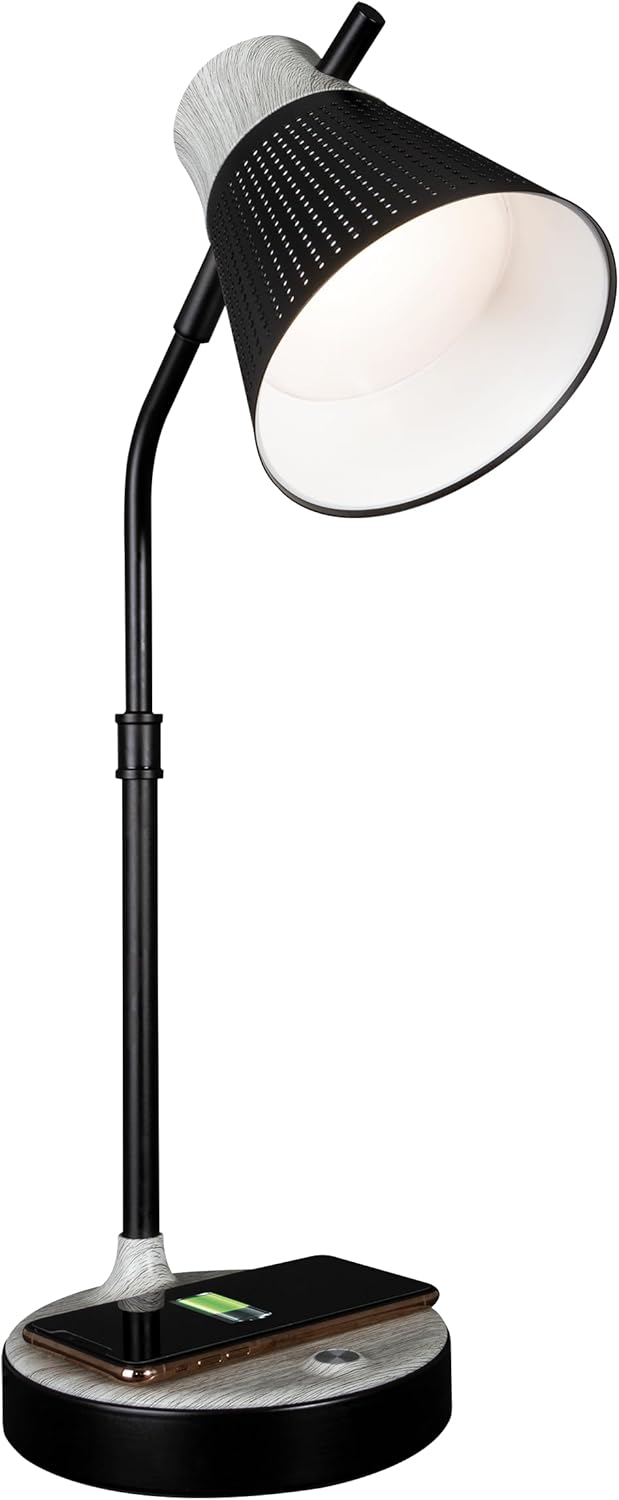
El lamp ahora está listo para funcionar.
Instrucciones de funcionamiento
1. Encendido/apagado y control de brillo
El lamp features touch-sensitive controls located on the base.
- Para encender/apagar: Toque suavemente el icono de encendido en la lamp base.
- Para ajustar el brillo: Con la lamp on, repeatedly touch the power icon to cycle through three brightness levels.

2. Ajustes de temperatura de color
El lamp ofrece tres modos de temperatura de color distintos:
- Luz natural ClearSun: Provides a balanced spectrum for reduced eyestrain.
- Blanco cálido: A softer, warmer light ideal for relaxation.
- Blanco brillante: A crisp, clear light suitable for tasks requiring focus.
To switch between color temperatures, touch the mode icon on the lamp base. Cycle through the available options to select your preferred light.

3. Ajuste de Lamp
El lamp features a flexible neck and an adjustable shade for precise light placement.
- Cuello flexible: Doble suavemente la lamp neck to direct light where needed.
- Pantalla ajustable: The shade can be moved up, down, and side-to-side to optimize illumination.

4. Carga inalámbrica
El lamp base includes a Qi-compatible wireless charging pad.
- Place your Qi-compatible device (e.g., smartphone) directly onto the charging pad on the lamp base.
- Asegúrese de que el dispositivo esté centrado en la plataforma de carga para una conexión óptima.
- Un indicador de carga en su dispositivo confirmará que la carga ha comenzado.

5. Puerto de carga USB
A 5V, 2.1A USB charging port is integrated into the lamp base para cargar dispositivos adicionales.
- Connect your device's USB charging cable to the USB port on the back of the lamp base.
- Connect the other end of the cable to your device (e.g., headphones, smartwatch, tablet).

Mantenimiento
- Limpieza: Desconecte la alimentación antes de limpiar. Utilice un paño suave y seco para limpiar la lamp. No utilice limpiadores abrasivos ni disolventes.
- Cuidado del LED: The LED light source is designed for long-term use and does not require replacement. Avoid direct contact with the LED panel.
Solución de problemas
| Problema | Posible causa | Solución |
|---|---|---|
| Lamp no se enciende. | Adaptador de corriente no conectado o toma de corriente defectuosa. | Asegúrese de que el adaptador de corriente esté enchufado de forma segura.amp and a working wall outlet. Test the outlet with another device. |
| La carga inalámbrica no funciona. | Dispositivo no compatible con Qi o no está alineado correctamente. | Verify your device supports Qi wireless charging. Reposition the device on the charging pad, ensuring it is centered. Remove any thick phone cases. |
| La carga USB no funciona. | Cable USB defectuoso o dispositivo no compatible. | Try a different USB cable. Ensure the device is compatible with 5V, 2.1A charging. |
| La luz parpadea o es inconsistente. | Loose power connection or electrical interference. | Check all power connections. Move the lamp lejos de otros dispositivos electrónicos que puedan causar interferencias. |
Presupuesto
- Número de modelo: CSAQABG9-SHPR
- Marca: OttLite
- Dimensiones del producto: 6.88" de profundidad x 6.88" de ancho x 25" de alto (altura ajustable)
- Peso del artículo: 4.99 libras
- Fuente de energía: Eléctrico con cable (110 voltios CA)
- Tipo de fuente de luz: LED (Tecnología ClearSun)
- Quétage: 10 vatios
- Método de control: Tocar
- Características especiales: Wireless Charging, USB Charging Port, Flexible Neck, Adjustable Shade, 3 Brightness Settings, 3 Color Temperatures
- Material: Metal, madera
- Tipo de acabado: Pintado
- Uso en interiores y exteriores: Solo en interiores

Información de garantía
OttLite products are manufactured to high-quality standards. For specific warranty details, including coverage period and terms, please refer to the warranty card included with your purchase or visit the official OttLite webSitio. Conserve su comprobante de compra para reclamaciones de garantía.
Atención al cliente
If you have any questions, require assistance, or need to report an issue with your OttLite Wellness Series Wireless Charging LED Table Lamp, please contact OttLite customer support through their official websitio o la información de contacto proporcionada en el embalaje de su producto.
Para obtener más información, visite el OttLite Store.