
Introducción
This manual provides detailed instructions for the installation, operation, and maintenance of your Hikity Android Auto Radio. Please read this manual thoroughly before using the product to ensure proper function and safety. Keep this manual for future reference.
Compatibilidad
This Hikity Android Auto Radio is specifically designed for the following vehicle model:
- FÍAT 500: Años modelo 2007-2015
Ensure your vehicle's dashboard matches the compatible configuration shown below.
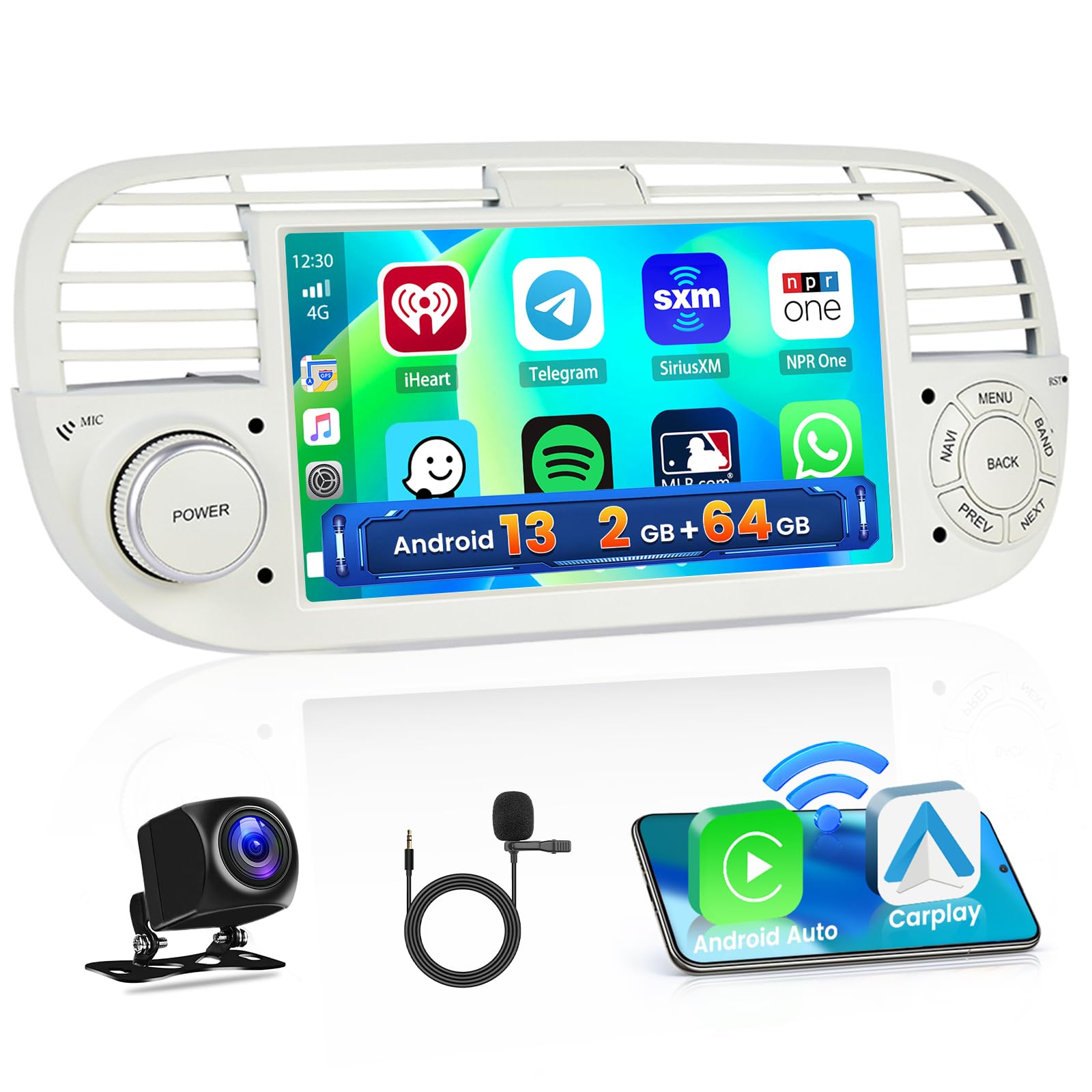
Image: The product is compatible with Fiat 500 models from 2007-2015 that feature the 'Model A' dashboard configuration, indicated by a checkmark. 'Model B' is shown as incompatible with an 'X' mark.
Contenido del paquete
Verifique que todos los elementos enumerados a continuación estén presentes en el paquete:
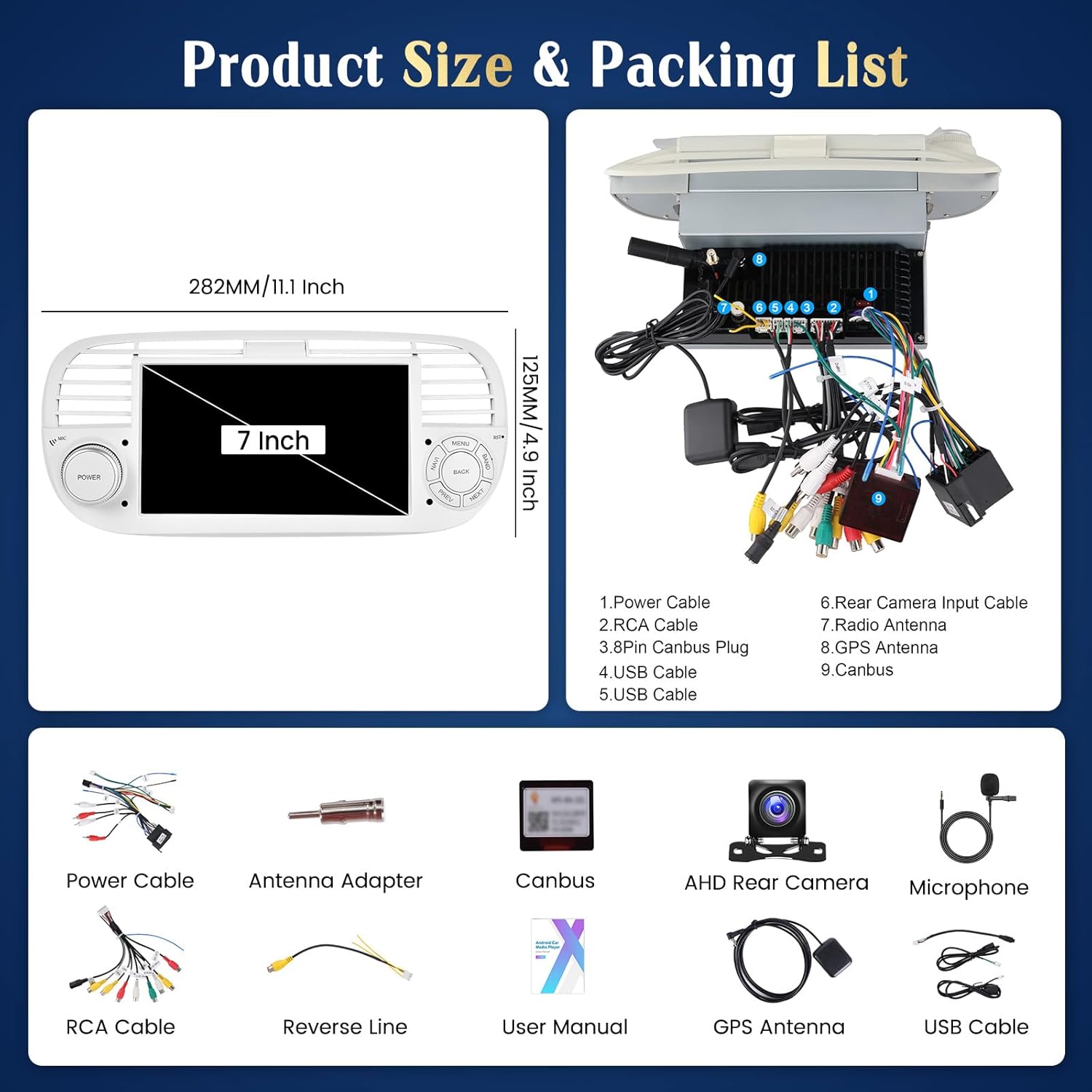
Image: This diagram illustrates the dimensions of the 7-inch head unit and provides a visual and numbered list of all included accessories, such as power cables, RCA cables, USB cables, GPS antenna, AHD rear camera, microphone, and Canbus box.
- Hikity Android Auto Radio Unit (7-inch screen)
- Cable de alimentación
- Cable RCA
- Conector Canbus de 3 pines
- Cables USB (x2)
- Cable de entrada de cámara trasera
- Antena de radio
- Antena GPS
- Caja Canbus
- adaptador de antena
- Cámara trasera AHD
- Micrófono
- Línea inversa
- Manual de usuario (este documento)
Configuración e instalación
Notas generales de instalación
- This unit is designed for plug-and-play installation in compatible FIAT 500 models (2007-2015).
- Se recomienda la instalación profesional si no está familiarizado con el cableado de audio del automóvil.
- Desconecte la batería del vehículo antes de comenzar la instalación para evitar daños eléctricos.
Conexiones de cableado
Refer to the wiring diagram provided in the 'Package Contents' image for specific connections. Key connections include:
- Cable de energía: Conéctelo al arnés de alimentación del vehículo. Asegúrese de que las conexiones de los cables positivo, negativo y auxiliar sean correctas.
- Cables RCA: Para exterior amplifiers, subwoofers, or video output to headrests.
- Cables USB: For connecting USB devices or for wired CarPlay/Android Auto.
- Antena GPS: Móntelo en un lugar despejado. view del cielo para una recepción óptima de la señal.
- Antena de radio: Conéctese a la antena de radio existente del vehículo.
- Caja Canbus: Connect as per the vehicle's wiring to enable steering wheel controls and other vehicle data integration.
Instalación de la cámara trasera
La cámara trasera AHD incluida proporciona una visión clara view for parking. Connect the camera to the 'Rear Camera Input Cable' on the head unit. Ensure the camera's power is connected to the vehicle's reverse light circuit so it activates automatically when shifting into reverse.

Image: This image demonstrates the AHD reversing input, which automatically displays the rear camera feed when the car is in reverse. It highlights features like night vision, waterproofing, guidelines, and a wide-angle view, comparing the clarity of an AHD camera to a standard HD camera.
Instrucciones de funcionamiento
Encendido/apagado
The unit powers on automatically with the vehicle's ignition. To manually power off or on, press and hold the 'POWER' button on the unit's front panel.
Operación de pantalla táctil
The 7-inch HD 1080P touchscreen (1024*600 resolution) supports multi-touch gestures. Navigate through menus, select applications, and control functions by tapping, swiping, and pinching.

Image: This image emphasizes the screen's quality, including its 1024x600 resolution, 2.5D scratch-resistant glass, anti-knock durability, and accurate color reproduction. It also showcases different customizable user interface themes.
CarPlay inalámbrico/Android Auto
Connect your smartphone wirelessly for CarPlay or Android Auto functionality. This allows access to navigation, calls, messages, and music through the car's display, supporting voice assistance for safe driving.
- Asegúrese de que Bluetooth y Wi-Fi estén habilitados en su teléfono inteligente.
- En la unidad principal, seleccione la aplicación CarPlay o Android Auto.
- Siga las instrucciones en pantalla para emparejar su dispositivo.
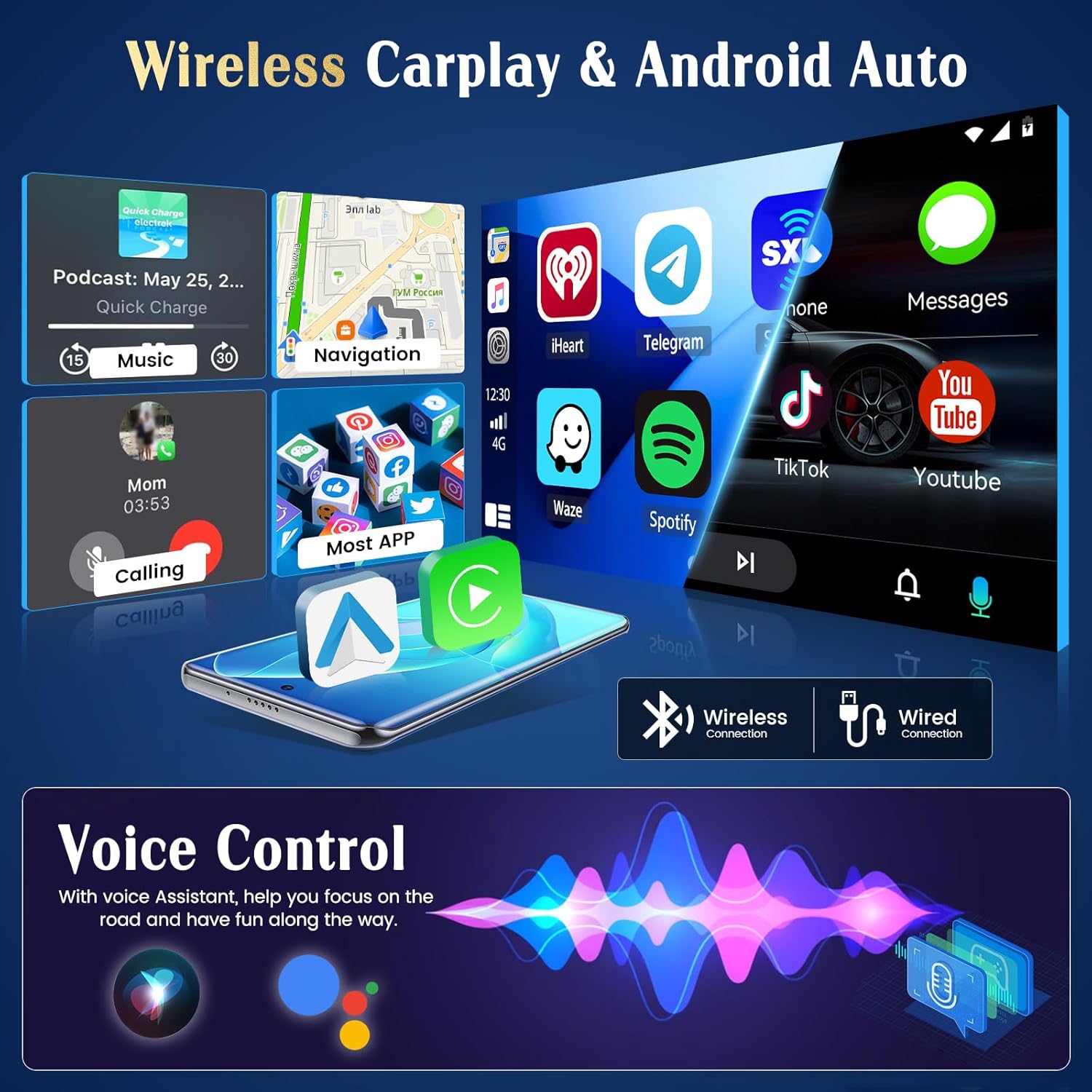
Image: This visual illustrates the seamless integration of wireless CarPlay and Android Auto, displaying common applications and emphasizing the convenience of voice control for hands-free operation while driving.
Navegación GPS y WiFi
The unit features integrated GPS for both online and offline navigation. Connect to a Wi-Fi hotspot to download maps, access real-time traffic information, and use online applications.
- GPS: Open the navigation app. Ensure the GPS antenna is properly installed.
- Wi-Fi: Vaya a Ajustes > Red e Internet > Wi-Fi. Seleccione la red deseada e introduzca la contraseña.

Image: This image displays the GPS navigation interface, indicating both offline and online map functionality. It also highlights the WiFi connection feature, enabling users to download applications and access internet content.
Conectividad Bluetooth
Empareje su teléfono inteligente a través de Bluetooth para transmisión inalámbrica de música, llamadas manos libres y sincronización de contactos.
- On the head unit, open the Bluetooth application.
- Habilite Bluetooth en su teléfono inteligente y busque dispositivos disponibles.
- Select the head unit from the list and confirm pairing.
Radio FM/RDS
Access FM radio stations with RDS (Radio Data System) functionality, which displays station information, traffic updates, and other data.

Image: This image illustrates the FM RDS radio interface, showing a tuned station with its frequency and RDS data. It highlights the feature's ability to provide real-time traffic, news broadcasts, and weather forecasts.
Audio Features (EQ)
Customize your audio experience with the integrated Equalizer (EQ). Adjust frequency bands to match your musical preferences. The unit also supports subwoofer output.

Image: This image displays the graphical equalizer interface, allowing users to fine-tune audio output with various presets like Pop, Rock, Jazz, and custom settings. It also shows the RDS radio interface in the background.
Control del volante
The unit supports integration with your vehicle's existing steering wheel controls, allowing you to manage essential functions (e.g., volume, track change) without taking your hands off the wheel. Configuration may be required in the unit's settings menu.
Mantenimiento
- Limpieza: Utilice un paño suave y seco para limpiar la pantalla y la unidad. Evite limpiadores abrasivos o disolventes.
- Actualizaciones de software: Revise periódicamente las instrucciones del fabricante. websitio o la configuración de la unidad para obtener actualizaciones de software disponibles para garantizar un rendimiento óptimo y acceso a nuevas funciones.
- Temperatura: Evite exponer la unidad a temperaturas extremas, que pueden afectar su rendimiento y vida útil.
Solución de problemas
| Problema | Posible causa | Solución |
|---|---|---|
| La unidad no enciende | Cableado incorrecto; Fusible quemado; Batería del vehículo baja | Check power connections; Inspect vehicle fuses; Charge vehicle battery |
| Sin sonido | Volume muted/low; Speaker wiring incorrect; Ampproblemas de lifier | Adjust volume; Check speaker connections; Verify amppoder elevador |
| Señal GPS perdida/débil | GPS antenna obstructed/disconnected | Asegúrese de que la antena GPS tenga cielo despejado view; Check antenna connection |
| El Bluetooth no se conecta | Bluetooth off on phone/unit; Device not in pairing mode | Enable Bluetooth; Put device in pairing mode; Forget and re-pair device |
| La cámara trasera no se muestra | Cableado incorrecto de la cámara; disparador inverso no conectado | Check camera power and video input; Verify reverse trigger wire connection |
Presupuesto
| Característica | Detalle |
|---|---|
| Marca | Caminata |
| Número de modelo | Manju-A3423WEA4MI2 |
| Sistema operativo | Androide |
| Procesador | 4 núcleos |
| RAM | 2 GB |
| ROM (Almacenamiento interno) | 64 GB |
| Tamaño de pantalla | 7 pulgadas |
| Resolución de pantalla | 1024*600 (HD1080P support) |
| Tecnología de conectividad | RCA, HDMI, Bluetooth, Wi-Fi |
| Características especiales | Android Auto, Apple CarPlay (Wireless), GPS Navigation, RDS, Integrated Wi-Fi |
| Dispositivos compatibles | Smartphone, Tablet, Camera |
| Puertos HDMI | 1 |
| Modo de salida de audio | Rodear |
| Canales de sonido envolvente | 4.0 |
| Codificación de vídeo | H.264, MPEG-4, etc. |
| Potencia de salida (máx.) | 180 vatios |
| Output Power (RMS per channel) | 45 vatios |
| Número de canales | 4 |
| Internet Applications | Netflix, Pandora, iTunes (via app download) |
| Método de control | Tocar |
| Tipo de salida de audio | Internal, Bluetooth |
| Formato de medios digitales | MP3 audio, MPEG-2.5 |
| Dimensiones (D x W x H) | 15.5 cm x 28 cm x 12.5 cm |
| Color | Blanco |
| País natal | Porcelana |
Garantía y soporte
Información de garantía
This Hikity product comes with a Garantía de 12 meses a partir de la fecha de compra, cubriendo defectos de fabricación y mal funcionamiento en condiciones normales de uso.
Atención al cliente
For any inquiries, technical assistance, or warranty claims, please contact Hikity customer support. We offer lifetime online support and aim to respond to all inquiries within 24 hours.
- Correo electrónico: hikityservices@163.com

Image: A customer service representative is shown, symbolizing the availability of 24-hour customer support. The image prominently displays the support email address: hikityservices@163.com.
Vídeos oficiales de productos
No se encontraron vídeos oficiales del producto del vendedor en los datos proporcionados.


