
Introducción
This manual provides detailed instructions for the installation, operation, and maintenance of your ICUIXIAN 16x16 HDMI Matrix Switch, Model DC-16x16. This professional device is designed for switching and distributing multiple HDMI digital signals to multiple display terminals, supporting HDMI 1.4a standard and EDID management up to 1080P resolutions.
Información de seguridad
Lea y comprenda todas las instrucciones de seguridad antes de utilizar este dispositivo. De lo contrario, podría sufrir lesiones o dañar el equipo.
- Asegúrese de que haya una ventilación adecuada alrededor del dispositivo para evitar el sobrecalentamiento.
- Utilice únicamente el adaptador de corriente proporcionado.
- No exponga el dispositivo al agua ni a la humedad excesiva.
- Evite colocar objetos pesados encima del dispositivo.
- Desconecte la energía antes de limpiar o reparar.
Producto terminadoview
The ICUIXIAN 16x16 HDMI Matrix Switch allows you to connect up to 16 HDMI input sources and distribute them to 16 HDMI output displays. It features various control options and supports advanced video management.

Imagen: Front and rear panels of the ICUIXIAN 16x16 HDMI Matrix Switch, highlighting 16 HDMI inputs, 16 HDMI outputs, RS-232, LAN, and power ports.
Características del panel frontal:
- LED de encendido: Indica el estado de energía.
- Input/Output Selection Buttons: For local control of source and display routing.
- Pantalla LCD: Shows current input/output status and menu options.
- Receptor IR: Para comandos de control remoto.
Características del panel trasero:
- Entrada de energía DC 5V: Conecte el adaptador de corriente proporcionado.
- RS-232 Port (IN/OUT): For serial communication control.
- Puerto RJ45 (LAN): For network-based control via Web GUI
- HDMI Input Ports (1-16): Conecte sus dispositivos fuente HDMI.
- HDMI Output Ports (1-16): Connect your HDMI display devices.
Configuración y conexión
Follow these steps to set up your HDMI Matrix Switch:
- Apagar dispositivos: Ensure all HDMI source devices, display devices, and the matrix switch are powered off before making connections.
- Conecte fuentes HDMI: Connect your HDMI source devices (e.g., Blu-ray players, PCs, game consoles) to the HDMI Input ports (1-16) on the rear panel of the matrix switch using high-quality HDMI cables.
- Conectar pantallas HDMI: Connect your HDMI display devices (e.g., TVs, projectors, monitors) to the HDMI Output ports (1-16) on the rear panel of the matrix switch using high-quality HDMI cables.
- Conectar cables de control (opcional):
- For RS-232 control, connect an RS-232 cable from your control system to the RS-232 IN port.
- For LAN control, connect an Ethernet cable from your network router/switch to the RJ45 LAN port.
- Encendido: Connect the provided DC 5V power adapter to the matrix switch and then plug it into a power outlet. Power on the matrix switch, followed by your display devices, and then your source devices.
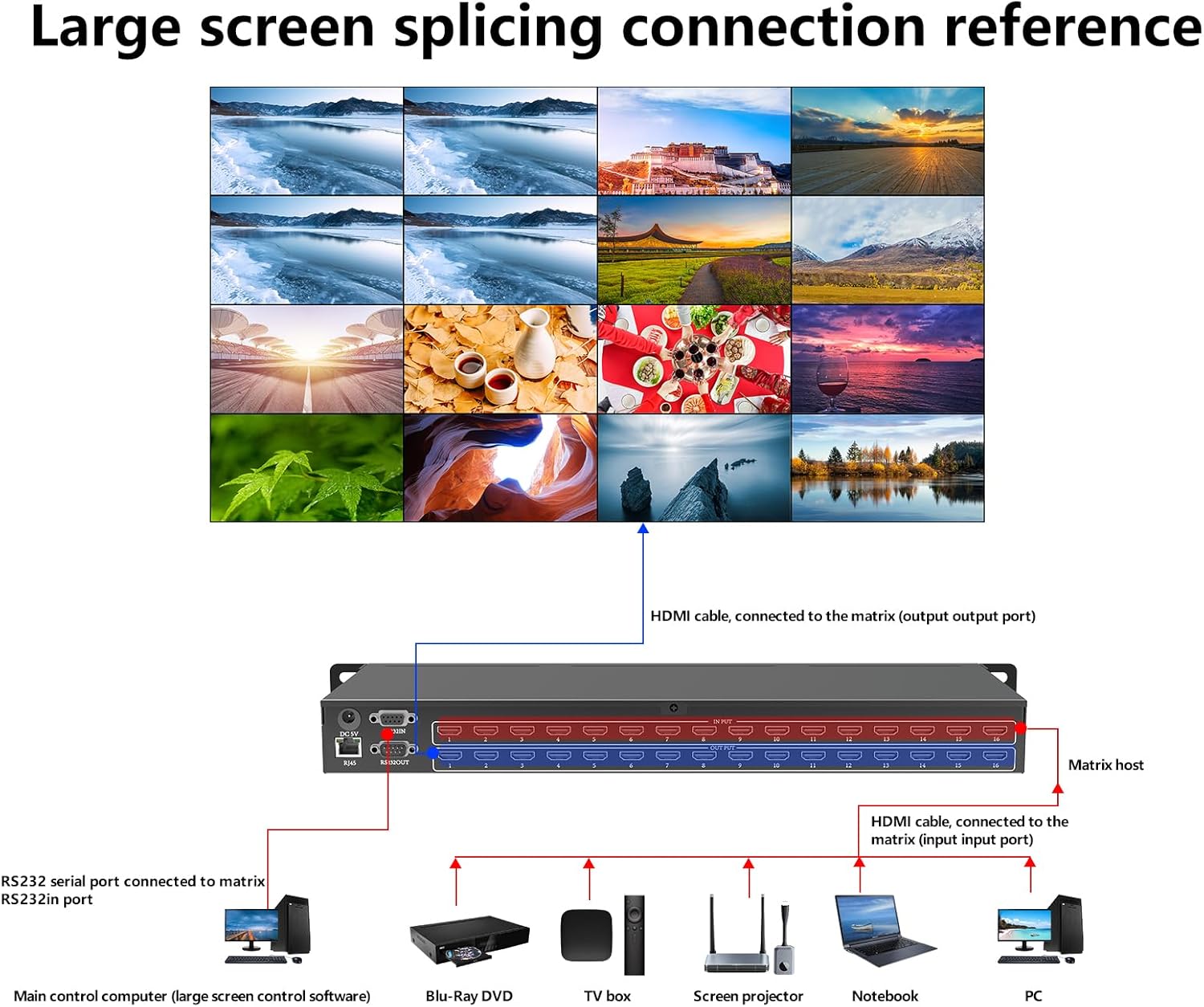
Imagen: A connection diagram illustrating how to connect various HDMI sources (PC, Notebook, Screen projector, TV box, Blu-ray DVD) to the input ports and how the output ports connect to a large screen display, along with RS-232 serial port connection.
Instrucciones de funcionamiento
The ICUIXIAN 16x16 HDMI Matrix Switch offers multiple control methods for flexible operation.
1. Local Button Control
Use the buttons on the front panel to select inputs and outputs. Refer to the front panel layout in the Product Overview section for button locations.
- Selección de entrada: Press the corresponding input button (1-16) to select a source.
- Selección de salida: Press the corresponding output button (1-16) to select a display.
- Traspuesta: After selecting an input and output, confirm the switch using the designated button (e.g., "OK" or "Switch").
2. Control remoto IR
The included IR remote control allows for convenient wireless operation. Point the remote directly at the IR receiver on the front panel of the matrix switch.
- Use the numeric buttons to select input and output channels.
- Dedicated buttons for switching, menu navigation, and other functions are available on the remote.
3. RS-232 Serial Control
For integration with professional control systems, the matrix switch can be controlled via RS-232 commands. Connect your control system to the RS-232 IN port.
- Refer to the detailed RS-232 command protocol document (usually provided separately or available for download) for specific commands and syntax.
- Default baud rate: 9600, Data bits: 8, Stop bit: 1, No parity.
4. Web GUI Control (LAN Port)
El Web Graphical User Interface (GUI) provides a user-friendly way to control the matrix switch from a computer, mobile phone, or tablet connected to the same network.
- Conectarse a la red: Ensure the matrix switch's LAN port is connected to your network.
- Buscar dirección IP: The IP address of the matrix switch can usually be found on the device's LCD display or through network scanning tools.
- Acceso Web Interfaz gráfica de usuario: Abrir una web browser on a device connected to the same network and enter the IP address of the matrix switch in the address bar.
- Acceso: If prompted, enter the default username and password (refer to the separate network configuration guide or contact support if unknown).
- Control: Use the intuitive interface to switch inputs to outputs, manage EDID settings, and configure scenes.

Imagen: Screenshots demonstrating the web control interface, showing input/output selection grids and system settings for easy operation.
Gestión de EDID
The matrix switch supports EDID (Extended Display Identification Data) management to ensure optimal compatibility between sources and displays. This feature allows you to select the best EDID settings for your connected devices, preventing resolution or audio issues.
- EDID settings can typically be configured via the Web Comandos GUI o RS-232.
- Options may include copying EDID from a specific output, using a default EDID, or custom EDID settings.
Gestión de escenas
The device includes a built-in pre-plan management system that allows you to save and recall up to 32 different input/output configurations (scenes). This is useful for quickly switching between complex setups.
- Saving a Scene: Configure your desired input-to-output routing, then use the control interface (Web GUI, RS-232, or local buttons) to save this configuration as a scene.
- Recalling a Scene: Select the desired scene number from the control interface to instantly apply the saved configuration.
Video Switching Modes
El conmutador de matriz admite varias configuraciones de pantalla:
- Conmutación independiente: Each display can show a different input source.
- Shared Input: Multiple displays can share the same input source.
- Compartir parcialmente: Some displays show independent sources, while others share a common source.

Imagen: Ejemplo visualamples of different screen configurations: each display showing an independent source, all displays sharing the same source, and some displays sharing a source while others are independent.
Video: This video demonstrates common switching modes and configurations possible with the ICUIXIAN HDMI Matrix Switch/Splitter, showcasing how different inputs can be routed to various outputs.
Mantenimiento
To ensure the longevity and optimal performance of your ICUIXIAN HDMI Matrix Switch, follow these maintenance guidelines:
- Limpieza: Utilice un paño suave y seco para limpiar el exterior del dispositivo. No utilice limpiadores líquidos ni en aerosol.
- Ventilación: Asegúrese de que las aberturas de ventilación no estén bloqueadas.
- Sistema de organización de cables: Keep cables organized and free from kinks or excessive tension.
- Actualizaciones de firmware: Verifique el fabricante webSitio periódicamente para actualizaciones de firmware que puedan mejorar el rendimiento o agregar nuevas funciones.
Solución de problemas
If you encounter issues with your HDMI Matrix Switch, refer to the following common problems and solutions:
| Problema | Posible causa | Solución |
|---|---|---|
| No hay salida de vídeo en la pantalla. |
|
|
| Mala calidad de video o parpadeo. |
|
|
| El control remoto no funciona. |
|
|
| No se puede acceder Web GUI |
|
|
Presupuesto
Technical specifications for the ICUIXIAN 16x16 HDMI Matrix Switch (Model DC-16x16):
| General | |
|---|---|
| Entradas | 16 |
| Salidas | 16 |
| Interface Width | 13.5 Gbps |
| Soporte de resolución | 1920*1080@60Hz (backward compatible) |
| Estándar HDMI | HDMI 1.4a |
| HDCP Decoding | Apoyado |
| Soporte 3D | Apoyado |
| Control | |
| Métodos de control | Web GUI, RS-232, IR Remote, Local Buttons |
| Serial Control Interface | RS-232, 9-pin female D-type connector with 9-pin male D-type connector |
| Tasa de Baud | 9600 |
| Bits de datos | 8 |
| Bit de parada | 1 |
| Paridad | Ninguno |
| Características físicas y ambientales | |
| System Operating Power Supply | 100VAC ~ 240VAC, 50/60Hz (International adaptive) |
| Storage, Operating Temperature | 0 ~ + 50 ° C |
| Storage, Working Humidity | 20% ~ 70% |
| Tamaño del recinto | Montaje en rack 1U |
| Chassis Weight | 3 kg (aproximadamente 6.6 libras) |
| Dimensions (without lugs) | 435 x 182 x 47 mm (17.1 x 7.2 x 1.85 pulgadas) |
| Dimensions (with lugs) | 496 x 182 x 47 mm (19.5 x 7.2 x 1.85 pulgadas) |
| Tiempo medio entre fallos (MTBF) | 30,000 horas |

Imagen: A table summarizing the technical specifications of the ICUIXIAN 16x16 HDMI Matrix Switch, including inputs, outputs, resolution, control interfaces, power, and physical dimensions.
Garantía y soporte
ICUIXIAN products are designed for reliability and performance. For warranty information, technical support, or service inquiries, please refer to the contact information provided with your purchase or visit the official ICUIXIAN websitio.
For product quality assurance, each unit undergoes thorough testing before shipment. Professional technical staff are available to assist with any product-related issues.
Recursos en línea: Visit the ICUIXIAN Store on Amazon