
Bytech BY-AU-BE-152-03
User Manual for Bytech Earbud Headphones
Model: BY-AU-BE-152-03
Marca: Bytech
Introducción
The Bytech BY-AU-BE-152-03 True Wireless Earbuds offer a unique "face changing" design, combining fun aesthetics with practical functionality. These earbuds are designed for ease of use, featuring auto-pairing and hands-free calling. They are compatible with voice assistants like Siri and Google Assistant, providing a versatile audio experience.

Figure 1: Front packaging of the Bytech BY-AU-BE-152-03 Earbud Headphones.
Face Changing Design
A distinctive feature of these earbuds is the "face changing" design on the charging case. The front panel of the case can be rotated to display different facial expressions, adding a playful element to the product.

Cara triste

Cara feliz

Winking Face
Figure 5: Various expressions of the "face changing" design on the charging case.
Contenido del paquete
Antes de continuar con la configuración, asegúrese de que todos los elementos enumerados a continuación estén presentes en su paquete:
- Estuche de carga
- 2 Auriculares inalámbricos verdaderos
- Cable de carga tipo C
- Manual de instrucciones
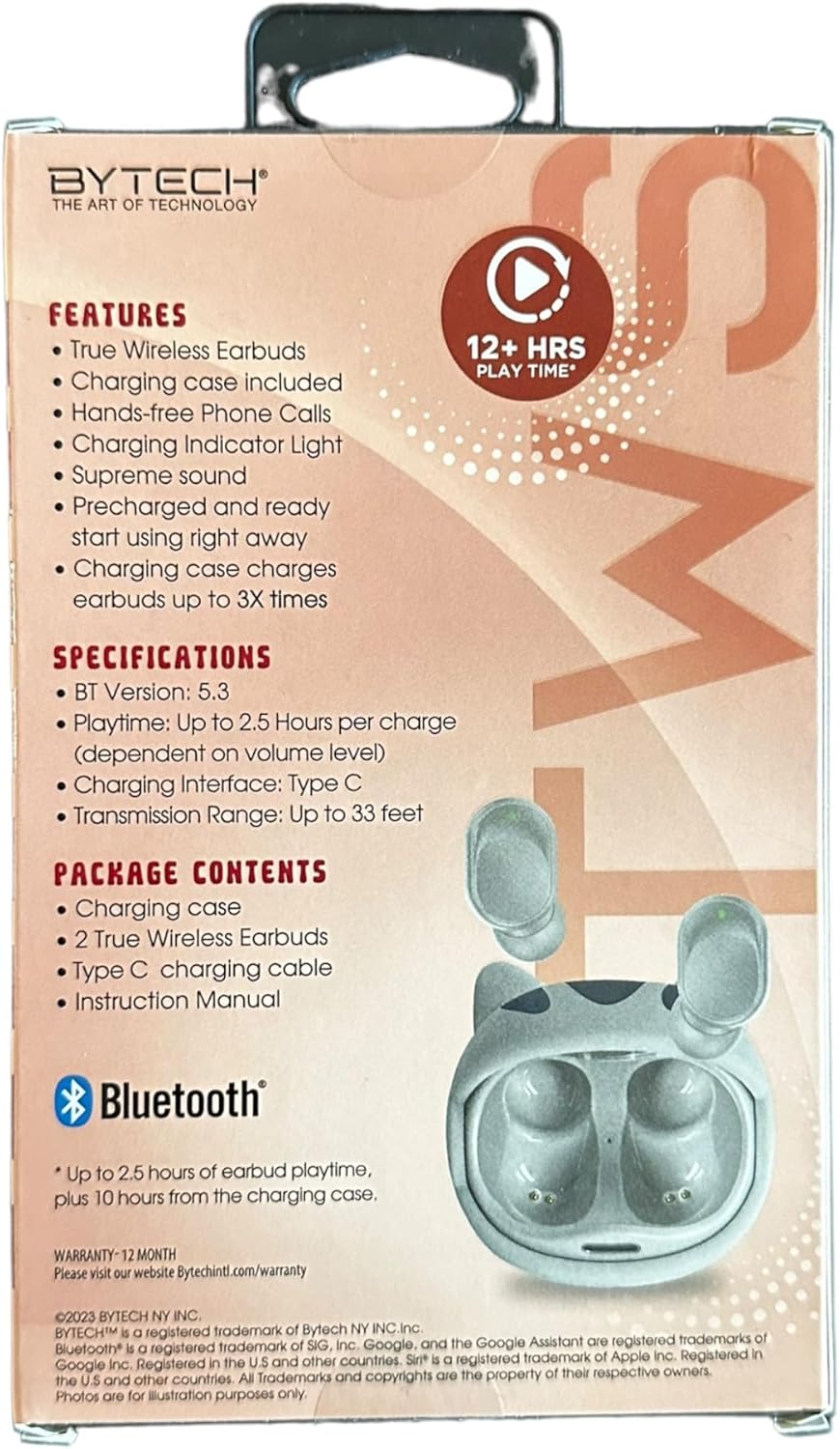
Figure 2: Back packaging detailing product features and contents.
Configuración
1. Carga de los auriculares y el estuche
For optimal performance, fully charge the earbuds and the charging case before first use. The charging case can provide up to 3 full charges for the earbuds.
- Connect the provided Type C charging cable to the charging port on the case and to a compatible USB power source.
- The charging indicator light on the case will illuminate to show charging status.
- Coloca los auriculares en el estuche de carga. Se cargarán automáticamente.
- A full charge for the carrying case typically takes approximately 7.5 hours.

Figure 3: Packaging indicating charging capacity of the case.
2. Emparejamiento con un dispositivo
The earbuds feature auto-pairing for convenient connection to your device.
- Asegúrese de que Bluetooth esté habilitado en su teléfono inteligente u otro dispositivo de audio.
- Abre el estuche de carga. Los auriculares se encenderán automáticamente y entrarán en modo de emparejamiento.
- On your device, search for Bluetooth devices and select "BY-AU-BE-152-03" (or similar name) from the list.
- Una vez conectado, escuchará un tono de confirmación y los auriculares estarán listos para usar.
- The transmission range is up to 33 feet (10 meters).
Instrucciones de funcionamiento
1. Encendido y apagado
- Encendido: Los auriculares se encienden automáticamente cuando se retiran del estuche de carga.
- Apagado: Coloque los auriculares nuevamente en el estuche de carga para apagarlos automáticamente y comenzar a cargarse.
2. Reproducción de música
Enjoy supreme sound quality for your audio. The earbuds provide up to 2.5 hours of playtime per charge.
- Reproducir/Pausa: Toque el área de control táctil en cualquiera de los auriculares una vez.
- Pista siguiente: Toca dos veces el auricular derecho.
- Pista anterior: Toca dos veces el auricular izquierdo.
- Control de volumen: (Note: Volume control may be primarily managed via your connected device. Refer to your device's instructions.)
3. Gestión de llamadas
The earbuds support hands-free phone calls.
- Responder/Finalizar llamada: Toque el área de control táctil en cualquiera de los auriculares una vez.
- Rechazar llamada: Mantenga presionada la zona de control táctil en cualquiera de los auriculares durante 2 segundos.
4. Asistente de voz
Access your device's voice assistant directly from the earbuds.
- Activar Asistente de voz (Siri/Asistente de Google): Toque tres veces el área de control táctil en cualquiera de los auriculares.
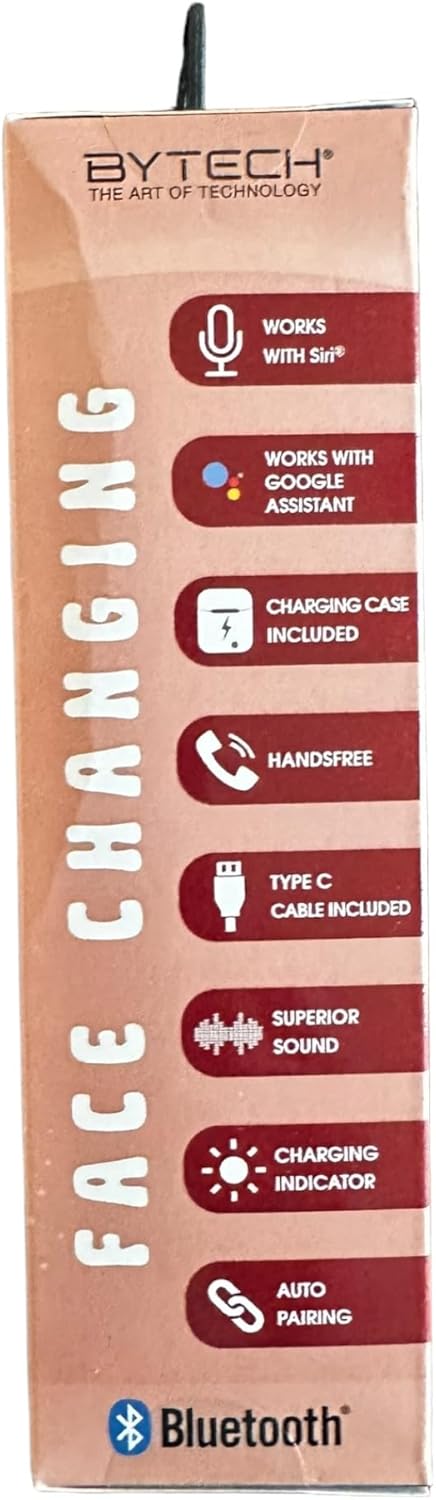
Figure 4: Packaging highlighting key operational features.
Mantenimiento
Un mantenimiento adecuado garantiza la longevidad y el rendimiento óptimo de sus auriculares.
- Limpieza: Utilice un paño suave, seco y sin pelusa para limpiar los auriculares y el estuche de carga. No utilice productos químicos agresivos ni materiales abrasivos.
- Almacenamiento: Cuando no los utilice, guarde los auriculares en su estuche de carga para protegerlos y mantenerlos cargados.
- Evite la humedad: Mantenga los auriculares y el estuche lejos del agua, la humedad y las temperaturas extremas.
- Cargando: Cargue el dispositivo periódicamente, incluso si no lo usa con frecuencia, para mantener la salud de la batería.
Solución de problemas
If you encounter issues with your Bytech Earbud Headphones, refer to the following common solutions:
| Problema | Posible solución |
|---|---|
| Los auriculares no se emparejan. |
|
| No hay sonido en los auriculares. |
|
| Los auriculares no se cargan. |
|
| Mala calidad de llamada. |
|
Presupuesto
Detailed technical specifications for the Bytech BY-AU-BE-152-03 Earbud Headphones:
| Característica | Detalle |
|---|---|
| Nombre del modelo | BY-AU-BE-152-03 |
| Versión de Bluetooth | 5.3 |
| Tiempo de juego por carga | Hasta 2.5 horas |
| Interfaz de carga | Tipo C |
| Rango de transmisión | Hasta 33 pies (10 metros) |
| Estuche de transporte Duración media de la batería | 7.5 horas (tiempo de juego adicional) |
| Estuche de transporte Tiempo de carga de la batería | 7.5 horas |
| Tipo de control | Google Assistant, Siri (Voice Control) |
| Componentes incluidos | Cable, manual de usuario |
| Material | Plástico |
| Peso del artículo | 3.1 onzas |
| Fabricante | BYTECH |
| Código Postal | 805112118816 |
Información de garantía
Este producto está cubierto por un Garantía de 12 meses from the date of purchase. For detailed warranty terms and conditions, please visit the official Bytech websitio:
Conserve su comprobante de compra para cualquier reclamo de garantía.
Apoyo
For further assistance, technical support, or inquiries regarding your Bytech Earbud Headphones, please visit the Bytech official websitio o póngase en contacto con su servicio de atención al cliente.
Oficial Websitio: www.bytechintl.com
Consulte la webSitio para obtener información de contacto, preguntas frecuentes y recursos adicionales.
Ask a question about this manual
Ask about setup, troubleshooting, compatibility, parts, safety, or missing instructions. Manuals+ will review the question and use this page’s manual context to help answer it.