
Della 9000 BTU - 115V - 24 SEER2 (Model: 048-TP-9K1V-23S-I+O)
Manual de instrucciones del minisplit DELLA Hyper Heat de 9,000 BTU
Marca: Della | Modelo: 9000 BTU - 115V - 24 SEER2 (048-TP-9K1V-23S-I+O)
1. Información importante de seguridad
Lea atentamente todas las instrucciones antes de instalar y utilizar el producto. El incumplimiento de estas instrucciones podría provocar daños materiales, lesiones personales o la muerte.
- Este sistema requiere instalación profesional. No es un minisplit de aire acondicionado que se pueda instalar uno mismo.
- Line set vacuuming is required during installation.
- No refrigerant adjustment is needed if the tube is under 25 ft; over 25 ft requires adjustment according to the manual.
- Ensure proper electrical connections. Maximum fuse size is 20A.
- Este producto puede contener sustancias químicas que el estado de California reconoce como causantes de cáncer y defectos de nacimiento u otros daños reproductivos (advertencia de la Proposición 65).
2. Producto terminadoview Y componentes
The DELLA Hyper Heat Mini Split system provides efficient cooling and heating for spaces up to 400 sq. ft. It features a durable and stylish indoor unit and a robust outdoor unit, designed for optimal performance and energy savings.

Figure 2.1: Main Components of the DELLA Mini Split System
Componentes incluidos:
| Artículo Nro. | Componente |
|---|---|
| 1 | Unidad interior |
| 2 | Unidad exterior |
| 3 | Tubería de refrigerante (conjunto de tubería de cobre pre-abocinada y aislada de 16.4 pies) |
| 4 | Líneas de drenaje (extensión de drenaje de 6.56 pies) |
| 5 | Mando a distancia |
| 6 | Pies de goma |
| 7 | Espuma de aislamiento |
| 8 | Placa de montaje |
| 9 | 2 pilas AAA |
| 10 | Codo de drenaje |
| 11 | Manga de la pared |
| 12 | Masilla de plastilina |
| 13 | Tornillos |
| 14 | Anclas |
| 15 | Tapa de pared |
| 16 | Envoltura de plástico |
| 17 | Cable de comunicación |
| 18 | Plantilla de soporte |
3. Configuración e instalación
Installation of the DELLA Mini Split AC unit requires specialized knowledge and tools. It is strongly recommended that installation be performed by a certified HVAC professional to ensure proper function, safety, and warranty validity.
Consideraciones clave de instalación:
- Selección del sitio: Choose a location for both indoor and outdoor units that allows for proper airflow, drainage, and accessibility for maintenance.
- Montaje: Securely mount the indoor unit to a wall using the provided mounting plate and the outdoor unit on a stable surface or wall bracket.
- Conexión del conjunto de líneas: Connect the pre-flared and insulated copper line set between the indoor and outdoor units. Ensure all connections are tight to prevent refrigerant leaks.
- Aspirar: A vacuum pump must be used to evacuate the air and moisture from the refrigerant lines before releasing refrigerant. This is a critical step for system efficiency and longevity.
- Cableado eléctrico: Connect the power supply and communication cable according to local electrical codes and the wiring diagram in the full user manual.
- Drenaje: Ensure the drainage hose from the indoor unit is properly sloped to allow for continuous condensate removal.
For detailed step-by-step installation instructions, please refer to the comprehensive User Manual available for download from the product page or the manufacturer's websitio.
4. Instrucciones de funcionamiento
The DELLA Mini Split offers multiple ways to control your comfort, including a remote control, a mobile app, and voice commands.
Operación de control remoto:

Figura 4.1: Disposición y funciones del control remoto
- Encendido/apagado: Encender o apagar la unidad.
- Modo: Cycle through 6 modes: Cooling, Heating, Dry, Auto, Dehumidifying, and Fan.
- Temperatura arriba/abajo: Ajuste la temperatura deseada.
- Velocidad del ventilador: Select from 7 wind speeds (Quiet, Low, Mid Low, Mid, Mid High, High, Turbo).
- Columpio: Control vertical and horizontal airflow direction (4D airflow).
- Modo ecologico: Activa el funcionamiento de ahorro de energía.
- Modo de sueño: Ajusta la temperatura automáticamente para un sueño confortable.
- Minutero: Set a schedule for the unit to turn on or off automatically.
- Modo I Feel: Senses the temperature at the remote's location for precise comfort.
Della+ App & WiFi Connectivity:
Control your mini split from anywhere using the free Della+ app on your smartphone. The unit supports WiFi connectivity for seamless remote management.

Figure 4.2: Della+ App Interface for Comprehensive Control
- Mando a distancia: Adjust settings, change modes, and set schedules from your phone.
- Ubicación geográfica inteligente: The app can automatically turn your AC unit on or off based on your location, providing hands-free control while driving.
- Horarios y temporizador: Create custom schedules for daily or weekly operation to optimize energy usage.
Compatibilidad con control por voz:
The DELLA Mini Split seamlessly integrates with Amazon Alexa and Google Assistant, allowing for convenient voice commands.
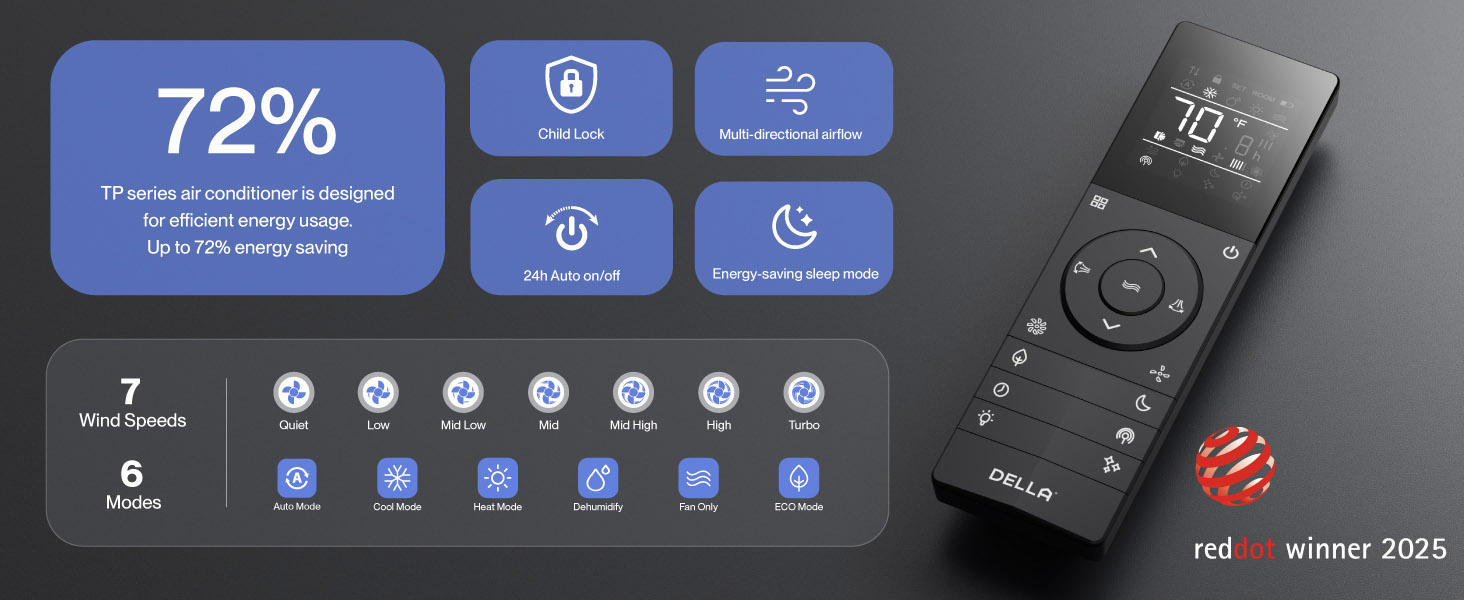
Figure 4.3: Voice Control Integration with Smart Home Devices
Simply use voice commands like "Alexa, turn on the air conditioner" to control your unit.
5. Mantenimiento
El mantenimiento regular garantiza un rendimiento óptimo y la longevidad de su sistema DELLA Mini Split.
- Limpieza de filtros: Regularly clean the air filters in the indoor unit to maintain air quality and efficiency. Refer to the full manual for frequency and procedure.
- Tecnología PureClean: The unit features PureClean tech that helps stop dust buildup and defrosts your indoor unit, contributing to cleaner air and advanced sterilization.
- Tecnología FIN bañada en oro: The gold plated FIN technology in the outdoor unit prevents freezing and rust corrosion, enhancing durability and boosting heat efficiency, even in extreme temperatures down to -13°F (-25°C).

Figure 5.1: PureClean Technology for Cleaner Air

Figure 5.2: Gold Plated FIN Technology for Enhanced Durability
6. Solución de problemas
If you encounter issues with your DELLA Mini Split, refer to the following common troubleshooting tips. For more detailed solutions, consult the full user manual.
- La unidad no se enciende: Verifique la fuente de alimentación, el disyuntor y asegúrese de que las baterías del control remoto no estén agotadas.
- Refrigeración/calefacción insuficiente: Verify correct mode selection, temperature setting, and ensure air filters are clean. Check for obstructions around indoor and outdoor units.
- Ruidos inusuales: Some operational noises are normal (e.g., refrigerant flow). If noises are loud or unusual, consult the manual or contact support.
- Problemas de conexión Wi-Fi: If the unit occasionally loses connection with Wi-Fi, try resetting the unit by cycling power at the breaker. Ensure your Wi-Fi network is stable.
- Códigos de error: If an error code appears on the display, note the code and refer to the troubleshooting section in the comprehensive user manual for specific instructions.
If problems persist after attempting these solutions, please contact DELLA customer support.
7. Especificaciones
Key technical specifications for the DELLA Hyper Heat 9,000 BTU Mini Split.

Figura 7.1: Dimensiones del producto y especificaciones clave
| Especificación | Valor |
|---|---|
| Número de modelo | 048-TP-9K1V-23S-E+O |
| Capacidad de enfriamiento | 9000 BTU/h (0.75 toneladas) |
| Capacidad de calentamiento | 10000 BTU/h |
| Fuente de alimentación | 115V~/60Hz/1PH |
| Potencia máxima de entrada | 730 vatios |
| Volumen de flujo de aire | 554 m³/h |
| máx. Tamaño del fusible | 20A |
| Clasificación SEER2 | 24 |
| Clasificación HSPF2 | 10 |
| Temperatura de funcionamiento (calefacción) | Functional up to -13°F (-25°C) |
| Nivel de ruido (unidad interior) | Tan bajo como 30 dB(A) |
| Tamaño de habitación recomendado | Hasta 400 pies cuadrados. |
| Certificaciones | Energy Star, ETL listed, AHRI certified |

Figure 7.2: Energy Efficiency Comparison (24 SEER2)
8. Garantía y soporte
DELLA is committed to providing exceptional product quality and customer service.
Garantía de por vida:
The DELLA Hyper Heat Mini Split is backed by a lifetime warranty, offering unmatched support and peace of mind. This warranty covers manufacturing defects and ensures long-term reliability without additional costs.

Figure 8.1: Lifetime Coverage and Support
Atención al cliente:
For any inquiries, technical assistance, or warranty claims, please contact DELLA customer support:
- Soporte telefónico: Disponible de lunes a viernes, de 6 a. m. a 4 p. m., hora estándar del Pacífico.
- Chat en vivo: Disponible 24/7 para asistencia inmediata.

Figure 8.2: Della Customer Support Options
You can also find the full User Manual (PDF) and User Guide (PDF) for this product at the following links:
Ask a question about this manual
Ask about setup, troubleshooting, compatibility, parts, safety, or missing instructions. Manuals+ will review the question and use this page’s manual context to help answer it.