
Introducción
Gracias por la compraasing the Muse M-780 BTB Bluetooth Speaker. This portable speaker features 20W output, colored lights, IPX5 splash resistance, hands-free calling, and stereo pairing capabilities. It supports Bluetooth, Auxiliary input, and USB MP3 playback. Please read this manual carefully before use to ensure proper operation and to maximize your listening experience.
Información de seguridad
- No exponga el dispositivo a temperaturas extremas, luz solar directa o humedad alta.
- Evite dejar caer o someter el altavoz a impactos fuertes.
- The speaker is IPX5 splash-resistant. Do not immerse it in water or expose it to strong jets of water.
- No intente desmontar ni modificar el altavoz. Esto anulará la garantía.
- Utilice únicamente el cable de carga proporcionado o aprobado.
- Mantener fuera del alcance de los niños.
Contenido del paquete
Por favor, compruebe que todos los elementos estén presentes:
- Muse M-780 BTB Bluetooth Speaker
- Cable de carga USB-C
- Cable de entrada auxiliar
- Manual de instrucciones (este documento)
Producto terminadoview
Familiarícese con los controles y puertos del altavoz.
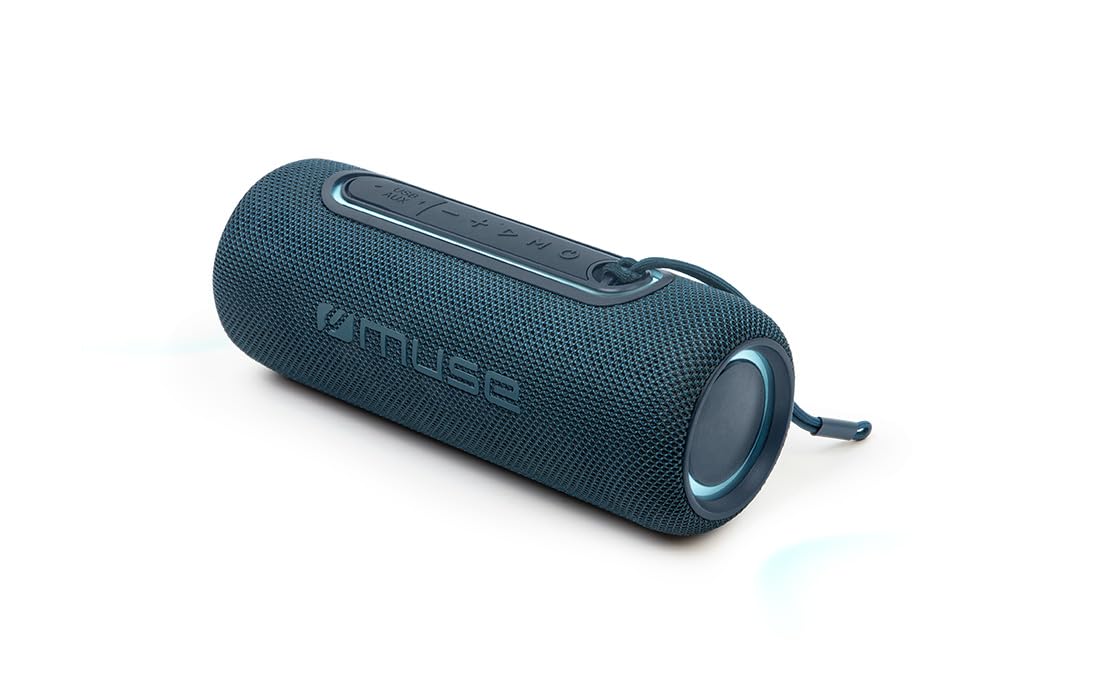
Figura 1: Frente view of the Muse M-780 BTB Bluetooth Speaker, showing the speaker grille and control buttons on top.
Controles e indicadores:
- Botón de encendido: Mantenga presionado para encender/apagar.
- Botón de reproducción/pausa: Press to play or pause music. Answer/end calls.
- Subir volumen (+): Presione para aumentar el volumen. Mantenga presionado para la siguiente pista.
- Bajar volumen (-): Presione para disminuir el volumen. Mantenga presionado para ir a la pista anterior.
- Botón de modo (M): Press to switch between Bluetooth, Aux-in, and USB modes.
- Botón de modo de luz: Press to cycle through different colored light effects.
- Bluetooth Pairing LED Indicator: Muestra el estado de la conexión Bluetooth.
- Indicador LED de carga: Muestra el estado de carga de la batería.
Puertos:
- Puerto de carga USB-C: Para cargar la batería interna.
- Puerto AUX-IN: Para conectar dispositivos de audio externos mediante un cable de 3.5 mm.
- Puerto USB: Para reproducción de MP3 desde una unidad flash USB.
Configuración
1. Carga inicial
Before first use, fully charge the speaker. Connect the supplied USB-C cable to the speaker's USB-C charging port and the other end to a USB power adapter (not included) or a computer's USB port. The Charging LED indicator will illuminate during charging and turn off when fully charged. A full charge provides up to 10 hours of music playback.
2. Encendido / apagado
Mantenga pulsado el Botón de encendido for approximately 3 seconds to turn the speaker ON or OFF.
Instrucciones de funcionamiento
Emparejamiento Bluetooth
- Turn on the speaker. It will automatically enter Bluetooth pairing mode, and the Bluetooth Pairing LED indicator will flash.
- Habilite Bluetooth en su teléfono inteligente, tableta u otro dispositivo compatible con Bluetooth.
- Buscar "M-780 BTB" in the list of available devices and select it to connect.
- Once successfully paired, the Bluetooth Pairing LED indicator will stop flashing and remain solid. You can now stream music wirelessly from your device within a range of up to 10 meters.
Auxiliary Input (AUX-IN)
- Connect one end of the supplied 3.5mm auxiliary cable to the AUX-IN port on the speaker.
- Conecte el otro extremo al conector de auriculares o a la salida de audio de su dispositivo de audio externo.
- Presione el Botón de modo (M) to switch to AUX-IN mode.
- Controle la reproducción y el volumen desde su dispositivo externo.
Reproducción de MP3 por USB
- Inserte una unidad flash USB que contenga audio MP3 files en el puerto USB del altavoz.
- Presione el Botón de modo (M) para cambiar al modo USB.
- The speaker will automatically begin playing MP3 files de la unidad USB.
- Utilice los botones Reproducir/Pausa, Subir volumen (+) y Bajar volumen (-) para controlar la reproducción.
Llamadas manos libres
Cuando se conecta mediante Bluetooth a su teléfono inteligente:
- Responder/Finalizar llamada: Presione el Botón de reproducción/pausa una vez.
- Rechazar llamada: Mantenga pulsado el Botón de reproducción/pausa durante 2 segundos.
Stereo Pairing (TWS - True Wireless Stereo)
You can pair two M-780 BTB speakers together for a true wireless stereo sound experience.
- Ensure both M-780 BTB speakers are turned on and not connected to any Bluetooth device.
- En un altavoz (este será el altavoz principal), mantenga presionado el botón Botón de modo (M) for 2-3 seconds until you hear a confirmation tone. The speakers will attempt to pair with each other.
- Once successfully paired, you will hear another confirmation tone. The Bluetooth LED on the primary speaker will flash, and the LED on the secondary speaker will be solid.
- Now, connect your Bluetooth device to the primary speaker as described in the "Bluetooth Pairing" section. Both speakers will play audio in stereo.
Luces de colores
Presione el Botón de modo de luz to cycle through various colored light effects. Press again to change the effect or turn the lights off.
Carga del altavoz
When the battery is low, the speaker may emit an audible alert. Connect the USB-C charging cable to the speaker and a power source. The Charging LED indicator will show the charging status. Disconnect the cable once fully charged to preserve battery life.
Mantenimiento
- Limpieza: Utilice un paño suave y seco para limpiar la superficie del altavoz. No utilice limpiadores abrasivos ni disolventes.
- Resistencia al agua: The M-780 BTB has an IPX5 splash-resistant rating, meaning it can withstand splashes of water. Do not submerge the speaker in water or expose it to running water. Ensure the port cover is securely closed to maintain water resistance.
- Almacenamiento: Guarde el altavoz en un lugar fresco y seco cuando no lo utilice durante períodos prolongados.
Solución de problemas
| Problema | Posible causa | Solución |
|---|---|---|
| El altavoz no se enciende. | La batería está agotada. | Cargue el altavoz mediante el cable USB-C. |
| No hay sonido. | El volumen está demasiado bajo o silenciado. Modo de entrada incorrecto. | Increase volume on both the speaker and the connected device. Press the Mode button to select the correct input (Bluetooth, AUX, USB). |
| No se puede emparejar a través de Bluetooth. | El altavoz no está en modo de emparejamiento. El dispositivo está demasiado lejos. Hay interferencias. | Ensure speaker is in pairing mode (flashing LED). Move device closer to speaker (within 10m). Turn off other Bluetooth devices. |
| El emparejamiento estéreo no funciona. | Speakers not correctly paired. | Ensure both speakers are disconnected from other devices. Follow the stereo pairing instructions carefully. |
Presupuesto
| Nombre del modelo: | M-780 BTB |
| Marca: | Musa |
| Potencia de salida: | 20 vatios |
| Conectividad: | Bluetooth, USB, AUX-IN |
| Alcance de Bluetooth: | Hasta 10 metros (33 pies) |
| Resistencia al agua: | IPX5 Splash-Resistant |
| Tiempo de reproducción: | Hasta 10 horas (a volumen moderado) |
| Puerto de carga: | USB-C |
| Dimensiones (L x An x Al): | 24.2 x 9.2 x 9.2 cm (9.5 x 3.6 x 3.6 pulgadas) |
| Peso: | 1 kg (2.2 libras) |
| Dispositivos compatibles: | Teléfonos inteligentes, tabletas, computadoras portátiles |
| Características especiales: | Colored Lights, Hands-Free Calling, Stereo Pairing (TWS) |
Garantía y soporte
This product is covered by a standard manufacturer's warranty. For detailed warranty terms and conditions, please refer to the warranty card included with your purchase or contact your retailer. For technical support or service inquiries, please contact Muse customer service through their official websitio o la información de contacto proporcionada con su producto.