
1. Introducción
Thank you for choosing the PNI Voyager S2600 WiFi 4K Ultra HD Car DVR Camera. This device is designed to record high-quality video footage of your journeys, providing security and evidence in case of incidents. It features 4K Ultra HD recording, Wi-Fi connectivity for smartphone control, parking monitoring, and a G-sensor for automatic incident detection.

Image 1.1: PNI Voyager S2600 Dash Cam installed in a vehicle, showcasing its key features: 4K Ultra HD recording, Wi-Fi connectivity, and Parking Monitoring.
2. Información de seguridad
Lea y siga estas pautas de seguridad para garantizar el funcionamiento correcto y evitar daños al dispositivo o lesiones.
- No exponga el dispositivo a temperaturas extremas, luz solar directa durante períodos prolongados o alta humedad.
- Asegúrese de que el dispositivo esté montado de forma segura y no obstruya la conducción. view o interferir con los controles del vehículo.
- Utilice únicamente el cable de alimentación y los accesorios suministrados. El uso de accesorios no autorizados puede dañar el dispositivo y anular la garantía.
- No intente desmontar ni reparar el dispositivo usted mismo. Para obtener ayuda, contacte con el personal de servicio técnico autorizado.
- Mantenga la lente limpia para garantizar una grabación de video nítida.
- Always format the microSD card regularly to maintain optimal recording performance.
3. Contenido del paquete
Verifique que todos los artículos estén presentes en el paquete:
- PNI Voyager S2600 Car DVR Camera
- Power cord with cigarette lighter plug (12V/24V compatible)
- Soporte de parabrisas
- Manual de usuario

Image 3.1: The PNI Voyager S2600 dash cam, its magnetic mount, and the power cable with a cigarette lighter adapter.
4. Producto terminadoview
Familiarize yourself with the components of your PNI Voyager S2600 dash cam.
4.1. Disposición del dispositivo
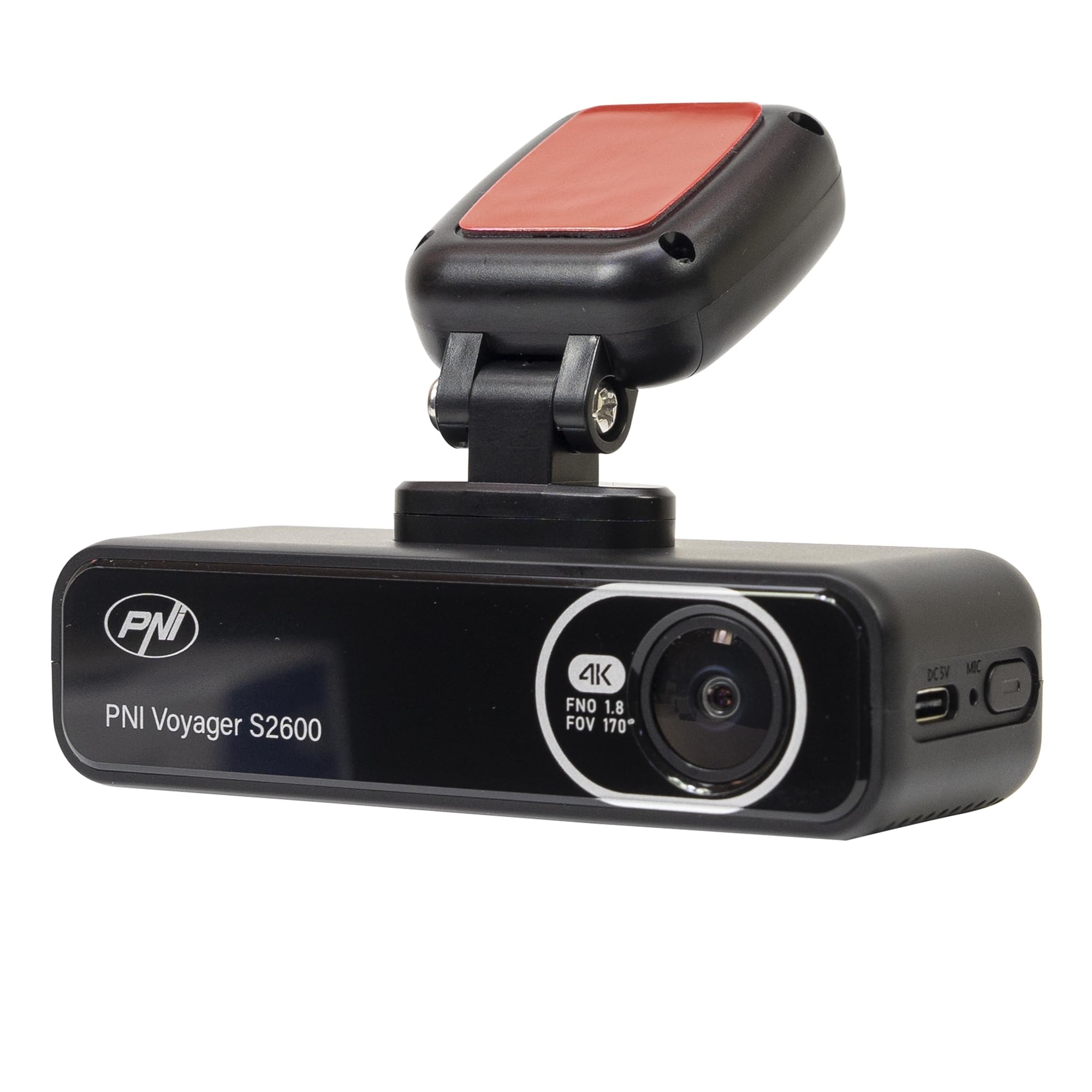
Imagen 4.1: Frente view of the PNI Voyager S2600, displaying the camera lens with 4K FNO 1.8 FOV 170° markings, the PNI brand logo, and the model name.

Imagen 4.2: Detallada view of the side of the dash cam, highlighting the USB-C power input (DC 5V) and the microphone opening.
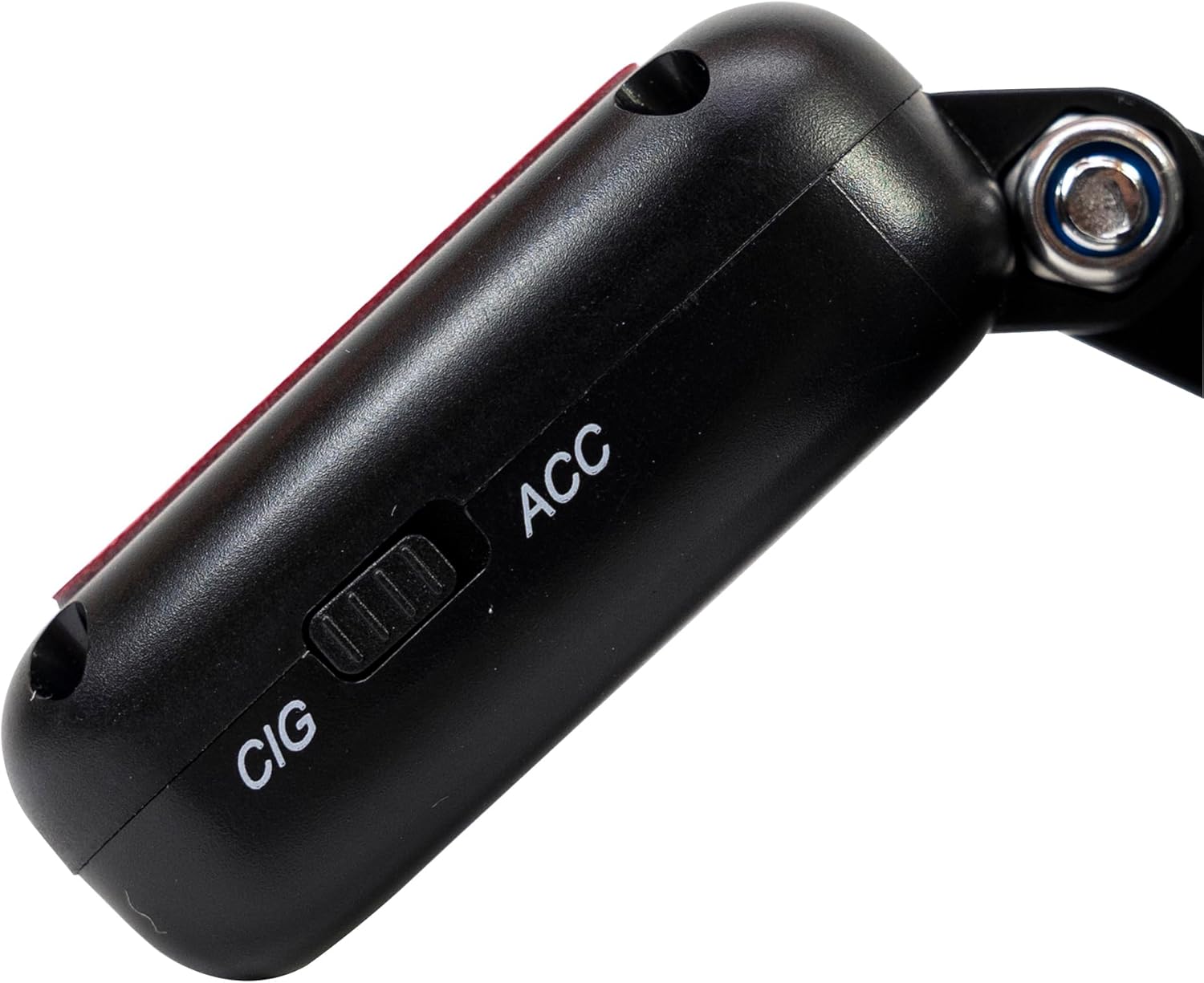
Imagen 4.3: Lateral view of the magnetic mount, featuring a switch to select between 'CIG' (cigarette lighter power) and 'ACC' (accessory power) modes.
4.2. Características principales
- Grabación de video 4K Ultra HD: Captures video at 3840x2160 resolution at 30FPS, or 2560x1440 at 30FPS, and 1920x1080 at 60FPS/30FPS.
- Conectividad Wi-Fi: Connects to your smartphone via the Viidure-Dashcam Viewer app for live view, descarga de videos y ajuste de configuración.
- Monitoreo de estacionamiento: Activates the camera to record when vibration or movement is detected while the vehicle is parked.
- Sensor G: Automatically locks the current video file in case of a collision to prevent overwriting.
- Lente gran angular: 170 grados viewángulo para capturar una perspectiva amplia de la carretera.
- Grabación en bucle: Sobrescribe el foo más antiguotage cuando la tarjeta de memoria está llena, lo que garantiza una grabación continua.
- GPS integrado: Records speed and coordinates, which can be displayed on recorded videos.
5. Configuración
5.1. Inserción de la tarjeta MicroSD
- Asegúrese de que la cámara del tablero esté apagada.
- Localice la ranura para tarjetas microSD en el dispositivo.
- Insert a high-speed (Class 10 or higher) microSD card (up to 512GB) into the slot until it clicks into place.
- To remove, gently push the card in until it clicks, then release. The card will eject.
Importante: Format the microSD card within the app or on a computer before first use and periodically thereafter to ensure stable recording.
5.2. Instalación y conexión eléctrica
- Limpie el área del parabrisas donde desea montar la cámara para tablero. Asegúrese de que no obstruya su view.
- Attach the windshield mount to the dash cam. The mount is magnetic for easy attachment.
- Peel off the protective film from the adhesive pad on the mount and firmly press it onto the chosen spot on your windshield for at least 30 seconds.
- Connect the power cable to the USB-C port on the mount.
- Route the power cable neatly along the windshield and dashboard to the vehicle's cigarette lighter socket.
- Plug the cigarette lighter adapter into the vehicle's 12V/24V power outlet.
- Select the appropriate power mode on the mount's switch: 'CIG' for continuous power from the cigarette lighter, or 'ACC' for power only when the vehicle's ignition is on.

Image 5.1: The PNI Voyager S2600 dash cam detached from its magnetic mount, illustrating the contact points for secure attachment.
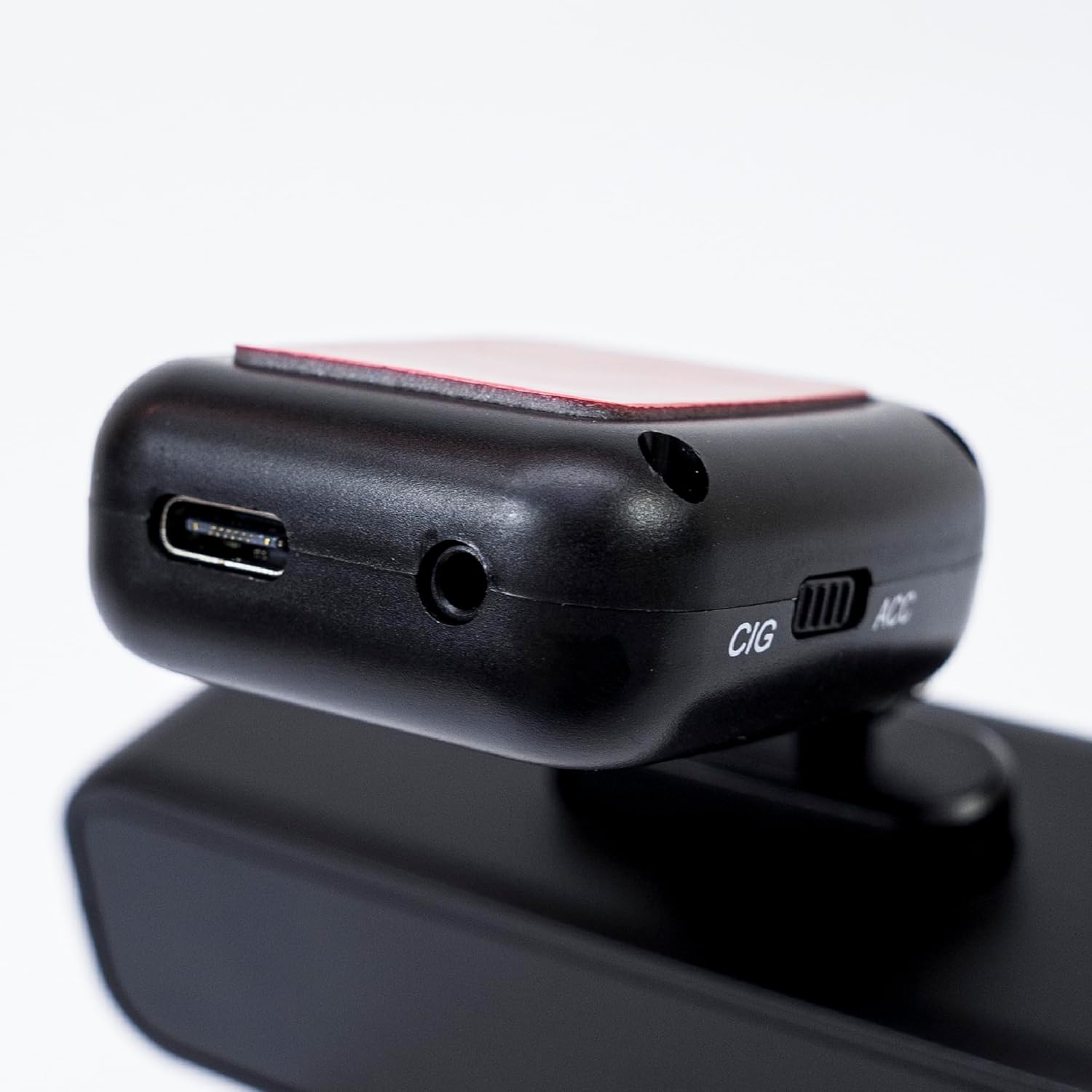
Image 5.2: The top of the dash cam mount, featuring the USB-C port for power input and the CIG/ACC switch for power mode selection.
5.3. Instalación de la aplicación y conexión Wi-Fi
- Descargar el Viidure-Dashcam Viewer aplicación de la App Store (iOS) o Google Play Store (Android).
- Encienda la cámara del tablero.
- On your smartphone, go to Wi-Fi settings and connect to the dash cam's Wi-Fi network. The network name (SSID) and password can usually be found in the dash cam's settings (if it has a screen) or in the manual.
- Open the Viidure-Dashcam Viewer app. The app should automatically detect and connect to the dash cam.
- A través de la aplicación, puedes view vivir footage, adjust settings, download recorded videos, and format the microSD card.

Image 5.3: A smartphone showing the Viidure-Dashcam Viewer application, demonstrating the wireless connection and control over the PNI Voyager S2600 dash cam.
6. Instrucciones de funcionamiento
6.1. Grabación automática
Once powered on and with a valid microSD card inserted, the PNI Voyager S2600 will automatically begin loop recording. Video files are saved in segments (e.g., 1, 3, or 5 minutes) to the microSD card.
6.2. Sensor G (Grabación de emergencia)
The built-in G-sensor detects sudden impacts or rapid acceleration/deceleration. When triggered, it automatically locks the current video segment, preventing it from being overwritten by loop recording. These emergency files are stored in a separate folder on the microSD card.
6.3. Monitoreo de estacionamiento
When the vehicle is parked and the dash cam is powered (either continuously via CIG mode or with a hardwire kit), the parking monitor function activates. If the G-sensor detects a collision or motion detection is enabled and detects movement, the dash cam will automatically power on and record a short video segment. This feature helps protect your vehicle when unattended.

Image 6.1: Visual representation of the Parking Monitor feature, showing the dash cam detecting an impact while the car is parked.
6.4. Wi-Fi and App Usage
The Viidure-Dashcam Viewer app allows you to:
- Vivir View: See what the camera is recording in real-time on your smartphone.
- Reproducción de vídeo: Review recorded videos directly from the microSD card.
- Descargar vídeos: Transfer important video files from the dash cam to your smartphone.
- Ajuste de configuración: Configure various dash cam settings, such as video resolution, G-sensor sensitivity, loop recording duration, and parking monitor options.
- Formatear tarjeta SD: Erase all data on the microSD card.
6.5. Funcionalidad GPS
The integrated GPS receiver records your vehicle's speed and location data. This information can be overlaid on the video footage during playback via the app or compatible desktop software, providing additional context for your recordings.
7. Mantenimiento
7.1. Limpieza del dispositivo
Use a soft, dry cloth to clean the dash cam body. For the lens, use a specialized lens cleaning cloth to avoid scratches. Do not use chemical cleaners or abrasive materials.
7.2. MicroSD Card Formatting
It is recommended to format the microSD card every 2-4 weeks to prevent data corruption and ensure optimal recording performance. This can be done through the Viidure-Dashcam Viewer aplicación.
7.3. Actualizaciones de firmware
Periodically check the PNI website or the Viidure-Dashcam Viewer app for available firmware updates. Firmware updates can improve performance, add new features, or fix bugs. Follow the instructions provided with the update carefully.
8. Solución de problemas
If you encounter issues with your PNI Voyager S2600, refer to the following common problems and solutions:
| Problema | Posible causa | Solución |
|---|---|---|
| La cámara del tablero no se enciende. | No power supply; faulty cable; incorrect power mode. | Check power cable connection; ensure cigarette lighter socket is active; verify CIG/ACC switch setting. |
| La grabación se detiene o se congela. | MicroSD card error; card full; low-speed card. | Format microSD card; replace with a high-speed (Class 10 U3) card; ensure sufficient storage. |
| Wi-Fi connection unstable or fails. | Interference; incorrect password; app issue. | Ensure dash cam Wi-Fi is enabled; re-enter password; restart app and dash cam; try connecting in a different location. |
| Mala calidad de vídeo. | Dirty lens; incorrect resolution setting. | Clean the camera lens; check video resolution settings in the app. |
| El monitor de estacionamiento no funciona. | Incorrect power mode; feature disabled. | Ensure dash cam is receiving continuous power (CIG mode or hardwire kit); enable parking monitor in app settings. |
If the problem persists, please contact PNI customer support.
9. Especificaciones
Detailed technical specifications for the PNI Voyager S2600 Car DVR Camera:
| Característica | Descripción |
|---|---|
| Número de modelo | PNI-S2600 |
| Resolución de vídeo | 4K (3840x2160@30FPS), 2K (2560x1440@30FPS), FHD (1920x1080@60FPS/30FPS) |
| Sensor de imagen | SONY335 (5MP, 2592x1944px) |
| Viewángulo de ing | 170 grados |
| Formato de vídeo | MP4, H.264 |
| Formato de la fotografía | JPEG |
| Resolución máxima de fotos | 8 MP (3264 x 2448) |
| Almacenamiento | MicroSD card slot, up to 512GB (Class 10 or higher recommended) |
| Conectividad | Wi-Fi, GPS (integrated) |
| Características especiales | G-Sensor, Parking Monitoring, Motion Detection, Loop Recording |
| Fuente de alimentación | 5V/2A (via 12V/24V car adapter) |
| Batería | Super capacitor 1.5 UF |
| Temperatura de funcionamiento | -26 °C ~ +80 °C |
| Dimensiones (L x An x Al) | 105 mm x 35 mm x 27 mm |
| Peso | 88 gramos |
| Tipo USB | Tipo C |
10. Garantía y soporte
10.1. Información de garantía
The PNI Voyager S2600 Car DVR Camera comes with a Garantía de 24 meses from the date of purchase. This warranty covers manufacturing defects under normal use. It does not cover damage caused by misuse, accidents, unauthorized modifications, or improper installation. Please retain your proof of purchase for warranty claims.
10.2. Atención al cliente
For technical assistance, troubleshooting, or warranty inquiries, please contact PNI customer support. You can find more information and support resources on the official PNI websitio:
Fabricante: ONLINESHOP SRL
Dirección: Olteniei 26A, Piatra Neamt, Neamt, 610206, Rumania