
1. Introducción
This manual provides essential information for the safe and efficient operation of your Sharp GX-BT190 Portable Bluetooth Speaker. Please read it thoroughly before using the device and retain it for future reference.
2. Información de seguridad
- No exponga el altavoz a temperaturas extremas, luz solar directa o humedad alta.
- No desmonte, repare ni modifique el altavoz. Esto podría anular la garantía y suponer riesgos de seguridad.
- Ensure the charging port cover is securely closed when using the speaker near water to maintain its IP67 rating.
- Utilice únicamente el cable de carga proporcionado o un equivalente certificado.
- Mantenga el altavoz alejado de niños y mascotas.
- Evite escuchar a niveles de volumen altos durante períodos prolongados para evitar daños auditivos.
3. Contenido del paquete
- Sharp GX-BT190 Portable Bluetooth Speaker
- Cable de carga USB
- Acollador
- Manual de instrucciones
4. Producto terminadoview

Frente view of the Sharp GX-BT190 speaker, showing the central speaker grille with the Sharp logo and the LED light ring.

Lado view of the Sharp GX-BT190 speaker, highlighting the textured speaker grille and the integrated lanyard.
Trasero view of the Sharp GX-BT190 speaker, showing the control buttons and the sealed charging port cover.
Controles e indicadores:
- Botón de encendido: Mantenga presionado para encender/apagar.
- Botón para subir volumen/siguiente pista (+): Presione brevemente para subir el volumen, presione prolongadamente para la siguiente pista.
- Botón para bajar el volumen/pista anterior (-): Presione brevemente para bajar el volumen, presione prolongadamente para la pista anterior.
- Botón de reproducción/pausa/llamada (►||): Pulsación corta para reproducir/pausar, responder/finalizar llamadas. Pulsación larga para rechazar llamadas.
- Mode / Light Button (M): Short press to cycle through LED light modes. Long press to turn off LED lights.
- Puerto de carga USB-C: For charging the speaker. Ensure the rubber cover is sealed when not charging.
- Indicador LED: Muestra el estado de carga y el estado de emparejamiento de Bluetooth.
5. Configuración
5.1 Carga del altavoz
- Open the rubber cover on the back of the speaker to access the USB-C charging port.
- Conecte el cable de carga USB provisto al puerto USB-C del altavoz.
- Conecte el otro extremo del cable USB a un adaptador de corriente USB (no incluido) o al puerto USB de una computadora.
- The LED indicator will illuminate during charging and turn off once fully charged.
- Close the rubber cover securely after charging to maintain the speaker's waterproof rating.
5.2 Encendido / Apagado
- Para encender: Mantenga presionado el botón de encendido durante aproximadamente 3 segundos. Oirá una señal sonora y el indicador LED parpadeará.
- Para apagar: Mantenga presionado el botón de encendido durante aproximadamente 3 segundos. Oirá una señal sonora y el indicador LED se apagará.
5.3 Emparejamiento Bluetooth
- Ensure the speaker is powered on and the LED indicator is flashing, indicating it is in pairing mode.
- En su dispositivo móvil, habilite Bluetooth y busque dispositivos disponibles.
- Select "GX-BT190" from the list of devices.
- Una vez emparejado, el indicador LED dejará de parpadear y permanecerá fijo, y escuchará un tono de confirmación.
- El altavoz se volverá a conectar automáticamente al último dispositivo emparejado cuando se encienda, si el dispositivo está dentro del alcance y Bluetooth está habilitado.
5.4 Emparejamiento estéreo inalámbrico verdadero (TWS)
TWS allows you to pair two GX-BT190 speakers together for a stereo audio experience.

Two Sharp GX-BT190 speakers, one red and one blue, positioned together, illustrating the True Wireless Stereo (TWS) pairing feature.
- Ensure both GX-BT190 speakers are powered on and not connected to any Bluetooth device.
- En uno de los altavoces (el principal), pulsa dos veces el botón de encendido. El altavoz entrará en modo de emparejamiento TWS.
- Los dos altavoces se buscarán y se conectarán automáticamente. Escuchará un tono de confirmación una vez que el emparejamiento TWS se haya realizado correctamente.
- Once TWS paired, connect your mobile device to the primary speaker via Bluetooth as described in section 5.3.
- Para desconectar TWS, presione dos veces el botón de encendido en cualquiera de los altavoces.
6. Operando
6.1 Reproducción de audio
- Reproducir/Pausa: Presione brevemente el botón Reproducir/Pausar.
- Sube el volumen: Presione brevemente el botón '+'.
- Bajar volumen: Presione brevemente el botón '-'.
- Pista siguiente: Mantenga presionado el botón '+'.
- Pista anterior: Mantenga presionado el botón '-'.
6.2 Llamadas manos libres
- Responder llamada: Presione brevemente el botón Reproducir/Pausa cuando suene una llamada entrante.
- Finalizar llamada: Presione brevemente el botón Reproducir/Pausa durante una llamada.
- Rechazar llamada: Mantenga presionado el botón Reproducir/Pausa cuando suene una llamada entrante.
6.3 LED Mood Lights
- Short press the 'M' (Mode/Light) button to cycle through the 6 available LED mood light modes.
- Long press the 'M' button to turn off the LED lights.
6.4 Uso a prueba de agua y polvo (IP67)

The Sharp GX-BT190 speaker partially submerged in water, demonstrating its IP67 waterproof and dustproof capabilities.
The GX-BT190 speaker is rated IP67, meaning it is protected from dust ingress and can withstand immersion in water up to 1 meter for 30 minutes. To ensure this protection:
- Always ensure the rubber cover for the charging port is fully and securely sealed before exposing the speaker to water or dust.
- No sumerja intencionalmente el altavoz durante períodos prolongados o más allá de la profundidad especificada.
- Después de la exposición al agua, seque el altavoz con un paño suave antes de cargarlo.
7. Mantenimiento
7.1 Limpieza
- Limpie el altavoz con un paño suave, damp paño.
- No utilice limpiadores abrasivos, alcohol ni disolventes químicos.
- Asegúrese de que el altavoz esté seco antes de cargarlo o guardarlo.
7.2 Almacenamiento
- Guarde el altavoz en un lugar fresco y seco, alejado de la luz solar directa y de temperaturas extremas.
- Si va a almacenarla durante un período prolongado, cargue la batería periódicamente (por ejemplo, cada 3 meses) para mantener su salud.
8. Solución de problemas
| Problema | Solución |
|---|---|
| El altavoz no se enciende. | Asegúrese de que la batería esté cargada. Conecte el altavoz a una fuente de alimentación mediante el cable USB. |
| No se puede emparejar a través de Bluetooth. | Ensure the speaker is in pairing mode (LED flashing). Turn off and on Bluetooth on your device. Move the speaker closer to your device. Clear previous Bluetooth connections on your device. |
| No hay sonido o volumen bajo. | Sube el volumen tanto del altavoz como del dispositivo conectado. Asegúrate de que el altavoz esté correctamente emparejado. |
| Mala calidad de sonido. | Move the speaker closer to your device. Ensure there are no obstructions between the speaker and your device. Try playing a different audio source. |
| El emparejamiento de TWS falla. | Ensure both speakers are GX-BT190 models and are not connected to any other Bluetooth device. Try powering both speakers off and on, then re-attempt TWS pairing. |
9. Especificaciones

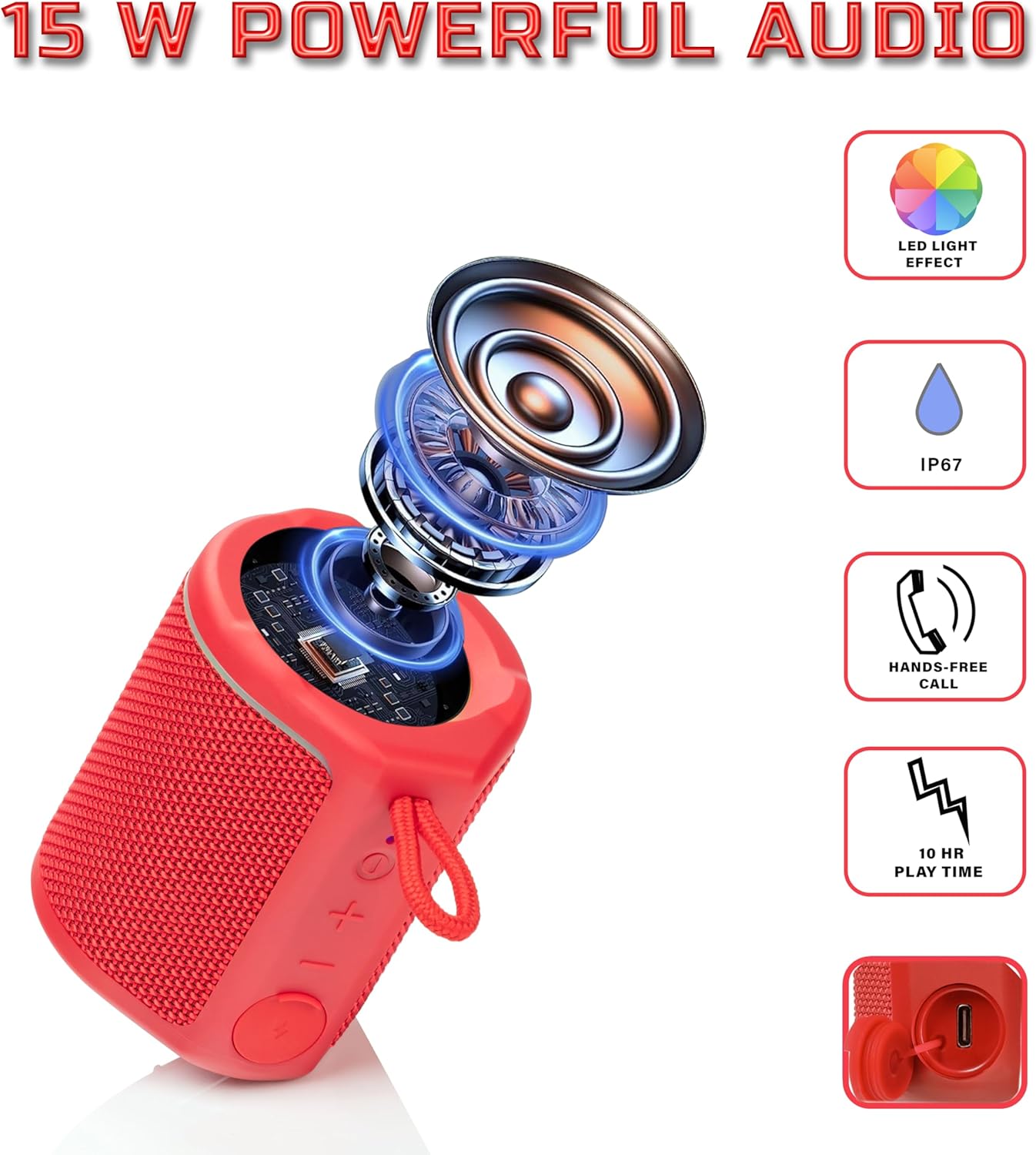
Diagram illustrating the internal components of the Sharp GX-BT190 speaker, including the speaker driver, and highlighting features like LED light effect, IP67 rating, hands-free call function, and battery life.
| Característica | Detalle |
|---|---|
| Número de modelo | GX-BT190 |
| Tecnología de conectividad | Bluetooth |
| Potencia máxima de salida del altavoz | 10 vatios |
| Clasificación de impermeabilidad | IP67 |
| Duración de la batería | Hasta 15 horas |
| Tipo de batería | 1 ion de litio (incluido) |
| Capacidad de la batería | 1200 mAh |
| Dimensiones del producto (Pr. x An. x Al.) | 7.5 x 7.5 x 7.5 cm (aprox.) |
| Peso del artículo | 226.8 g (8 onzas) |
| alcance inalámbrico | Hasta 33 pies |
| Características adicionales | LED Light, True Wireless Stereo (TWS), Hands-Free Calling |
10. Garantía
The Sharp GX-BT190 Portable Bluetooth Speaker comes with a 1-Year Limited Warranty from the date of purchase. This warranty covers manufacturing defects under normal use. It does not cover damage caused by misuse, accidents, unauthorized modifications, or normal wear and tear. Please retain your proof of purchase for warranty claims.
11. Soporte
For technical assistance, warranty inquiries, or further information regarding your Sharp GX-BT190 speaker, please contact Sharp Inc. customer support:
- Contacto del fabricante: Sharp Inc
- Teléfono: 1-800-BE-SHARP