
Introducción
Welcome to the GOBOULT UFO True Wireless Earbuds user manual. These earbuds are designed to provide a superior audio experience with features like extended playtime, low latency gaming, advanced noise cancellation, and robust bass drivers. Please read this manual carefully to ensure proper use and optimal performance of your device.
¿Qué hay en la caja?
- GOBOULT UFO True Wireless Earbuds
- Estuche de carga inalámbrica
- Cable de carga rápida tipo C
- Par adicional de almohadillas para los oídos
- Manual de usuario
- Tarjeta de garantía
Producto terminadoview
The GOBOULT UFO earbuds feature a distinctive design with integrated breathing LEDs on both the earbuds and the charging case. They are equipped with 13mm drivers for rich bass and Quad Mic ENC for clear calls.

Image: GOBOULT UFO Earbuds and Charging Case. This image highlights key features such as Bluetooth 5.3 connectivity, 48 hours of playtime, Quad Mic ENC, 13mm drivers, 45ms low latency, and Type-C fast charging.
LED de respiración
The breathing LEDs on the case and earbuds provide visual feedback for various actions, including opening/closing the case, charging, and when buds are connected.

Image: The GOBOULT UFO charging case and earbuds displaying their distinctive breathing LED lights, which indicate various operational states.
Calidad de audio
Experience high-fidelity sound with precision-tuned 13mm drivers, ensuring clear audio across all frequencies and rich bass. The Quad Mic ENC (Environmental Noise Cancellation) system ensures crystal-clear, interference-free calls.
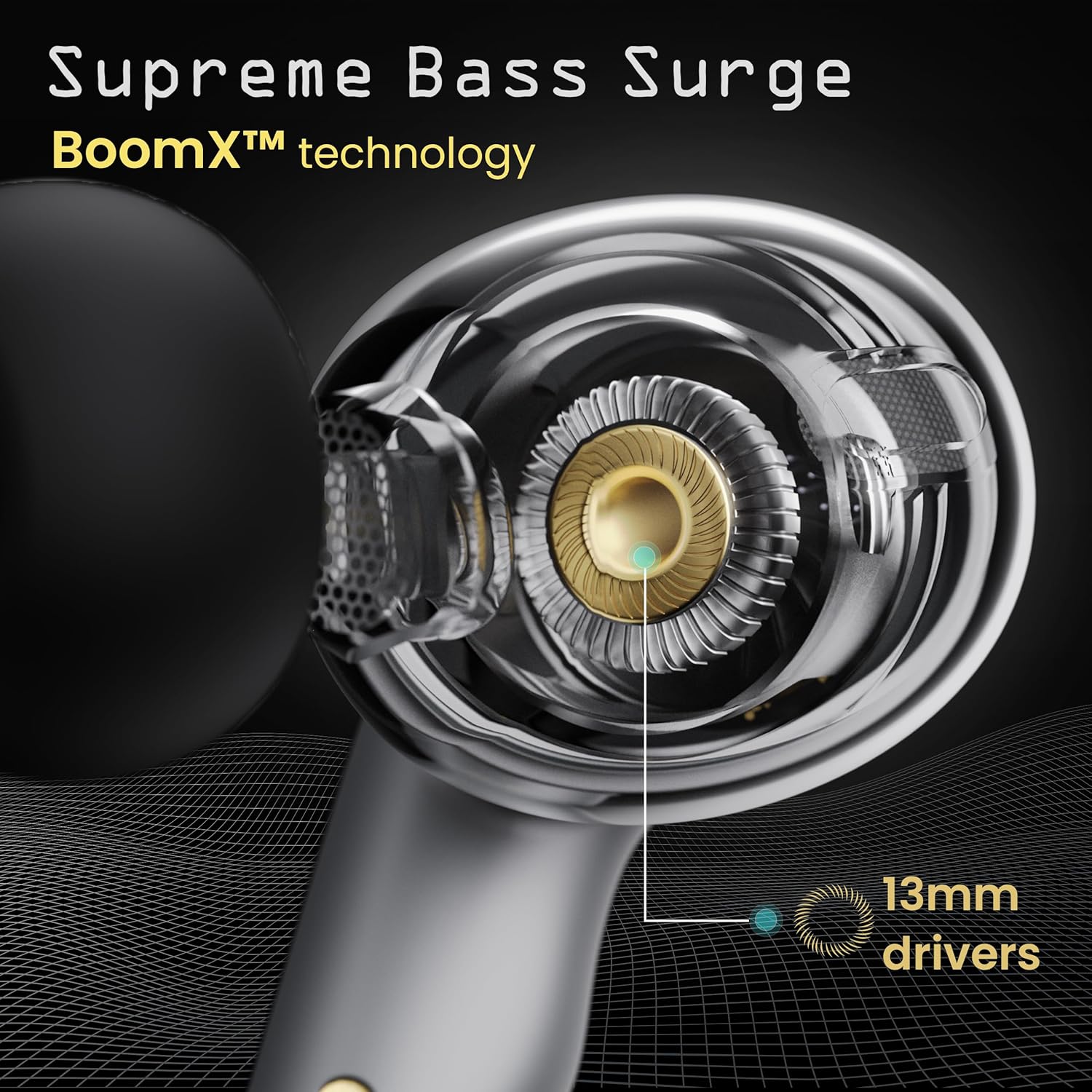
Image: A close-up of a GOBOULT UFO earbud, highlighting the 13mm drivers responsible for supreme bass surge.

Imagen: Un detalle view of a GOBOULT UFO earbud, showcasing the AI-powered Quad Mic AI-ENC technology for high-definition call clarity and Zen™ mode for silence.
Configuración
Emparejamiento inicial
- Abre el estuche de carga. Los auriculares entrarán automáticamente en modo de emparejamiento.
- En su dispositivo (teléfono inteligente, tableta, etc.), habilite Bluetooth.
- Buscar "GOBOULT UFO" in the list of available Bluetooth devices and select it to connect.
- Una vez conectado, escuchará un aviso de audio y los indicadores LED de los auriculares cambiarán.
The earbuds utilize Bluetooth 5.3 for stable and efficient connection, featuring Blink & Pair™ technology for fast pairing.

Image: GOBOULT UFO Earbuds illustrating stable connectivity with Bluetooth 5.3 and fast pairing technology.
Soporte de aplicaciones
Enhance your experience by downloading the dedicated GOBOULT app. The app allows you to:
- Switch between 6 Equalizer Modes.
- Personaliza los controles táctiles.
- Cambie el nombre de sus auriculares.
- Acceda a configuraciones y funciones adicionales.
Instrucciones de funcionamiento
Controles táctiles
The GOBOULT UFO earbuds feature intuitive touch controls on each earbud.
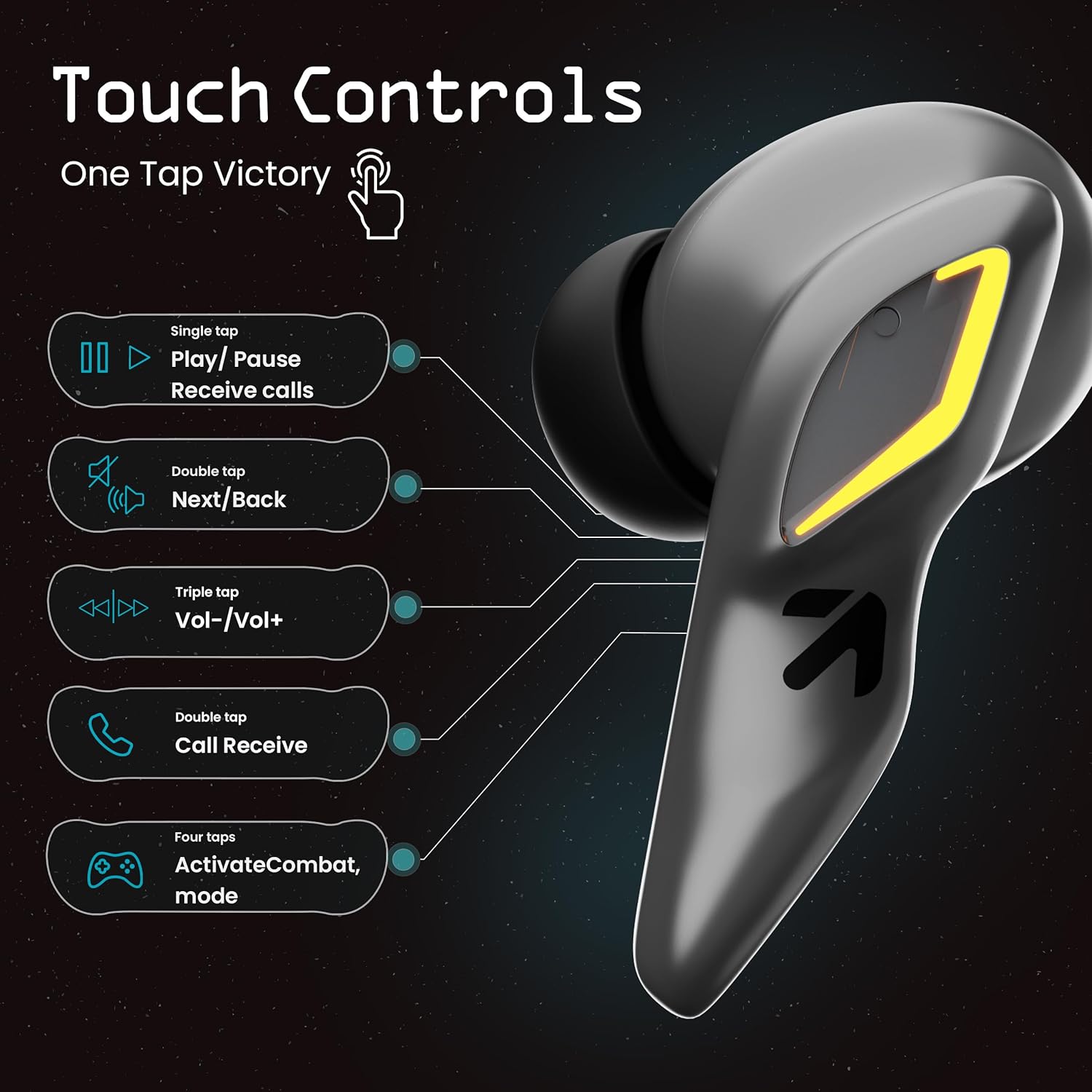
Image: A visual guide to the touch controls on the GOBOULT UFO Earbuds, detailing single, double, triple, and four-tap functions.
- Solo toque: Play/Pause music, Receive calls.
- Doble toque: Next/Back track.
- Triple Tap: Volumen arriba/abajo.
- Cuatro toques: Activate Combat Mode (Gaming Mode).
- Pulsación larga: Activar Asistente de Voz (Google Assistant, Siri).
Gaming Mode (Combat Mode)
Activate Combat Mode for an ultra-low latency experience of 45ms, ideal for gaming. Tap the earbud four times to toggle this mode.

Image: The GOBOULT UFO Earbuds case open, highlighting the Combat Gaming Mode with 45ms ultra-low latency, activated by four taps.
Asistente de voz
Long press the touch control area on either earbud to activate your device's voice assistant (e.g., Google Assistant, Siri).

Image: GOBOULT UFO Earbuds demonstrating the long-press gesture to activate the voice assistant feature.
Cargando
The GOBOULT UFO earbuds offer up to 48 hours of total playtime with the charging case.
Cómo cargar el estuche y los auriculares
- Coloque los auriculares en el estuche de carga. Asegúrese de que estén bien colocados.
- Connect the Type-C fast charging cable to the charging port on the case and to a power source.
- Los indicadores LED del estuche mostrarán el estado de carga.
- A full charge for the earbuds and case takes approximately 100 minutes.
- With Type-C fast charging, a 10-minute charge can provide up to 1.5 hours of playtime.
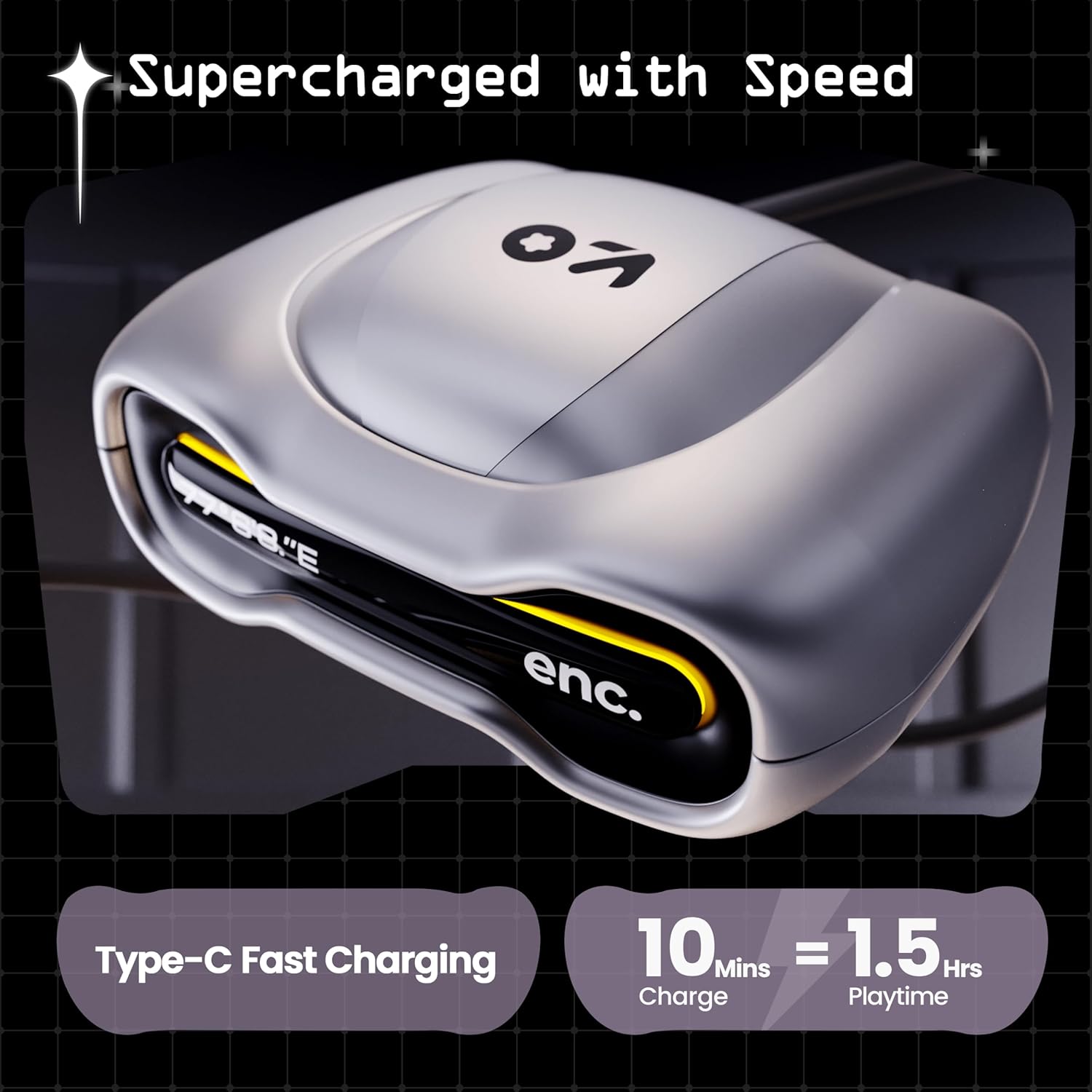
Image: The GOBOULT UFO charging case, illustrating its Type-C fast charging capability, providing 1.5 hours of playtime from a 10-minute charge.
Mantenimiento
Resistencia al agua
The GOBOULT UFO earbuds are IPX5 water-resistant, making them sweatproof, rainproof, and splashproof. This protection allows for use during workouts or in light rain.

Image: GOBOULT UFO Earbuds on a metallic surface, indicating their IPX5 water resistance, making them suitable for sweat, rain, and splashes.
Limpieza
Para mantener un rendimiento y una higiene óptimos, limpie periódicamente los auriculares y el estuche de carga.
- Utilice un paño suave, seco y sin pelusa para limpiar los auriculares y el estuche.
- Para suciedad difícil, ligeramente dampEnjuague el paño con agua. Evite usar productos químicos agresivos o materiales abrasivos.
- Asegúrese de que los contactos de carga de los auriculares y del estuche estén limpios y libres de residuos.
- Allow all components to dry completely before placing earbuds back in the case or charging.
Solución de problemas
If you encounter any issues with your GOBOULT UFO earbuds, please refer to the following common solutions:
- Sin sonido: Ensure earbuds are charged and properly connected to your device. Check device volume.
- Problemas de emparejamiento: Asegúrate de que el Bluetooth esté activado en tu dispositivo. Intenta olvidar el dispositivo en la configuración de Bluetooth y vuelve a emparejarlo. Asegúrate de que los auriculares estén completamente cargados.
- Un auricular no funciona: Place both earbuds back in the case, close it, and then open it again. This often resets the connection.
- Mala calidad de llamada: Ensure microphones are clean. Check for strong Bluetooth connection.
- Controles táctiles que no responden: Asegúrate de tener los dedos limpios y secos. Intenta reiniciar los auriculares colocándolos en el estuche y luego sacándolos.
Para obtener más ayuda, comuníquese con el servicio de atención al cliente de GOBOULT.
Presupuesto
| Característica | Detalle |
|---|---|
| Nombre del modelo | UFO (Airbass Earbuds) |
| Versión de Bluetooth | 5.3 |
| Recreo | Hasta 48 horas (con estuche de carga) |
| Latencia de audio | 45 milisegundos (modo de juego) |
| Conductores | Controladores dinámicos de 13 mm |
| Micrófonos | Quad Mic ENC (Cancelación de ruido ambiental) |
| Resistencia al agua | IPX5 (resistente al sudor, a la lluvia y a las salpicaduras) |
| Puerto de carga | Carga rápida tipo C |
| Tiempo de carga | Aprox. 100 minutos |
| Alcance de Bluetooth | 10 metros |
| Respuesta de frecuencia | 20 Hz |
| Sensibilidad | 115 dB |
| Impedancia | 32 ohmios |
| Peso del artículo | 60 gramos |
| Dimensiones del producto | 4.7 x 9 x 10 cm |
| Material | Metal |
Garantía y soporte
Información de garantía
The GOBOULT UFO True Wireless Earbuds come with a 1 año de garantía del fabricante from the date of purchase. Please retain your proof of purchase for warranty claims. The warranty covers manufacturing defects. It does not cover damage caused by misuse, accidents, or unauthorized modifications.
Atención al cliente
For any questions, technical support, or warranty claims, please contact GOBOULT customer service.
Fabricante: Exotic Mile Pvt. Ltd.
DIRECCIÓN: B67 Wazirpur Industrial Area, New Delhi 110052, India.
Please refer to the warranty card included in your product packaging for specific contact details and procedures.