
1. Introducción
Thank you for choosing the MASINGO Allegro X8 2.0 Professional Karaoke Machine. This manual provides essential information for the safe and efficient operation of your device. Please read it thoroughly before use and retain it for future reference.
2. ¿Qué hay en la caja?
A ellosASINGO Allegro X8 2.0 package includes the following components:
- Máquina de karaoke Allegro X8
- 2 micrófonos inalámbricos
- Adaptador de carga
- Manual de usuario
- Cable auxiliar

Imagen: La MASINGO Allegro X8 2.0 Karaoke Machine with its included accessories: two wireless microphones, a power adapter, a remote control, and the user manual.
3. Producto terminadoview
3.1 Características principales
- 15-inch Touch-Screen Tablet: Integrated display for lyrics and app navigation.
- Micrófonos inalámbricos duales: Two rechargeable microphones with individual displays for volume, echo, and EQ control.
- Múltiples modos de reproducción: Supports Tablet, Bluetooth, USB, AUX-out, Micro-SD, HDMI, and Guitar inputs.
- Diseño portátil: Equipped with wheels and a telescoping handle for easy transport.
- Efectos de voz: 'Magic Mode' allows voice alteration (e.g., Man, Woman, Electric, Shout).
- Batería de larga duración: Features a 12V 5000 mAh rechargeable battery providing 3-4 hours of operation.
3.2 Componentes físicos

Imagen: La MASINGO Allegro X8 2.0 Karaoke Machine, showcasing its overall design with the integrated touchscreen and speaker grille.
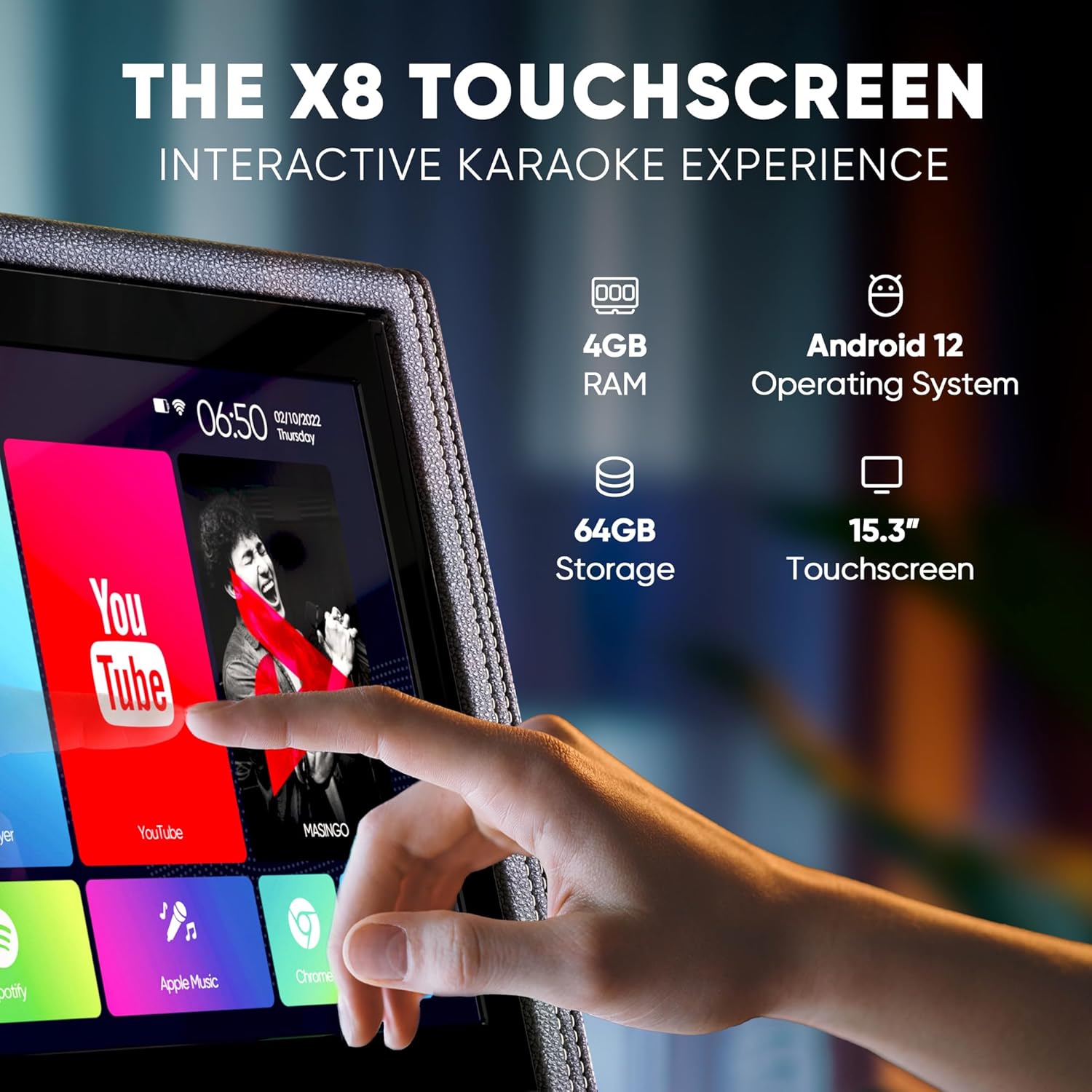
Imagen: Un detalle view of the 15-inch touchscreen tablet, highlighting its Android 12 operating system, 4GB RAM, and 64GB storage. The screen displays various app icons like YouTube and Spotify.

Image: Two wireless microphones are shown, emphasizing their visual control displays for battery levels and frequency, and the easy AA battery setup.

Image: A close-up of the top control panel, showing HDMI, WiFi, Bluetooth 5.0, USB, and Micro SD connectivity options.

Image: A person is shown easily transporting the karaoke machine using its telescoping handle and wheels, highlighting its portability and 12V 5000 mAh battery capacity.
Product Video: Introducing the Allegro X8 2.0 Karaoke Machine
Video Description: This official seller video provides an introduction to the MASINGO Allegro X8 2.0 Karaoke Machine, showcasing its features and design. It highlights the integrated touchscreen, dual wireless microphones, and portable nature of the device.
4. Configuración
4.1 Carga inicial
- Before first use, fully charge the karaoke machine using the provided charging adapter.
- Connect the charging adapter to the DC 15V input port on the control panel.
- Espere aproximadamente 3 a 4 horas para una carga completa.
4.2 Configuración del micrófono
- Insert 2 AA batteries into each wireless microphone.
- Press the power button on each microphone to turn it on. The microphones will automatically pair with the karaoke machine.
5. Instrucciones de funcionamiento
5.1 Encendido y apagado
- Para encender la máquina, ubique el interruptor de encendido en el panel de control y colóquelo en la posición "ENCENDIDO".
- Para apagar, mueva el interruptor a la posición “APAGADO”.
5.2 Uso de la pantalla táctil
- The 15-inch touchscreen operates like a standard Android tablet.
- Navigate through pre-installed apps (e.g., YouTube, Spotify, Google Chrome) or download new ones from the Play Store.
- Use the remote control for basic navigation and volume adjustments from a distance.
5.3 Opciones de conectividad
- Bluetooth: Pair your smartphone or tablet wirelessly to stream music.
- USB/Micro-SD: Insert a USB drive or Micro-SD card with your music files.
- Entrada auxiliar: Conecte dispositivos de audio externos utilizando el cable AUX provisto.
- HDMI: Connect the machine to an external display (e.g., TV) to show lyrics on a larger screen.
- Entrada de guitarra: Plug in a guitar to use the machine as an ampmás duradero.
5.4 Controles del micrófono
- Adjust individual microphone volume, echo, and EQ settings using the dedicated controls on the microphone itself or the main control panel.
- Utilize 'Magic Mode' to change your voice with various effects like 'Man', 'Woman', 'Electric', or 'Shout'.
6. Mantenimiento
- Keep the machine clean by wiping it with a soft, dry cloth. Avoid using abrasive cleaners or solvents.
- Guarde la máquina en un lugar fresco y seco, alejado de la luz solar directa y de temperaturas extremas.
- Ensure microphones are stored securely in their designated sleeves when not in use.
7. Solución de problemas
7.1 No hay sonido en el altavoz
- Check if the master volume is turned up.
- Ensure the correct playback mode (Bluetooth, USB, AUX) is selected.
- Verify that the connected device's volume is also turned up.
7.2 El micrófono no funciona
- Confirm microphones are powered on and have fresh batteries.
- Check microphone volume levels on both the mic and the main control panel.
- Ensure microphones are paired correctly (usually automatic upon power-on).
7.3 Display Lagging or Unresponsive
- Reinicie la máquina.
- Clear cache or uninstall unused apps from the Android tablet interface.
- Ensure a stable Wi-Fi connection for streaming content.
8. Especificaciones
| Característica | Especificación |
|---|---|
| Número de modelo | X8 2.0 |
| Dimensiones del producto | 15.3 x 9.4 x 25.1 pulgadas |
| Peso del artículo | 35 libras |
| Batería | 1 12V 5000 mAh battery (included) |
| Tiempo de funcionamiento de la batería | 3-4 horas |
| Característica especial | Portable, Touchscreen |
| Color | Black faux leather |
9. Garantía y soporte
A ellosASINGO Allegro X8 2.0 Karaoke Machine comes with a 60-day warranty. For support or warranty claims, please refer to the contact information provided in your product packaging or visit the MASINGO official websitio.