
Introducción
Gracias por la compraasing the PUREMIC S3 Portable Bluetooth Karaoke Machine. This manual provides detailed instructions for setting up, operating, and maintaining your device. Please read this manual thoroughly before use to ensure proper function and to maximize your enjoyment of the product.
¿Qué hay en la caja?
Verifique que todos los artículos estén presentes en el paquete:
- Altavoz Bluetooth x 1
- UHF Wireless Microphone x 2
- Leather Bag x 1
- Speaker Charger x 1
- Microphone Charger x 1
- Manual de usuario x 1

Image: All components included in the PUREMIC S3 package.
Producto terminadoview y características
The PUREMIC S3 is a portable karaoke system designed for high-quality audio and versatile use. Key features include:
- Sonido envolvente: Equipped with a 5.25-inch woofer and two 1-inch tweeters for clear, powerful sound.
- Micrófonos inalámbricos: Two UHF wireless microphones for singing.
- Voice Elimination: One-touch vocal elimination feature on microphones.
- Efectos sonoros: Eight entertainment sound effects (Children, Monster, K.T.V., etc.).
- Batería de larga duración: Built-in 10,000 mAh rechargeable battery providing up to 8 hours of playtime for the speaker and 10 hours for microphones.
- Ahorro de energía: Automatic power-down after 15 minutes of inactivity.
- Conectividad versátil: Bluetooth 5.0, AUX input, USB port for playback and recording.
- Iluminación dinámica: Six adjustable lighting modes with 128 LED colors that synchronize with music.
- Portabilidad: Lightweight, compact design with a swivel handle and included leather carrying bag.
- Resistencia al agua: IPX4 rated for splash resistance.
- Conectividad NFC: Quick pairing with Android devices via NFC.
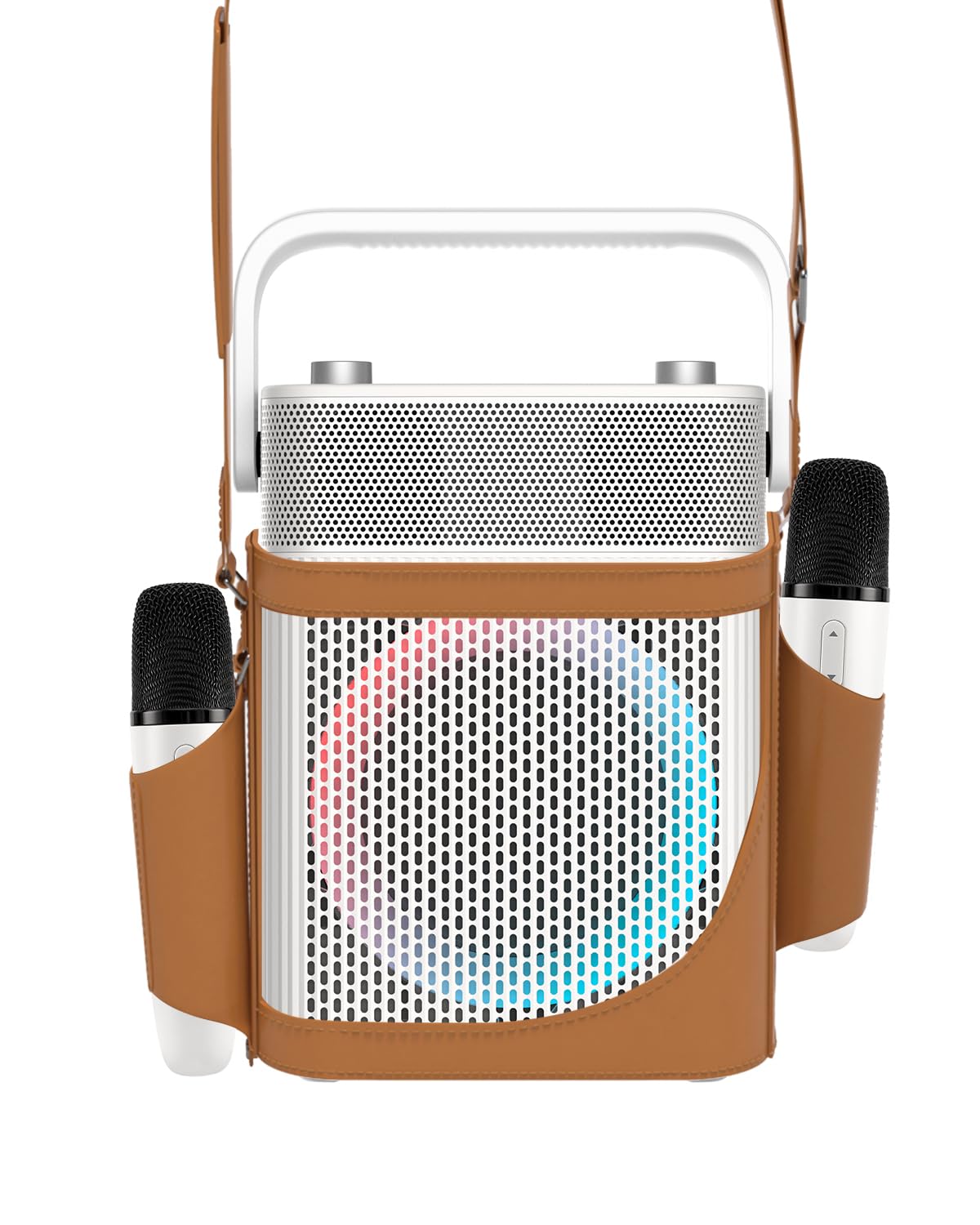
Imagen: Frente view of the PUREMIC S3 Karaoke Machine, highlighting its design and LED lights.
Guía de configuración
1. Carga del dispositivo
Antes del primer uso, cargue completamente el altavoz y los micrófonos.
- Vocero: Connect the speaker charger to the "Charge Port" on the back of the speaker. The charging indicator will show progress.
- Micrófonos: Place the UHF wireless microphones into their dedicated charging holders on top of the speaker. The microphones will begin charging automatically.

Image: Close-up of the speaker's rear panel, indicating the Charge Port, Aux-in Port, and USB Port.
2. Encendido / apagado
- Vocero: Press and hold the Power On/Off button on the control panel until the device powers on or off.
- Micrófonos: Press and hold the power button on each microphone to turn them on or off. They will automatically pair with the speaker when both are powered on.
Instrucciones de funcionamiento
1. Conexión Bluetooth
- Turn on the PUREMIC S3 speaker.
- Presione el BT button on the speaker's control panel to enter Bluetooth pairing mode. The Bluetooth indicator will flash.
- On your device (smartphone, tablet, TV, computer), enable Bluetooth and search for "PUREMIC S3".
- Select "PUREMIC S3" from the list of available devices to pair. A confirmation sound will indicate a successful connection.
Emparejamiento NFC (solo dispositivos Android): For quick pairing, ensure NFC is enabled on your Android smartphone. Tap your phone gently against the NFC area on the speaker's control panel. Your phone will prompt you to connect to the PUREMIC S3.

Image: Demonstrates NFC pairing with an Android phone on the PUREMIC S3 speaker.
2. Entrada AUX
To connect devices via AUX cable:
- Connect one end of a 3.5mm AUX cable (not included) to the AUX-in port on the back of the PUREMIC S3.
- Connect the other end to the audio output jack of your device (e.g., TV, MP3 player).
- El altavoz cambiará automáticamente al modo AUX.

Image: PUREMIC S3 connected to a TV via AUX, showing karaoke lyrics on screen.
3. Reproducción y grabación USB
Insert a USB drive into the USB port on the back of the speaker for music playback or to record your performance.
- Reproducción: El altavoz detectará y reproducirá audio automáticamente. files de la unidad USB.
- Grabación: Presione el REC button on the control panel to start recording. Press it again to stop recording. Recordings will be saved to the USB drive.
4. Funciones del micrófono
The wireless microphones offer several features:
- Volume/Echo: Use the dedicated knob on the speaker to adjust microphone volume and echo effect.
- Vocal Elimination: Press the designated button on the microphone for one-touch vocal elimination from music tracks.
- Efectos sonoros: The microphones feature 8 different sound effects (Children, Monster, Male, Female, Original, Concert, Live, K.T.V.). Cycle through these effects using the microphone's controls.

Image: Visual representation of the 8 sound effects available on the PUREMIC S3 microphones.
5. Controles de los altavoces
The speaker's control panel includes:
- Encendido/apagado: Mantenga presionado para encender/apagar.
- Volume/Echo Knob: Rotate to adjust overall volume and microphone echo.
- Botón BT: Activa el modo de emparejamiento Bluetooth.
- Botón BAJO: Toggles bass sound enhancement.
- Botón de pausa: Pauses/resumes playback.
- Botón REC: Initiates/stops recording to USB.
- Botón de efecto de luz: Cycles through 6 different lighting modes.
- Pre/Next Song Knob: Rotate to skip tracks.

Imagen: Detallada view of the speaker's control panel, showing all buttons and their functions.
6. TWS Pairing (True Wireless Stereo)
If you have two PUREMIC S3 speakers, you can pair them for a true wireless stereo experience:
- Asegúrese de que ambos altavoces estén encendidos y no conectados a ningún dispositivo Bluetooth.
- On one speaker, press and hold the Bluetooth button until you hear a pairing tone.
- Repita este paso en el segundo altavoz.
- Los altavoces se conectarán automáticamente. Una vez emparejados, conecta tu dispositivo a uno de los altavoces por Bluetooth.

Image: Two PUREMIC S3 speakers set up for TWS, providing double stereo sound in a room.
Mantenimiento
- Limpieza: Limpie el altavoz y los micrófonos con un paño suave y seco. No utilice limpiadores abrasivos ni disolventes.
- Almacenamiento: Guarde el dispositivo en un lugar fresco y seco, alejado de la luz solar directa y de temperaturas extremas.
- Cuidado de la batería: To prolong battery life, fully charge the device before long periods of storage and recharge it every 3 months.
- Resistencia al agua: The speaker is IPX4 rated, meaning it is resistant to splashes. Do not submerge the device in water. Ensure all ports are securely covered when exposed to moisture.
Solución de problemas
| Problema | Posible causa | Solución |
|---|---|---|
| Sin poder | La batería está agotada. | Charge the speaker and microphones using the provided chargers. |
| No se puede conectar a través de Bluetooth | Bluetooth is not enabled on your device or speaker is not in pairing mode. Device is too far. | Ensure Bluetooth is active on your device. Press the BT button on the speaker. Move device closer to the speaker. |
| No hay sonido de micrófonos | Microphones are off or not paired. Microphone volume is too low. | Turn on microphones. Ensure they are charged. Adjust microphone volume knob on the speaker. |
| Distorsión del sonido | Volume is too high. Microphone is too close to the speaker. | Reduce the volume. Increase distance between microphone and speaker. |
| La reproducción USB no funciona | La unidad USB no está formateada correctamente o no es compatible file tipos. | Ensure USB drive is formatted to FAT32. Use supported audio formats (e.g., MP3). |
Presupuesto
| Característica | Detalle |
|---|---|
| Número de modelo | S3 |
| Peso del artículo | 8.82 libras |
| Dimensiones del producto | 5.91 x 7.72 x 10.2 pulgadas |
| Tipo de batería | 1 batería de iones de litio (requerida) |
| Capacidad de la batería | 10,000 mAh (Speaker) |
| Recreo | Up to 8 hours (Speaker), Up to 10 hours (Microphones) |
| Dispositivos compatibles | Smartphones, Televisions, iPads, Tablets, Computers |
| Tipo de conector | 3.5 mm Jack (AUX), USB |
| Número de oradores | 3 (1x 5.25-inch woofer, 2x 1-inch tweeters) |
| Salida Wattage | 300 vatios |
| Fuente de poder | Funciona con pilas |
| Volumentage | 5 voltios (CC) |
| Resistencia al agua | IPX4 |
| Característica especial | Light Up Speaker, NFC |
Garantía y soporte
For warranty information and technical support, please refer to the warranty card included in your package or contact PUREMIC customer service through their official websitio o el minorista donde se compró el producto.
Soporte en línea: Visit the PUREMIC Store on Amazon for additional product information and support resources: PUREMIC Store