
1. Introducción
Thank you for choosing the MONODEAL DV68 Bone Conduction Headphones. These headphones are designed to provide a comfortable and safe listening experience, especially during sports and outdoor activities. Utilizing advanced bone conduction technology and Bluetooth 5.3, they deliver clear audio while keeping your ears open to ambient sounds. The integrated smart light enhances visibility and safety during nighttime use.
2. Contenido del paquete
Por favor revise el paquete para ver los siguientes artículos:
- MONODEAL DV68 Bone Conduction Headphones
- Cable de carga magnética
- Manual de usuario
- Tapones para los oídos (opcionales, para un mejor aislamiento del sonido)
3. Producto terminadoview
Familiarize yourself with the components of your MONODEAL DV68 headphones.
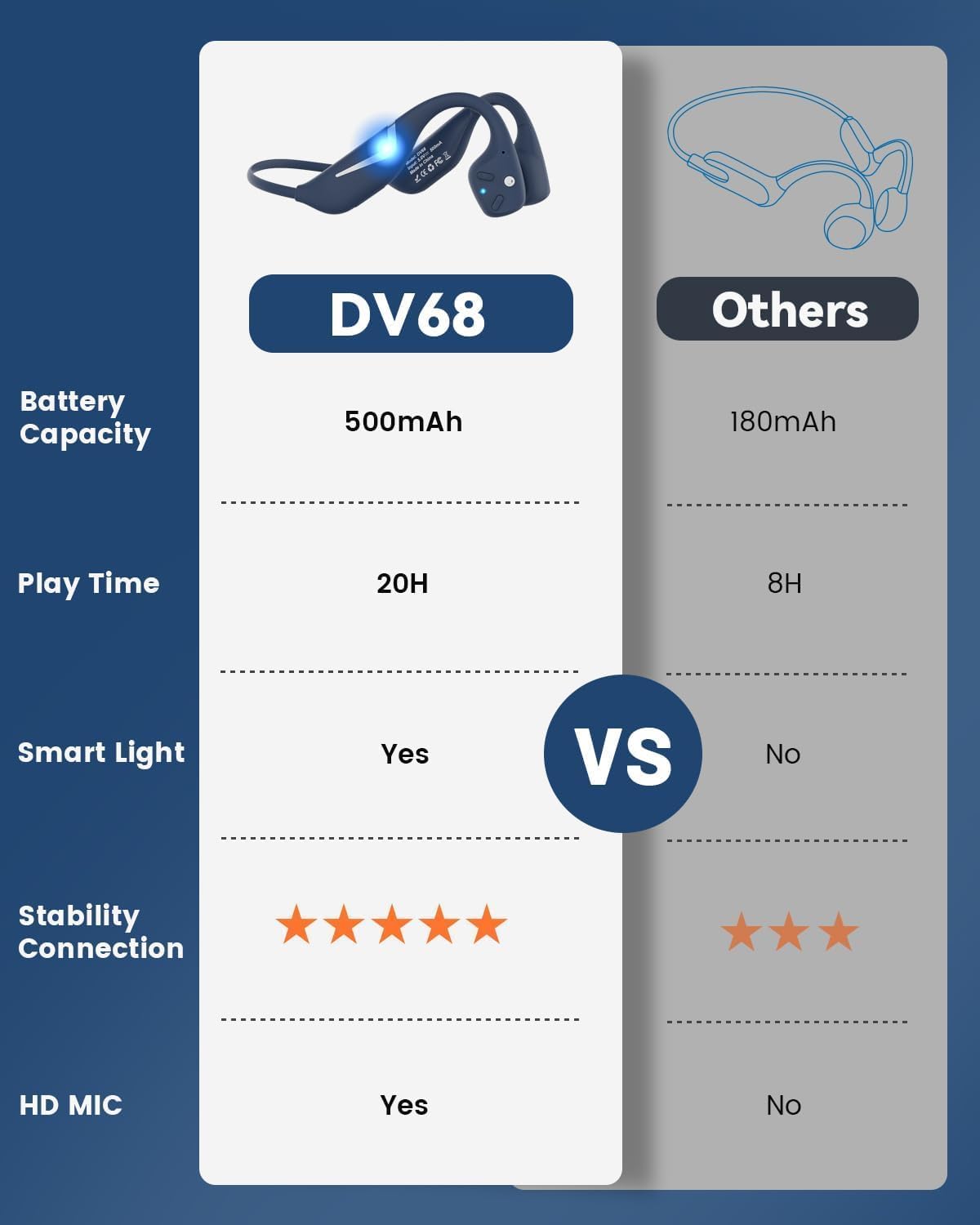
Figure 3.1: MONODEAL DV68 Bone Conduction Headphones, showing the overall design.

Figura 3.2: Explosión view illustrating the bone conduction transducer and built-in microphone.
3.1 Controles y puertos
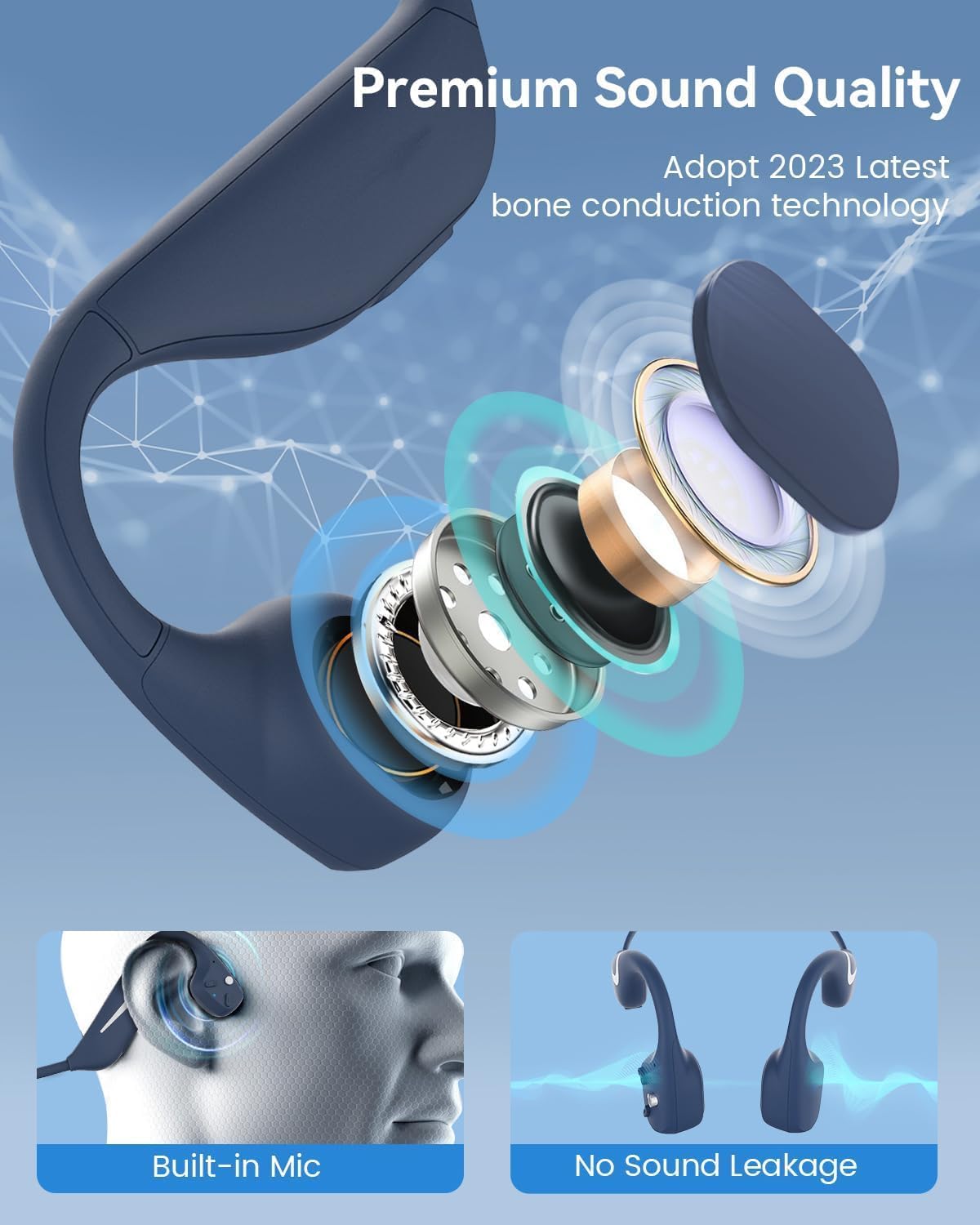
Figura 3.3: Lado view de los auriculares resaltando los botones de control.

Figura 3.4: Primer plano view of the magnetic charging port.
The headphones feature physical buttons for power, volume, and playback control. The magnetic charging port is located on one of the ear pieces for convenient charging.
4. Especificaciones
| Característica | Especificación |
|---|---|
| Número de modelo | DV68 |
| Versión de Bluetooth | 5.3 |
| Capacidad de la batería | 500 mAh |
| Recreo | Hasta 20 horas |
| Clasificación de resistencia al agua | IP67 (Sweat, rain, and splash resistant) |
| Peso | 34 gramos |
| Rango de frecuencia | 20 Hz - 20,000 Hz |
| Tecnología de conectividad | Inalámbrico (Bluetooth) |
| Tipo de controlador de audio | Conducción ósea |
| Características especiales | Smart LED Light, Built-in Microphone, Multipoint Pairing |

Figura 4.1: Sobreview of key features including Open-Ear design, IP67 Waterproofing, 500mAh Battery, Bluetooth V5.3, Lightweight, HD Microphone, Multipoint Pairing, and RGB Light.
5. Configuración
5.1 Carga de los auriculares
Antes del primer uso, cargue completamente los auriculares.
- Conecte el cable de carga magnético al puerto de carga de los auriculares.
- Conecte el otro extremo del cable a un adaptador de corriente USB (no incluido) o al puerto USB de una computadora.
- El indicador LED mostrará el estado de carga. Una carga completa suele tardar aproximadamente 2 horas.

Figure 5.1: Illustration of 20-hour battery life and quick charge feature (10 minutes charging for 2 hours playtime).
5.2 Emparejamiento Bluetooth
Para conectar sus auriculares a un dispositivo:
- Asegúrese de que los auriculares estén apagados.
- Mantenga presionado el botón de encendido hasta que el indicador LED parpadee en rojo y azul, lo que indica el modo de emparejamiento.
- En su dispositivo (teléfono inteligente, tableta, computadora), habilite Bluetooth y busque los dispositivos disponibles.
- Select "MONODEAL DV68" from the list of found devices.
- Una vez conectado, el indicador LED se volverá azul fijo o parpadeará en azul lentamente.
The headphones support multipoint pairing, allowing connection to two devices simultaneously. Refer to your device's Bluetooth settings for managing multiple connections.
6. Instrucciones de funcionamiento
6.1 Encendido y apagado
- Encendido: Mantenga presionado el botón de encendido durante 3 segundos.
- Apagado: Mantenga presionado el botón de encendido durante 5 segundos.
6.2 Reproducción de música
- Reproducir/Pausa: Presione el botón multifunción una vez.
- Pista siguiente: Mantenga presionado el botón Volumen + durante 2 segundos.
- Pista anterior: Mantenga presionado el botón Volumen - durante 2 segundos.
- Sube el volumen: Presione el botón Volumen +.
- Bajar volumen: Presione el botón de volumen -.
6.3 Gestión de llamadas
- Responder/Finalizar llamada: Presione el botón multifunción una vez.
- Rechazar llamada: Mantenga presionado el botón multifunción durante 2 segundos.
- Asistente de voz: Presione dos veces el botón multifunción.
6.4 Smart LED Light
The headphones feature a smart LED light for enhanced visibility during nighttime activities.
- Encender/apagar la luz: Refer to the specific button combination in your quick start guide (usually a dedicated light button or a long press of a volume button).
- The light can cycle through different colors (e.g., blue, green, red) to increase your safety and visibility.

Figure 6.1: A runner demonstrating the smart LED light feature for night safety.
7. Mantenimiento
7.1 Limpieza
To maintain hygiene and product longevity:
- After sweating or intense workouts, gently wipe the headphones with a damp paño o toallita húmeda.
- Evite utilizar productos químicos agresivos o limpiadores abrasivos.
7.2 Almacenamiento
- Guarde los auriculares en un lugar fresco y seco, alejado de la luz solar directa y de temperaturas extremas.
- When not in use, it is recommended to store them in their original packaging or a protective case.
7.3 Resistencia al agua
The MONODEAL DV68 headphones are IP67 rated, meaning they are resistant to sweat, rain, and splashes. However, they are No apto para nadar ni sumergir en agua..

Figure 7.1: A person exercising with the headphones, demonstrating their IP67 water resistance against sweat and rain. Note: Not for swimming.
8. Solución de problemas
Si tiene problemas con sus auriculares, consulte las siguientes soluciones comunes:
- Sin energía:
Asegúrese de que los auriculares estén completamente cargados. Conéctelos al cable de carga y a una fuente de alimentación. - No se puede emparejar:
Make sure the headphones are in pairing mode (LED flashing red and blue). Turn off Bluetooth on other nearby devices that may have previously connected. Try restarting both the headphones and your device. - Sin sonido/volumen bajo:
Check the volume levels on both the headphones and your connected device. Ensure the headphones are properly positioned on your cheekbones. If using earplugs, ensure they are correctly inserted. - Conexión intermitente:
Ensure your device is within the Bluetooth range (up to 15 meters) and there are no significant obstacles between the headphones and your device. Avoid strong electromagnetic interference. - Mala calidad de llamada:
Ensure the microphone is not obstructed. Move to an area with better network reception for your phone.
9. Garantía y soporte
9.1 Información de garantía
MONODEAL provides a 2 año de garantía for the DV68 Bone Conduction Headphones from the date of purchase. This warranty covers manufacturing defects and ensures the product meets its specified performance. Please retain your proof of purchase for warranty claims.
9.2 Atención al cliente
For further assistance, technical support, or warranty inquiries, please contact MONODEAL customer service through the retailer where you purchased the product or visit the official MONODEAL websitio para información de contacto.


