
Producto terminadoview
The SUNOL H08 Mecha Bluetooth Wireless Headset offers a unique transparent design combined with advanced audio technology. Engineered for comfort and convenience, these headphones provide clear sound quality, low latency, and extended battery life, making them suitable for various activities from daily listening to gaming and calls.
Key features include Bluetooth 5.3 for stable connectivity, environmental noise reduction for clear calls, and a robust charging case with an LED display.
¿Qué hay en la caja?
- H08 Mecha Bluetooth Wireless Headset (Left and Right Earbuds)
- Estuche de carga
- Cable de carga
- Multiple Sizes of Ear Tips (for comfortable fit)
Guía de configuración
1. Carga inicial
Before first use, fully charge the headset and charging case. Place the earbuds into the charging case. Connect the charging cable to the case and a USB power source. The LED display on the charging case will indicate the charging status and battery level.
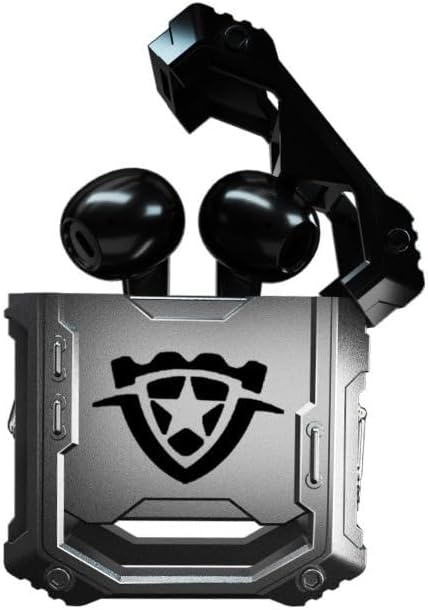
Image: The H08 Mecha Bluetooth Wireless Headset, showing both earbuds securely placed within their open charging case. The case features a distinctive, rugged design with a central emblem.
2. Emparejamiento con un dispositivo
- Asegúrese de que los auriculares estén cargados y colocados en el estuche de carga.
- Abre el estuche de carga. Los auriculares entrarán automáticamente en modo de emparejamiento.
- En su dispositivo (teléfono inteligente, tableta, computadora), vaya a la configuración de Bluetooth y active Bluetooth.
- Buscar dispositivos disponibles y seleccione "H08" de la lista.
- Once connected, a voice prompt will confirm successful pairing. The effective connection distance is up to 10 meters.

Image: The H08 Mecha Bluetooth Wireless Headset charging case in a closed position, showcasing its metallic, rugged exterior. The image highlights the zinc alloy material and suggests a long battery life.
3. Cómo usar los auriculares
Select the ear tips that provide the most comfortable and secure fit for your ears. Gently insert each earbud into your ear canal and twist slightly to ensure a snug fit. A proper fit enhances sound quality and noise isolation.
Instrucciones de funcionamiento
Encendido/apagado
- Encendido: Abra el estuche de carga y los auriculares se encenderán automáticamente.
- Apagado: Vuelve a colocar los auriculares en el estuche de carga y cierra la tapa. Se apagarán automáticamente y comenzarán a cargarse.
Control de reproducción de música
- Reproducir/Pausa: Toque una vez el área de control táctil en cualquiera de los auriculares.
- Pista siguiente: Toque dos veces el auricular derecho.
- Pista anterior: Toque dos veces el auricular izquierdo.
Gestión de llamadas
- Responder/Finalizar llamada: Toque una vez el área de control táctil en cualquiera de los auriculares durante una llamada entrante.
- Rechazar llamada: Press and hold the touch control area on either earbud for 2 seconds during an incoming call.
The built-in environmental noise reduction (ENC) chip ensures clear sound quality during calls by filtering out ambient noise.

Image: A close-up of the H08 Mecha Bluetooth Wireless Headset earbuds, highlighting their sleek design. The background features a graphic representation of sound waves, illustrating the intelligent noise reduction technology for clear audio.
Modo de baja latencia (juegos)
The headset features a low latency mode, significantly improving Bluetooth transmission speed for a more synchronized audio experience, especially beneficial for gaming. This ensures that sound effects and dialogue are heard with minimal delay.
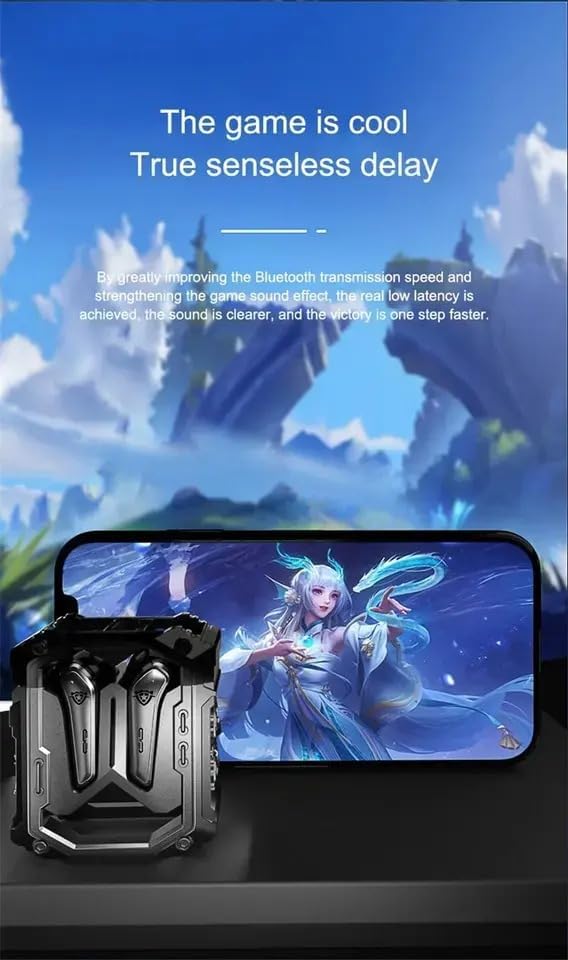
Image: The H08 Mecha Bluetooth Wireless Headset charging case positioned next to a smartphone displaying a vibrant game scene. This image emphasizes the headset's low latency feature, ideal for an immersive gaming experience.
Mantenimiento
Carga de los auriculares y el estuche
- The charging case has a built-in 600mAh battery, capable of charging the earbuds approximately four times, providing up to 48 hours of total playtime.
- The LED display on the charging case shows the battery level of both the case and the earbuds.
- Use the provided charging cable to charge the case.

Image: The H08 Mecha Bluetooth Wireless Headset with its charging case open, revealing the earbuds inside. The image highlights the "mechanical metal technology" and the robust design of the charging compartment, emphasizing its durability and environmental noise filtering capabilities.
Limpieza
Regularly clean the earbuds and charging case with a soft, dry, lint-free cloth. Avoid using abrasive materials or harsh chemicals. Ensure charging contacts on both the earbuds and case are clean and dry.
Almacenamiento
Cuando no los use, guarde los auriculares en su estuche de carga para protegerlos del polvo y daños. Guárdelos en un lugar fresco y seco, alejado de temperaturas extremas.
Solución de problemas
- No se puede emparejar:
- Asegúrese de que Bluetooth esté habilitado en su dispositivo.
- Make sure the earbuds are charged and in pairing mode (open the case).
- Acerque los auriculares a su dispositivo.
- Olvídese de "H08" de la lista de Bluetooth de su dispositivo e intente emparejarlo nuevamente.
- No hay sonido en un auricular:
- Coloque nuevamente ambos auriculares en el estuche de carga, cierre la tapa, espere unos segundos y luego ábrala nuevamente.
- Asegúrese de que ambos auriculares estén cargados.
- Problemas de carga:
- Compruebe si el cable de carga está conectado de forma segura tanto al estuche como a la fuente de alimentación.
- Asegúrese de que los contactos de carga de los auriculares y del interior del estuche estén limpios.
- Pruebe con un cable de carga o adaptador de corriente diferente.
- Mala calidad de llamada:
- Asegúrese de que el micrófono no esté obstruido.
- Move to a quieter environment if environmental noise is excessive.
- Verifique la configuración del volumen de llamadas de su dispositivo.
Presupuesto
| Característica | Detalle |
|---|---|
| Nombre del modelo | H08 |
| Tecnología de conectividad | Inalámbrico (Bluetooth) |
| Tecnología de comunicación inalámbrica | Bluetooth 5.3 |
| Alcance de Bluetooth | Hasta 10 metros (33 pies) |
| Latencia de audio | 60 milisegundos |
| Duración de la batería (auriculares) | Hasta 18 horas (una sola carga) |
| Tiempo total de reproducción (con estuche de carga) | Aproximadamente 48 horas |
| Capacidad de la batería del estuche de carga | 600 mAh |
| Tipo de controlador de audio | 14mm Dynamic Bass Unit |
| Control de ruido | Environmental Noise Reduction (ENC) for calls |
| Tipo de control | Media Control, Call Control (Touch/Remote) |
| Material | Plastic (Earbuds), Zinc Alloy (Charging Case) |
| Peso | 6.4 onzas (paquete total) |
| Color | Negro |
| Colocación de orejas | En el oído |
| Fabricante | SWISSES |
Garantía y soporte
For warranty information and detailed support, please refer to the documentation included with your purchase or visit the official SUNOL website. You may also contact the seller, SWISSES, through the platform where the product was purchased for assistance.
Conserve su comprobante de compra para cualquier reclamo de garantía.