
1. Introducción
Thank you for choosing the AVATTO WT410-BH-3A-W Smart Thermostat. This device is designed to provide intelligent control over your gas boiler system, allowing you to manage your home's heating efficiently. With Wi-Fi connectivity, you can remotely adjust temperatures via a mobile application, integrate with popular voice assistants, and utilize advanced scheduling options. This manual provides detailed instructions for installation, operation, and maintenance to ensure optimal performance and energy savings.
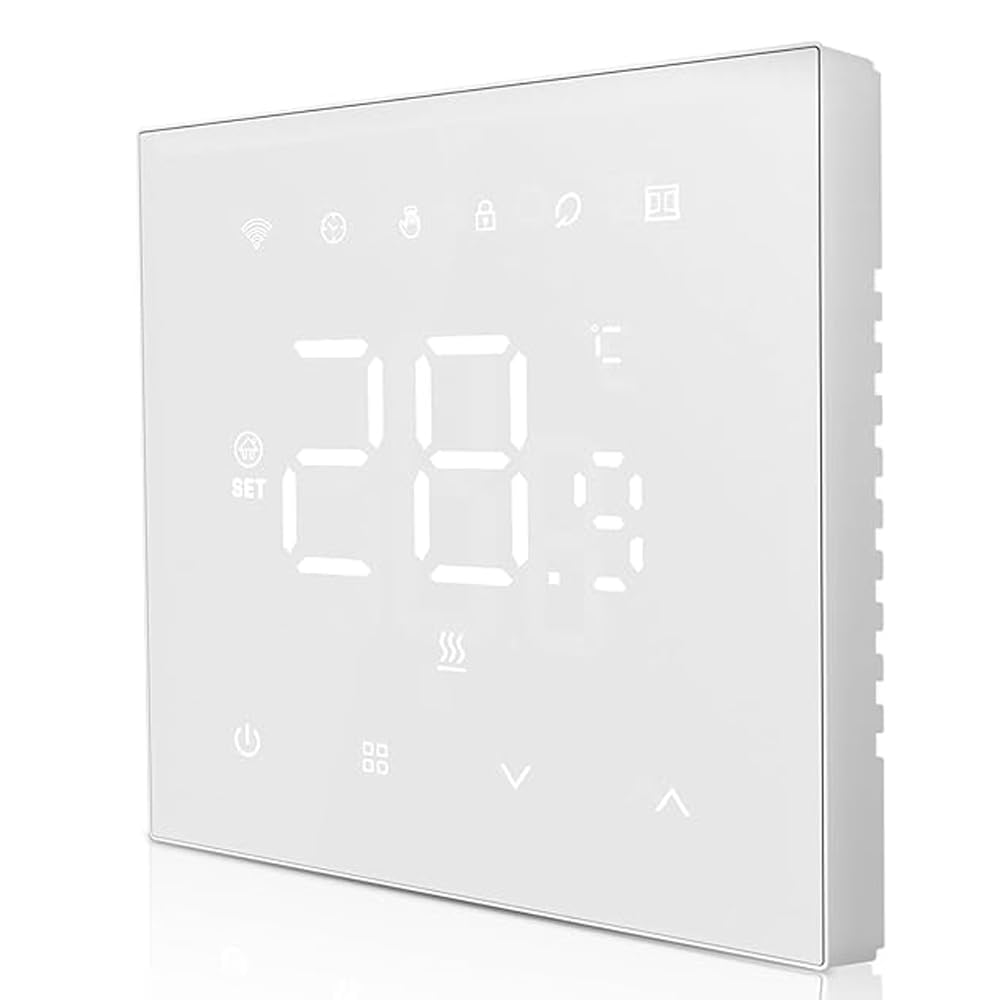
Figura 1: Frente view of the AVATTO WT410-BH-3A-W Smart Thermostat, showing its sleek design and LED display.
2. Información de seguridad
- Peligro eléctrico: Installation must be performed by a qualified electrician. Disconnect power at the circuit breaker before installation to prevent electrical shock.
- VolumentagCompatibilidad: Asegúrese de que el volumen del termostatotage requirements match your electrical system.
- Compatibilidad de calderas: This thermostat is designed for gas boiler systems with a maximum load of 3A. Verify compatibility with your boiler before installation.
- Condiciones ambientales: Do not install in areas with high humidity, direct sunlight, or extreme temperatures.
- Seguridad de los niños: Mantenga el dispositivo fuera del alcance de los niños.
3. Contenido del paquete
Por favor revise el paquete para ver los siguientes artículos:
- AVATTO WT410-BH-3A-W Smart Thermostat Unit
- Tornillos de montaje (2 piezas)
- Manual de usuario (este documento)
4. Instalación
Importante: Installation should only be carried out by a qualified professional. Ensure the main power supply to your heating system is turned off before proceeding.
- Desconexión de energía: Turn off the main power supply to your boiler system at the circuit breaker. Verify that the power is off using a voltage probador.
- Retire el termostato antiguo (si corresponde): Retire con cuidado el termostato existente de la pared. Observe las conexiones del cableado antes de desconectarlas.
- Montaje de la placa base: Separate the front panel of the AVATTO thermostat from its base plate. Secure the base plate to the wall using the provided mounting screws. Ensure it is level.
- Alambrado: Connect the wires from your boiler system to the appropriate terminals on the thermostat's base plate. Refer to the "Wiring Diagram" section for detailed instructions. Ensure all connections are secure.
- Conecte la unidad del termostato: Carefully attach the front panel of the thermostat onto the mounted base plate, ensuring it clicks securely into place.
- Restaurar energía: Turn the main power supply back on at the circuit breaker. The thermostat display should illuminate.
5. Diagrama de cableado
The AVATTO WT410-BH-3A-W thermostat typically requires connections for power supply and boiler control.
Standard Wiring (Gas Boiler 3A):
- L (En vivo): Conéctese al cable activo de su fuente de alimentación.
- N (Neutral): Conéctese al cable neutro de su fuente de alimentación.
- NO (Normalmente Abierto): Connect to the boiler's control input (often labeled as 'SW' or 'COM' on the boiler).
- COM (Común): Connect to the other boiler control input.
Note: Always refer to your boiler's specific wiring diagram and consult a qualified electrician if you are unsure about any connections. Incorrect wiring can damage the thermostat or your boiler system.
6. App and Wi-Fi Setup
To unlock the full potential of your AVATTO Smart Thermostat, connect it to your home Wi-Fi network and the compatible mobile application.
- Descargar la aplicación: Buscar "Smart Life" or "Tuya Smart" in your mobile app store (iOS or Android) and download the application.
- Registrarse/Iniciar sesión: Abra la aplicación y regístrese para obtener una nueva cuenta o inicie sesión si ya tiene una.
- Agregar dispositivo: In the app, tap the "+" icon (usually in the top right corner) to add a new device. Select "Thermostat" or "Heater" from the device list.
- Modo de emparejamiento: On the thermostat, press and hold the Wi-Fi icon button (or a similar pairing button) until the Wi-Fi indicator light starts blinking rapidly. This indicates it's in pairing mode.
- Conectarse a Wi-Fi: Follow the on-screen instructions in the app. You will need to enter your home Wi-Fi network name (SSID) and password. Ensure your phone is connected to a 2.4GHz Wi-Fi network (5GHz networks are generally not supported by smart home devices).
- Confirmación: Once connected, the Wi-Fi indicator on the thermostat will become solid, and the app will confirm successful pairing. You can now control your thermostat remotely.
For voice assistant integration (e.g., Amazon Alexa, Google Assistant), follow the instructions within the "Smart Life" or "Tuya Smart" app to link your account.
7. Modos de funcionamiento
The AVATTO WT410-BH-3A-W thermostat supports four main operating modes to suit your heating needs:
- Modo manual: In this mode, the thermostat maintains a constant temperature set by the user until manually changed. It overrides any programmed schedules.
- Modo de programación: The thermostat follows the pre-set weekly schedule, automatically adjusting the temperature at specified times.
- Temporary Programming Mode: While in Programming Mode, you can temporarily adjust the temperature. The thermostat will maintain this new temperature until the next scheduled program change, then revert to the schedule.
- Absence Mode (Holiday Mode): Designed for extended periods away from home. You can set a lower, energy-saving temperature for a specified duration, and the thermostat will automatically resume normal operation afterward.
Switch between modes using the dedicated mode button on the thermostat or through the mobile application.
8. Programación semanal
The thermostat allows for advanced weekly programming, enabling you to set different temperatures for specific time periods throughout the week. This helps optimize comfort and energy efficiency.
You can set up to 6 periodos de tiempo for weekdays (Monday-Friday) and 2 periodos de tiempo for weekends (Saturday-Sunday).
- Programación de acceso: Press and hold the "M" (Mode) button or navigate to the "Schedule" section in the mobile app.
- Establecer horario de días laborables: For Monday to Friday, define up to 6 time periods (e.g., Wake, Leave, Return, Sleep) and their corresponding desired temperatures.
- Establecer horario de fin de semana: For Saturday and Sunday, define up to 2 time periods and their desired temperatures.
- Guardar configuración: Confirm and save your programming. The thermostat will now follow this schedule when in Programming Mode.
The thermostat offers high precision with temperature settings, accurate to 0.5°C, and displays temperature with 0.1°C precision. An adjustable hysteresis function (0.5°C to 10°C) allows fine-tuning of temperature deviation.
9. Mantenimiento
The AVATTO WT410-BH-3A-W Smart Thermostat requires minimal maintenance to ensure long-term performance.
- Limpieza: Limpie suavemente la pantalla yasinLimpie el dispositivo con un paño suave y seco. No utilice limpiadores abrasivos, disolventes ni aerosoles químicos, ya que pueden dañarlo.
- Evite Obstrucciones: Ensure no objects are blocking the thermostat's vents or sensors, as this can affect temperature readings.
- Actualizaciones de software: Periodically check the mobile application for firmware updates for your thermostat. Updates can improve performance and add new features.
10. Solución de problemas
| Problema | Posible causa | Solución |
|---|---|---|
| La pantalla del termostato está en blanco. | No hay suministro de energía. | Check the circuit breaker for your heating system. Ensure wiring is correct and secure. |
| El termostato no se conecta al Wi-Fi. | Contraseña de Wi-Fi incorrecta; red de 5 GHz; termostato demasiado lejos del enrutador. | Ensure correct 2.4GHz Wi-Fi password. Move thermostat closer to router or use a Wi-Fi extender. Re-enter pairing mode. |
| La caldera no responde al termostato. | Incorrect wiring; boiler issue; thermostat not in heating mode. | Verify wiring connections. Check boiler's power and status. Ensure thermostat is set to a temperature higher than the current room temperature and is in an active heating mode. |
| Lecturas de temperatura inexactas. | Thermostat placed near heat sources/drafts; sensor obstruction. | Relocate thermostat if possible. Ensure no objects are blocking the internal sensor. |
If you encounter issues not listed here or require further assistance, please contact AVATTO customer support.
11. Especificaciones
| Característica | Detalle |
|---|---|
| Marca | AVATTO |
| Número de modelo | WT410-BH-3A-W |
| Compatibilidad | Gas Boiler (3A Max Load) |
| Conectividad | Wi-Fi (2.4 GHz) |
| Precisión de temperatura | 0.5°C |
| Precisión de visualización de temperatura | 0.1°C |
| Rango de histéresis | De 0.5 °C a 10 °C |
| Programación | 6 periods (Mon-Fri), 2 periods (Sat-Sun) |
| Compatibilidad con asistente de voz | Yes (via Smart Life/Tuya Smart app integration) |
12. Garantía y soporte
AVATTO products are manufactured to the highest quality standards. For information regarding warranty coverage, please refer to the warranty card included with your purchase or visit the official AVATTO websitio.
For technical support, troubleshooting assistance, or any questions about your AVATTO WT410-BH-3A-W Smart Thermostat, please contact AVATTO customer service through their official channels.
Websitio: www.avatto.com (Nota: Este es un marcador de posición URL as no official support link was provided.)