
1. Introducción
The OWON HDS25 is a compact, multi-functional handheld device integrating a 2-channel oscilloscope and a 20,000-count multimeter. Designed for portability and versatility, it features a 3.5-inch LCD display, USB Type-C connectivity for charging and data transfer, and supports SCPI commands for remote control. This manual provides essential information for the safe and effective operation, maintenance, and troubleshooting of your HDS25 device.
2. Producto terminadoview
2.1 Características principales
- Funcionalidad 3 en 1: Combines a 2-channel oscilloscope and a 20,000-count True RMS multimeter.
- Osciloscopio: Ancho de banda de 25 MHz, 250 MSa/s en tiempo realample rate, 8K record length.
- Multímetro: Mide volumen CA/CCtage, corriente CA/CC, resistencia, capacitancia, diodo y continuidad.
- Mostrar: LCD de alta resolución de 3.5 pulgadas.
- Conectividad: USB Type-C for charging and PC communication, supports SCPI commands.
- Portabilidad: Compact design with approximately 4 hours of continuous battery operation.
2.2 Componentes del dispositivo
The following image illustrates the main components of the OWON HDS25 device:
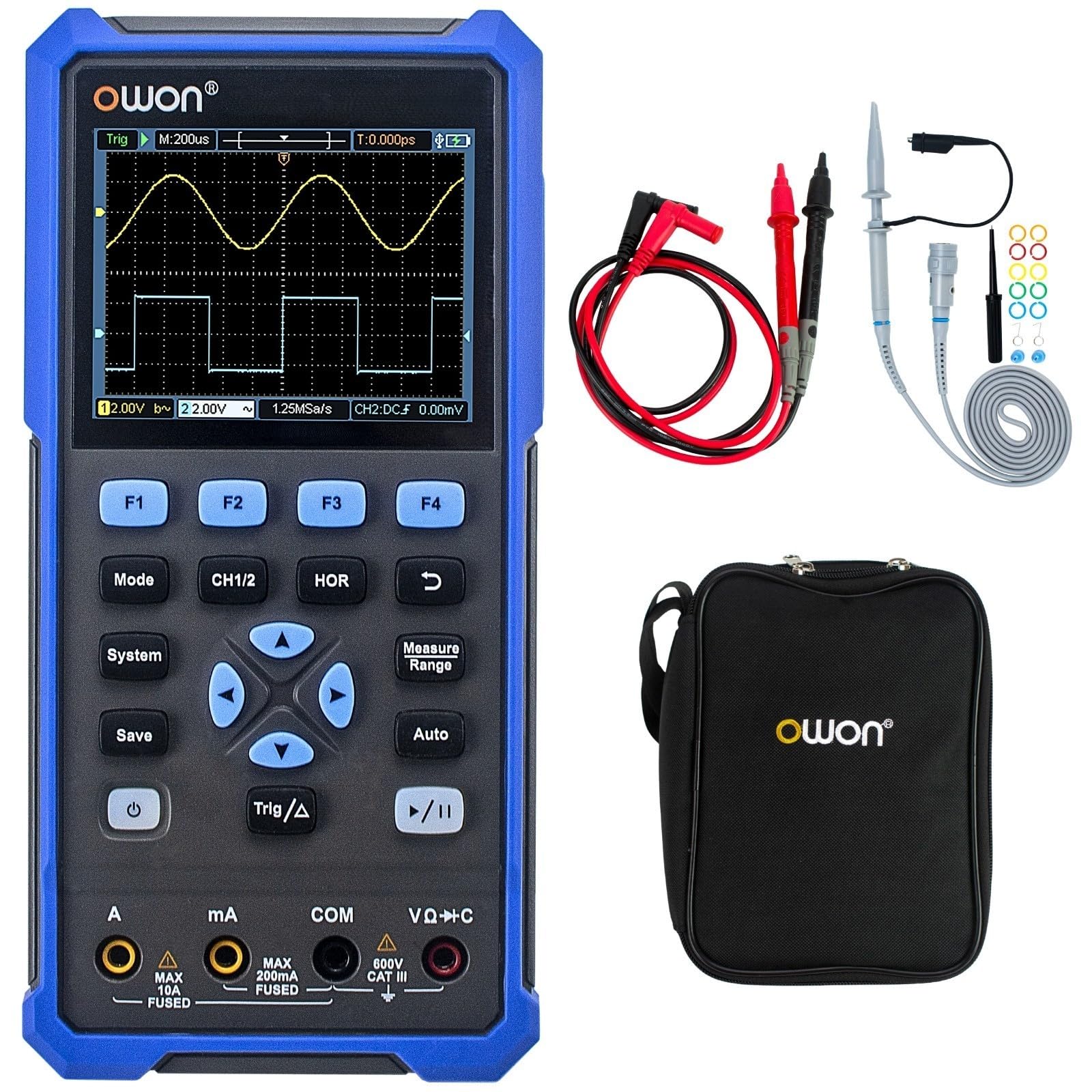
The device features a central 3.5-inch LCD screen for waveform display and measurement readings. Below the screen are function buttons (F1-F4), mode selection buttons (Mode, CH1/2, HOR, System, Save, Auto, Trig/Δ, Power, Play/Pause), and a directional pad for navigation. At the bottom, there are input jacks for current (A, mA), common ground (COM), and voltage/resistance/capacitance (VΩ+C) measurements.

2.3 Accesorios incluidos
- Cable USB tipo C
- Sondas de osciloscopio (2)
- Herramienta de ajuste de la sonda
- Cables de prueba para multímetro
- Bolsa protectora

3. Configuración
3.1 Carga del dispositivo
Before initial use, fully charge the device using the provided USB Type-C cable and a compatible power adapter (not included). The charging indicator on the device will show the charging status.
3.2 Conexión de sondas y cables
- Sondas de osciloscopio: Connect the BNC connector of the oscilloscope probes to the CH1 and CH2 input ports on the top of the device. Ensure a secure connection.
- Cables de prueba del multímetro: For multimeter functions, insert the red test lead into the VΩ+C jack and the black test lead into the COM jack. For current measurements, use the A or mA jacks as appropriate.
3.3 Encendido / Apagado
Mantenga pulsado el Fuerza button (usually marked with a circle and vertical line symbol) to turn the device on or off.
4. Instrucciones de funcionamiento
4.1 Navegación general
- Utilice el Modo button to switch between Oscilloscope and Multimeter modes.
- The directional pad (up, down, left, right) is used to navigate menus and adjust parameters.
- Botones F1 a F4 correspond to on-screen menu options.
- El Sistema button accesses system settings.
- El Ahorrar button allows saving waveforms or measurement data.
4.2 Modo de osciloscopio
In Oscilloscope mode, the device displays real-time waveforms. Use the following controls:
- CH1/2: Selects the active channel or displays both.
- HOR (Horizontal): Adjusts the time base (horizontal scale) of the waveform.
- Escala vertical: Use the directional pad (up/down) to adjust the voltage scale for the selected channel.
- Trig/Δ (Trigger): Configures trigger settings (edge, level, mode) to stabilize the waveform display.
- Auto: Automatically adjusts vertical, horizontal, and trigger settings for a stable waveform display.
- Reproducir/Pausa: Freezes or resumes the waveform acquisition.
4.3 Modo multímetro
In Multimeter mode, the device functions as a digital multimeter. Use the directional pad to select the desired measurement function (Voltage, Current, Resistance, etc.). Ensure the test leads are connected to the correct input jacks for the selected measurement type.
- Volumentage Medida (V): Conecte los cables en paralelo con el circuito.
- Current Measurement (A/mA): Connect leads in series with the circuit. Ensure correct jack selection (A or mA) based on expected current.
- Medición de resistencia (Ω): Connect leads across the component when power is off.
- Continuidad/Diodo: For checking circuit continuity or diode function.
- Medición de capacitancia (F): Connect leads across the capacitor when power is off.
5. Mantenimiento
5.1 Limpieza
Limpie el exterior del dispositivo con un paño suave.amp cloth. Do not use abrasive cleaners or solvents. Ensure the device is powered off and disconnected from all power sources and measurement circuits before cleaning.
5.2 Cuidado de la batería
To prolong battery life, avoid fully discharging the battery frequently. Charge the device regularly, especially if it will be stored for an extended period. Store the device in a cool, dry place.
5.3 Almacenamiento
When not in use, store the HDS25 in its protective bag in a clean, dry environment away from direct sunlight, extreme temperatures, and high humidity.
6. Solución de problemas
If you encounter issues with your OWON HDS25, refer to the following common problems and solutions:
| Problema | Posible causa | Solución |
|---|---|---|
| El dispositivo no se enciende. | Batería baja o botón de encendido defectuoso. | Cargue el dispositivo durante al menos 30 minutos. Si sigue sin responder, contacte con el servicio de asistencia. |
| No se muestra ninguna forma de onda en el modo osciloscopio. | Incorrect probe connection, wrong vertical/horizontal scale, or trigger settings. | Asegúrese de que las sondas estén bien conectadas. Presione el Auto button. Adjust vertical (voltage) and horizontal (time) scales. Check trigger level. |
| Las lecturas del multímetro son inexactas o cero. | Incorrect lead connection, wrong measurement function selected, or open circuit. | Verify test leads are in the correct jacks for the selected function. Ensure proper connection to the circuit. Check for open circuits. |
| El dispositivo se congela o no responde. | Fallo del software. | Realice un reinicio suave manteniendo presionado el botón de encendido hasta que el dispositivo se apague y luego reinícielo. Si el problema persiste, contacte con el servicio de asistencia. |
7. Especificaciones
| Característica | Especificación |
|---|---|
| Modelo | HDS25 |
| Ancho de banda | 25 MHz |
| Canales | 2 |
| Samptasa | 250 MSa/s |
| Duración del registro | 8K |
| Conteos del multímetro | 20,000 |
| Mostrar | LCD de 3.5 pulgadas |
| Conectividad | USB Tipo-C (carga y datos) |
| Duración de la batería | Aproximadamente 4 horas |
| Certificaciones | Certificación CE, RoHS y UL |
| Artículos incluidos | USB cable, probes, probe adjustment tool, multimeter leads, bag |
8. Garantía y soporte
8.1 Información de garantía
The OWON HDS25 comes with a Garantía del fabricante de 3 años para la unidad principal y una 1 año de garantía for included accessories. Please retain your proof of purchase for warranty claims.
8.2 Atención al cliente
For technical assistance, troubleshooting, or warranty inquiries, please contact OWON customer support. You can also find the latest user manual and support resources on the official OWON websitioowon.co.jp) or on the product page where you purchased the device.