
SENTRY HPXBTA1000
SENTRY BT Pro Sq Headset User Manual
Model: HPXBTA1000
1. Introducción
Welcome to the user manual for your new SENTRY BT Pro Sq Headset with Active Noise Canceling. This manual provides essential information on setting up, operating, maintaining, and troubleshooting your headset to ensure optimal performance and longevity. Please read this manual thoroughly before using the product.
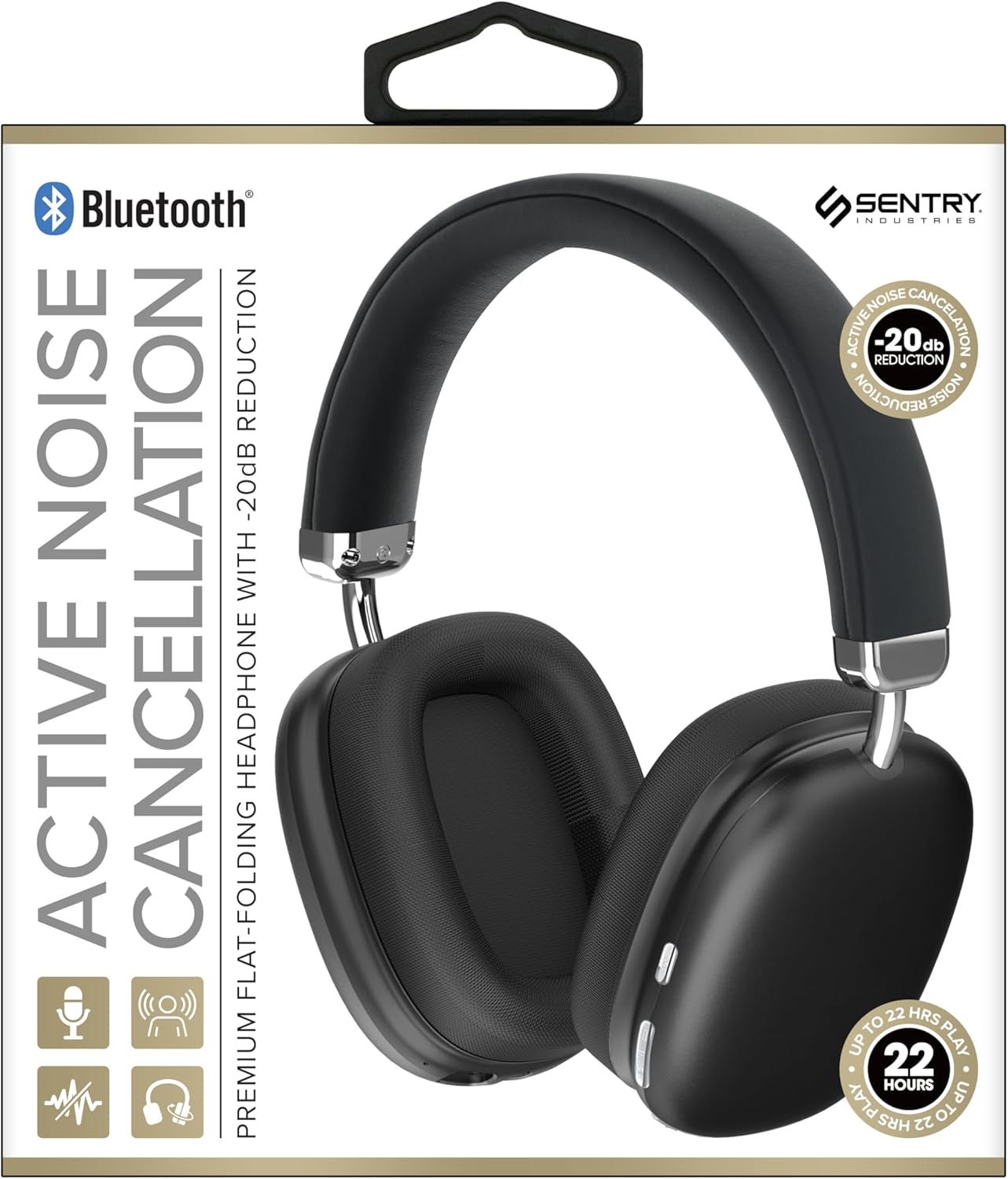
This image displays the SENTRY BT Pro Sq Headset in black, highlighting its over-ear design, adjustable headband, and the control buttons located on the earcups. The packaging indicates features such as Bluetooth connectivity, Active Noise Cancellation with -20dB reduction, and up to 22 hours of play time.
2. Información importante de seguridad
Para garantizar un funcionamiento seguro y adecuado, tenga en cuenta las siguientes pautas:
- No exponga los auriculares a temperaturas extremas, humedad o sustancias corrosivas.
- Evite dejar caer o someter los auriculares a impactos fuertes.
- No desmonte ni intente reparar los auriculares usted mismo. Esto anulará la garantía.
- Clean the headset with a soft, dry cloth only. Do not use liquid cleaners.
- Escuchar el volumen alto durante mucho tiempo puede causar daño auditivo. Ajuste el volumen a un nivel seguro.
- No utilice los auriculares en situaciones en las que la incapacidad de escuchar sonidos ambientales pueda resultar peligrosa (por ejemplo, al conducir, andar en bicicleta o caminar en el tráfico).
3. Contenido del paquete
Por favor revise el paquete para ver los siguientes artículos:
- SENTRY BT Pro Sq Headset
- Cable de carga USB
- Manual de usuario
4. Producto terminadoview
The SENTRY BT Pro Sq Headset features an over-ear design with soft ear pads for comfort and noise isolation. It includes an adjustable folding headband for portability. Key components include:
- Auriculares: House the audio drivers and provide passive noise isolation.
- Venda: Adjustable for a comfortable fit, designed to fold for compact storage.
- Botones de control: Located on the earcups for power, volume, track control, and Active Noise Cancellation (ANC).
- Micrófono: Integrado para llamadas manos libres.
- Puerto de carga: Para conectar el cable de carga USB.
Refer to the product image in the Introduction section for visual identification of these components.
5. Configuración
5.1 Carga de los auriculares
- Conecte el extremo pequeño del cable de carga USB al puerto de carga del auricular.
- Conecte el extremo más grande del cable de carga USB a un adaptador de corriente USB (no incluido) o al puerto USB de una computadora.
- The LED indicator on the headset will illuminate to show charging status. It will change color or turn off when fully charged.
- Una carga completa suele tardar entre 2 y 3 horas aproximadamente.
5.2 Emparejamiento con dispositivos Bluetooth
Before using the headset wirelessly, you must pair it with your Bluetooth-enabled device (smartphone, laptop, tablet, smart speaker, gaming console).
- Asegúrese de que los auriculares estén completamente cargados.
- With the headset powered off, press and hold the Power button for approximately 5-7 seconds until the LED indicator flashes rapidly, indicating pairing mode.
- En su dispositivo Bluetooth, habilite Bluetooth y busque nuevos dispositivos.
- Select "SENTRY BT Pro Sq" (or similar name) from the list of available devices.
- Once paired, the LED indicator on the headset will stop flashing and may turn solid blue or off, depending on the model.
- El auricular intentará reconectarse automáticamente al último dispositivo emparejado cuando se encienda.
6. Instrucciones de funcionamiento
6.1 Encendido y apagado
- Encendido: Press and hold the Power button for 2-3 seconds. The LED indicator will light up.
- Apagado: Mantenga pulsado el botón de encendido durante 3 o 4 segundos. El indicador LED se apagará.
6.2 Cancelación activa de ruido (ANC)
Los auriculares cuentan con cancelación activa de ruido para reducir el ruido ambiental.
- Activar ANC: Locate the ANC button (if separate) or press the designated control. The ANC indicator light will turn on.
- Desactivar ANC: Presione el botón ANC nuevamente. La luz indicadora de ANC se apagará.
6.3 Media Control (Touch Control)
Control your audio playback directly from the headset:
- Reproducir/Pausa: Toque una vez el botón multifunción.
- Sube el volumen: Tap the Volume Up button.
- Bajar volumen: Tap the Volume Down button.
- Pista siguiente: Toque dos veces el botón multifunción.
- Pista anterior: Toque tres veces el botón multifunción.
6.4 Gestión de llamadas
Manage phone calls with the built-in microphone:
- Responder llamada: Single tap the multi-function button when a call comes in.
- Finalizar llamada: Toque una vez el botón multifunción durante una llamada.
- Rechazar llamada: Mantenga presionado el botón multifunción durante 2 segundos cuando entre una llamada.
7. Mantenimiento y cuidado
- Limpieza: Limpie los auriculares con un paño suave, seco y sin pelusa. No utilice limpiadores abrasivos, alcohol ni disolventes químicos.
- Almacenamiento: When not in use, store the headset in a cool, dry place, away from direct sunlight and extreme temperatures. Utilize the folding headband feature for compact storage.
- Cuidado de la batería: To preserve battery life, charge the headset regularly, even if not used for extended periods. Avoid fully discharging the battery frequently.
- Evite el agua: The headset is not waterproof. Keep it away from water and moisture.
8. Solución de problemas
Si tiene problemas con sus auriculares, consulte los siguientes problemas y soluciones comunes:
| Problema | Posible solución |
|---|---|
| El auricular no se enciende. | Ensure the headset is fully charged. Connect to a power source and allow it to charge for at least 30 minutes before attempting to power on again. |
| No se puede emparejar con un dispositivo Bluetooth. | Ensure the headset is in pairing mode (LED flashing rapidly). Make sure Bluetooth is enabled on your device and it is within range (10 meters). Try restarting both the headset and your device. |
| No hay sonido en los auriculares. | Check the volume level on both the headset and your connected device. Ensure the headset is properly paired and connected. Try playing audio from a different application or device. |
| La cancelación activa de ruido (ANC) no es efectiva. | Ensure ANC is activated. Make sure the earcups are properly sealed around your ears. ANC is most effective against low-frequency, constant noise. |
| El micrófono no funciona. | Ensure the headset is connected and selected as the input device on your computer or smartphone. Check privacy settings on your device that might restrict microphone access. |
9. Especificaciones
| Característica | Detalle |
|---|---|
| Nombre del modelo | HPXBTA1000 |
| Tecnología de conectividad | Inalámbrico (Bluetooth) |
| Control de ruido | Cancelación activa de ruido |
| Colocación de orejas | Sobre la oreja |
| Factor de forma | Sobre la oreja |
| Tipo de control | Control de medios, táctil |
| Rango de frecuencia | De 20 Hz a 20,000 Hz |
| Tipo de controlador de audio | Controlador dinámico |
| Dispositivos compatibles | Smartphones, Laptops, Tablets, Smart Speakers, Gaming Consoles |
| Color | Negro |
| Peso del artículo | 1.2 libras |
| Código Postal | 080068501503 |
| Fabricante | CENTINELA |
10. Garantía y soporte
SENTRY products are designed and manufactured to the highest quality standards. For information regarding warranty coverage, technical support, or service inquiries, please refer to the warranty card included with your product or visit the official SENTRY webSitio web. Conserve su comprobante de compra para reclamaciones de garantía.
Ask a question about this manual
Ask about setup, troubleshooting, compatibility, parts, safety, or missing instructions. Manuals+ will review the question and use this page’s manual context to help answer it.