
AZIJYV P21
Manual del usuario de la pantalla del indicador AZIJYV P21 OBD2
Modelo: P21
Marca: AZIJYV
1. Introducción
The AZIJYV P21 is a multi-functional dual-system car head-up display designed to provide essential vehicle and driving data directly on its screen, minimizing the need for drivers to look away from the road. It supports both OBD (On-Board Diagnostics) and GPS modes, offering comprehensive monitoring capabilities. This manual provides detailed instructions for installation, operation, and maintenance of your P21 device.

Figure 1.1: AZIJYV P21 OBD2 Gauge Display

Figure 1.2: P21 Dual System Overview
2. ¿Qué hay en la caja?
Al abrir el paquete, verifique que estén incluidos todos los siguientes elementos:
- Unidad HUD P21
- Soporte de ventosa giratoria
- Cable OBD
- Alfombrilla antideslizante
- Manual de usuario

Figura 2.1: Contenido del paquete
3. Configuración e instalación
The P21 offers flexible installation options for optimal viewing y accesibilidad.
3.1. Elección de la ubicación de instalación
You can install the P21 on the car's center console using the non-slip mat or on the windscreen using the suction cup bracket. The suction cup bracket allows for 360-degree rotation to adjust the viewángulo de ing.

Figure 3.1: Multiple Installation Ways

Figure 3.2: 360° Rotatable Bracket
3.2. Connecting the OBD Cable
The P21 connects to your vehicle's OBD interface. This port is typically located under the dashboard on the driver's side.
- Locate your vehicle's OBD2 port.
- Connect the provided OBD cable to the P21 unit and then to the vehicle's OBD2 port.
- Coloque el cable de forma ordenada para evitar interferencias con los controles de conducción.
Video 3.1: P21 Heads Up Display Installation Guide. This video demonstrates the physical installation of the P21 device, including connecting the OBD cable and positioning the unit on the dashboard.
4. Instrucciones de funcionamiento
4.1. Encendido y apagado
The P21 features automatic power on/off with your car's ignition. When the car starts, the device will power on; when the car is turned off, the device will power off.

Figura 4.1: Encendido y apagado automático
4.2. Funciones de los botones
The P21 unit has several buttons for navigation and settings:
- Botón de encendido: Turns the device on/off manually (if auto-off is disabled).
- Botón de aumento: Navega hacia arriba en los menús o aumenta los valores.
- Botón de disminución: Navega hacia abajo en los menús o disminuye valores.
- Setting Button (M Button): Short press to switch display interfaces; long press to enter settings menu.

Figure 4.2: P21 Button Layout
4.3. Display Modes and Functions
The P21 supports two main modes: OBD and GPS. It features a 3.5-inch color LCD display with clear fonts and ambient lighting.
4.3.1. OBD Mode Functions
When connected via the OBD port, the P21 can display a wide range of vehicle data:
- Velocidad del vehículo
- Temperatura del agua
- Volumentage
- Consumo de combustible
- Speed Clock (RPM)
- Single Driving Time
- Driving Distance (Single/Cumulative)
- Presión de admisión
- Temperatura del aceite
- Relación aire-combustible
- Presión de la turbina
- Altitud
- Indicaciones para conducir
- La válvula del acelerador
- Intake Temperature
- Temperatura de transmisión
- Carga del motor
- Up/Down Slope Angle
- Left/Right Tilt Angle
- Prueba de aceleración
- Prueba de freno
4.3.2. GPS Mode Functions
For vehicles not compatible with OBD or for general use, the GPS mode provides data via satellite signals:
- Velocidad del vehículo
- Volumentage
- Satellite Time
- Altitud
- Número de satélites
- Indicaciones para conducir
- Kilometraje individual
- Tiempo de conducción
- Up/Down Slope Angle
- Left/Right Tilt Angle
- Prueba de aceleración
- Prueba de freno

Figura 4.3: Iconos de visualización de funciones

Figure 4.4: 11 Display Interfaces

Figure 4.5: Switching Display Interfaces
4.4. Personalización
- Unidad de velocidad: Switch between MPH and KM/H.
- Idioma: The HUD tachometer supports 12 languages.
- Luces ambientales: Choose between blue, red, and purple ambient lights.

Figure 4.6: 12 Languages Supported
4.5. Funciones de alarma
The P21 includes multiple alarm functions to enhance driving safety:
- Alarma de exceso de velocidad: Alerts when vehicle speed exceeds a set limit (50-200).
- Speed Alarm (RPM): Alerts when engine speed exceeds a set RPM (1000-8000).
- Alarma de temperatura del agua: Alerts if water temperature exceeds 120°C (setting range 50-200).
- Volumentage Alarma: Alertas si voltage drops below a set threshold (10.0-15.0V).
- Tilt Alarm: Alerts if the vehicle's tilt angle is excessive.
- Recordatorio de conducción fatigada: Prompts for a break after extended driving.
- Recordatorio del código de falla: Notifies of detected engine fault codes.
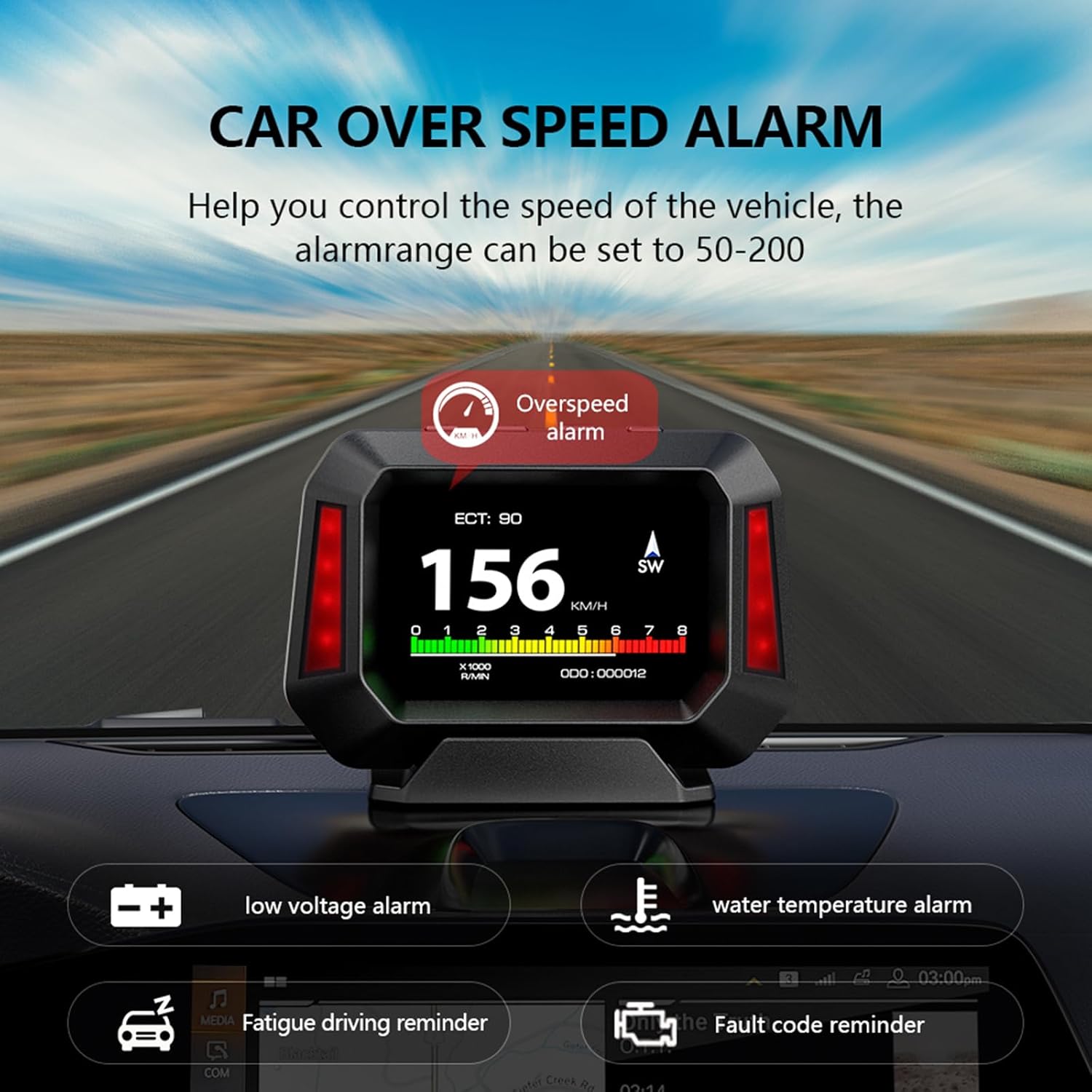
Figure 4.7: Multiple Alarm Functions

Figure 4.8: Detailed Alarm Types
4.6. Slope Meter Function
The P21 integrates a slope meter that monitors the vehicle's driving angle, including up/down slope and left/right tilt, in real-time. This function is available in both OBD and GPS modes, providing crucial information for off-road or uneven terrain driving.

Figure 4.9: Electronic Slope Meter
4.7. Diagnostic Tool
The P21 features enhanced display and scanning functions for automotive diagnostics. It allows vehicle owners to quickly read and delete DTCs (engine trouble codes) and view real-time data streams. This can help identify why the check engine light is on and clear trouble codes, potentially saving trips to an auto repair shop.
5. Compatibilidad
5.1. OBD System Compatibility
The OBD system is primarily applicable to gasoline vehicles manufactured after 2009 that support the OBD2 protocol and EU-OBD protocol. It is important to note the following limitations:
- Hace no support JOBD and OBDI protocols.
- Hace no support hybrid electric vehicles, diesel vehicles, pickup trucks, RVs, and computer modified vehicles.
- The following brands are generally no compatible with the OBD2 system: Renault, Peugeot, Citroen, Fiat, Jeep, Dodge, Jazz, RV, Hummer, etc.
If you intend to use OBD mode and are unsure about your car's compatibility, please confirm with the manufacturer before purchasing.
5.2. GPS System Compatibility
The GPS system is universally applicable to all vehicles, regardless of make, model, or year. If your vehicle is not compatible with the OBD system, you should switch to GPS mode for operation.
6. Mantenimiento
To ensure the longevity and optimal performance of your AZIJYV P21 HUD, follow these simple maintenance guidelines:
- Limpieza: Utilice un paño suave y seco para limpiar la pantalla y el cuerpo del dispositivo. Evite usar limpiadores abrasivos o disolventes que puedan dañar la superficie.
- Almacenamiento: If the device will not be used for an extended period, disconnect it from the OBD port and store it in a cool, dry place away from direct sunlight and extreme temperatures.
- Cuidado de cables: Asegúrese de que el cable OBD no esté pellizcado o excesivamente doblado, ya que podría dañar los cables internos.
- Temperatura: Avoid exposing the device to extreme hot or cold temperatures, as this can affect its electronic components.
7. Solución de problemas
Si tiene problemas con su HUD P21, consulte los siguientes problemas y soluciones comunes:
| Problema | Posible causa | Solución |
|---|---|---|
| El dispositivo no se enciende. | No power from OBD port; loose connection; vehicle not compatible with OBD mode. | Check OBD cable connection. Ensure vehicle ignition is on. If in OBD mode, try switching to GPS mode. Verify vehicle compatibility. |
| No se muestran datos en el modo OBD. | Vehicle not OBD2 compliant; faulty OBD port; incorrect mode selected. | Confirm your vehicle is OBD2 compliant (gasoline, post-2009). Try GPS mode. Consult a mechanic to check the vehicle's OBD port. |
| Lectura de velocidad inexacta. | Calibration needed; GPS signal interference. | Access settings to calibrate speed. Ensure clear view del cielo para la señal GPS. |
| La pantalla es demasiado oscura/brillante. | Brightness settings; photosensitive component blocked. | Adjust brightness in settings. Ensure the photosensitive component (on top of the unit) is not covered. |
| El dispositivo se reinicia con frecuencia. | Unstable power supply; software issue; compatibility problem. | Ensure stable OBD connection. Try switching to GPS mode if in OBD mode. If issues persist, contact customer support. |

Figure 7.1: Common Issues the P21 Helps Address
8. Especificaciones
| Característica | Detalle |
|---|---|
| Número de modelo | P21 |
| Dimensiones del producto | 4.33 x 1.1 x 3.15 pulgadas (110 mm x 28 mm x 80 mm) |
| Peso del artículo | 1.41 onzas (40 gramos) |
| Tipo de pantalla | LCD a color de 3.5 pulgadas |
| Conectividad | OBD2, GPS, USB (for power/data) |
| Modos de funcionamiento | OBD Mode, GPS Mode |
| Idiomas compatibles | 12 idiomas |
| Fabricante | AZIJYV |
| País natal | Porcelana |

Figure 8.1: Internal Chip Technology
9. Garantía y soporte
For warranty information and technical support, please refer to the contact details provided with your product packaging or visit the official AZIJYV webSitio. Conserve su recibo de compra como comprobante de compra para cualquier reclamación de garantía.
Ask a question about this manual
Ask about setup, troubleshooting, compatibility, parts, safety, or missing instructions. Manuals+ will review the question and use this page’s manual context to help answer it.