
1. Introducción
The MASTECH MS8236 is a versatile 2-in-1 digital multimeter and network cable track tester designed for electrical and network diagnostics. This device combines the functions of a digital multimeter for measuring electrical parameters with a network cable tester for verifying cable integrity and a tone generator for tracing wires. It is suitable for professional and DIY use in various applications.
2. Información de seguridad
Always adhere to basic safety precautions when using this device to prevent personal injury or damage to the meter or equipment under test. Read all instructions carefully before use.
- No exceda los valores de entrada máximos especificados para cada función.
- Tenga mucho cuidado al trabajar con circuitos activos.
- Asegúrese de que el interruptor de función esté en la posición correcta antes de realizar mediciones.
- No utilice el medidor si parece dañado o si los cables de prueba están dañados.
- Reemplace las baterías inmediatamente cuando aparezca el indicador de batería baja para garantizar lecturas precisas.
- Avoid using the device in environments with high humidity, extreme temperatures, or explosive gases.
- Always disconnect power to the circuit before testing continuity or resistance.
3. Producto terminadoview
The MASTECH MS8236 integrates a digital multimeter with a detachable cable tracker/tone generator. The main unit features a clear digital display, function selector dial, and input jacks. The cable tracker assists in identifying and tracing network and telephone lines.
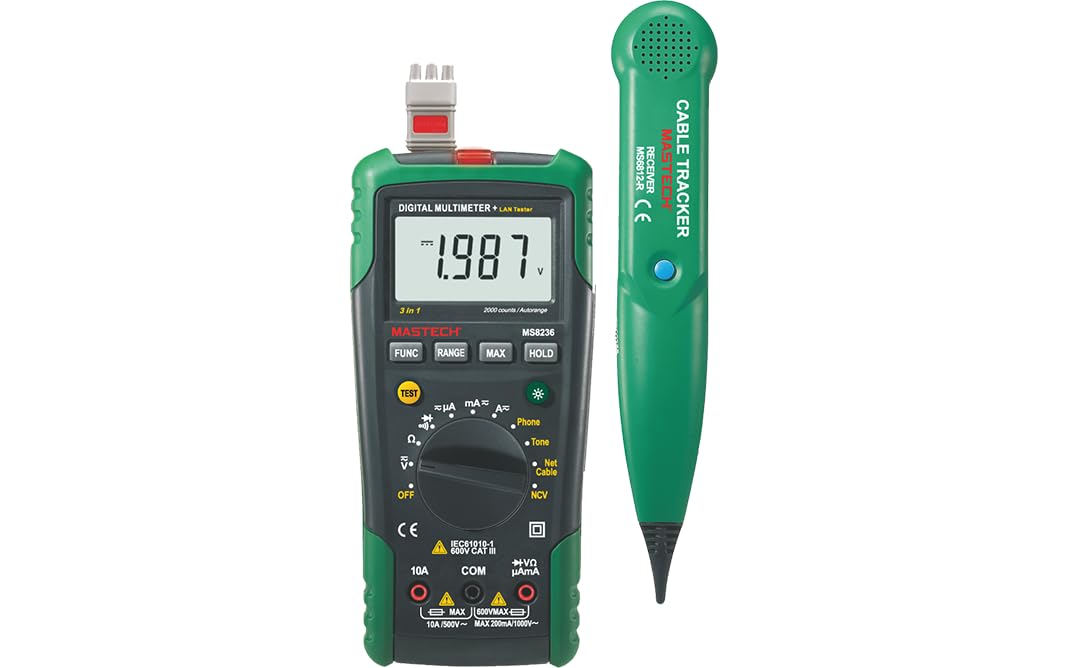
Figure 3.1: MASTECH MS8236 Digital Multimeter and Cable Tracker. The image shows the main multimeter unit on the left and the separate cable tracker unit on the right. Both are green and black.
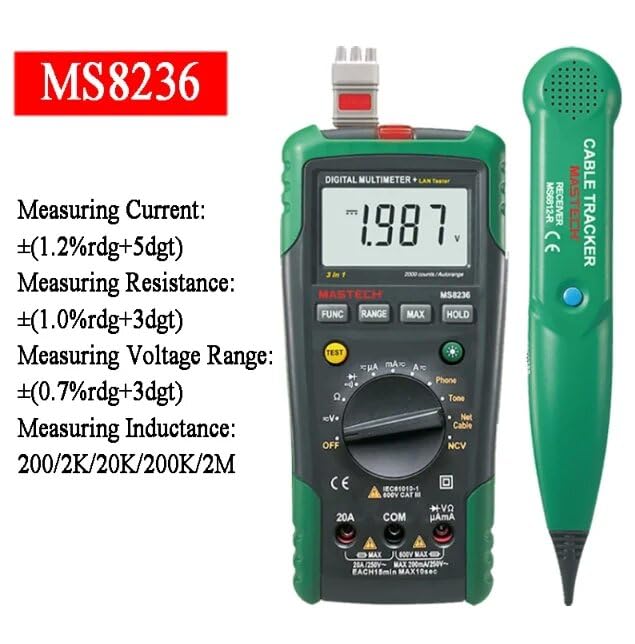
Figure 3.2: Close-up of the MASTECH MS8236 Multimeter Display and Controls. The display shows '1.987 V' and the function dial indicates various measurement modes including V, A, Ohm, Diode, Continuity, Phone, Net Cable, and NCV.
Características principales:
- Pantalla: recuentos de 2000
- Ranging: Auto & Manual
- Vol sin contactotagDetector e (NCV)
- Diodo abierto Voltage: 1.7 V
- Continuity Buzzer: Activates below 70Ω
- Función de retención de datos
- Pantalla de batería baja
- Retroiluminación de la pantalla
- Apagado automático
- Network Cable Check: Tests for open circuits, shorts, miss-wires, reversals, split pairs, and shield detection. Supports T568A, T568B, 10Base-T.
- Telephone Line Check: Identifies line states (Busy, Ringing, Clear) and continuity.
- Tone Function: For tracking cables and diagnosing break points.
4. Configuración
4.1. Desembalaje e inspección
Carefully unpack the MS8236 and all accessories. Inspect the device for any signs of damage. If any damage is found, contact your supplier immediately.
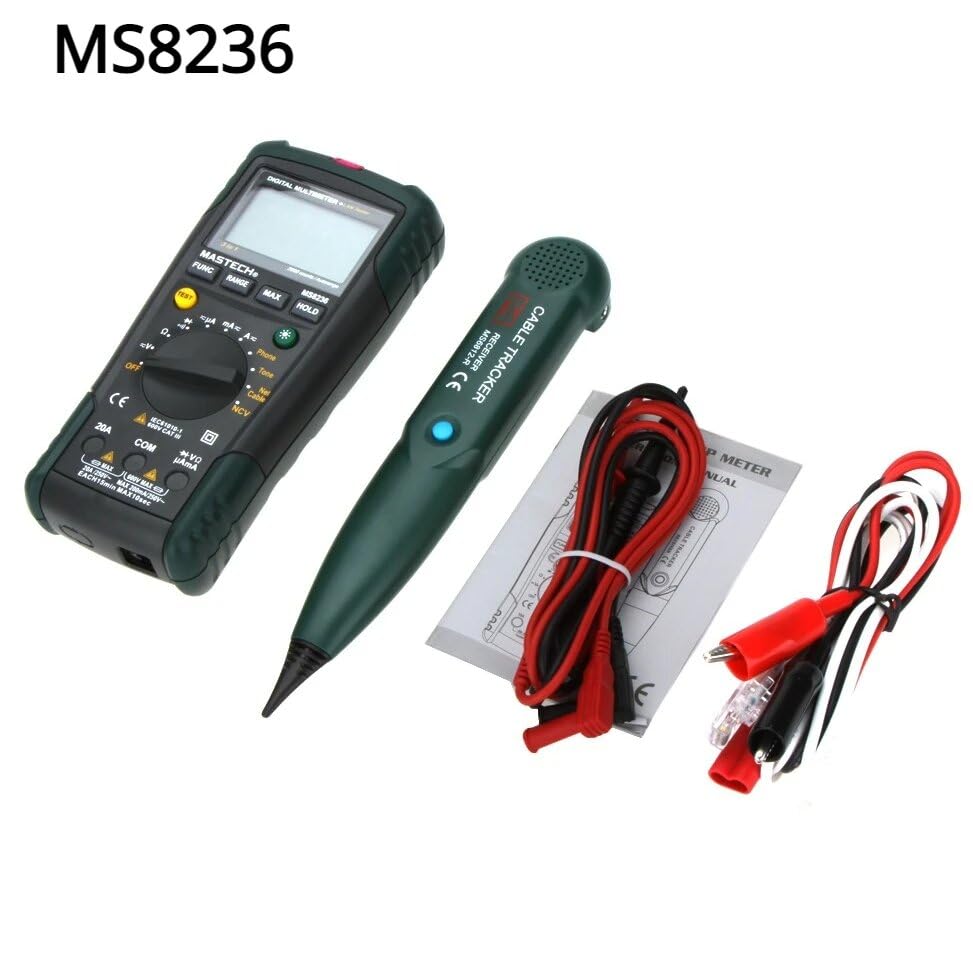
Figure 4.1: MASTECH MS8236 Kit Contents. The image displays the multimeter, cable tracker, red and black test leads, a network cable adapter, and a small instruction manual.
4.2. Instalación de la batería
The MS8236 requires 2 LR44 batteries, which are included. To install or replace batteries:
- Locate the battery compartment cover on the back of the multimeter unit.
- Use un destornillador para abrir el compartimiento de la batería.
- Insert the 2 LR44 batteries, observing the correct polarity (+/-).
- Cierre bien la tapa del compartimento de la batería.
5. Instrucciones de funcionamiento
5.1. Basic Multimeter Functions
Connect the test leads to the appropriate input jacks (COM for black lead, VΩmA for red lead for most measurements, or 20A for high current). Select the desired function using the rotary switch.
- VolumentagMedición electrónica (DCV/ACV): Turn the rotary switch to the 'V' position. Select DC or AC voltage if applicable. Connect test leads in parallel to the circuit.
- Medición de corriente (DCA/ACA): Turn the rotary switch to the 'A' position. Select DC or AC current. Connect test leads in series with the circuit. Ensure the correct input jack (mA or 20A) is used.
- Medición de resistencia (Ω): Turn the rotary switch to the 'Ω' position. Ensure the circuit is de-energized. Connect test leads across the component.
- Prueba de diodo (→|): Turn the rotary switch to the diode symbol. Connect the red lead to the anode and the black lead to the cathode of the diode.
- Examen de continuidad ()))): Turn the rotary switch to the continuity symbol. The buzzer will sound if the resistance is below approximately 70Ω.
5.2. Network Cable Check
This function tests the integrity of network cables (RJ45). It can detect open circuits, shorts, miss-wires, reversals, split pairs, and shield detection for T568A, T568B, and 10Base-T standards.
- Turn the rotary switch to the 'Net Cable' position.
- Connect one end of the network cable to the RJ45 port on the main multimeter unit.
- Connect the other end of the network cable to the RJ45 port on the remote cable tracker unit.
- Observe the display for test results, which will indicate the cable status. The device also features a debug mode for detailed fault identification.
5.3. Telephone Line Check
This function allows for checking the state of a working telephone line and its continuity.
- Turn the rotary switch to the 'Phone' position.
- Connect the telephone line to the appropriate port on the main unit.
- The device will identify the state of the line as Busy, Ringing, or Clear. It can also judge the continuity of the telephone cables or wires.
5.4. Tone Function
The tone function is used with the cable tracker to trace cables and wires and diagnose break points.
- Turn the rotary switch to the 'Tone' position.
- Connect the test leads or RJ11/RJ45 plug to the cable you wish to trace.
- Use the remote cable tracker unit to follow the cable. The tracker will emit an audible tone when it detects the signal from the main unit, helping to locate the cable and identify breaks.
5.5. Vol sin contactotagDetección de e (NCV)
La función NCV permite detectar el voltaje de CAtagy sin contacto directo con el conductor.
- Gire el interruptor giratorio a la posición 'NCV'.
- Mueva la parte superior del multímetro cerca de un voltaje de CA activo.tagy fuente.
- El dispositivo indicará la presencia de voltaje de CA.tagy mediante una alarma sonora y/o indicador visual.
5.6. Funciones adicionales
- Retención de datos: Pulse el botón "HOLD" para congelar la lectura actual en la pantalla. Pulse de nuevo para liberarla.
- Iluminar desde el fondo: Press the backlight button (often labeled with a light bulb symbol) to illuminate the display for better visibility in low-light conditions.
- Apagado automático: El dispositivo se apagará automáticamente después de un período de inactividad para conservar la vida útil de la batería.
6. Mantenimiento
6.1. Limpieza
Limpiar la carcasa con publicidadamp Paño y detergente suave. No utilice abrasivos ni disolventes. Asegúrese de que el dispositivo esté completamente seco antes de usarlo.
6.2. Reemplazo de la batería
When the low battery indicator appears on the display, replace the batteries as described in Section 4.2. Remove batteries if the device will not be used for an extended period.
7. Solución de problemas
- Sin pantalla o pantalla débil: Verifique la instalación y el nivel de carga de las baterías. Reemplace las baterías si es necesario.
- Lecturas incorrectas: Ensure test leads are properly connected and the correct function is selected. Verify the circuit is de-energized for resistance/continuity tests.
- Network cable test failure: Ensure both ends of the cable are securely connected to the main unit and remote. Check for physical damage to the cable or connectors.
- No tone from cable tracker: Verify the main unit is in 'Tone' mode and properly connected to the cable. Check the cable tracker's battery.
8. Especificaciones
The following table outlines the general and electrical specifications for the MASTECH MS8236.

Figure 8.1: MASTECH MS8236 Features and Specifications Table. This image provides detailed electrical specifications for DC Voltage, Vol ACtage, DC Current, AC Current, and Resistance, including ranges, resolutions, and accuracies.
| Parámetro | Rango | Resolución | Exactitud |
|---|---|---|---|
| Vol DCtage | 200mV/2V/20V/200V/600V | 0.1mV/1mV/10mV/100mV/1V | ±(0.5%+5) |
| Vol. CAtage | 200mV/2V/20V/200V/600V | 0.1mV/1mV/10mV/100mV/1V | ±(0.8%+5) |
| Corriente continua | 200µA/2000µA/20mA/200mA/2A/10A | 0.1µA/1µA/10µA/0.1mA/1mA/10mA | ±(1.2%+5) ±(2.0%+10) for 10A |
| Corriente alterna | 200µA/2000µA/20mA/200mA/2A/10A | 0.1µA/1µA/10µA/0.1mA/1mA/10mA | ±(1.5%+5) ±(3.0%+10) for 10A |
| Resistencia | 200Ω/2kΩ/20kΩ/200kΩ/2MΩ/20MΩ | 0.1Ω/1Ω/10Ω/100Ω/1kΩ/10kΩ | ±(1.0%+5) ±(1.5%+5) for 20MΩ |
| Diodo abierto Voltage | 1.7 V | ||
| Zumbador de continuidad | <70Ω | ||
| Mostrar | 2000 cuentas | ||
| Alcance | Automático y manual | ||
| Vol sin contactotagdetector | Sí | ||
| Apagado automático | Sí | ||
| Retención de datos | Sí | ||
| Pantalla de batería baja | Sí | ||
| Retroiluminación de la pantalla | Sí | ||
| Fuente de poder | 2 pilas LR44 (incluidas) | ||
| Dimensiones del producto | 16 x 9 x 5 cm | ||
| Peso del artículo | 500 gramos | ||
| Material | Acrilonitrilo butadieno estireno (ABS) | ||
| Certificaciones | CE, RoHS | ||
9. Garantía y soporte
For warranty information and technical support, please refer to the documentation provided with your purchase or contact the seller or manufacturer directly. Specific warranty terms may vary by region and retailer.