
Producto terminadoview
The MONODEAL MD08 Air Conduction Headphones are designed for comfort and clear communication, featuring an open-ear design, Bluetooth 5.1 connectivity, and a noise-canceling microphone with a mute function. These headphones transmit sound through air conduction, providing an alternative to traditional in-ear or bone conduction devices, aiming to reduce pressure and discomfort during extended use.

Image: MONODEAL MD08 Air Conduction Headphones, showcasing the open-ear design and boom microphone.
¿Qué hay en la caja?
- Air Conduction Headphones (1 unit)
- Cable de carga USB-C (1 unidad)
- Manual de usuario (1 unidad)
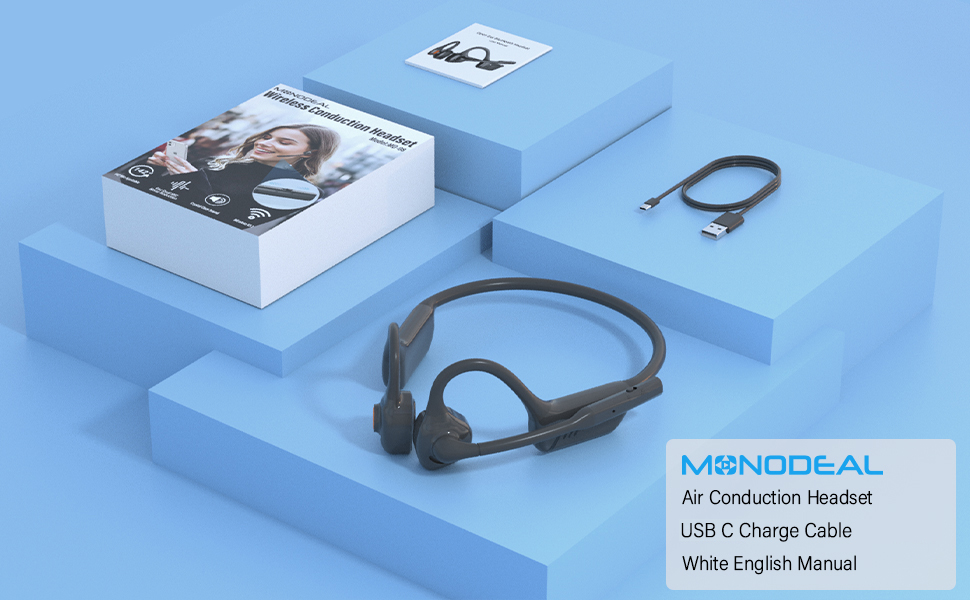
Image: The MONODEAL MD08 headphones, USB-C charging cable, and user manual laid out, representing the package contents.
Configuración
1. Carga de los auriculares
Before initial use, fully charge the headphones. Connect the provided USB-C charging cable to the charging port on the headphones and plug the other end into a compatible USB power source. A full charge typically takes approximately 2 hours.

Image: Diagram illustrating the charging process and battery life indicators: 8 hours usage, 36 hours standby, 2 hours charging time.
2. Emparejamiento Bluetooth
To connect your MONODEAL MD08 headphones to a device:
- Asegúrese de que los auriculares estén apagados.
- Press and hold the multi-function button until the indicator light flashes red and blue, indicating pairing mode.
- En su dispositivo (teléfono inteligente, tableta, computadora), habilite Bluetooth y busque los dispositivos disponibles.
- Select "MD08" from the list of found devices to connect. A voice prompt will confirm successful pairing.
3. Multi-Point Connection (Connecting to Two Devices Simultaneously)
The MD08 headphones support connecting to two Bluetooth devices at the same time. This allows you to seamlessly switch between audio sources, for example, listening to music on your tablet and answering calls on your phone.
- Paso 1: Pair the headphones with the first device (e.g., your phone) as described in the Bluetooth Pairing section.
- Paso 2: Once connected to the first device, turn off Bluetooth on the first device. This will put the headphones back into pairing mode.
- Paso 3: Pair the headphones with the second device (e.g., your tablet).
- Paso 4: Vuelve a activar el Bluetooth en el primer dispositivo. Los auriculares deberían reconectarse automáticamente a ambos dispositivos.
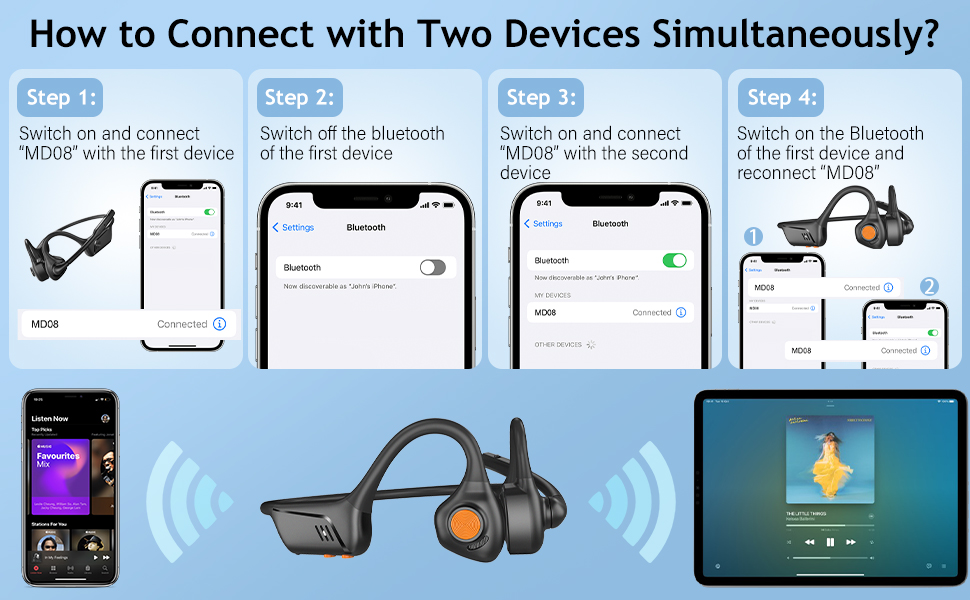
Image: Visual guide demonstrating the four steps to connect the MD08 headphones to two devices simultaneously, showing a phone and a tablet.
Instrucciones de funcionamiento
1. Uso de los auriculares
Position the headphones with the speakers resting gently in front of your ears, allowing the sound to be transmitted through air conduction. The flexible band should rest comfortably around the back of your head. The open-ear design ensures you remain aware of your surroundings.

Image: A man wearing the MD08 headphones, illustrating the open-ear design and comfortable fit, emphasizing its lightweight nature (40g) and stable design.
2. Controles básicos
The headphones feature a multi-functional button and volume controls for easy operation:
- Encendido/apagado: Mantenga presionado el botón multifunción.
- Reproducir/Pausa: Presione una vez el botón multifunción.
- Responder/Finalizar llamada: Presione una vez el botón multifunción durante una llamada entrante o una llamada activa.
- Rechazar llamada: Mantenga presionado el botón multifunción durante una llamada entrante.
- Subir/Bajar volumen: Utilice los botones de volumen dedicados.
- Pista siguiente: Presione dos veces el botón multifunción.
- Pista anterior: Presione tres veces el botón multifunción.
- Activar Asistente de voz (Siri/Asistente de Google): Mantenga pulsado el botón multifunción durante 2 segundos.

Image: A user demonstrating the controls of the MD08 headphones, with icons indicating functions like Play/Pause, Skip Track, Control Calls, Volume+/-, and Voice Assistant.
3. Función de silenciamiento del micrófono
The MD08 headphones feature a dedicated mute button on the microphone boom. During a call, you can easily touch this button to mute or unmute your microphone, providing privacy when needed.

Image: A woman using the MD08 headphones, highlighting the microphone mute function and environmental noise reduction technology, showing 96% noise filtered during calls.
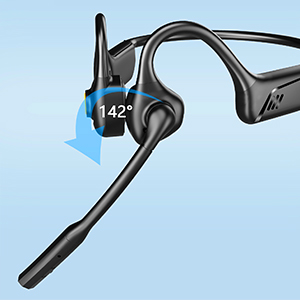
Image: Close-up of the MD08 microphone, showing its 142-degree rotation capability for optimal positioning.
Mantenimiento
- Limpieza: Utilice un paño suave y seco para limpiar los auriculares. Evite utilizar productos químicos agresivos o materiales abrasivos.
- Almacenamiento: Guarde los auriculares en un lugar fresco y seco, alejado de la luz solar directa y de temperaturas extremas.
- Cargando: Para prolongar la vida útil de la batería, evite descargarla por completo con frecuencia. Cargue los auriculares regularmente, incluso si no los usa durante períodos prolongados.
- Resistencia al agua: While designed for active use, avoid submerging the headphones in water.
Solución de problemas
| Problema | Solución |
|---|---|
| Los auriculares no se encienden. | Asegúrate de que los auriculares estén completamente cargados. Conéctalos a una fuente de alimentación y vuelve a intentarlo. |
| No se puede emparejar con un dispositivo. |
|
| No hay sonido o volumen bajo. |
|
| El micrófono no funciona. |
|
| Conexión intermitente. |
|
Presupuesto
| Característica | Detalle |
|---|---|
| Nombre del modelo | MD08 |
| Tecnología de conectividad | Inalámbrico (Bluetooth) |
| Versión de Bluetooth | 5.1 |
| Alcance de Bluetooth | Hasta 10 metros (33 pies) |
| Tipo de controlador de audio | Air Conduction Driver |
| Battery Life (Music/Talk Time) | Hasta 8 horas |
| Tiempo de espera | Hasta 36 horas |
| Tiempo de carga | Aproximadamente 2 horas |
| Puerto de carga | USB-C |
| Peso | 1.41 onzas (aprox. 40 g) |
| Colocación de orejas | Oído abierto |
| Control de ruido | Cancelación activa de ruido (para micrófono) |
| Características especiales | Microphone Included, Multipoint Pairing, Rechargeable Battery, Volume Control, Mute Function |
Garantía y soporte
MONODEAL products are designed and manufactured to high-quality standards. For warranty information, technical support, or customer service inquiries, please refer to the contact information provided with your purchase or visit the official MONODEAL websitio.
Manufacturer: MONODEAL