
1. Introducción
This manual provides detailed instructions for the installation, operation, and maintenance of your PUTORSEN Monitor Wall Mount. This heavy-duty wall-mounted monitor arm is designed to support ultrawide screens up to 49 inches and weighing up to 44 lbs. It features a gas spring for smooth adjustments, along with tilt, swivel, and rotation capabilities to optimize your viewing experience and reclaim desk space.
Lea este manual detenidamente antes de la instalación y consérvelo para futuras consultas.

Image 1.1: The PUTORSEN Monitor Wall Mount installed with a 49-inch ultrawide monitor, showcasing its strength and stability.
2. Información de seguridad
- Capacidad de peso: No exceda el peso máximo de 20 kg (44 lb). Superar este límite podría causar lesiones graves o daños al producto.
- Tamaño de pantalla: Compatible with monitors from 17 to 49 inches.
- Compatibilidad VESA: Asegúrese de que su monitor tenga patrones de montaje VESA de 75 x 75 mm o 100 x 100 mm.
- Tipo de pared: This mount is designed for installation on wood stud walls, brick walls, or concrete walls. DO NOT mount solely on drywall. Drywall cannot support the weight of the mount and monitor.
- Instalación profesional: Si no está seguro sobre el proceso de instalación o el tipo de pared, consulte con un profesional calificado.
- Advertencia sobre el resorte de gas: The gas spring is under pressure. Exercise caution during assembly and adjustment. Do not attempt to disassemble the gas spring cylinder.
- Niños: Mantenga las piezas pequeñas fuera del alcance de los niños.
3. Contenido del paquete
Please verify that all components are present and undamaged before proceeding with installation. All necessary hardware for installation is included.
Note: An ultrawide adapter for monitors with circular/non-standard VESA patterns is not included. Check your monitor's original packaging for a conversion adapter if needed.
4. Especificaciones
| Característica | Especificación |
|---|---|
| Marca | PUTORES |
| Modelo | B0CZDS7RYY |
| Material | Acrylonitrile Butadiene Styrene (ABS), Alloy Steel, Aluminum |
| Color | Negro |
| Tipo de montaje | Montaje en pared |
| Tipo de movimiento | Swivel, Tilt, Rotation, Height Adjustment |
| Compatibilidad del tamaño del monitor | 17" - 49" (flat or curved) |
| Capacidad de peso | Hasta 44 libras (20 kg) |
| Compatibilidad VESA | 75 x 75 mm, 100 x 100 mm |
| Rango de inclinación | De +50° a -20° |
| Rango giratorio | ±90° |
| Rango de rotación | 360° (±180°) |
| Ajuste de altura | Up to 11.34 inches (via gas spring) |
| Distancia a la pared (mín./máx.) | 4.15" / 22.58" |
| Peso del artículo | 8.16 libras |
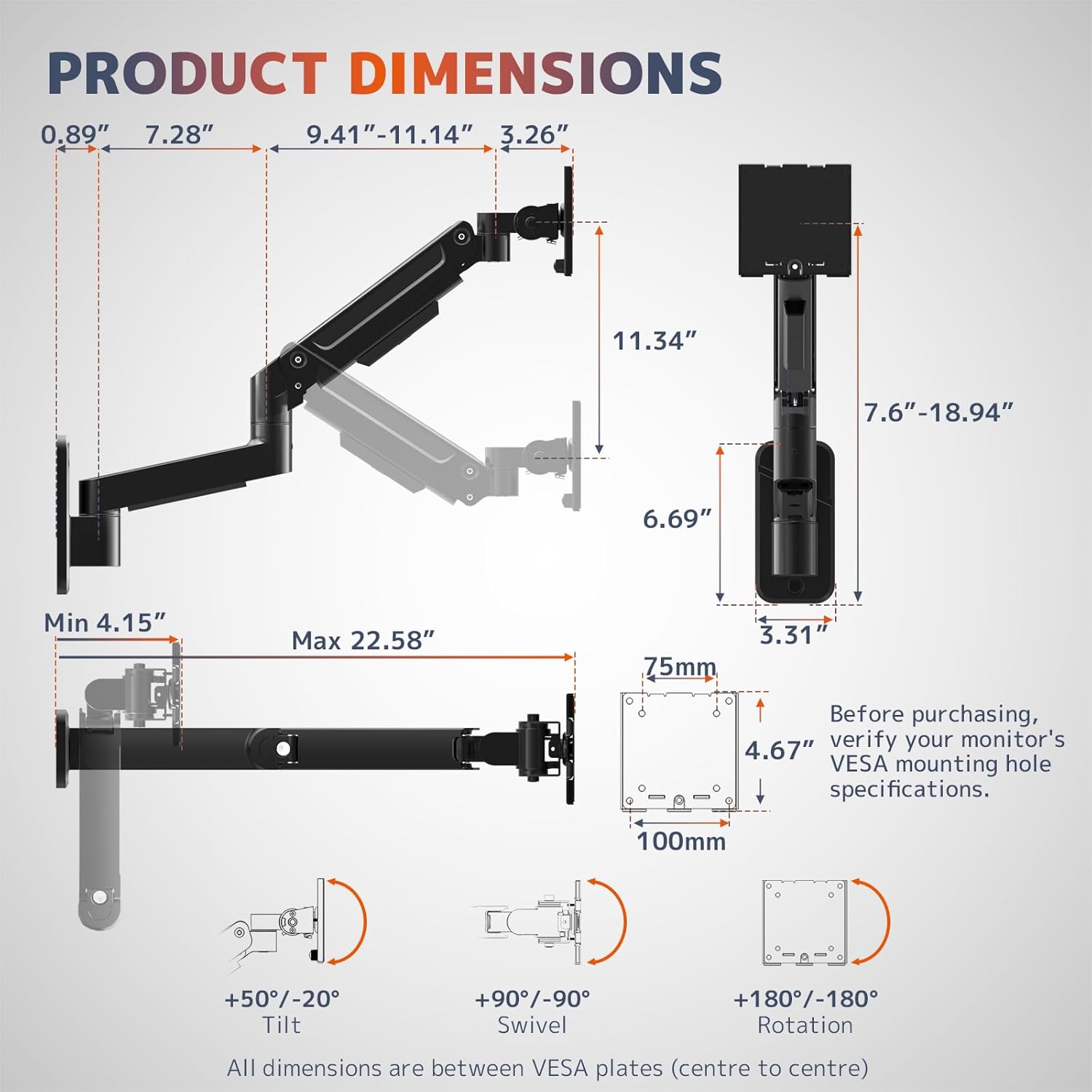
Image 4.1: Detailed product dimensions and movement ranges. Verify your monitor's VESA specifications before purchase.
5. Configuración e instalación
Follow these steps carefully for a secure installation. It is recommended to have a second person assist during certain stages of installation, especially when mounting the monitor.
5.1 Choose a Mounting Location
- Identify a suitable wall location that can support the combined weight of the mount and your monitor.
- Ensure the wall is a wood stud, brick, or concrete wall. Avoid drywall-only installations.
- Use a stud finder to locate the center of a wood stud if mounting on a wood stud wall.
5.2 Attach Wall Plate
- Position the wall plate at the desired height and mark the drilling locations.
- Drill pilot holes according to the provided template and hardware instructions.
- Secure the wall plate to the wall using the appropriate screws and anchors for your wall type. Ensure it is firmly attached.
5.3 Assemble Arm Sections
- Connect the arm sections as shown in the assembly diagram. The modular design allows for straightforward assembly.
- Asegúrese de que todas las conexiones estén firmes y seguras.

Image 5.1: Streamlined installation process, illustrating modular assembly and compatible wall types. Remember: Do not mount solely on drywall.
5.4 Conecte la placa VESA al monitor
- Coloque con cuidado el monitor boca abajo sobre una superficie suave y limpia.
- Alinee la placa VESA con los orificios de montaje en la parte posterior de su monitor (75 x 75 mm o 100 x 100 mm).
- Secure the VESA plate to the monitor using the provided screws. Do not overtighten.

Image 5.2: The heavy-duty tilt mechanism and VESA interface. Ensure proper alignment and secure fastening of the VESA plate to your monitor.
5.5 Montar el monitor en el brazo
- With assistance, carefully lift the monitor with the attached VESA plate.
- Slide the VESA plate onto the monitor arm's mounting head until it clicks into place or is securely fastened.
- Tighten any safety screws or mechanisms to prevent accidental dislodgement.
5.6 Gestión de cables
- Route monitor cables through the integrated cable management channels on the arm.
- This helps maintain a neat and clutter-free workspace.

Image 5.3: Reinforced base with integrated cable management for a clean setup.
6. Instrucciones de funcionamiento
The PUTORSEN Monitor Wall Mount offers full motion capabilities for optimal viewing comodidad.
6.1 Height Adjustment (Gas Spring)
- To adjust the monitor height, gently push or pull the monitor to the desired position. The gas spring system allows for smooth vertical movement up to 11.34 inches.
- If the arm does not hold its position or is difficult to move, refer to the "Troubleshooting" section for gas spring tension adjustment.
6.2 Ajuste de inclinación
- The monitor can be tilted +50° upwards and -20° downwards.
- Loosen the tilt adjustment screw slightly, adjust the monitor to the desired angle, then re-tighten the screw to secure it.
6.3 Ajuste giratorio
- The monitor arm allows for a ±90° swivel range.
- Gently rotate the monitor horizontally to achieve your preferred viewángulo de ing.
6.4 Ajuste de rotación
- The VESA plate allows for a full 360° rotation (±180°).
- Rotate the monitor to switch between landscape and portrait orientations as needed.

Image 6.1: The monitor arm's extendable design allows for flexible positioning and space optimization.
7. Mantenimiento
- Limpieza: Utilice un paño suave y seco.amp cloth to clean the surface of the mount. Avoid harsh chemicals or abrasive cleaners.
- Controles periódicos: Revise periódicamente todos los tornillos y conexiones para asegurarse de que estén bien apretados y seguros. Vuelva a apretarlos si es necesario.
- Resorte de gas: The gas spring is designed for long-term performance. No specific maintenance is required for the gas spring itself, but ensure its tension is correctly adjusted for your monitor's weight.
8. Solución de problemas
| Problema | Solución |
|---|---|
| Arm will not raise: Monitor feels too heavy, arm sags. | Tighten the gas spring adjustment screw in the "+" direction (counter-clockwise) until the arm can hold the monitor's weight. |
| Arm will not lower: Monitor feels too light, arm stays up. | Loosen the gas spring adjustment screw in the "-" direction (clockwise) until the arm can be lowered smoothly. |
| Tilt is too loose: Monitor tilts freely or sags. | Tighten the tilt adjustment screw clockwise to prevent the monitor from lowering. |
| Tilt is too stiff: Difficult to adjust monitor tilt. | Loosen the tilt adjustment screw counter-clockwise for smoother movement. |
| El monte se siente inestable. | Ensure all mounting screws are securely tightened. Verify the wall type is appropriate and the mount is anchored correctly. |
| Los cables son un desastre. | Utilize the integrated cable management channels on the arm to route and conceal cables. |

Image 8.1: Joint adjustment guide for gas spring tension and tilt mechanism.
9. Garantía y soporte
PUTORSEN products are manufactured with quality and durability in mind. While specific warranty details may vary by region and retailer, we stand by the quality of our products.
Atención al cliente: Our dedicated customer support team is available to assist with any installation guidance, compatibility questions, or usage concerns you may have. We are committed to providing clear and practical support to ensure a smooth experience with your product.
For assistance, please refer to the contact information provided with your purchase or visit the official PUTORSEN websitio.