
1. Introducción
This manual provides detailed instructions for the installation, operation, maintenance, and troubleshooting of your Roinvou 9-inch Android Car Stereo. Please read this manual thoroughly before installation and use to ensure proper function and safety. This unit is specifically designed for Hyundai Elantra models manufactured between 2007 and 2010.
2. Configuración e instalación
2.1 Consideraciones importantes
This upgraded radio dash kit is compatible with Hyundai Elantra 2007, 2008, 2009, and 2010 models. The stereo package includes an in-dash head unit, wiring harness cables, and a frame panel. The package contains three power cables; select and use the one that matches the port of your original car. Verify the power cable port on the detail page matches your original car before beginning installation.
2.2 Contenido del paquete
Los siguientes componentes están incluidos en su paquete:
- Roinvou Car Stereo Head Unit
- Triple Power Cable (choose appropriate one)
- Arnés RCA
- Antena GPS
- Cámara de respaldo AHD
- Micrófono externo
- Cable de entrada de cámara trasera
- Cable USB doble
- Herramienta de instalación
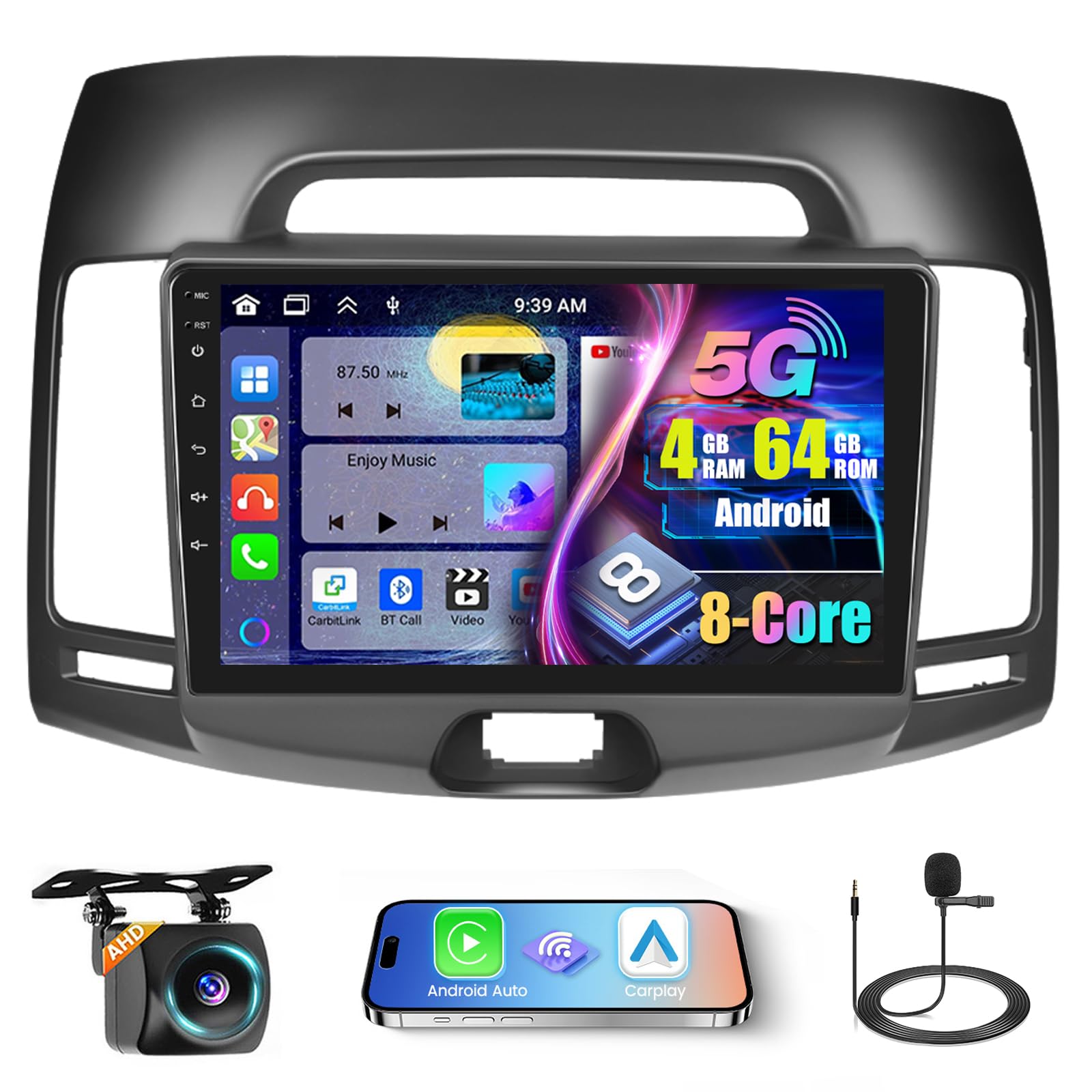
Image: Comparison of the car dashboard before and after installing the Roinvou 9-inch Android car stereo in a Hyundai Elantra 2007-2010 model.

Image: Diagram showing the dimensions of the 9-inch car stereo and a visual list of all included accessories such as power cables, microphone, GPS antenna, and backup camera.
2.3 conexiones de cableado
Carefully follow the wiring diagrams provided. Ensure all connections are secure to prevent electrical issues.

Image: Detailed diagram illustrating the various power cord ports and their connections for the car stereo installation.

Image: Wiring diagram for the reversing camera, showing connections for power, ground, and reverse lamp. The display shows a clear view de la cámara trasera.
3. Instrucciones de funcionamiento
3.1 Interfaz de usuario y pantalla
The unit features a 9-inch HD capacitive touch screen with a 1280 x 720 resolution, providing a clear visual experience. You can customize the interface by touching the color circle in the lower left corner of the screen to switch between 19 backgrounds. Long-pressing the main interface allows you to switch between 59 desktop themes.

Image: The 1080P IPS touch screen highlighting its 1280*720 resolution, scratch-resistant, anti-knock, and high-temperature protection features.

Image: Illustration of the powerful Android system with 4GB RAM and 64GB storage, emphasizing its ultra-fast running speed compared to other systems.
3.2 Carplay inalámbrico, Android Auto y Mirror Link
The car stereo supports wireless and wired Apple CarPlay and Android Auto for voice-assisted control and access to phone features like music, navigation, calls, and messages. Mirror Link functionality allows syncing your phone screen to the unit via WiFi hotspot or USB cable.

Image: Visual representation of Wireless Carplay, Android Auto, and Mirror Link functionalities, showing connection methods via Bluetooth/USB and WiFi/USB.

Imagen: Una sobreview of Carplay, Android Auto, and Mirror Link features, displaying various compatible applications and screen mirroring capabilities.
3.3 Navegación GPS y WiFi
The unit includes a built-in GPS module. Navigation software like Waze and free offline maps can be utilized. With a WiFi or hotspot connection, online maps function seamlessly, and you can download apps such as YouTube and TikTok from the Play Store for online video streaming.

Image: Depiction of GPS navigation with both offline and online map capabilities, alongside WiFi connectivity for downloading apps and streaming content.
3.4 Radio Bluetooth y FM/RDS
The Android head unit features built-in and external microphones, supporting hands-free calling, music playback, voice functions, and contact synchronization. The stable FM radio offers 18 preset stations, with manual, semi-automatic, and fully automatic channel search. High-quality FM/RDS radio provides channel broadcasting, weather forecasts, and real-time road conditions.

Image: Displaying the FM RDS radio interface, Bluetooth calling and music streaming, and the split-screen function for multitasking.
3.5 Audio Equalization (32-band EQ)
The system supports 32-band EQ options, allowing for precise audio tuning to enhance your music listening experience.

Image: Illustration of the Hi-Fi audio capabilities with a 32-band equalizer interface, demonstrating sound customization options.
3.6 Control del volante
La unidad admite controles en el volante, lo que le permite administrar diversas funciones sin quitar las manos del volante.

Image: The display showing a reverse camera view with parking guidelines, and an overlay demonstrating how to configure steering wheel controls for various functions.
3.7 Control de voz
Enhance your driving experience with voice-assisted control for various functions.
Video: This video demonstrates the user interface functions, including changing wallpapers and themes, and the seamless integration of Carplay and Android Auto for music, navigation, and hands-free calls. It also showcases the voice control feature, dual-screen capability, FM/RDS radio, weather forecast, network radio, Bluetooth hands-free calling, 32-band EQ DSP, GPS navigation, and rear view funcionalidad de la cámara.
4. Mantenimiento
Para garantizar la longevidad y el rendimiento óptimo de su estéreo para automóvil Roinvou, siga estas pautas de mantenimiento:
- Limpieza de pantalla: Utilice un paño suave y sin pelusa para limpiar suavemente la pantalla táctil. Para manchas difíciles, limpie ligeramenteampEnjuague el paño con agua o un limpiador de pantallas. Evite productos químicos agresivos o materiales abrasivos.
- Actualizaciones de software: Verifique periódicamente si hay actualizaciones de software disponibles a través de la configuración de la unidad o del fabricante. website. Keeping the software updated ensures access to the latest features and performance improvements.
- Cuidado del Medio Ambiente: Evite exponer la unidad a temperaturas extremas, luz solar directa durante períodos prolongados o humedad excesiva.
- Comprobaciones de conexión: Occasionally inspect wiring connections to ensure they remain secure, especially after driving on rough terrain.
5. Solución de problemas
Si tiene problemas con el estéreo de su automóvil Roinvou, consulte los siguientes pasos comunes de solución de problemas:
- Sin energía: Check all power cable connections. Ensure the car's ignition is on. Verify the fuse in the car's fuse box and the unit's wiring harness.
- Sin sonido: Check speaker connections. Ensure the volume is not muted or set too low. Verify audio settings and equalizer configurations.
- La pantalla táctil no responde: Intente reiniciar la unidad. Si el problema persiste, podría ser necesario restablecer la configuración de fábrica (nota: esto borrará la configuración personal).
- El GPS no funciona: Asegúrese de que la antena GPS esté conectada correctamente y tenga una vista clara. view del cielo. Verifique la configuración del GPS dentro de la unidad.
- Problemas de conexión Bluetooth: Asegúrate de que el Bluetooth esté activado tanto en el estéreo como en tu dispositivo. Elimina los emparejamientos anteriores e intenta volver a emparejarlos.
- CarPlay/Android Auto no se conecta: Verify your phone's USB cable is functional and properly connected. Ensure CarPlay/Android Auto is enabled on your phone and the stereo. Try connecting wirelessly if supported.
- Problemas con la pantalla de la cámara trasera: Check the camera's power and video signal connections. Ensure the camera type setting in the factory settings (CVBS/AHD) matches your camera.
Si estos pasos no resuelven el problema, comuníquese con el servicio de atención al cliente.
6. Especificaciones
| Marca | Roinvou |
| Número de modelo | B0D12M2KBW |
| Sistema operativo | Androide |
| Tamaño de pantalla | 9 pulgadas |
| Resolución | 1280 x 720 |
| Capacidad de almacenamiento de memoria | 64 GB |
| Tecnología de conectividad | Bluetooth, USB, Wi-Fi |
| Versión de Bluetooth | 5.0 |
| Características especiales | Wireless/Wired Apple CarPlay, Wireless/Wired Android Auto, Mirror Link, Voice Control, GPS Navigation, WiFi, Bluetooth, FM/RDS Radio, HD Touchscreen, SWC, 32-band EQ, 19 Backgrounds, 59 UI Themes |
| Modo de salida de audio | Estéreo |
| Tipo de montaje | Montaje en tablero de instrumentos |
| Tipo de vehículo compatible | Coche (Hyundai Elantra 2007-2010) |
| Sistema de navegación por satélite compatible | GLONASS, GPS, Galileo |
| Peso del artículo | 1.62 kilogramos |
7. Información de garantía
This Roinvou car stereo comes with a Garantía de 1 años A partir de la fecha de compra. Conserve su comprobante de compra para reclamaciones de garantía. La garantía cubre defectos de fabricación y mal funcionamiento en condiciones normales de uso. No cubre daños causados por instalación incorrecta, mal uso, accidentes ni modificaciones no autorizadas.
8. Atención al cliente
Para cualquier pregunta, asistencia técnica o consultas sobre garantía, comuníquese con el servicio de atención al cliente de Roinvou:
- Correo electrónico: roinvouservices@163.com
- Soporte en línea: Visita el Tienda Roinvou en Amazon and click "Ask a question" to reach our support team.
Our customer support team is available to assist you with any product-related concerns.