Introducción
The Generic Zigbee Smart Switch Module (TYZG-002RF) is a 1-channel smart relay switch designed for home automation. It operates with AC 85-250V or USB 5V power input and is compatible with Zigbee gateways, enabling control via mobile applications and voice assistants like Amazon Alexa and Google Home. This module supports various working modes including interlock, jog (momentary), and self-locking, making it suitable for controlling a wide range of household appliances such as lights, electric kettles, garage doors, and access control systems. It also functions as a Zigbee router to extend network stability.
Información de seguridad
- The device features a fire-proof and flame-retardant shell for enhanced safety.
- AES-128 encryption is utilized to protect data and device privacy.
- Asegúrese siempre que la energía esté desconectada antes de realizar cualquier cableado o instalación.
- La instalación debe ser realizada por un profesional calificado si no está seguro acerca del cableado eléctrico.
Contenido del paquete
- 1 x Zigbee Smart Switch Module
- 1 x Manual de instrucciones en inglés (este documento)
- 1 x embalaje del producto
Lista de verificación antes de usar
Before proceeding with installation and setup, please ensure the following:
- A 2.4G WiFi network is available (5G networks are not supported).
- An Android device with version 4.0 or above is needed for app control.
- If your wireless router has MAC address filtering enabled, disable this function in the router settings.
- A Zigbee gateway (hub) is mandatory for operation. Ensure the smart switch is placed close to the Zigbee gateway during the pairing process.
Configuración
Pairing with Zigbee Gateway
- Asegúrese de que su puerta de enlace Zigbee esté encendida y en modo de emparejamiento.
- Encienda el módulo del interruptor inteligente.
- Open the Tuya or Smart Life app and follow the in-app instructions to add a new device.
- The device should be quickly discovered and added to your Zigbee gateway hub.
- Alternatively, if your Alexa device is connected to a compatible Zigbee hub, you can ask "Alexa, find devices."
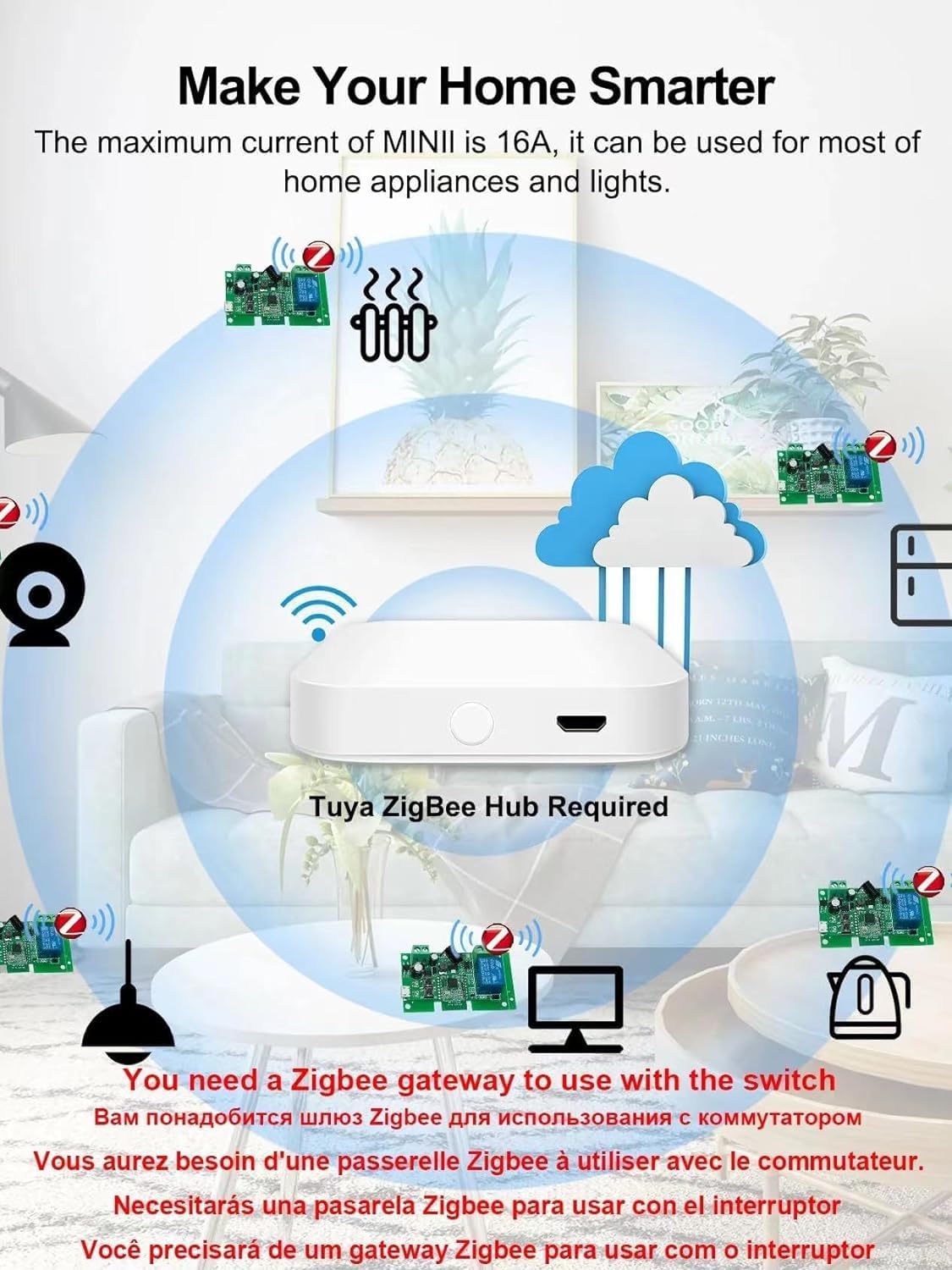
Diagram illustrating a smart home setup with multiple Zigbee smart switch modules connected to a central Tuya Zigbee Hub. This shows how the hub acts as the central point for controlling various appliances and lights, extending the smart home network.
Diagramas de cableado
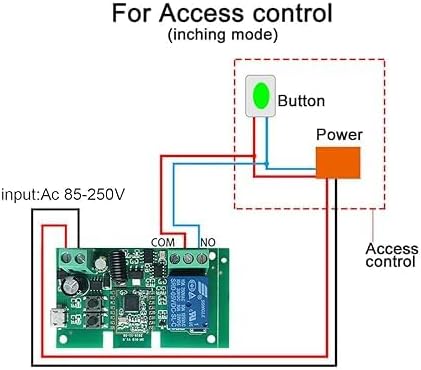
Wiring diagram for access control in inching (momentary) mode. This setup shows how to connect the smart switch to an access control system, using the COM and NO terminals for a pulse signal output. The input power is AC 85-250V.
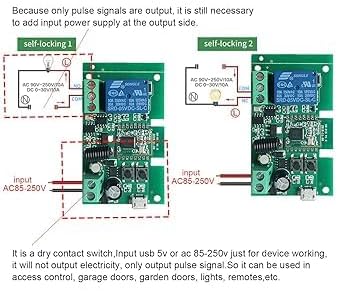
Wiring diagrams for self-locking modes. Two configurations are shown for connecting the smart switch to a load (e.g., a light bulb) in self-locking mode. The device provides a pulse signal output and requires an external power supply for the output side. It supports both AC 85-250V and USB 5V input for device operation.
Setting Working Modes
The smart switch supports two working modes: Latching and Momentary (Jog) mode. These modes determine how the relay behaves when activated.
- Modo momentáneo In this mode, the switch acts like a push button, providing a brief pulse signal. This is suitable for applications such as garage door openers or access control systems that require a momentary contact closure.
- Modo de enclavamiento: In this mode, the switch acts as a standard ON/OFF switch. Once activated, it remains in that state until another command is received. This is suitable for controlling lights or other appliances that require continuous power.
To switch between these working modes, press the mode button located on the module board. Refer to the product's physical instructions for the exact location of the mode button.
Operante
Control de aplicaciones
- Manage numerous Zigbee smart switches using the Tuya or Smart Life application on your smartphone.
- The app provides real-time status tracking of your devices, showing their current ON/OFF state.
- Remotely turn on/off household appliances connected to the switch from anywhere with an internet connection.
Control de voz
The smart switch is compatible with Amazon Alexa and Google Assistant for hands-free voice control.
- Ensure your smart switch is successfully paired with your Zigbee gateway and linked to your Alexa or Google Home account.
- Utilice comandos de voz sencillos como:
- "Alexa, enciende el [nombre del dispositivo]".
- "Ok Google, desactiva el [nombre del dispositivo]".
- "Alexa, set [device name] to [ON/OFF]."
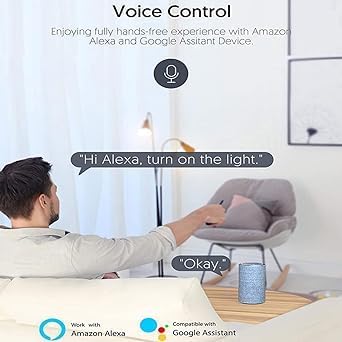
Illustration of voice control with Amazon Alexa. A user is shown giving a command to turn on a light, and Alexa responds.

Illustration of voice control compatibility with Amazon Alexa and Google Assistant, showing smart speakers and a light bulb.
Control de RF
The module includes a built-in 433MHz RF receiver and supports learning 433MHz RF fixed codes for remote control. An RF remote control is not included and must be purchased separately.
Escenas inteligentes
Create custom smart scenes within the Tuya or Smart Life app to automate appliances based on various conditions such as departure mode, home mode, temperature, humidity, or other environmental factors. This feature allows for intelligent linkage with other Zigbee products to create a fully automated smart home experience.
Temporizadores
Set up to 8 different timers per device, including schedule, countdown, and cycle timers, to automate device operation according to your daily routine or specific needs.
Intercambio
Share control of the smart switch with family members through the Tuya or Smart Life app, allowing multiple users to manage the connected appliances.
Mantenimiento
- Keep the device clean and free from dust by gently wiping it with a dry cloth.
- Asegúrese de que haya una ventilación adecuada alrededor del módulo para evitar el sobrecalentamiento.
- Evite exponer el dispositivo a temperaturas extremas, luz solar directa o alta humedad.
- Do not attempt to disassemble or repair the device yourself, as this may void the warranty and pose safety risks.
Solución de problemas
- El dispositivo no se empareja: Ensure the Zigbee gateway is powered on and in pairing mode. Verify the smart switch is within effective range of the gateway. Confirm that your WiFi network is 2.4Ghz, as 5Ghz is not supported. Reset the device if necessary (refer to product specific reset instructions).
- No response from device: Check all power connections to the smart switch. Verify the Zigbee gateway is online and connected to the internet. Ensure the device status in the Tuya/Smart Life app is correct and shows as online.
- Problemas de control por voz: Confirm that the smart switch is correctly linked to your Amazon Alexa or Google Home account. Check your internet connection and the functionality of your voice assistant device. Try re-syncing devices through the voice assistant app.
- Conexión intermitente: Ensure the Zigbee gateway is centrally located and not obstructed by physical barriers. The smart switch can act as a Zigbee router to extend network stability, but optimal placement of the gateway is crucial.
Presupuesto
| Número de modelo | TYZG-002RF |
| Marca | Genérico |
| Modo de operación | ENCENDIDO-APAGADO-ENCENDIDO |
| Calificación actual | 10 Amps |
| Vol de funcionamientotage | AC 85-250 Volts (also supports USB 5V for device working) |
| Tipo de contacto | Normalmente abierto |
| Tipo de conector | Conectar |
| Terminal | A través del agujero |
| Dimensiones del artículo (largo x ancho x alto) | 2.87 x 1.81 x 1.14 pulgadas |
| Tipo de circuito | 1 vías |
| Tipo de actuador | Botón pulsador |
| Material de contacto | Metal |
| Calificación de protección internacional | IP53 |
| Número de posiciones | 1 |
| Clasificación de temperatura superior | 70 grados centígrados |
| Tipo de controlador | Amazon Alexa, Asistente de Google |
| Método de control | App, RF |
| Protocolo de conectividad | ZigBee |
| Peso del artículo | 1.6 onzas |
| Fabricante | Qianyi Technology.co.ltd |
Garantía
Warranty information for this product is typically provided at the point of purchase or on the manufacturer's official website. Please refer to your retailer or the manufacturer for specific warranty terms and conditions, including coverage duration and claim procedures.
Apoyo
For technical support, troubleshooting assistance, or further inquiries regarding the Generic Zigbee Smart Switch Module, please contact the retailer or manufacturer directly. Contact details can usually be found on the product packaging, the seller's information page, or the manufacturer's official websitio.
